hasisyed/gpu-governor
Pause Docker containers when your NVIDIA GPU or CPU overheats, auto-resume when cool, no work lost.
216
hasisyed/gpu-governor repository overview
GPU Governor: overheating protection for Docker containers
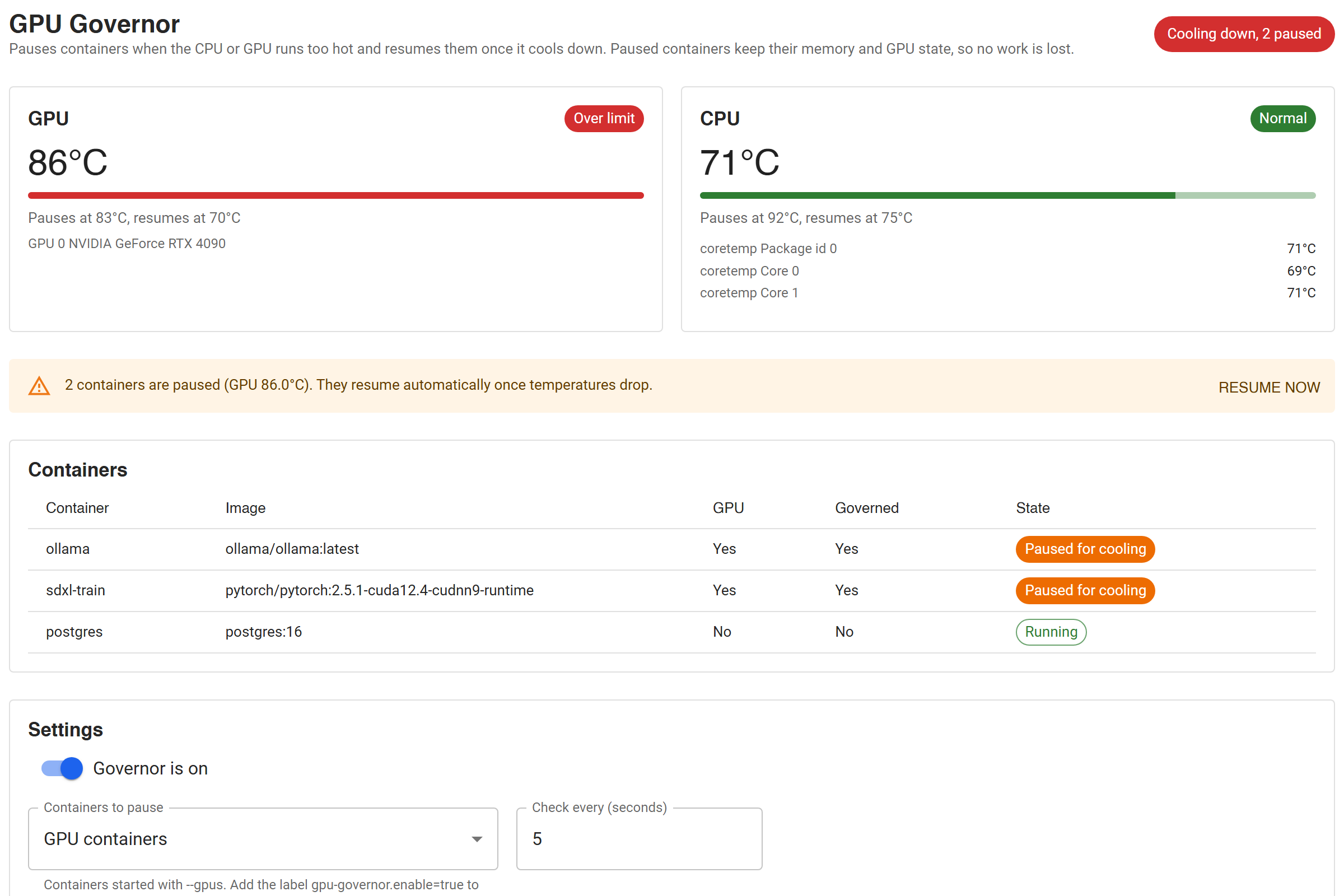
GPU Governor is a Docker Desktop extension that watches your NVIDIA GPU temperature and CPU temperature. When the hardware runs too hot, it pauses your Docker containers. When it cools down, it resumes them automatically. Nothing is restarted and no work is lost: a PyTorch training run, Stable Diffusion render, Ollama model or batch job continues from the exact point where it was paused.
It suits gaming laptops, small form factor PCs, home labs and any machine where long AI or GPU workloads push the hardware into thermal throttling.
Install
Open in Docker Desktop (one click, shows an Install button), or from a terminal:
docker extension install hasisyed/gpu-governor:latest
If Docker Desktop refuses, turn off Settings > Extensions > Allow only extensions distributed through the Docker Marketplace and run the command again. A GPU Governor tab appears in Docker Desktop.
Linux server or workstation (no Docker Desktop)
docker run -d --name gpu-governor --restart unless-stopped \
  --gpus all --stop-timeout 30 \
  -v /var/run/docker.sock:/var/run/docker.sock \
  -v gpu-governor-state:/var/lib/gpu-governor \
  -p 127.0.0.1:9090:9090 \
  hasisyed/gpu-governor:latest

curl localhost:9090/status
Leave out --gpus all on machines without an NVIDIA GPU to govern on CPU
temperature alone.
Features
- Live GPU and CPU temperature dashboard inside Docker Desktop
- Separate pause and resume temperature limits (hysteresis), so containers do not flap on and off
- Ignores short temperature spikes: pauses only after several hot readings in a row
- Pauses GPU containers by default; can also pause labeled containers or every container
- Uses
docker pause, which freezes processes in place: RAM, open files and GPU memory are kept - Never resumes containers you paused yourself
- Remembers what it paused across restarts, and resumes everything when it is turned off or uninstalled
- HTTP API for scripts and monitoring:
/status,/config,/resume
Default limits
| Sensor | Pause at | Resume at |
|---|---|---|
| GPU | 83 °C | 70 °C |
| CPU | 92 °C | 75 °C |
All limits can be changed from the dashboard or the API.
Container labels
docker run --label gpu-governor.enable=true ...   # always governed
docker run --label gpu-governor.exclude=true ...  # never governed
Requirements
- NVIDIA GPU monitoring: Docker Desktop on Windows with the WSL 2 backend, or Docker on Linux with the NVIDIA Container Toolkit
- CPU monitoring: Linux host. Docker Desktop's VM does not expose CPU sensors.
- Images for
linux/amd64andlinux/arm64
Links
- Source code and documentation: https://github.com/QuantumNovice/docker-gpu-governor
- Issues: https://github.com/QuantumNovice/docker-gpu-governor/issues
- License: MIT
Tag summary
Content type
Image
Digest
sha256:97183d90a…
Size
29.6 MB
Last updated
20 days ago
docker pull hasisyed/gpu-governor