hatognss/mrtklib-docker-ui
Web UI for MRTKLIB — GNSS post-processing, real-time positioning, QZSS CLAS/MADOCA, in Docker
1.4K
hatognss/mrtklib-docker-ui repository overview
MRTKLIB Web UI
A modern web-based user interface for MRTKLIB,
running entirely in a Docker container. MRTKLIB is a modernized C11
implementation of RTKLIB with MADOCA-PPP, CLAS PPP-RTK, and advanced
GNSS positioning capabilities. No compilation required — just
docker compose up and start processing GNSS data from your browser.



Status: v0.4.2-alpha — core features are functional. Known limitations are listed in Known Issues.
Features
Post Processing (mrtk post)
- Sidebar navigation covering all MRTKLIB configuration options (Positioning: Mode / Method / PPP-MADOCA / CLAS PPP-RTK / AR / Kalman Filter; Station; Misc: Output Format / Input Options / Data Files / Server)
- Full TOML configuration import / export
- Named preset management (saved to
/workspace/presets/) - Support for all positioning modes: Single, DGPS, Kinematic, Static, PPP-Kinematic, PPP-Static, PPP-AR, CLAS PPP-RTK, MADOCA PPP, VRS-RTK
- Result visualization: 2D E/N scatter, interactive basemap (Leaflet), and position / quality charts — reads LLH, XYZ-ECEF, and NMEA-0183 solution outputs (auto-detected)
- Compressed inputs (
.gz,.Z, single-file.zip,.tar) and Hatanaka-compressed RINEX (.crx,.??d, e.g..crx.gz) are decompressed bymrtk(the image bundlescrx2rnx/rnx2crx) - Trace view with search: highlight, step through matches, show matching lines only
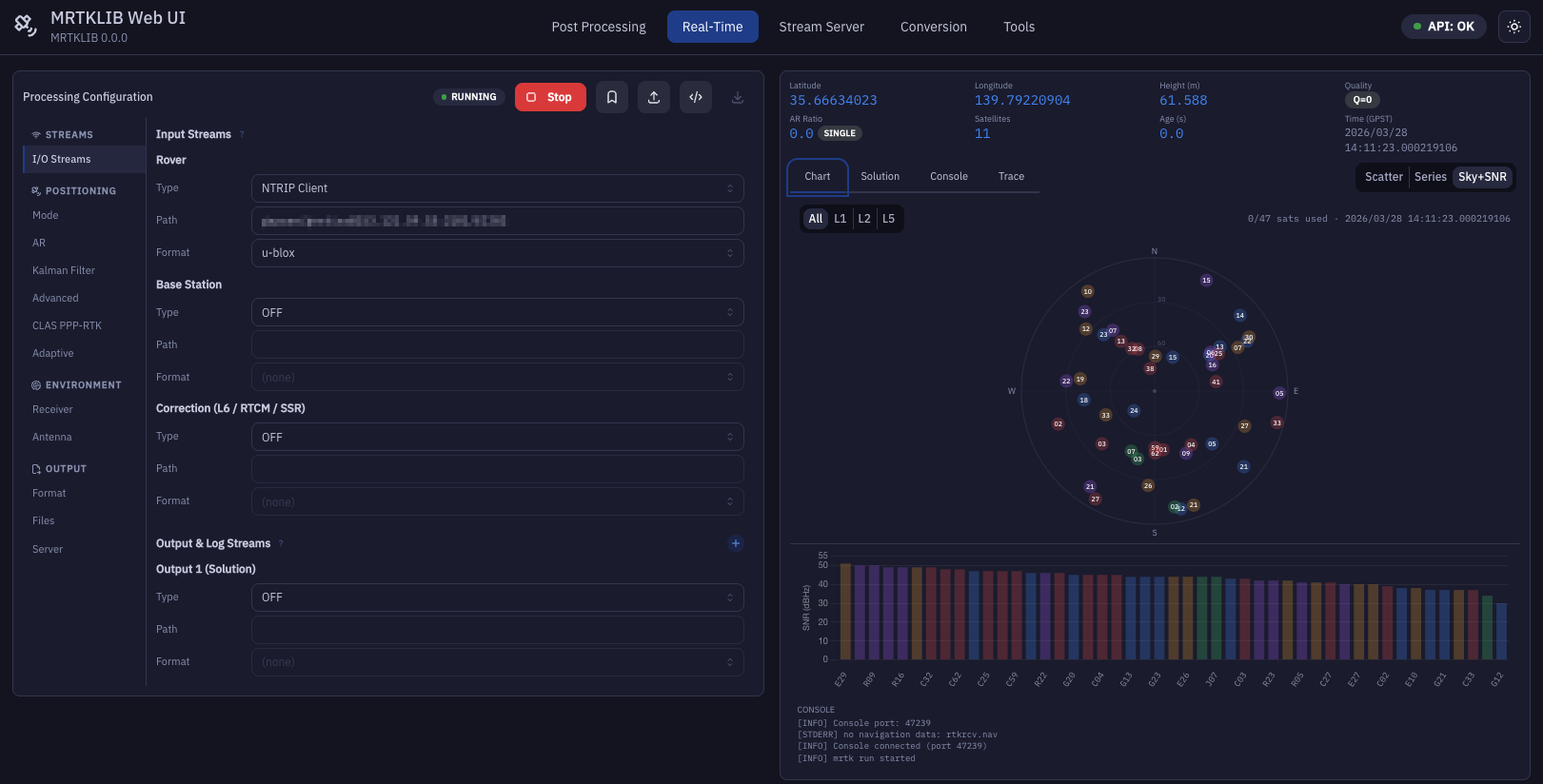
Real-Time Positioning (mrtk run)
- Live position display (Lat / Lon / Height / AR Ratio / Satellites / Age / GPST)
- Fix quality badges: FIXED / FLOAT / SINGLE color-coded
- 2D E/N scatter (1:1 aspect ratio, quality colors) and a live Map view on a real basemap (Leaflet), shown individually or side by side
- Time series chart
- Sky plot + SNR bar chart (per-constellation color coding, used/unused satellite highlighting, satellite details on hover)
- Solution and debug-trace streaming (trace files in
/workspace/rtlog/rtkrcv/), with search in the Trace view - Input stream status footer for Rover / Base / Correction (receiving, connecting, stalled, no decode, error with a readable cause such as an unknown NTRIP mountpoint)
- Reattaches to a running
mrtk runafter a page reload or a closed tab - Raw input logging: per-input "Save Raw" switch (Rover / Base /
Correction) records the received bytes before decoding, hourly
files under
/workspace/rtlog/%Y/%n/(e.g.rovr_%n%H.sbf), optional time tag (.tag) for real-time replay - Restart-safe file outputs: if a solution or raw-log file already
exists, the run writes to
_2,_3, … instead of overwriting it
Stream Relay (mrtk relay)
- Multi-stream configuration (up to 4 simultaneous streams)
- Per-stream Start / Stop control with live console output
- Running relays are restored after a page reload and can still be stopped
CLAS Pipeline (mrtk relay + mrtk cssr2rtcm3)
- One-form Wizard for the SBC + receiver + CLAS workflow (supported by MRTKLIB since v0.6.5; the image bundles the pinned version)
- Pipes Septentrio SBF (with QZSS L6 CLAS) → cssr2rtcm3 → RTCM3 → back to the receiver, which runs VRS-RTK on its own engine
- Live throughput meter, position scatter (parsed from SBF PVTGeodetic), and split logs for both child processes
- Currently ships with a mosaic-G5 preset; request more receivers via the GitHub Issue template
RINEX Conversion (mrtk convert, rnx2crx / crx2rnx)
- Supports all convbin formats: u-blox, Septentrio SBF, NovAtel, BINEX, Trimble RT17, RTCM2/3, RINEX re-processing
- Collapsible option groups (Time Range, Signal Options, RINEX Header, Debug)
- Live command preview before execution
- RINEX file preview after conversion (header + first 5–10 epochs)
- Hatanaka (CRX): compress RINEX → CRX or decompress CRX → RINEX,
with optional gzip; inputs from
/dataor/workspace, output to/workspace
Receiver Monitor (NMEA / UBX / SBF)
- Direct connection to GNSS receiver without invoking
mrtk run - Parses NMEA GGA/RMC, UBX NAV-PVT, SBF PVTGeodetic
- Live position visualization identical to Real-Time tab
- Raw data file logging to
/workspace/logs/
Tools
- GNSS Time Converter: fully bidirectional conversion between Calendar/UTC, GPS Week/ToW, and Day of Year/Session
- Data Downloader: QZSS L6D (CLAS) and L6E (MADOCA) file download; IGS atx update; IGS products and GSI CORS data (NASA Earthdata and GSI credentials required for the latter two)
Configuration & Workflow
- Two-volume Docker setup:
/workspace(read-write) and/data(read-only host data directory) - Server-side preset management with import / export
- TOML import with lossless round-trip (unknown keys preserved)
- IBM Plex Sans + IBM Plex Mono typography
- Dark / light mode toggle
Getting Started
Prerequisites
- Docker (the Build from source flow additionally uses
docker compose, which ships with Docker Desktop) - GNSS data files (RINEX observation and navigation files)
Quick Start (pre-built image)
The fastest way to try MRTKLIB Web UI. No cloning or building required.
Images are published for both linux/amd64 and linux/arm64
(Apple Silicon native).
-
Pull the image
# Docker Hub docker pull hatognss/mrtklib-docker-ui:0.4.2-alpha # or GitHub Container Registry docker pull ghcr.io/h-shiono/mrtklib-docker-ui:0.4.2-alpha -
Prepare host directories
mkdir -p ./workspace ./data # Place your GNSS data files under ./data (read-only in container) -
Run the container
docker run -d --name mrtklib-web-ui \ -p 8080:8000 \ -v "$(pwd)/workspace:/workspace:rw" \ -v "$(pwd)/data:/data:ro" \ -e PUID="$(id -u)" -e PGID="$(id -g)" \ hatognss/mrtklib-docker-ui:0.4.2-alpha -
Open the UI at http://localhost:8080
Published images:
| Registry | Repository |
|---|---|
| Docker Hub | hatognss/mrtklib-docker-ui |
| GHCR | ghcr.io/h-shiono/mrtklib-docker-ui |
Both repositories carry the same multi-arch manifest. See the repository pages above for the list of available tags.
Build from source
Use this flow if you need to customise the MRTKLIB version, build against a local MRTKLIB checkout, or develop the Web UI itself.
-
Clone the repository
git clone https://github.com/h-shiono/mrtklib-docker-ui.git cd mrtklib-docker-ui -
Configure directories
mkdir -p ./workspace ./data cp .env.example .env # Edit .env to set DATA_DIR to your GNSS data directory -
Build and run
docker compose up --build -
Open the UI at http://localhost:8080
Data Directory Configuration
| Mount | Default | Purpose | Access |
|---|---|---|---|
/workspace | ./workspace | Output files, presets, logs | Read-write |
/data | ./data | Input GNSS data files | Read-only |
# .env
DATA_DIR=/path/to/your/gnss-data
The app runs as PUID:PGID (default 1000:1000), not root, so files
it writes to /workspace belong to that host user. Set them to your
own IDs (id -u / id -g) in .env. On start, existing files under
/workspace owned by someone else (for example root, from versions
that ran as root) are chowned to PUID:PGID. PUID=0 restores the
old run-as-root behaviour.
Serial Device Passthrough (Monitor tab and CLAS Pipeline)
To connect to a GNSS receiver via serial port, add the device
to docker-compose.yml:
services:
  mrtklib-web-ui:
    devices:
      - /dev/ttyUSB0:/dev/ttyUSB0
    volumes:
      # Optional: mount /dev/serial so the UI can list ports by descriptor
      # name (e.g. "usb-Septentrio_Mosaic-G5_..." instead of "ttyUSB0").
      - /dev/serial:/dev/serial:ro
The CLAS Pipeline tab uses one bidirectional serial device: the
receiver streams SBF (with L6 frames) out of the port and accepts the
generated RTCM3 back on the same port. Configure the receiver port to
do both (output SBF/L6, input RTCM3). Set CLAS_INPUT_DEVICE in
.env to that port, then uncomment the matching devices: line in
docker-compose.yml.
macOS host
Docker Desktop on macOS runs Linux containers in a hidden VM, so
USB-serial devices on the Mac (/dev/cu.usbmodem*) are not
visible to the container by default. Use one of:
- Run on the SBC itself (recommended for production CLAS use).
- Forward over the network with USB/IP or a TCP↔serial bridge
(e.g.
socat,ser2net) and pick TCP in the UI instead of serial. - Use a Linux host or VM with native USB device access.
Credentials (Data Downloader)
The Data Downloader supports three credential sources
(priority order: .netrc mount > environment variables > UI).
Mount a .netrc at /home/mrtk/.netrc (see docker-compose.yml);
an existing /root/.netrc mount is copied there on start.
# .env
EARTHDATA_USER=your_username    # NASA Earthdata (IGS products)
EARTHDATA_PASSWORD=your_password
GSI_USER=your_username          # GSI CORS FTP
GSI_PASSWORD=your_password
QZSS L6D/L6E files require no authentication.
Architecture
Technology Stack
Backend
- Language: Python 3.11+
- Framework: FastAPI
- Process Management: asyncio.subprocess
- Real-time Communication: WebSocket
- Data Validation: Pydantic v2
Frontend
- Framework: React 19 + TypeScript
- Build Tool: Vite
- UI Library: Mantine v8
- Charts: Chart.js, uPlot, Recharts; Leaflet for the map view
- Typography: IBM Plex Sans + IBM Plex Mono
Deployment
- Container: Multi-stage Docker build
- MRTKLIB Binary: Built from source via CMake (
mrtkunified binary) - Volumes:
/workspace(read-write),/data(read-only)
Development Setup
Backend
uv sync
uv run uvicorn mrtklib_web_ui.main:app --reload --host 0.0.0.0 --port 8000
Note: QC Preview is temporarily disabled (the button is greyed out and
/api/obs-qc/analyzereturns 503) until it is integrated with MRTKLIB QC. The previous cssrlib-based implementation and itsqcextra were removed.
Run the backend tests (pytest is in the dev dependency group):
uv run pytest
Frontend
cd frontend
npm install
npm run dev   # http://localhost:5173
The frontend dev server runs on http://localhost:5173 and proxies
API requests to the backend at http://localhost:8000.
Releases & Image Maintenance
Tag → image mapping
The publish-docker.yml workflow is the only thing that pushes
to GHCR / Docker Hub. It runs on two events:
| Trigger | Resulting tags (per registry) |
|---|---|
git push origin vX.Y.Z[-suffix] | X.Y.Z[-suffix], sha-<7-char>. For non-prerelease tags also X.Y, X, latest. |
gh workflow run publish-docker.yml --ref <branch> | dev-<branch> only. Repeated runs overwrite the same tag in place — no accumulation. |
So the recommended dev cycle is gh workflow run --ref my-branch →
docker pull ...:dev-my-branch. Cutting an actual release is
the only way to mint a new long-lived tag.
Cleaning up GHCR safely
Do not bulk-delete "untagged" entries in the GHCR Versions
view. Multi-arch images (linux/amd64 + linux/arm64) live as
a tagged manifest list that references per-architecture
manifests appearing as untagged digests. Deleting those breaks
docker pull for the matching platform with manifest unknown.
Safe order if the registry needs a tidy-up:
- Delete
dev-*or stalesha-*entries that have a tag — their referenced platform manifests then drop to true orphans. - Wait briefly (or refresh the view) and only then delete the now-dereferenced untagged digests.
- If a release tag does break,
git push --delete origin vX.Y.Zfollowed bygit push origin vX.Y.Zre-runs the workflow and restores the manifest list. The GitHub Release object re-attaches automatically.
The same rule applies to Docker Hub, which is just slower to surface orphan state in its UI.
Roadmap
| Version | Description |
|---|---|
| v0.1.x-alpha | Core UI for all mrtk subcommands, presets, TOML I/O, Monitor tab |
| v0.2.x-alpha | Template presets, GNSS time converter, Monitor Sky+SNR, IGS/GSI downloader, GHCR/Docker Hub publish |
| v0.3.0-alpha | MRTKLIB 0.7.6 config migration, console redesign, CLAS pipeline, RINEX Converter overhaul, unified dark consoles, XYZ-ECEF / NMEA-0183 result views, live basemap map |
| v0.3.1-alpha | MRTKLIB 0.7.11, Real-Time raw input logging, restart-safe file outputs |
| v0.3.2-alpha | Security hardening, non-root container (PUID:PGID), Real-Time input stream status + live trace, reload-safe Real-Time / Stream Server sessions, PR CI |
| v0.4.0-alpha | Audit follow-ups (#39, #40): PPP-AR systems / max sol std controls, broader log masking, bounded file previews, NMEA and time-system fixes in the Result Viewer, slimmer image (QC Preview paused), reproducible builds (uv.lock) |
| v0.4.1-alpha | Bug fixes: Hatanaka (crx2rnx) inputs in the image, Real-Time log views hold while scrolled up, Post Processing Trace shows the file's end, Data Downloader (Earthdata login, non-blocking GSI, past default dates), Galileo HAS label, CLAS single-port docs |
| v0.4.2-alpha (current) | Small improvements: Trace search (Real-Time / Post Processing), Hatanaka compress / decompress in Conversion, readable ENU chart axes, sky plot hover details and larger markers, Real-Time satellite count matches the solution |
Known Issues
This is an alpha release. Many features have been implemented but not yet thoroughly tested in real-world conditions. Bug reports and feedback are very welcome — please open an issue.
Known untested or partially tested areas
- Real-Time positioning (
mrtk run): basic operation confirmed; edge cases (stream reconnection, dual-channel CLAS, long runs) not yet validated - Monitor tab (NMEA/UBX/SBF): parser logic implemented but not tested against real receiver hardware
- Data Downloader: QZSS L6D/L6E endpoints implemented; IGS products (NASA Earthdata) and GSI CORS (FTP) untested
- TOML import round-trip: basic cases work; complex configs with all options may have edge cases
- Configuration option coverage: UI covers all options from the reference, but default values and conditional logic have not been exhaustively verified
- RINEX preview: implemented but not tested across all receiver formats
- CLAS Pipeline: uses a single bidirectional serial port; hardware passthrough validated only with the mosaic-G5 preset
Platform notes
- Tested on: Linux (Ubuntu 22.04), macOS (Apple Silicon)
- Windows (Docker Desktop): untested
All bug reports are appreciated, including partial or unclear ones.
Contributing
Contributions of all kinds are welcome — bug reports, feature requests, documentation improvements, and pull requests.
The most helpful thing right now is real-world testing. If you try MRTKLIB Web UI with your own receiver or dataset and something does not work as expected, please open an issue. You do not need to have a fix ready — a clear description of what happened is enough.
Opening an Issue
When reporting a bug, please include:
- Which tab / feature was affected
- What you expected to happen
- What actually happened
- Browser and OS (and Docker version if relevant)
- Any error messages from the browser console or Docker logs
For feature requests, a brief description of the use case is more useful than a specific implementation proposal.
Pull Requests
For small fixes (typos, obvious bugs), a PR is welcome directly. For larger changes, please open an issue first to discuss the approach — this avoids duplicated effort.
Guidelines
- Python: PEP 8, type hints throughout
- TypeScript: strict mode, functional components
- Commits: conventional commits (
feat:,fix:,docs:) - Do not modify MRTKLIB source code in this repository
Bundled Correction Files
The Docker image includes correction files from MRTKLIB for quick-start CLAS PPP-RTK and MADOCA PPP processing:
CLAS PPP-RTK
| File | Purpose |
|---|---|
clas_grid.def | CLAS grid definition |
clas_grid.blq | Ocean tide loading coefficients |
igu00p01.erp | Earth rotation parameters |
igs14_L5copy.atx | Satellite/receiver antenna PCV |
isb.tbl | Inter-system bias table |
l2csft.tbl | L2C signal phase correction |
MADOCA PPP
| File | Purpose |
|---|---|
igs20.atx | IGS antenna model (satellite + receiver PCO/PCV) |
These files are available at /opt/mrtklib/corrections/ inside
the container and can be selected directly from the UI's
Files configuration panel. Use the "Apply CLAS PPP-RTK profile"
or "Apply MADOCA PPP profile" buttons to set all paths at once.
To use a newer version of any file, place it in your /data
directory and select it manually via the file browser.
License
MIT License. See LICENSE.
MRTKLIB is distributed under the BSD 2-Clause License. This project provides a web interface only and does not modify MRTKLIB source code.
The Docker image includes crx2rnx / rnx2crx built from the
RNXCMP software (Copyright (c) 2007 Geospatial Information Authority
of Japan), unmodified, under its license
(/usr/share/doc/rnxcmp/LICENSE.txt in the image;
source). Reference:
Hatanaka, Y. (2008), A Compression Format and Tools for GNSS
Observation Data, Bulletin of the Geospatial Information Authority of
Japan, 55, 21-30 (https://www.gsi.go.jp/ENGLISH/Bulletin55.html).
Acknowledgements
Built on MRTKLIB by Hayato Shiono, which is a modernized fork of RTKLIB by Tomoji Takasu.
Developed with assistance from Claude (Anthropic) and Gemini (Google).
Key dependencies: FastAPI · React · Mantine · Vite · Chart.js · uv
Tag summary
Content type
Image
Digest
sha256:13475a0d2…
Size
99.7 MB
Last updated
4 days ago
docker pull hatognss/mrtklib-docker-ui:sha-8d53d8c