hifzirs/qrgen-api
API for generating customizable QR codes with Node.js and Express.
1.2K
hifzirs/qrgen-api repository overview

QRGen API
A fast and flexible API for generating customizable QR codes with Node.js and Express.
Welcome to QRGen API! This project provides a robust and easy-to-use API for generating QR codes on demand. Built for developers, freelancers, and businesses who need reliable QR code generation with advanced customization.
🚀 Quick Example
Request:
http://localhost:8080/api/qr/url?data=example.com&size=300x300&margin=1&errorLevel=M
Response:
{
  "success": true,
  "data": {
    "url": "data:image/png;base64,iVBORw0KGgoAAAANSUhEUgAA...",
    "size": "300x300",
    "content": "example.com",
    "options": {
      "margin": "1",
      "errorCorrectionLevel": "M"
    }
  }
}
✨ Features
- ⚡ High-quality PNG QR code generation
- 🎨 Customizable size, margin, error correction, and colors
- 🔒 Secure and robust error handling
- 🌐 CORS enabled for cross-origin requests
- 🖼️ Data URL endpoint for easy embedding
- 🧪 Comprehensive API testing suite
- 🖥️ Web interface for real-time testing
Table of Contents
Installation
You can install and run QRGen API in two ways:
1. Node.js (Manual)
- Clone the repository:
git clone https://github.com/hifzi/qrgen-api.git - Navigate to the project directory:
cd qrgen-api - Install the dependencies:
npm install
2. Docker (Recommended for Easy Setup)
You can run QRGen API instantly using Docker:
docker run --name qrgen-api -p 8080:8080 -e PORT=8080 hifzirs/qrgen-api:latest
- Change the left port (
8080) to any port you want on your machine. - The API will be available at
http://localhost:8080or your local domain. - For a custom domain (e.g.
qrgen-api.local), edit your/etc/hostsfile.
Usage
To start the server, run one of the following commands:
Production mode:
npm start
Development mode (with auto-reload):
npm run dev
Run tests:
npm test              # Basic functionality tests
npm run test:enhanced # Enhanced tests with custom options
The server will start on http://localhost:8080. You can then access the QR code generation endpoints.
Usage Examples
Basic QR Code
GET /api/qr?data=example.com
Creates a 300x300 QR code with default settings.
High-Security QR Code
GET /api/qr?data=sensitive-data&errorLevel=H&margin=3
Creates a QR code with high error correction (30% recovery) and extra margin.
Branded QR Code
GET /api/qr?data=company.com&darkColor=%23FF6B35&lightColor=%23F7F7F7&size=500x500
Creates a branded QR code with custom orange color and light gray background.
Compact QR Code
GET /api/qr?data=short.ly/abc&size=150x150&margin=0&errorLevel=L
Creates a minimal QR code with no margin and low error correction for space-saving.
URL with Custom Options
GET /api/qr/url?data=example.com&size=400x400&margin=2&errorLevel=Q&darkColor=%23000080
Returns a base64 data URL for embedding in HTML/CSS.
API
Generate QR Code (PNG Image)
Endpoint: /api/qr
Method: GET
Query Parameters:
data: The data to encode in the QR code (required).size: The size of the QR code in format "WIDTHxHEIGHT" (optional, default is300x300).margin: The margin size around the QR code (optional, 0-10, default is1).errorLevel: Error correction level (optional, L/M/Q/H, default isM).darkColor: Dark color in hex format (optional, default is#000000).lightColor: Light color in hex format (optional, default is#FFFFFF).
Size Limits:
- Minimum:
50x50pixels - Maximum:
2000x2000pixels - Data length: Maximum 4000 characters
Error Correction Levels:
L: Low (~7% recovery)M: Medium (~15% recovery) - DefaultQ: Quartile (~25% recovery)H: High (~30% recovery)
Example Requests:
http://localhost:8080/api/qr?data=example.com&size=300x300
http://localhost:8080/api/qr?data=Hello%20World&margin=2&errorLevel=H
http://localhost:8080/api/qr?data=example.com&size=400x400&darkColor=%23FF0000&lightColor=%23FFFF00
http://localhost:8080/api/qr?data=test&size=200x200&margin=0&errorLevel=L
Response: Returns a PNG image file that can be directly displayed or saved.
Generate QR Code (Data URL)
Endpoint: /api/qr/url
Method: GET
Query Parameters: Same as above.
Example Request:
http://localhost:8080/api/qr/url?data=example.com&size=300x300
Response:
{
  "success": true,
  "data": {
    "url": "data:image/png;base64,iVBORw0KGgoAAAANSUhEUgAA...",
    "size": "300x300",
    "content": "example.com"
  }
}
Error Responses
400 Bad Request:
{
  "error": "Data parameter is required",
  "example": "/api/qr?data=example.com&size=300x300"
}
500 Internal Server Error:
{
  "error": "Failed to generate QR code",
  "details": "Error message details"
}
Features
- ✅ High-quality PNG QR code generation
- ✅ Customizable dimensions (50x50 to 2000x2000 pixels)
- ✅ Custom margin control (0-10)
- ✅ Error correction levels (L/M/Q/H)
- ✅ Custom colors (hex format)
- ✅ Support for any text or URL data
- ✅ Proper error handling and validation
- ✅ CORS enabled for cross-origin requests
- ✅ Data URL endpoint for base64 encoded images
- ✅ Scannable QR codes with customizable error correction
- ✅ Cache headers for better performance
- ✅ Web interface for easy testing
- ✅ Comprehensive API testing suite
- ✅ Enhanced testing with custom options
Testing
The project includes a comprehensive test suite to verify all endpoints and error conditions:
npm test
Web Interface
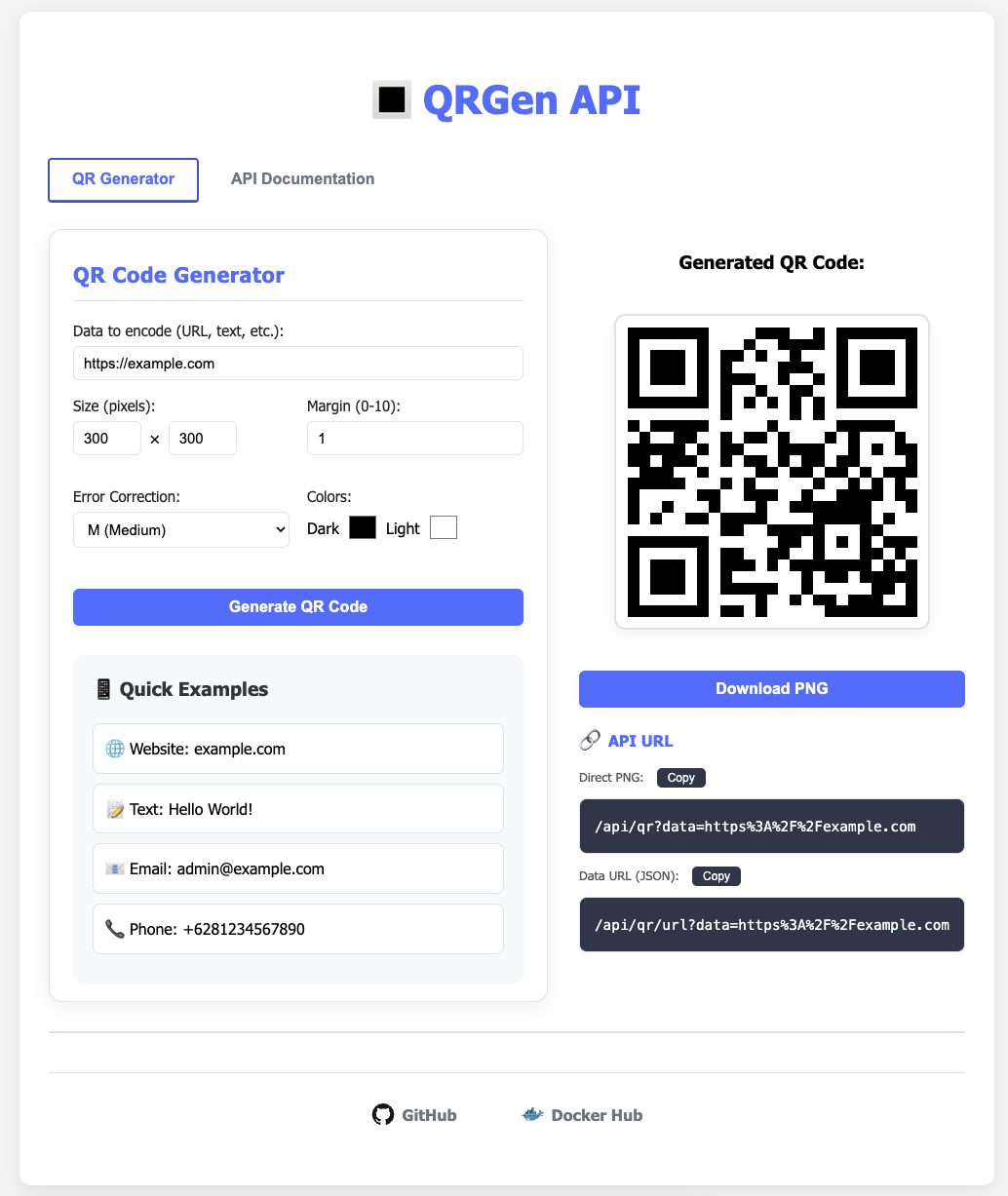
A user-friendly web interface is available at http://localhost:8080 for testing the QR code generation functionality. The interface includes:
- Real-time QR code generation
- Customizable size parameters
- Quick example buttons
- Download functionality
- Error handling display
Contributing
Contributions are welcome! Please open an issue or submit a pull request.
License
This project is licensed under the MIT License.
Tag summary
Content type
Image
Digest
sha256:37f7a149c…
Size
68.2 MB
Last updated
about 1 year ago
docker pull hifzirs/qrgen-api