hmonette/sf_dataloader repository overview
Salesforce Dataloader
Usage
Run Salesforce Dataloader (CLI) jobs from a lightweight container.
Using the default CMD - Any jobs executed is followed by a push of the "error" logs produced to a specifiable object in the same Salesforce org, in order to ensure traceability.
Mount requirements
-
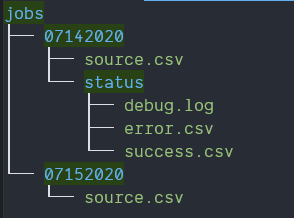
Jobs Folder Structure
- The Timestamp can be configured as an environment variable to match the folder structure.
- The "source" file is necessary to start processing the job. The status folder and it's content is the output of a job that ran.
-
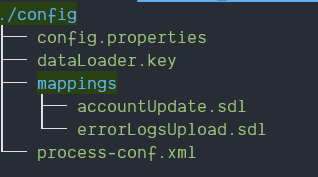
Config Folder
- The config folder must, at the very least, contain the necessary configuration files for the Dataloader CLI to work, plus the "Mappings" file appropriate for your job(s) to run.
Sample command to spawn a container
docker run -d \
  --mount type=bind,src=/host/path/to/config/folder,target=/mnt/config,readonly \
  --mount type=bind,src=/host/path/to/jobs/folder,target=/mnt/jobs \
  --env-file /host/path/to/environment/file/.env \
  hmonette/sf_dataloader
Environment Variables
| Key | Description |
|---|---|
| URL | The target org's URL |
| USERNAME | Username to login to Salesforce with |
| ENCRYPTED_PASSWORD | The password encrypted using the Encryption Key |
| ENCRYPTION_KEY_FILENAME | The filename of the encryption key within the config folder |
| TIMESTAMP_FORMAT | Format of the timestamp which will indicate which job to find & run from the "jobs" folder |
| JOB_NAME | Name of the job, defined in your process-conf file within the config folder, to run |
| JOB_MAPPING_FILENAME | Name of the mapping file to use for this job, stored inside the config/mappings folder. |
| ERRORLOGS_ENTITY_NAME | API Name of the Salesforce Object which will be used to load the Error Logs, if applicable, after executing the main job. |
| ERRORLOGS_MAPPING_FILENAME | Name of the mapping file to use for the Error Logs load, stored inside the config/mappings folder. |
Tag summary
Content type
Image
Digest
Size
150.8 MB
Last updated
over 6 years ago
docker pull hmonette/sf_dataloader