iampatde/iamdb
A modern, self-hosted MongoDB management tool. Built with Nuxt 3, PrimeVue 4, and TypeScript.
10K+
iampatde/iamdb repository overview
iamDB
A modern, self-hosted MongoDB management tool. Built with Nuxt 3, PrimeVue 4, and TypeScript.
Screenshots
Features
- Database Management — Browse, create, drop, and export databases
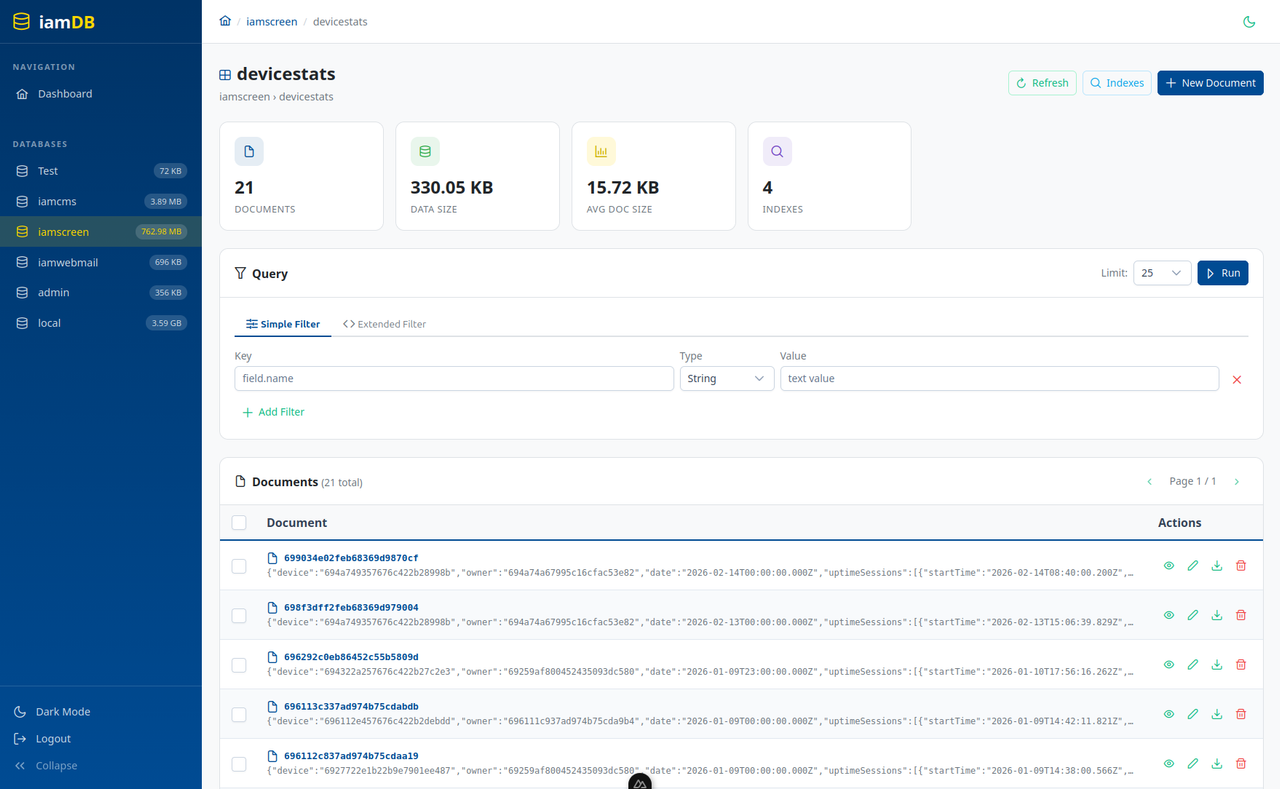
- Collection Management — Create, rename, drop collections with detailed stats
- Document CRUD — Insert, edit, delete documents with a syntax-highlighted JSON viewer
- Simple & Advanced Filtering — User-friendly Key/Value/Type filter or raw MongoDB JSON queries
- Pagination & Sorting — Navigate large collections with ease
- Index Management — Create, view, and drop indexes per collection
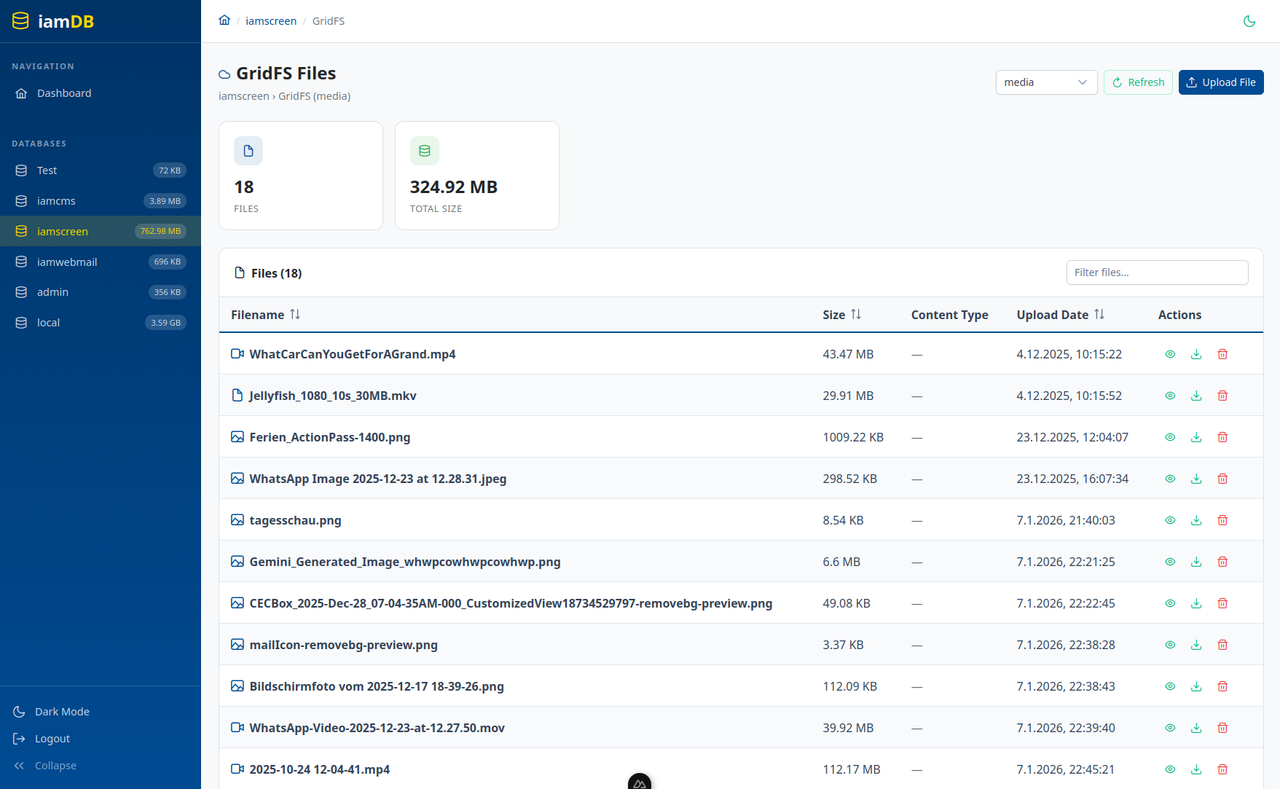
- GridFS Support — Upload, download, and manage files stored in GridFS (supports custom bucket names)
- Collection & Database Export — Export as JSON with one click
- Backup & Restore — Download and restore full
mongodumparchives (gzip) per database - Collection & Database Export — Export as JSON with one click
- Server Stats — MongoDB version, uptime, connections, and storage overview
- Server Status — Detailed connection pool, network, memory, and operation counters with auto-refresh
- Slow Query Log — Browse MongoDB's system.profile per database with duration highlighting
- Dark / Light Mode — Toggle with persistent preference
- Collapsible Sidebar — Compact navigation with localStorage persistence
- Mobile Responsive — Fully usable on mobile devices with burger menu
- Optional Authentication — Protect access with username/password via environment variables
- Multiple Connections — Connect to multiple MongoDB instances simultaneously via ENV, config file, or the UI
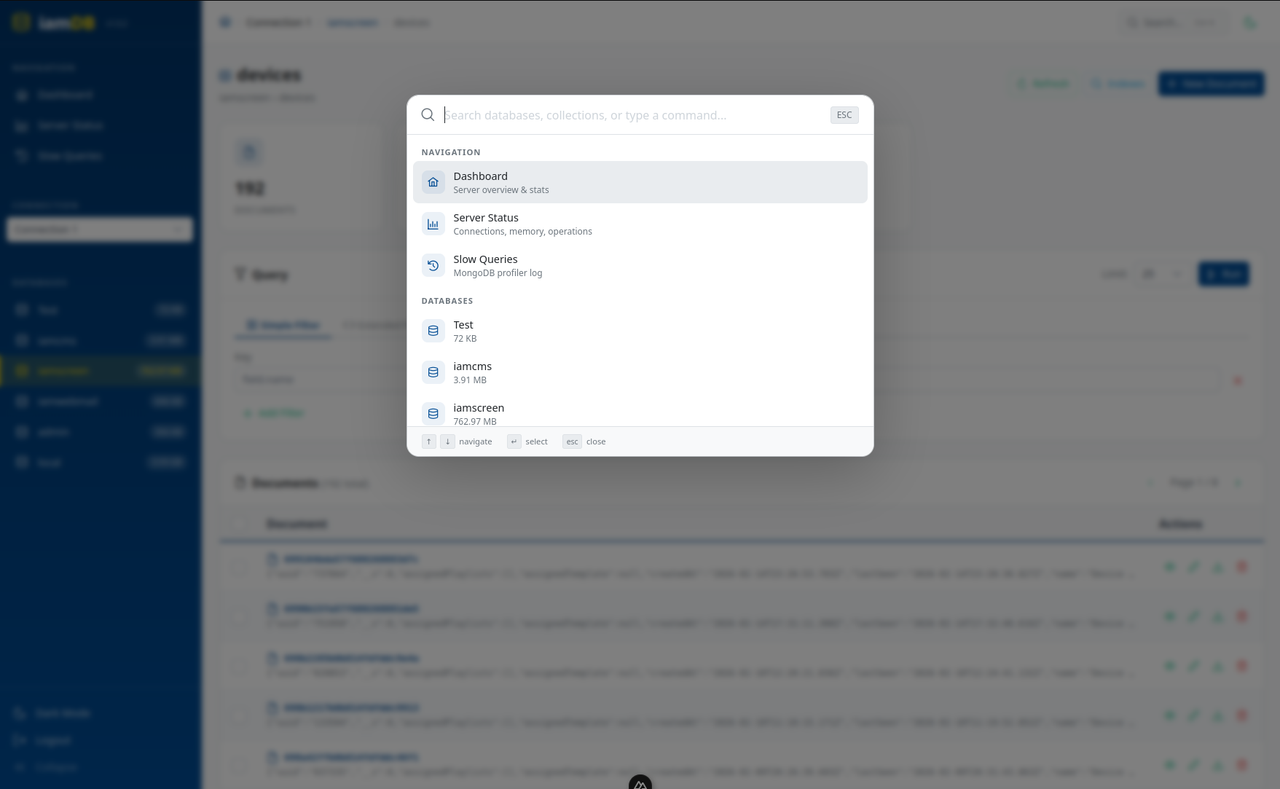
- Command Palette (Ctrl+K) — Quick search across all databases and collections with instant navigation
- Docker Ready — Single container, easy to deploy
Quick Start
Docker (recommended)
docker pull iampatde/iamdb:latest

docker run -d \
  -p 3000:3000 \
  -e MONGO_URL=mongodb://your-mongo-host:27017 \
  --name iamdb \
  iampatde/iamdb:latest
Docker Compose
Create a docker-compose.yml:
services:
  iamdb:
    image: iampatde/iamdb:latest
    ports:
      - "3000:3000"
    environment:
      - MONGO_URL=mongodb://mongo:27017
      - AUTH_USERNAME=admin
      - AUTH_PASSWORD=changeme
      - SESSION_SECRET=your-secret-key-here
    volumes:
      - iamdb_config:/app/config    # connections.json + backup-schedules.json
      - iamdb_backups:/app/backups  # stored backup archives
    depends_on:
      - mongo
    restart: unless-stopped

  mongo:
    image: mongo:7
    ports:
      - "27017:27017"
    volumes:
      - mongo_data:/data/db
    restart: unless-stopped

volumes:
  mongo_data:
  iamdb_config:
  iamdb_backups:
docker compose up -d
Connect to an existing MongoDB
If you already have a MongoDB instance running (local, Atlas, or remote), just point MONGO_URL to it:
docker run -d \
  -p 3000:3000 \
  -e MONGO_URL=mongodb://user:[email protected] \
  -e AUTH_USERNAME=admin \
  -e AUTH_PASSWORD=secret \
  -e SESSION_SECRET=my-secure-secret \
  --name iamdb \
  iampatde/iamdb:latest
Development
npm install
npm run dev
The app runs on http://localhost:3000.
Environment Variables
| Variable | Description | Default | Required |
|---|---|---|---|
MONGO_URL | MongoDB connection string (single connection) | mongodb://localhost:27017 | Yes* |
MONGO_URLS | Comma-separated MongoDB URLs (multiple connections) | (empty) | No |
CONNECTIONS_FILE | Path to connections.json config file | /app/connections.json | No |
AUTH_USERNAME | Login username (leave empty to disable auth) | (empty) | No |
AUTH_PASSWORD | Login password | (empty) | No |
SESSION_SECRET | Secret for session encryption | iamdb-secret-change-me | Recommended |
PORT | Port the application listens on | 3000 | No |
BASE_URL | Base path for reverse proxy (e.g. /iamdb) | / | No |
BACKUPS_DIR | Directory where scheduled backup archives are stored | /app/backups | No |
BACKUP_SCHEDULES_FILE | Path to the backup schedules config file | /app/backup-schedules.json | No |
BACKUP_TIMEZONE | Timezone for cron expressions (IANA name) | UTC | No |
* Either MONGO_URL or MONGO_URLS is required. If neither is set, defaults to mongodb://localhost:27017.
Persistent Storage
iamDB stores UI-managed connections and backup schedules as JSON files on the container filesystem. Mount these paths to keep data across restarts and image updates:
| Path | Content | Volume |
|---|---|---|
/app/config/ | connections.json + backup-schedules.json | iamdb_config:/app/config |
/app/backups/ | Stored backup archives | iamdb_backups:/app/backups |
Both volumes are named Docker volumes — no host-side files need to be created manually. Docker manages the directories, the app writes the files on first use.
Why named volumes instead of bind mounts for JSON files? If you use a bind mount like
./connections.json:/app/connections.jsonand the file doesn't exist yet on the host, Docker creates it as an empty directory, which causes anEISDIRerror on the first write. Named volumes don't have this problem.
Authentication
To enable login protection, set both AUTH_USERNAME and AUTH_PASSWORD. If either is empty, authentication is disabled and the app is accessible without login.
Multiple Connections
iamDB supports connecting to multiple MongoDB instances simultaneously. There are two ways to configure multiple connections:
Option 1: Comma-separated ENV variable
docker run -d \
  -p 3000:3000 \
  -e MONGO_URLS=mongodb://host1:27017,mongodb://host2:27017,mongodb://host3:27017 \
  --name iamdb \
  iampatde/iamdb:latest
Option 2: Config file (via Docker volume)
Create a connections.json file:
[
  { "name": "Production", "url": "mongodb://prod-host:27017" },
  { "name": "Staging", "url": "mongodb://staging-host:27017" },
  { "name": "Development", "url": "mongodb://localhost:27017" }
]
Mount it into the container:
docker run -d \
  -p 3000:3000 \
  -v ./connections.json:/app/connections.json \
  --name iamdb \
  iampatde/iamdb:latest
Option 3: Connection Manager UI
Go to Connections in the sidebar to add, edit, and delete connections directly in the browser — no file editing or container restart required. Connections added via the UI are saved to connections.json automatically.
You can also export the full config (connections + backup schedules) as a JSON file and import it on another instance.
All three options can be combined. ENV connections are read-only and always listed first. When multiple connections are available, a dropdown selector appears in the sidebar to switch between them.
Reverse Proxy (Subpath)
To serve iamDB under a subpath (e.g. https://example.com/iamdb/), set the BASE_URL environment variable:
docker run -d \
  -p 3000:3000 \
  -e MONGO_URL=mongodb://your-mongo-host:27017 \
  -e BASE_URL=/iamdb \
  --name iamdb \
  iampatde/iamdb:latest
Example Traefik configuration with Docker labels:
services:
  iamdb:
    image: iampatde/iamdb:latest
    environment:
      - MONGO_URL=mongodb://mongo:27017
      - BASE_URL=/iamdb
    labels:
      - "traefik.enable=true"
      - "traefik.http.routers.iamdb.rule=PathPrefix(`/iamdb`)"
      - "traefik.http.services.iamdb.loadbalancer.server.port=3000"
    restart: unless-stopped
Tech Stack
| Layer | Technology |
|---|---|
| Framework | Nuxt 3 (Vue 3, Nitro) |
| UI Components | PrimeVue 4, PrimeIcons, PrimeFlex |
| State Management | Pinia |
| Database Driver | MongoDB Node.js Driver 6 |
| Language | TypeScript |
| Containerization | Docker |
Project Structure
iamdb/
├── assets/css/main.css          # Global theme styles
├── components/JsonViewer.vue    # Recursive JSON viewer
├── composables/                 # Vue composables (API, formatting, theme)
├── layouts/default.vue          # Main app layout with sidebar
├── pages/
│   ├── index.vue                # Dashboard with server stats
│   ├── login.vue                # Login page
│   └── db/
│       └── [db]/
│           ├── index.vue        # Database overview & collections
│           ├── collection/
│           │   └── [collection].vue  # Document viewer & editor
│           └── gridfs.vue       # GridFS file manager
├── plugins/                     # PrimeVue plugin setup
├── server/
│   ├── api/                     # Nitro API routes
│   └── utils/
│       ├── connections.ts       # Multi-connection manager
│       └── mongo.ts             # MongoDB service layer
├── stores/app.ts                # Pinia store
├── Dockerfile                   # Multi-stage production build
├── docker-compose.yml           # Docker Compose with MongoDB
├── nuxt.config.ts               # Nuxt configuration
└── package.json
License
MIT
Changelog
#Version 1.0.0
    - Init version

#Version 1.0.1
    - Add Server Status, Slow Queries View, Version number

#Version 1.0.2
    - Add Multiconnection feature to add more mongodbs on one frontend

#Version 1.0.3
    - Add Command Palette (Ctrl+K) — Quick search

#Version 1.0.4
    - Add Backup / Restore over mongodump and automatic cronjob backups

#Version 1.0.5
    - Add connections also over the UI
Coming soon (maybee)
- Shell Mode, Browser Shell for MongoDB
- Explain Query, to show Index Usage, Scan Type etc. on a query
- Real-time OpLog Viewer
- Shema Analyzer
- Collection Copy/Clone
- Document Duplication
- JSON/CSV Import
- You have any idea? Let me know!
Tag summary
Content type
Image
Digest
sha256:5f8504ddc…
Size
87.5 MB
Last updated
3 months ago
docker pull iampatde/iamdb