interrogator/corpkit
Sophisticated corpus linguistics
336
interrogator/corpkit repository overview
corpkit: sophisticated corpus linguistics






corpkit is a module for doing more sophisticated corpus linguistics. It links state-of-the-art natural language processing technologies to functional linguistic research aims, allowing you to easily build, search and visualise grammatically annotated corpora in novel ways.
The basic workflow involves making corpora, parsing them, and searching them. The results of searches are CONLL-U formatted files, represented as pandas objects, which can be edited, visualised or exported in a lot of ways. The tool has three interfaces, each with its own documentation:
A quick demo for each interface is provided in this document.
Feature summary
From all three interfaces, you can do a lot of neat things. In general:
Parsing
Corpora are stored as
Corpusobjects, with methods for viewing, parsing, interrogating and concordancing.
- A very simple wrapper around the full Stanford CoreNLP pipeline
- Automatically add annotations, speaker names and metadata to parser output
- Detect speaker names and make these into metadata features
- Multiprocessing
- Store dependency parsed texts, parse trees and metadata in CONLL-U format
Interrogating corpora
Interrogating a corpus produces an
Interrogationobject, with results as Pandas DataFrame attributes.
- Search corpora using regular expressions, wordlists, CQL, Tregex, or a rich, purpose built dependency searching syntax
- Interrogate any dataset in CONLL-U format (e.g. the Universal Dependencies Treebanks)
- Collocation, n-gramming
- Restrict searches by metadata feature
- Use metadata as symbolic subcorpora
- Choose what search results return: show any combination of words, lemmata, POS, indices, distance from root node, syntax tree, etc.
- Generate concordances alongside interrogations
- Work with coreference annotation
Editing results
Interrogationobjects haveedit,visualiseandsavemethods, to name just a few. Editing creates a newInterrogationobject.
- Quickly delete, sort, merge entries and subcorpora
- Make relative frequencies (e.g. calculate results as percentage of all words/clauses/nouns ...)
- Use linear regression sorting to find increasing, decreasing, turbulent or static trajectories
- Calculate p values, etc.
- Keywording
- Simple multiprocessing available for parsing and interrogating
- Results are Pandas objects, so you can do fast, good statistical work on them
Visualising results
The
visualisemethod ofInterrogationobjects uses matplotlib and seaborn if installed to produce high quality figures.
- Many chart types
- Easily customise titles, axis labels, colours, sizes, number of results to show, etc.
- Make subplots
- Save figures in a number of formats
Concordancing
When interrogating a corpus, concordances are also produced, which can allow you to check that your query matches what you want it to.
- Colour, sort, delete lines using regular expressions
- Recalculate results from edited concordance lines (great for removing false positives)
- Format lines for publication with TeX
Other stuff
- Language modelling
- Save and load results, images, concordances
- Export data to other tools
- Switch between API, GUI and interpreter whenever you like
Installation
Via pip:
pip install corpkit
Via Git:
git clone https://github.com/interrogator/corpkit
cd corpkit
python setup.py install
Via Anaconda:
conda install -c interro_gator corpkit
Creating a project
Once you've got everything installed, you'll want to create a project---this is just a folder hierarchy that stores your corpora, saved results, figures and so on. You can do this in a number of ways:
Shell
new_project junglebook
cp -R chapters junglebook/data
Interpreter
> new project named junglebook
> add ../chapters
Python
>>> import shutil
>>> from corpkit import new_project
>>> new_project('junglebook')
>>> shutil.copytree('../chapters', 'junglebook/data')
You can create projects and add data via the file menu of the graphical interface as well.
Ways to use corpkit
As explained earlier, there are three ways to use the tool. Each has unique strengths and weaknesses. To summarise them, the Python API is the most powerful, but has the steepest learning curve. The GUI is the least powerful, but easy to learn (though it is still arguably the most powerful linguistics GUI available). The interpreter strikes a happy middle ground, especially for those who are not familiar with Python.
Interpreter
The first way to use corpkit is by entering its natural language interpreter. To activate it, use the corpkit command:
$ cd junglebook
$ corpkit
You'll get a lovely new prompt into which you can type commands:
corpkit@junglebook:no-corpus>
Generally speaking, it has the comforts of home, such as history, search, backslash line breaking, variable creation and ls and cd commands. As in IPython, any command beginning with an exclamation mark will be executed by the shell. You can also write scripts and execute them with corpkit script.ck, or ./script.ck if you have a shebang.
Making projects and parsing corpora
# make new project
> new project named junglebook
# add folder of (subfolders of) text files
> add '../chapters'
# specify corpus to work on
> set chapters as corpus
# parse the corpus
> parse corpus with speaker_segmentation and metadata and multiprocess as 2
Searching and concordancing
# search and exclude
> search corpus for governor-function matching 'root' \
...    excluding governor-lemma matching 'be'

# show pos, lemma, index, (e.g. 'NNS/thing/3')
> search corpus for pos matching '^N' showing pos and lemma and index

# further arguments and dynamic structuring
> search corpus for word matching any \
...    with subcorpora as pagenum and preserve_case

# show concordance lines
> show concordance with window as 50 and columns as LMR

# colouring concordances
> mark m matching 'have' blue

# recalculate results
> calculate result from concordance
Variables, editing results
# variable naming
> call result root_deps
# skip some numerical subcorpora
> edit root_deps by skipping subcorpora matching [1,2,3,4,5]
# make relative frequencies
> calculate edited as percentage of self
# use scipy to calculate trends and sort by them
> sort edited by decrease
Visualise edited results
> plot edited as line chart \
...    with x_label as 'Subcorpus' and \
...    y_label as 'Frequency' and \
...    colours as 'summer'
Switching interfaces
# open graphical interface
> gui
# enter ipython with current namespace
> ipython
# use a new/existing jupyter notebook
> jupyter notebook findings.ipynb
API
Straight Python is the most powerful way to use corpkit, because you can manipulate results with Pandas syntax, construct loops, make recursive queries, and so on. Here are some simple examples of the API syntax:
Instantiate and search a parsed corpus
### import everything
>>> from corpkit import *
>>> from corpkit.dictionaries import *

### instantiate corpus
>>> corp = Corpus('chapters-parsed')

### search for anything participant with a governor that
### is a process, excluding closed class words, and
### showing lemma forms. also, generate a concordance.
>>> sch = {GF: roles.process, F: roles.actor}
>>> part = corp.interrogate(search=sch,
...                         exclude={W: wordlists.closedclass},
...                         show=[L],
...                         conc=True)
You get an Interrogation object back, with a results attribute that is a Pandas DataFrame:
          daisy  gatsby  tom  wilson  eye  man  jordan  voice  michaelis  \
chapter1     13       2    6       0    3    3       0      2          0
chapter2      1       0   12      10    1    1       0      0          0
chapter3      0       3    0       0    3    8       6      1          0
chapter4      6       9    2       0    1    3       1      1          0
chapter5      8      14    0       0    3    3       0      2          0
chapter6      7      14    9       0    1    2       0      3          0
chapter7     26      20   35      10   12    3      16      9          5
chapter8      5       4    1      10    2    2       0      1         10
chapter9      1       1    1       0    3    3       1      1          0
Edit and visualise the result
Below, we make normalised frequencies and plot:
### calculate and sort---this sort requires scipy
>>> part = part.edit('%', SELF)

### make line subplots for the first nine results
>>> plt = part.visualise('Processes, increasing', subplots=True, layout=(3,3))
>>> plt.show()
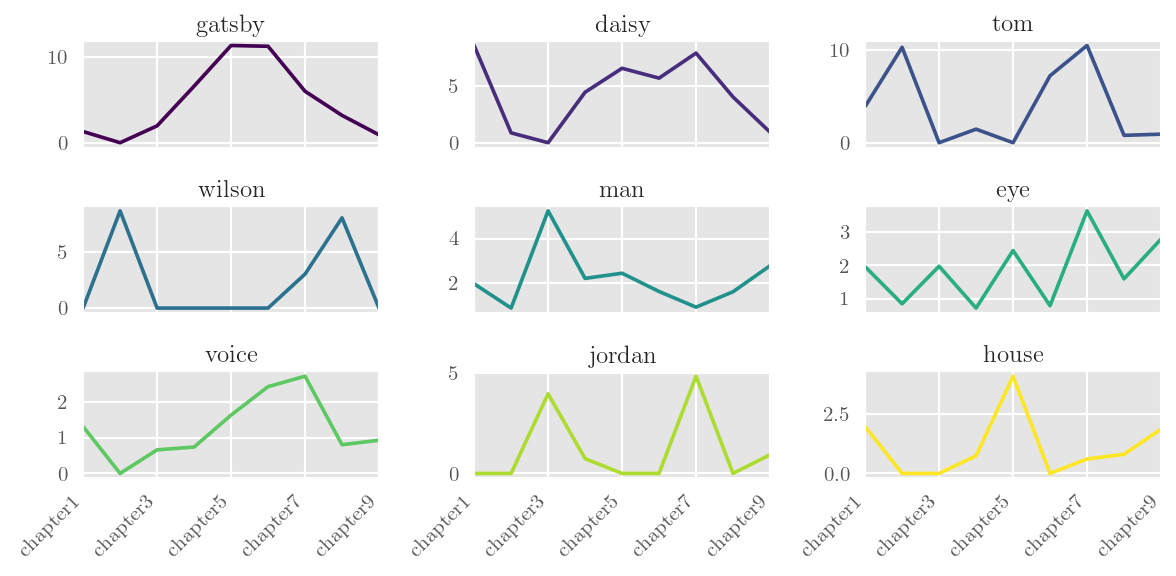
There are also some more detailed API examples over here. This document is fairly thorough, but now deprecated, because the official docs are now over at ReadTheDocs.
Example figures


Shifting register of scientific English

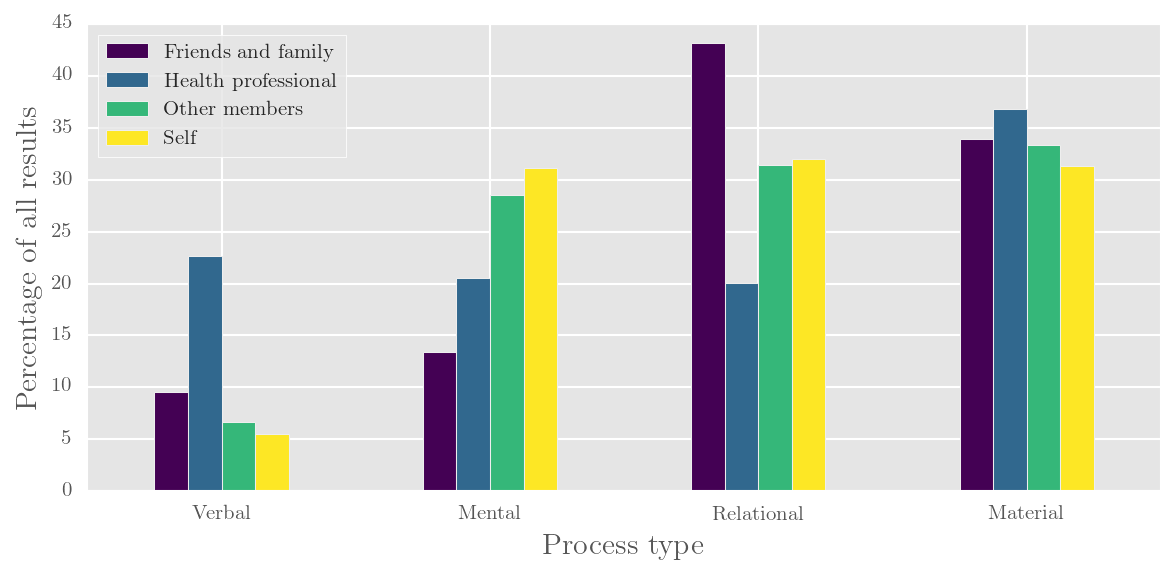
Participants and processes in online forum talk
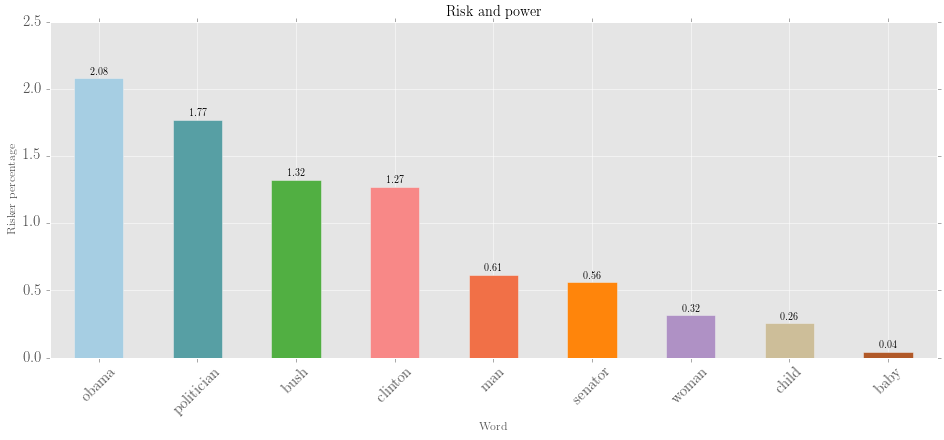

Riskers and mood role of risk words in print news journalism
Graphical interface
Screenshots coming soon! For now, just head here.
Contact
Twitter: @interro_gator
Cite
McDonald, D. (2015). corpkit: a toolkit for corpus linguistics. Retrieved from https://www.github.com/interrogator/corpkit. DOI: http://doi.org/10.5281/zenodo.28361
Tag summary
Content type
Image
Digest
Size
836.2 MB
Last updated
almost 10 years ago
docker pull interrogator/corpkit