intersystemsdc/mithackathon2019
InterSystems IRIS Demos for the MIT Hackathon 2019
903
intersystemsdc/mithackathon2019 repository overview
IRIS Healthcare Integration Demo for MIT Hackhathon
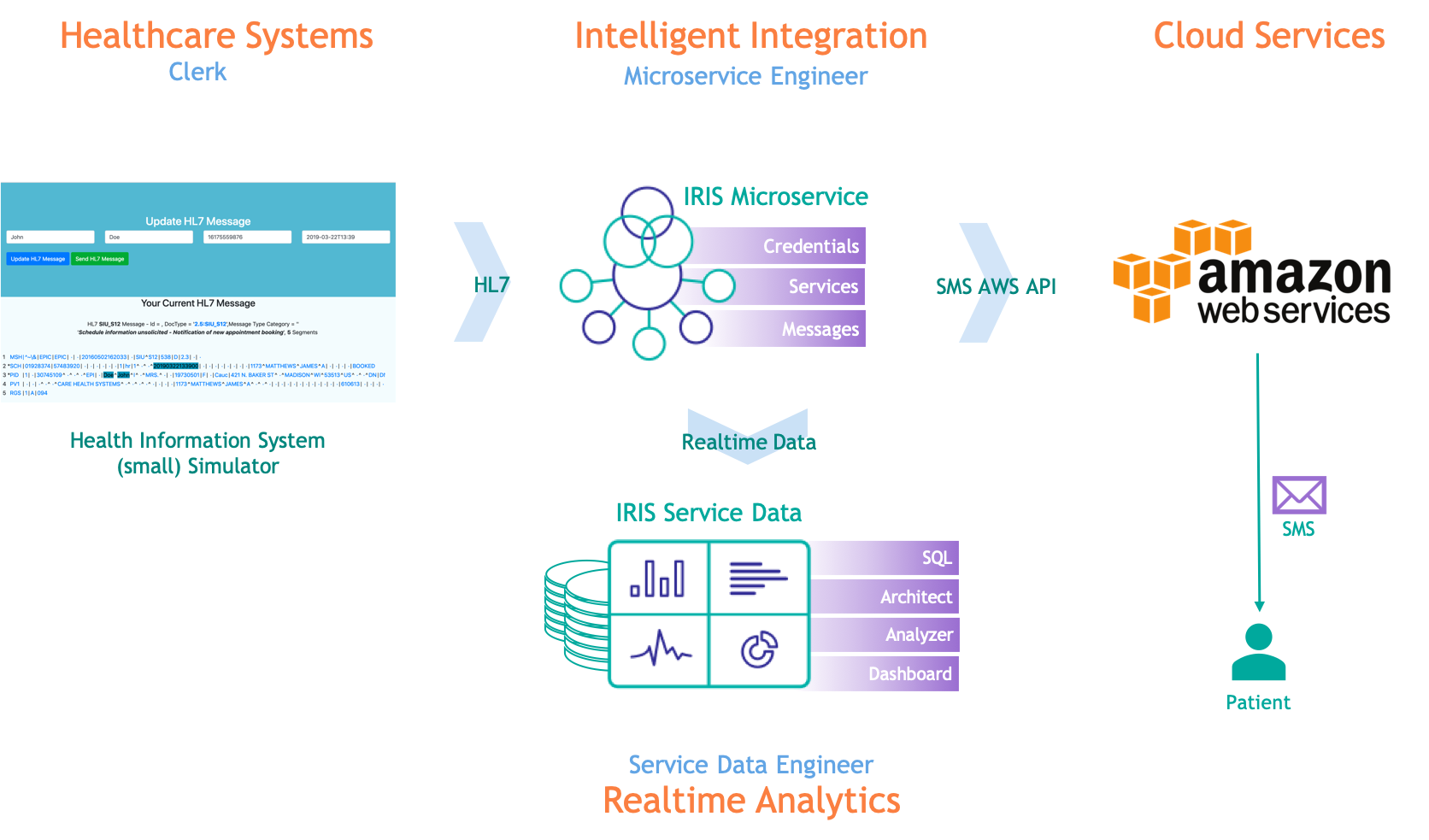
This demo shows how easy it is to integrate an Electronic Medical Record system that is sending HL7 messages with AWS. The example shows how we can receive appointments (SIU_S12 messages), extract data from the message and do two things with the data:
- Send a text (SMS) to notify the patient of the appointment
- Store the data on a table and give you a real-time dashboard about your business
- This version of the demo includes IoT support with Mosquitto MQTT broker and services on IRIS so you can send signals such as from heart rate and RFID sensors
The picture bellow shows the workflow:
You will find two YouTube videos bellow. The first one is 10 minutes long and walks you through the IRIS demo. But if you want to experience building an integration project with IRIS, we recommend watching both videos.
Have fun! :)
Just watch it
Start with this video demo on YouTube (if you haven't already watched it).
Run and Build it yourself!
Now that you have watched the demo, you can watch this second video and take two different paths:
- Use the video to run the demo on your PC with your AWS account. Don't worry, the video guides you through set up and AWS has a free tier for sending text messages!
- Use the video to build parts of your demo yourself.
To just run the demo on your PC, make sure you have Docker installed on your machine and run the following command:
docker run -it --rm -p 51773:51773 -p 52773:52773 -p 1883:1883 --name iris intersystemsdc/mithackathon2019:v1.0.full
Then open the demo landing page on http://localhost:52773/csp/user/demo.csp.
Use the username SuperUser and the password SYS. This is just a demo that is running on your machine, so we are using a default password.
If you want to experience on building parts of the demo, start this other container instead:
docker run -it --rm -p 51773:51773 -p 52773:52773 -p 1883:1883 --name iris intersystemsdc/mithackathon2019:v1.0.exercise
In this container, many componentes of the demo are missing, so you get to build and add them yourself.
Independently of the path you choose, don't forget to follow the second video for guidance.
Enjoy!
Ports Exposed
The following ports are being exposed by the docker run command above:
- 52773: InterSystems IRIS Web Server Port
- 51773: InterSystems IRIS Super Server Port
- 1883: Mosquitto MQTT Broker"
Tag summary
Content type
Image
Digest
Size
1.2 GB
Last updated
over 7 years ago
docker pull intersystemsdc/mithackathon2019