jaap14/darkroom-log
Darkroom print log + analog photo library. Immich integration, slideshows, public albums.
1.6K
jaap14/darkroom-log repository overview
Darkroom Log
Self-hosted darkroom printing log and analog photo library, built for Immich integration.
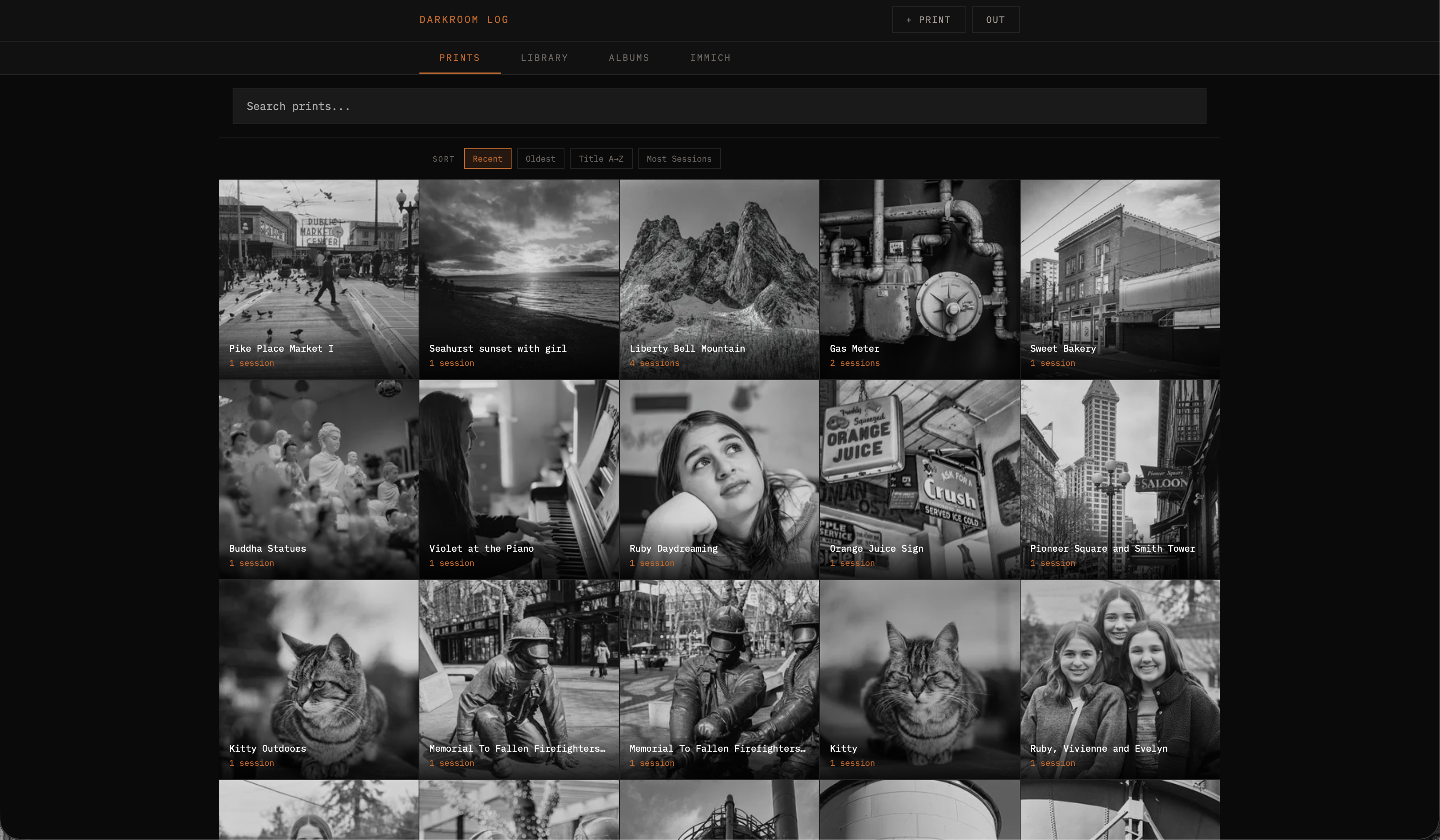
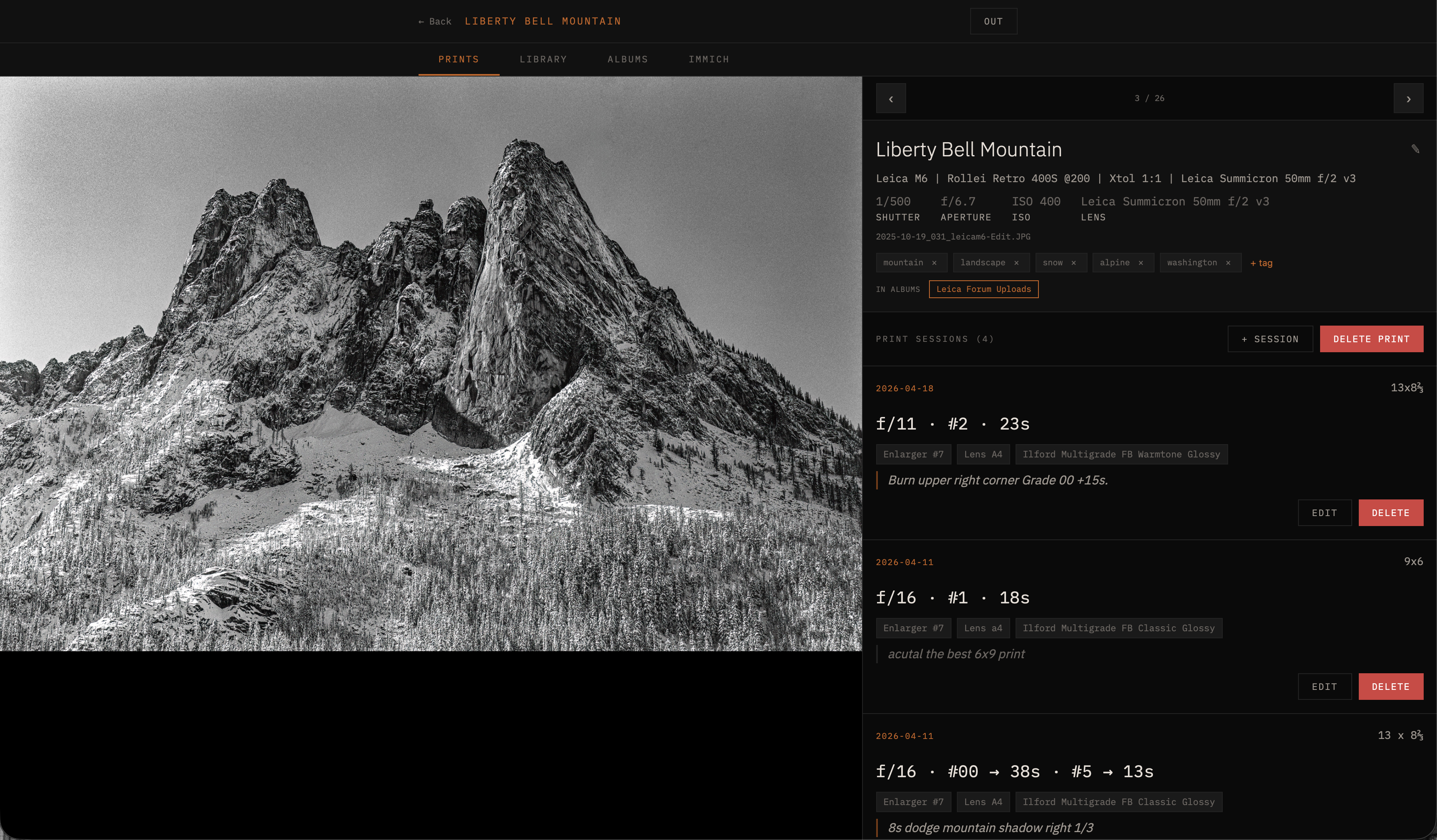
Each print page records full exposure data (shutter / aperture / ISO / lens), tags, every print session you've made of it (paper, enlarger, lens, exposure, dodge/burn notes), and chips for any album the print belongs to so you can jump straight to that album from the print itself.
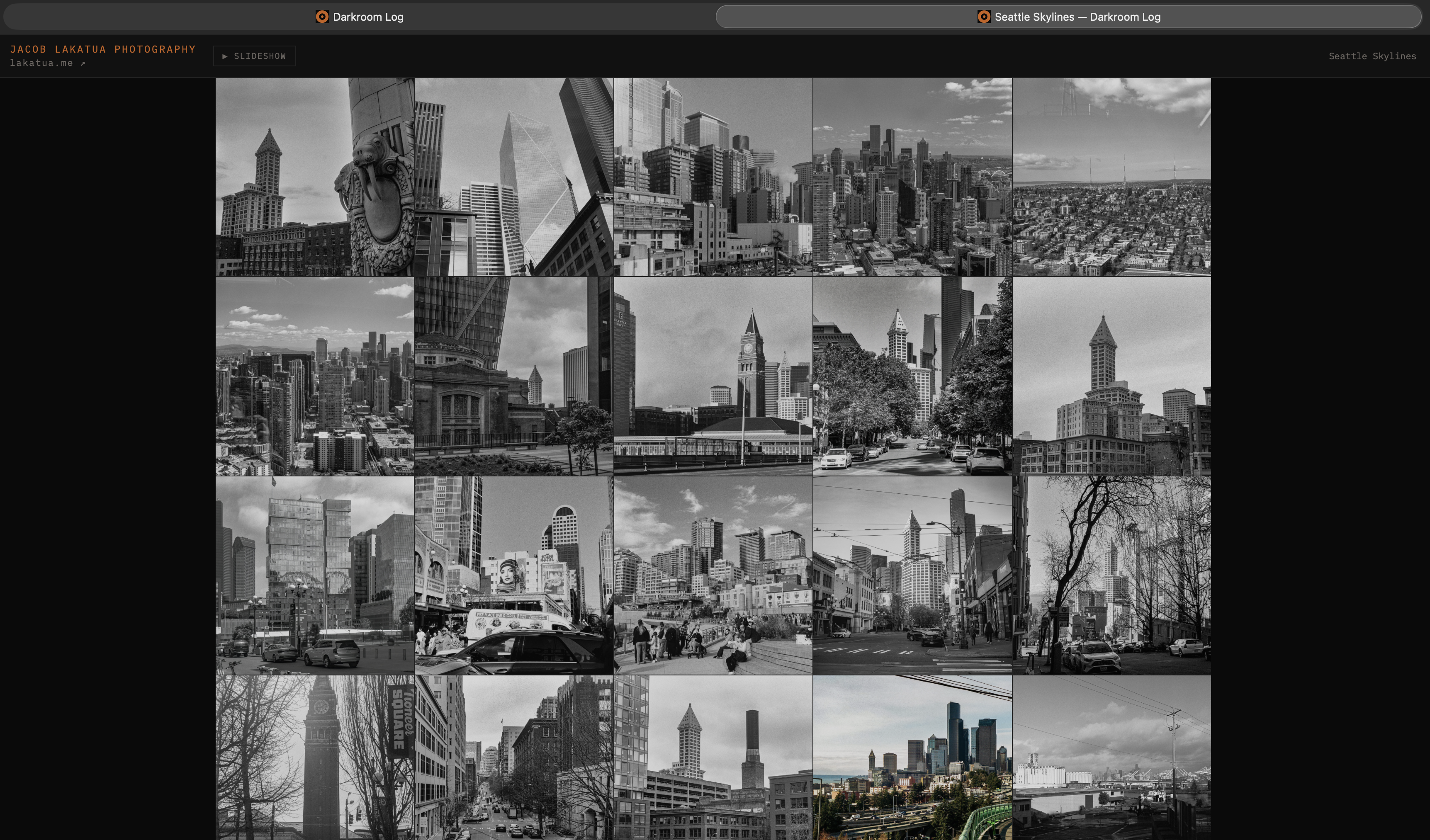
Albums double as public, shareable galleries — each gets its own URL with a custom branded header, optional slideshow, and pinch-zoom on every photo. No login required for viewers.
Source: https://github.com/jaapjan14/darkroom-log
Immich compatibility: actively run in production against Immich v3.2.0 (upgraded 2026-09-13, audited clean against this image). Talks to Immich entirely through its REST API (asset/search/album/tag endpoints), so it isn't tied to Immich's internal ML/vector-search backend — the v3 migration (pgvecto.rs → VectorChord) needed no changes on Darkroom's side. Not tested against Immich versions older than v3. Note: Immich v3.2.0 formally deprecated the "flat" search endpoints this app's Immich integration is built on, with removal planned for a future Immich v4 — no impact today, but a v4 upgrade will require a search-layer rewrite here.
What's new in v1.5.114–117
Security hardening plus a handful of fixes.
- Breaking:
APP_PASSWORD(orPASSWORD_HASH) is now required. The server refuses to start if neither is set, instead of silently falling back to a built-in default password. If you already set one, nothing changes. - Patched dependency DoS advisories in express, body-parser, qs and multer.
- Fixed: the "+ Album" picker didn't move the album you'd just added to back to the top until a page reload. It now updates immediately. Removing, reordering and renaming also keep the Albums tab's "Recently updated" sort current. The picker's Immich-albums tab is now sorted by most recently updated too.
- Fixed: the Analog tab's Sort button did nothing, and the Prints tab could get stuck on "Loading..." when Analog was the default tab.
What's new in v1.5.109–113
Renamed the Library/Immich tabs to match what's actually in them, plus a mode-toggle and Prints sort cleanup.
- Renamed tabs: Library → Analog, Immich → Digital — the old names didn't reflect content. "Analog" is film work exclusively; "Digital" is digital-camera work (organized into Immich's native albums), once cleared of redundant film-scan albums now covered by this app's own Albums tab.
- New Print/Analog mode toggle in the header — swap which of Prints/Analog opens first and reads first in the tab bar, since the right default depends on whether you're printing or working through scans that day. Persisted, so it's a one-time flip.
- Prints tab's Sort is now a compact dropdown at the end of the search bar instead of an always-visible button row, matching the Analog tab's existing pattern.
What's new in v1.5.104–108
Library tag-add bug fixes plus a dedicated title regenerate button.
- Fixed: pasting a multi-word tag list into a "+ tag" input shredded every tag into single words — the paste handler split on any whitespace instead of just commas. Multi-word tags (e.g. "black and white film") now paste correctly, and slashes are stripped from Library tags to avoid Immich's nested-tag-hierarchy parsing (
f/2→f2). - Fixed: a tag could silently fail to link with no error shown — the server now verifies each tag-link write actually succeeded against Immich's real per-item result before reporting success, instead of assuming success whenever the request didn't throw.
- Fixed: the Library tags row often needed a manual page reload to show a just-added/removed tag — it now updates from the write the client already knows succeeded, instead of immediately re-reading Immich (whose read-after-write isn't always immediate).
- New: dedicated "regenerate" button for just the suggested title — get a fresh title idea without re-running the whole caption/tag generation.
What's new in v1.5.102–103
Two Immich-tab fixes: a smarter Album picker sort, and Immich albums that had gone blank when opened.
- "Add to Album" picker now sorts most-recently-used first — with enough albums accumulated, finding the right one when filing a photo was getting tedious. Reuses the existing "last updated" sort already used for the main Albums grid.
- Fixed: Immich albums appeared empty when opened, despite showing a correct photo count — as of Immich v3.1.0,
GET /albums/:idstopped inlining anassetsarray (onlyassetCountcomes back now). This app's Immich-albums proxy now separately fetches the asset list via Immich'ssearch/metadataendpoint and merges it back in, so opening an album shows its photos again.
What's new in v1.5.101
Library-tab title and tag editing, AI-suggested titles, and a public-album timezone fix.
- Library-tab title and tag editing — the "Generate" button's suggestions can now actually be saved on Library photos, not just Prints: a new title edit and tag add/remove path writes real Immich tags and a manual title entry, separate from the Prints-only fields.
- AI-suggested titles — the Tag & Caption generator now proposes a short, evocative title for untitled photos alongside its tag suggestions.
- Public album date fix — photo dates/times on public albums could render several hours off from the actual capture time; fixed a local-vs-UTC timezone mismatch in the date formatting.
- Library search results no longer wipe to "No recent uploads" when re-entering the Library tab after filtering by a Lens/Camera/City/State chip.
What's new in v1.5.95–100
A one-click Tag & Caption generator for posting photos to Lomography, Flickr, and Instagram, plus a desktop layout fix.
- Tag & Caption generator — a new "Generate" button in the photo detail view (both the Prints and Library tabs) produces four copy-ready outputs per photo: a Standard Caption, a Lomography tag string (kept under its 123-character limit), a Flickr tag list, and a 3-line Instagram post (title / gear line / 5 hashtags). Camera, film, developer, lens, and format are pulled straight from your logged metadata; an AI pass ranks your existing tags by how likely someone is to actually search for them, and suggests a handful more for anything visible in the photo that isn't tagged yet — shown as "+" chips you can add to the photo's real tags, never applied automatically. Works even on untagged photos, generating a full tag set from the image itself. Requires an
ANTHROPIC_API_KEYin your container environment. - Fixed a desktop-only layout bug where the info panel could grow taller than the visible area with no way to scroll down to see it.
What's new in v1.5.80–94
A mobile-first rework of the Library toolbar, plus a new Film Type filter and several Immich v3 migration fixes.
- Library toolbar rebuilt for mobile — the search bar is back to just a search box and a "Sort" chip. Tap the search box to reveal Camera/Lens/State/City/Film dropdowns, the People avatar picker, and a Text/Smart search-mode toggle; tap Sort to reveal sort options and maintenance actions (full sweep, thumbnail refresh) — instead of a row of cramped buttons.
- Film Type filter — filter the Library by film stock, alongside the existing Camera/Lens/State/City dropdowns.
- People filter now includes unnamed faces — browse a detected-but-untagged face in Darkroom before naming it in Immich.
- "Last Edited" sort — a third Library sort option, separate from Upload Date and Date Taken, surfaces what's recently been republished.
- Real-time reconciliation for Immich v3 — republishing an already-printed/albumed photo (Immich v3 assigns a new UUID on every republish) now updates prints/albums and restores the correct Upload Date immediately, instead of waiting on a periodic background script.
- Fixes: archived photos no longer leak into Library search results; an album-embed loading hang specific to Chromium browsers on the same LAN as the server is resolved; an intermittent stale/duplicated Library listing after viewing an album is fixed.
What's new in v1.5.76–79
Reliability fixes for album browsing and the Library grid, plus a forum-friendly share size.
- Library grid no longer goes "wonky" after viewing an album — returning to the Library from an album could occasionally show a stale or duplicated set of photos, most often while albums were being edited. Both the deterministic cause (the album lightbox overwriting the Library's dataset) and an intermittent async-render race (a slow fetch repainting the grid after you'd already navigated back) are now fixed, so the grid always reflects the real library on return.
- Add to Album dedupes by name — typing the name of an existing album in the "+ Create" box now adds the photo into that album instead of silently spawning a duplicate.
- Leica Forum share size — a new share preset caps the long edge at 2048 px (≤2.4 MB) so any aspect ratio, including full squares, stays under the forum's upload limits.
- Upload-date sort default restored — the Library again defaults to Upload Date with a full sweep and a working Load More, instead of a narrow 7-day window.
What's new in v1.5.62–74
Album management and a fix for stale thumbnails after uploads, on top of a round of performance work.
- Rename albums — a ✎ Rename button in the album toolbar. Renaming changes only the display name by default; you're asked per-rename whether to also update the public
/album/<slug>URL, so existing share links and embeds don't break unless you choose to change them. - Sort albums — a Sort dropdown on the Albums tab: Recently updated (default), Recently created, Name (A–Z), or Photo count. Your choice is remembered. Albums now track a last-updated time, bumped on any edit.
- Thumbnail refresh — thumbnail URLs are versioned by the asset's Immich
updatedAt, so re-uploading or replacing a photo refreshes its thumbnail automatically instead of leaving a stale one cached. A ⟳ Thumbnails button manually forces a refetch when needed. - Faster everywhere — gzip/brotli compression on all responses (app shell, thumbnail JSON, and assets ship far smaller) and a server-side LRU cache for slideshow display variants, so repeat slideshow plays are smooth from the first viewing.
- Slideshow pace readout — an optional in-app badge shows live elapsed/target timing while a slideshow plays.
What's new in v1.5.60–61
A focused pass on mobile / cellular performance — browsing the library and public album galleries on a phone (5G) is now fast and smooth, with no dead taps or skipped photos. (v1.5.61 adds post-release hardening: a type-agnostic fallback so the fullscreen viewer never breaks on video/RAW originals, library queries filtered to images, and a few nav-feedback refinements.)
- Instant photo viewing on slow connections — the library detail view, Prints detail, and public album viewers now paint a lightweight, screen-sized image immediately and stream the full-resolution original in behind it, instead of blocking on a multi-megabyte download. Opening or paging through photos no longer feels dead on cellular, and a slow metadata fetch can no longer blank or "fail" the photo.
- Fullscreen prev/next, no jump — on mobile the fullscreen viewer leads with a connection-adaptive display variant (fills the screen right away, then sharpens) and prefetches the neighbouring photos, so prev/next is instant. A 350 ms nav guard means one tap advances exactly one photo (no more ghost-click skipping). Desktop keeps the plain high-res path.
- Public album grids ~20–30× lighter — gallery thumbnails now load Immich's small thumbnail (~16 KB) instead of the ~600 KB preview, so a shared album opens fast on mobile data.
- Filtered-library sorting fixed — applying a tile filter (e.g. a lens model) and then switching Upload date / Date taken no longer empties the grid; the filtered results sort client-side instead of falling back to a broken re-filter.
- Slideshow display variant — slideshow images are server-resized via sharp at a connection-adaptive width (960 / 1280 / 1920 px), fixing black frames on poor wifi where the full original used to fail to decode. Originals still power the lightbox + pinch-zoom.
What's new in v1.5
- In-Albums chips on every print and Recent photo — see at a glance which Darkroom albums each image is in; click to jump straight to the album.
- Public album detail view — tapping a thumbnail in
/album/<slug>opens a library-style two-column layout with EXIF (description, date, camera, lens, location), separate from the fullscreen Ken Burns slideshow. - Pinch-zoom fullscreen viewer — public album fullscreen is now image-only with 1×–5× pinch, pan-when-zoomed, double-tap toggle, swipe-down to close. Trackpad two-finger swipe-up also closes.
- Album metadata API — expanded
/api/public/photo/:idreturns full EXIF (make, model, lens, focal length, shutter, aperture, ISO, date, city/state/country) for the public viewer. GPS lat/long never leave the server. - Mobile Load More smoothness — fixed cumulative scroll drift across multi-page library loads; fast-path append now keeps the DOM above untouched.
- Session arrow-key fix — opening "+ Session" no longer leaks left/right arrows into print navigation, so sessions can't accidentally land on the wrong print.
- Lazy-loaded albums — opening a print or Recent photo before visiting the Albums tab no longer silently shows zero album chips; albums fetch on demand.
See CHANGELOG for full version history.
Quick start
services:
  darkroom:
    image: jaap14/darkroom-log:latest
    restart: unless-stopped
    ports:
      - "3000:3000"
    environment:
      APP_PASSWORD: change-me
      SESSION_SECRET: generate-with-openssl-rand-base64-24
      IMMICH_URL: http://your-immich-host:2283/api
      IMMICH_KEY: your-immich-api-key
    volumes:
      - ./data:/data
      - ./music:/music   # optional, for slideshow background music
docker compose up -d
Then open http://localhost:3000 and sign in with APP_PASSWORD.
Configuration
| Variable | Required | Description |
|---|---|---|
APP_PASSWORD | yes | Login password |
SESSION_SECRET | yes | Random secret for session signing |
IMMICH_URL | yes | Immich API URL e.g. http://192.168.0.10:2283/api |
IMMICH_KEY | yes | Immich API key |
BRAND_NAME | no | Public album header brand name (e.g. Your Name Photography) |
BRAND_URL | no | Public album header link destination |
BRAND_SITE_LABEL | no | Text shown next to the brand name (e.g. yourdomain.com ↗) |
CSP_FRAME_ANCESTORS | no | Space-separated origins allowed to embed /album/:slug |
Volumes
| Path | Description |
|---|---|
/data | Prints database and filter cache |
/music | MP3 files for slideshow music (optional) |
Tags
latest— current releasevX.Y.Z— pinned release
Highlights
- Split-grade and single-grade darkroom workflow with session history per print
- Immich library browser with combined text + CLIP search, person/face filters, and chip-based filtering
- Public album galleries with branded header, Ken Burns slideshow, and iframe-embed support
- A+ security score: CSP without
unsafe-inline, login rate limiting, HSTS, full security headers - Mobile/PWA: install to home screen, swipe gestures, no browser chrome
Tag summary
Content type
Image
Digest
sha256:39ad11bca…
Size
74.3 MB
Last updated
10 days ago
docker pull jaap14/darkroom-log