jackieqiu/flarum repository overview
mondedie/docker-flarum

What is this ?
Simple forum software for building great communities. http://flarum.org/
Features
- Lightweight & secure image
- Based on Alpine Linux with nginx and PHP 7.2
- Latest Flarum Core (v0.1.0-beta.8.1)
- MySQL/Mariadb driver
- OPCache extension configured
Build-time variables
- VERSION = Version of flarum/flarum skeleton (default: v0.1.0-beta.8.1)
Ports
- 8888
Volume
- /flarum/app/public/assets : Flarum assets directory
- /flarum/app/extensions : Flarum extension directory
- /etc/nginx/conf.d : Nginx location directory
Environment variables
| Variable | Description | Type | Default value |
|---|---|---|---|
| UID | Flarum user id | optional | 991 |
| GID | Flarum group id | optional | 991 |
| DEBUG | Flarum debug mode | optional | false |
| FORUM_URL | Forum URL | required | none |
| DB_HOST | MariaDB instance ip/hostname | optional | mariadb |
| DB_USER | MariaDB database username | optional | flarum |
| DB_NAME | MariaDB database name | optional | flarum |
| DB_PASS | MariaDB database password | required | none |
| DB_PREF | Flarum tables prefix | optional | none |
| DB_PORT | MariaDB database port | optional | 3306 |
| UPLOAD_MAX_SIZE | The maximum size of an uploaded file | optional | 50M |
| PHP_MEMORY_LIMIT | PHP memory limit | optional | 128M |
| OPCACHE_MEMORY_LIMIT | OPcache memory size in megabytes | optional | 128 |
| LOG_TO_STDOUT | Enable nginx and php error logs to stdout | optional | false |
Required environment variable for first installation
| Variable | Description | Type | Default value |
|---|---|---|---|
| FLARUM_ADMIN_USER | Name of your user admin | required | none |
| FLARUM_ADMIN_PASS | User admin password | required | none |
| FLARUM_ADMIN_MAIL | User admin adress mail | required | none |
| FLARUM_TITLE | Set a name of your flarum | optional | Docker-Flarum |
Installation
1 - Pull flarum image
# Pull from hub.docker.com :
docker pull mondedie/docker-flarum:0.1.0-beta.8.1-stable

# or build it manually :
docker build -t mondedie/docker-flarum https://github.com/mondediefr/flarum.git#master
2 - Docker-compose.yml
version: "3"

services:
  flarum:
    image: mondedie/docker-flarum:0.1.0-beta.8.1-stable
    container_name: flarum
    env_file:
      - /mnt/docker/flarum/flarum.env
    volumes:
      - /mnt/docker/flarum/assets:/flarum/app/public/assets
      - /mnt/docker/flarum/extensions:/flarum/app/extensions
      - /mnt/docker/flarum/nginx:/etc/nginx/conf.d
    depends_on:
      - mariadb

  mariadb:
    image: mariadb:10.2
    container_name: mariadb
    environment:
      - MYSQL_ROOT_PASSWORD=xxxxxxxxxx
      - MYSQL_DATABASE=flarum
      - MYSQL_USER=flarum
      - MYSQL_PASSWORD=xxxxxxxxxx
    volumes:
      - /mnt/docker/mysql/db:/var/lib/mysql
3 - Run it
You need a reverse proxy to access flarum, this is not described here. You can use the solution of your choice (Traefik, Nginx, Apache, Haproxy, Caddy, H2O...etc).
Create a environment file (see docker-compose: /mnt/docker/flarum/flarum.env here)
# vi /mnt/docker/flarum/flarum.env

DEBUG=false
FORUM_URL=http://domain.tld

# Database configuration
DB_HOST=mariadb
DB_NAME=flarum
DB_USER=flarum
DB_PASS=xxxxxxxxxx
DB_PREF=flarum_
DB_PORT=3306

# User admin flarum (environment variable for first installation)
# /!\ admin password must contain at least 8 characters /!\
FLARUM_ADMIN_USER=admin
FLARUM_ADMIN_PASS=xxxxxxxxxx
[email protected]
FLARUM_TITLE=Test flarum
Run your docker-compose
docker-compose up -d
- :warning: Your admin password must contain at least 8 characters (FLARUM_ADMIN_PASS).
- If you get an error 500 with Something went wrong message, switch the
DEBUGenvironment variable totrueto see the actual error message in your browser.

Upgrade to v0.1.0-beta.8.1 from v0.1.0-beta.7.2
:warning: Backup your database, config.php, composer.lock and assets folder
:warning: Disable all 3rd party extensions prior to upgrading in panel admin.
1 - Add installed.txt file in assets folder
Make sure to mount your assets folder with the folder /flarum/app/public/assets
touch /mnt/docker/flarum/assets/installed.txt
chown UID:GID /mnt/docker/flarum/assets/installed.txt
2 - Create your own environment file
# vi /mnt/docker/flarum/flarum.env

DEBUG=false
FORUM_URL=http://domain.tld

# Database configuration
DB_HOST=mariadb
DB_NAME=flarum
DB_USER=flarum
DB_PASS=xxxxxxxxxx
DB_PREF=flarum_
DB_PORT=3306

# environment variable not required
#FLARUM_ADMIN_USER=admin
#FLARUM_ADMIN_PASS=xxxxxxxxxx
#[email protected]
#FLARUM_TITLE=Test flarum
chown UID:GID /mnt/docker/flarum/flarum.env
3 - Update your docker-compose file, see an example here
4 - Pull the last docker images
docker pull mondedie/docker-flarum:0.1.0-beta.8.1-stable
docker-compose stop flarum
docker-compose rm flarum
docker-compose up -d
5 - Updating your database and removing old assets:
docker exec -ti flarum php /flarum/app/flarum migrate
docker exec -ti flarum php /flarum/app/flarum cache:clear
Since the flarum-english extension has been renamed to flarum-lang-english, you'll need to to re-enable it from the admin panel.
After that your upgrade is finish. :tada: :tada:
Upgrade to v0.1.0-beta.7.2 from v0.1.0-beta.6
:warning: Disable 3rd party extensions prior to upgrading.
docker pull mondedie/docker-flarum:0.1.0-beta.7.2-stable
docker-compose up -d
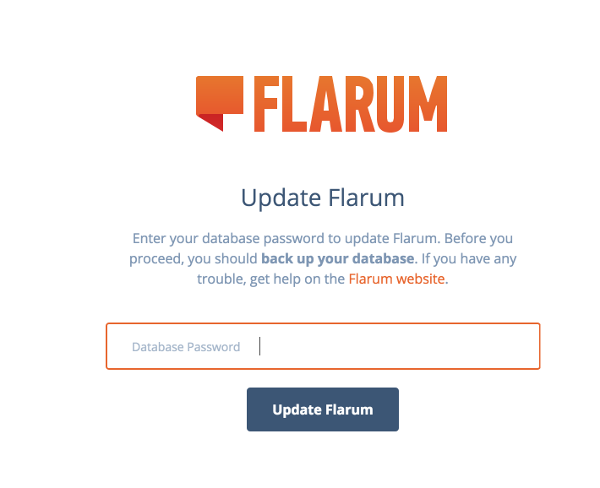
Navigate to yourforum.com/admin, enter your database password and update.
Remove and restart your container:
docker-compose stop flarum
docker-compose rm flarum
docker-compose up -d
Install custom extensions
Flarum extensions list : https://flagrow.io/extensions
Install an extension
docker exec -ti flarum extension require some/extension
Remove an extension
docker exec -ti flarum extension remove some/extension
List all extensions
docker exec -ti flarum extension list
Custom vhost flarum nginx
File to change the vhost flarum /etc/nginx/conf.d/custom-vhost-flarum.conf
To use file custom-vhost-flarum.conf add volume /etc/nginx/conf.d
Custom composer repositories
To use the composer repository system, add your repo name and json representation in /mnt/docker/flarum/extensions/composer.repositories.txt:
my_private_repo|{"type":"path","url":"extensions/*/"}
my_public_repo|{"type":"vcs","url":"https://github.com/my/repo"}
Example for a private repository in github
Add this in /mnt/docker/flarum/extensions/composer.repositories.txt
username|{"type":"vcs","url":"https://github.com/username/my-private-repo"}
Create a token in github with full control of privates repository
https://github.com/settings/tokens
Add your token in the file /mnt/docker/flarum/extensions/auth.token.txt replace by your token
github|<TOKEN>
Add your repo in the list file /mnt/docker/flarum/extensions/list
username/my-private-repo:0.1.0
https://getcomposer.org/doc/03-cli.md#modifying-repositories
Tag summary
Content type
Image
Digest
Size
51.5 MB
Last updated
over 7 years ago
docker pull jackieqiu/flarum