jak0ub/cli_chatter
E2EE Chat, masquerading as a simple Python HTTP server.
340
jak0ub/cli_chatter repository overview
CLI_Chatter (see more at repo )
How does it work?
-
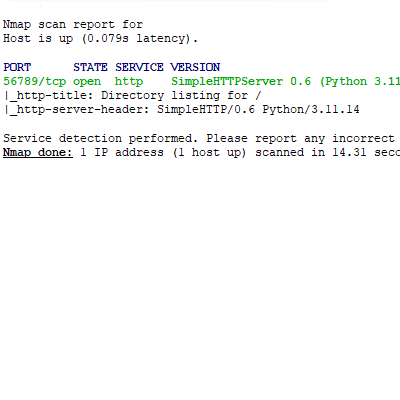
Server runs as Simple HTTP Server(shown in images below), so no network scan can suggest real intent (Chatting app). Some network analysers may flag this as C2 cause of the E2EE. Only the encrypted server public key is publicly available, so the server doesn't look that blank.
-
Every packet has following body (Encrypted by the server public key, which you obtained safely):
Unix timestamp(To make the packet expire after 5s, so replay attacks wont work)Client nickname_ID(not shared anywhere, unique, 16char long with letters (upper/lower) and numbers included)Client actionClient blob(Here the client sends the payloads)
-
How does the networking function?
- First you get the server public key which is encrypted using Fernet with the server access_code so no third-party could tamper with your future communication. If someone does tamper with data being sent, server will detect it and wont respond.
- After obtaining the server public key, you prove your integrity by decrypting the server public key by access_code entered on the client-side. You than use the public_key to encrypt every other request.
- The auth works by sending packet with
client action set to auth: {access_code}. Theclient_blob is set to your client public key, which is also encrypted using Fernet with the server access_code. Only with this packet, you use plaintext nickname, which the client wants to register. The server does checks whether the nickname is free or not. - After the server responds with client_generated_random_nickname_ID, the client loads room with
action: room_info. The unique 16 characters and numbers long nickname_ID is used to prevent session hijacks. - Client than either creates a new room using
action: room_createor joins a room usingaction: room_join. For both, you specify the room_specific password. The password is never sent to the server, that is why you can use this app even if you dont trust the server. Room_createis pretty straightforward, you get the server response which tells you if the room with your specified name was created successfully. You're now the room_leader, which will respond to new client, with the correct room_password, joining in.Room_joinworks bysending the room_leader your client_blob which now contains your new public_key encrypted with Fernet using the room_password.If room_leader decrypts the key, that means you have the same password and the room_leader sends you room specific pub and private key encrypted using your just sent public key. Otherwise, the room_leader sends the server notification about the wrong password. The server then notifies the guesser. Every nickname has only 3 guesses at all. If they join some room, the value resets, creating doesnt count. After 3 wrong guesses the nickname is blacklisted and logs will NOT be deleted.- If everyting went as it should, the client joins in and chatting can begin.
- If the room_leader quits the room, but the room is not empty, the room_leader role is passed down onto another client in the room.
- If the nickname went offline for a TTL_nickname var amount of seconds and hasn't used
client_action: QUIT, then the nickname is marked as free and all logs about it will be deleted after someone else reqeusts the certain nickname. - Code is equipped with MITM detection to warn you, if someting was tampered with.
⚠️ Warning: If client sees: 'Server-side error or possible MITM!', that means the client/server code or the payload was tampered with by third party.
Room commands:
/quit to leave the room and remove all logs about your nickname.
/details to get info about how many clients are connected in the room.
⚠️ Warning: Make sure to rotate server access_code, which is used to C2S. Ensure length of this access_code to be enough to prevent offline brute forcing (Not a big deal for real time MITM, but if you use the same access_code over and over again, it may cause undetectable MITM for future communications). Every room ensures E2EE by creating yet another password which should be known only by those using that room (Stronly recommended using long password).
 |  |
Tag summary
Content type
Image
Digest
sha256:17113edb1…
Size
73.7 MB
Last updated
about 2 months ago
docker pull jak0ub/cli_chatter