jamisonfitz/fliparr
Tinder-style swiping for Radarr movie recommendations — right adds, left excludes forever.
2.2K
jamisonfitz/fliparr repository overview
Fliparr
Tinder-style swiping for your Radarr & Seerr queue — movies and TV
Swipe right to add or request, left to pass. Movies from Radarr's recommendations or Seerr's endless discover; TV from Seerr. A self-hosted discovery app for your homelab, built for your phone.
What is Fliparr?
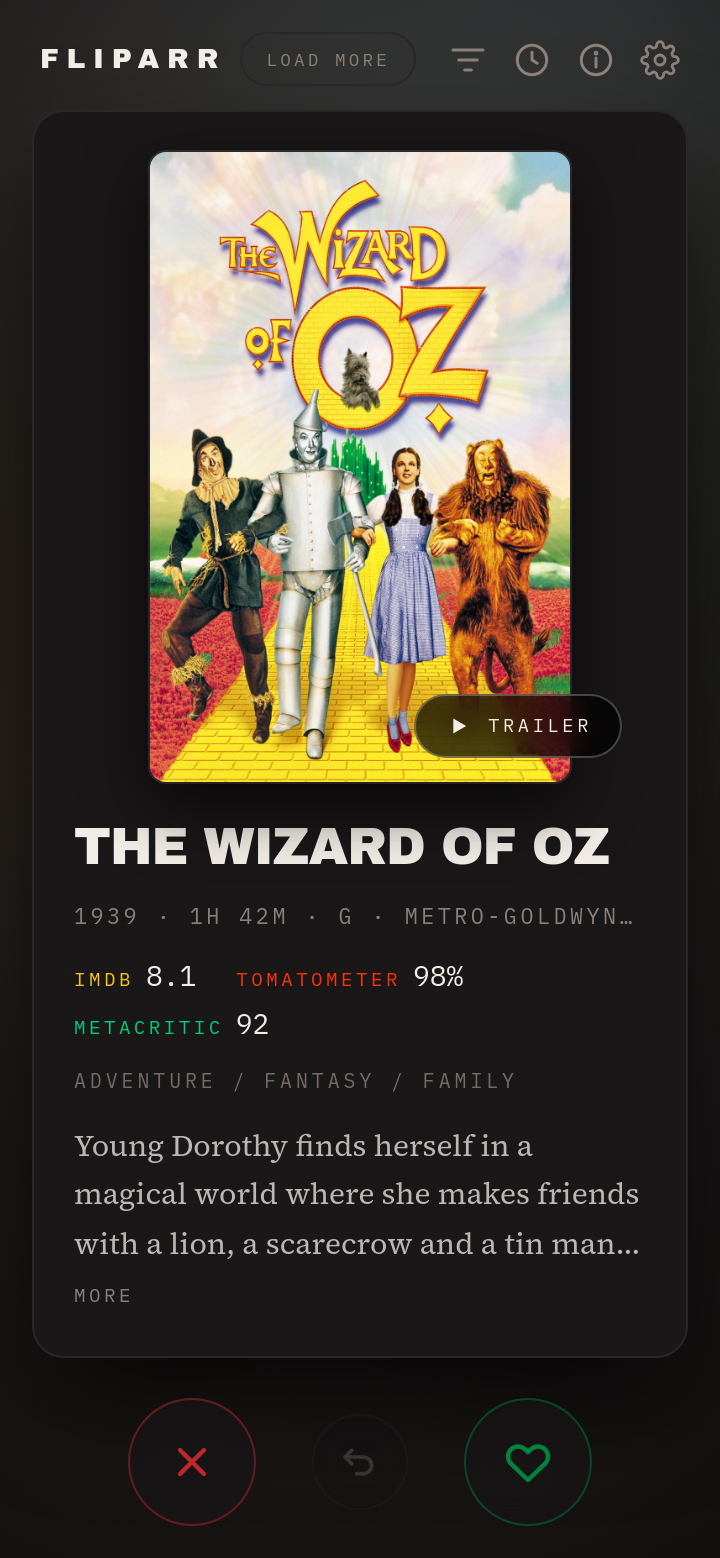
Discovering things to add to your library is a wall of text — Radarr's Discover tab, Seerr's grid — every title a few taps to add, request, or dismiss. Fliparr turns that into a deck of cards. One title fills your phone screen — poster, ratings, genres, synopsis, trailer — and you decide with a swipe.
| Gesture | Radarr movie | Seerr movie / TV |
|---|---|---|
| Swipe right | Added to your library, monitored, release search starts | Files a Seerr request (Seerr routes it to Radarr / Sonarr) |
| Swipe left | Written to Import List Exclusions — never comes back | Skips the card (Seerr has no exclusion list) |
| Undo | Reverses the last action, up to 50 deep | Cancels the request, or un-skips |
It's a library curation tool: it decides what enters your collection, not what you play tonight. Watch trailers in a sheet without leaving the deck, filter by genre and minimum rating, flip between Movies and TV, and review a reversible history of every decision. Mobile-first, dark, no login, no account, no telemetry.
Sources
- Movies come from Radarr's library-derived recommendations, Seerr's endless discover feed, or both blended together — your choice in Settings.
- TV comes from Seerr (Overseerr / Jellyseerr). Sonarr has no recommendation feed to swipe, so TV requires a Seerr connection. A right swipe files a series request; how many seasons it grabs (All / Latest / First) is a setting. Seerr applies its own quality profiles, root folders, and approval rules — Fliparr just files the request.
- A Movies / TV / Both toggle picks what's showing; Both interleaves movies and TV into one deck. Each card carries its own origin, so a mixed deck routes every swipe to the right backend on its own, and coloured per-type badges (configurable) keep movie and TV cards distinct as you swipe.
You need at least one of Radarr or Seerr. Movies work with either or both; TV needs Seerr.
Quick start
docker run -d \
  --name fliparr \
  --restart unless-stopped \
  -p 7979:3000 \
  --add-host host.docker.internal:host-gateway \
  -e RADARR_URL=http://host.docker.internal:7878 \
  -e RADARR_API_KEY=your_radarr_api_key \
  -e SEERR_URL=http://host.docker.internal:5055 \
  -e SEERR_API_KEY=your_seerr_api_key \
  -v /path/to/appdata/fliparr:/config \
  jamisonfitz/fliparr:latest
Then open http://your-server:7979. Every connection can also be set (with a
Test button) in the app's Settings screen — the env vars just seed a fresh
install. Leave the SEERR_* vars off if you only want Radarr movies; leave the
RADARR_* vars off if you only want Seerr.
Point the URLs at
host.docker.internal, not your host's LAN IP when the service is on the same machine — the LAN IP leaves the bridge network and can break on a container recreate.host-gatewaykeeps the traffic on the bridge.
| Variable | Purpose |
|---|---|
RADARR_URL | Radarr's address, e.g. http://192.168.0.10:7878 |
RADARR_API_KEY | Radarr → Settings → General → API Key |
SEERR_URL | Overseerr/Jellyseerr address, e.g. http://192.168.0.10:5055 — required for TV, optional for movies |
SEERR_API_KEY | Seerr → Settings → General → API Key (or the apiKey in Seerr's settings.json if your build doesn't show it there) |
DATA_DIR | Where the connection, settings, and history are stored. /config in Docker. |
Requires a Radarr v3 instance (tested against 6.3.0) and/or an Overseerr / Jellyseerr instance (tested against 3.4). TV needs Seerr.
Security: Fliparr has no authentication. Keep it on your LAN or behind your existing reverse proxy and auth. API keys are stored server-side and are never sent to the browser.
Tags
latest— most recent release frommain1.3,v1.3.0— pinned semver- Also mirrored to
ghcr.io/jamisonfitz/fliparr
Links & credits
- Source, full docs, and issues: https://github.com/Jamisonfitz/fliparr
- Radarr and Overseerr / Jellyseerr do the real work; Fliparr only calls their APIs and includes none of their code.
- Posters, ratings, and trailers come from TMDB. This product uses the TMDB APIs but is not endorsed or certified by TMDB.
Licensed under GPL-3.0.
Tag summary
Content type
Image
Digest
sha256:981f3d28a…
Size
61.4 MB
Last updated
about 1 month ago
docker pull jamisonfitz/fliparr