jeffcaldwellca/mkcertweb
mkcert web UI: self-hosted local CA for trusted HTTPS/TLS certs, SCEP server and expiry alerts
10K+
jeffcaldwellca/mkcertweb repository overview
mkcert Web UI
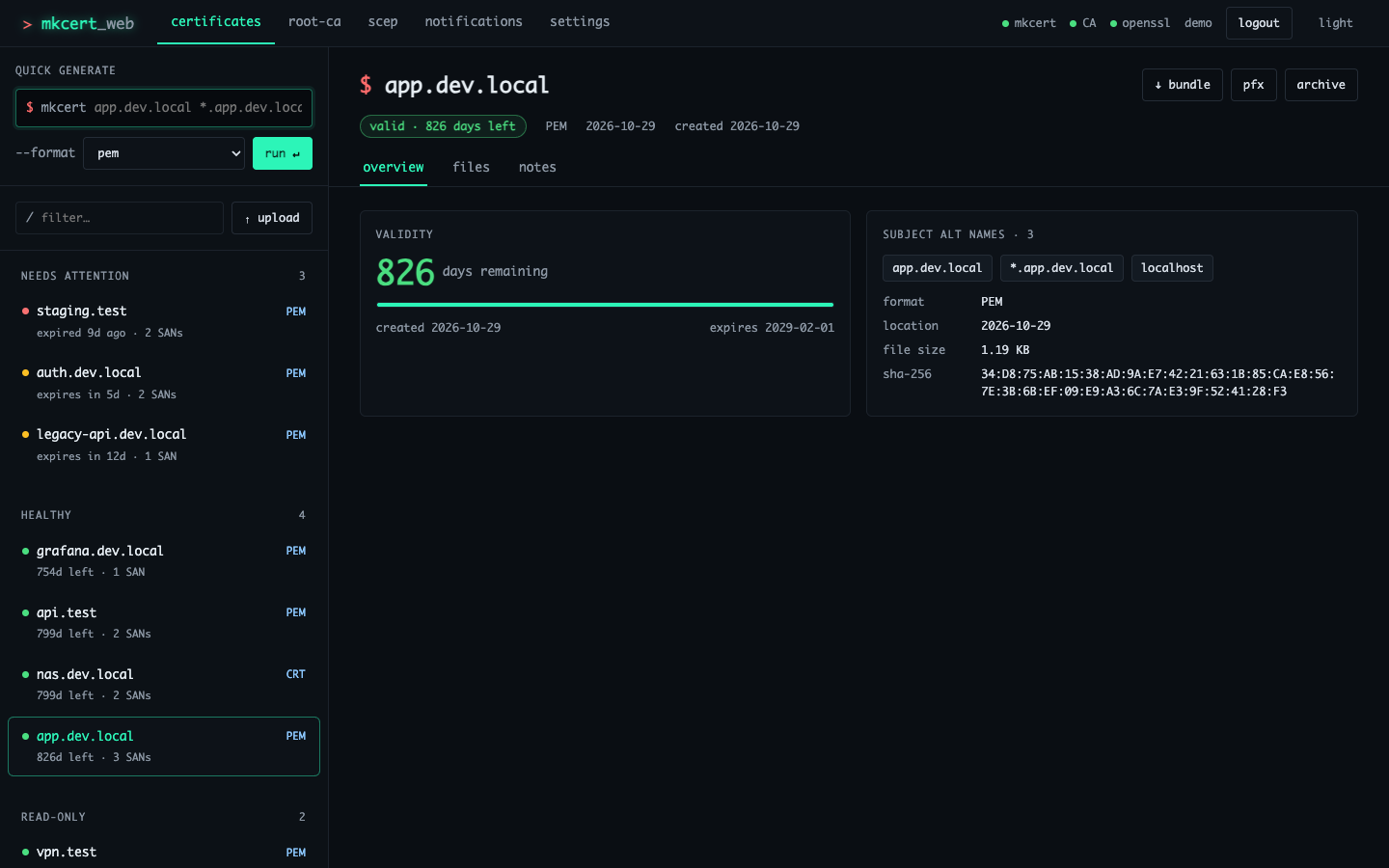
A self-hosted web interface for mkcert. Run your own local certificate authority (CA) in a container, then issue and manage locally-trusted HTTPS / TLS certificates for localhost, internal hostnames, wildcards and IP addresses from a browser. Includes a SCEP server for device enrollment and expiry alerts by email, ntfy or webhook.
It replaces self-signed certificates and browser warnings in dev environments, homelabs and internal networks: one root CA, installed once on your machines, makes every certificate it issues trusted.
GitHub · Documentation · Docker guide · Changelog · Website
Quick start
docker run -d --name mkcert-web-ui \
  -p 3000:3000 \
  -v mkcert_certificates:/app/certificates \
  -v mkcert_data:/app/data \
  -v mkcert_config:/app/config \
  -v mkcert_ca:/home/nodejs/.local/share/mkcert \
  -e ENABLE_AUTH=true -e AUTH_USERNAME=admin -e AUTH_PASSWORD='change-me' \
  -e SESSION_SECRET="$(openssl rand -hex 48)" \
  jeffcaldwellca/mkcertweb:latest
Open http://localhost:3000. The image ships without a root CA, so each installation creates its own. Open root-ca, press generate, then download mkcert-rootCA.pem and install it on the machines that should trust your certificates. Install steps for macOS, Linux and Windows are on the same page.
Or with Docker Compose:
git clone https://github.com/jeffcaldwellca/mkcertWeb.git
cd mkcertWeb
docker compose up -d
Features
- Certificates.
- Generate certificates for any mix of host names, wildcards (
*.dev.local) and IP addresses, inpem,crt,p12orp12-client(PKCS#12 with client auth) format. - See days to expiry, SANs and SHA-256 fingerprints.
- Download the certificate, the key, or both as a ZIP, or export a PFX.
- Upload existing
.pem,.crt,.key,.p12and.pfxfiles to track them. - Archive and restore certificates, and keep notes on each one.
- Generate certificates for any mix of host names, wildcards (
- Root CA. View CA details, download the root certificate, generate a CA for a fresh install, and follow trust-store install instructions for each OS.
- SCEP server. GetCACaps, GetCACert and PKIOperation for device enrollment, with one-time challenge passwords, manual enrollment templates and an optional enterprise CA.
- Expiry monitoring. A scheduled check that alerts by email (SMTP), ntfy or HTTP webhook before certificates expire.
- Authentication. Username/password login, optionally with OpenID Connect (OIDC) single sign-on.
- Security.
- CSRF tokens, a strict Content-Security-Policy and rate limits.
- Commands run without a shell, from an allowlist.
- The container runs as a non-root user (UID 1001).
- Interface. A split-pane layout with light and dark themes that works on phones.
Tags
| Tag | Points to |
|---|---|
latest | The newest release |
X (for example 5) | The newest release in that major version |
X.Y (for example 5.0) | The newest patch release of that minor version |
X.Y.Z (for example 5.0.0) | Exactly that release. Pin this in production |
The full list is on the Tags tab, and the changelog describes each release.
Images are multi-arch: linux/amd64 and linux/arm64, including 64-bit Raspberry Pi. The image runs Node.js 24 on Alpine, with openssl and mkcert v1.4.4. It is also published as ghcr.io/jeffcaldwellca/mkcertweb, whose version tags have a v prefix (v5.0.0).
Volumes
| Mount point | Holds |
|---|---|
/app/certificates | Generated, uploaded, archived and SCEP certificates |
/app/data | Certificate notes |
/app/config | Settings saved from the UI (settings.json) |
/home/nodejs/.local/share/mkcert | The root CA and its private key (CAROOT) |
Mount all four, or the CA, certificates and settings are lost when the container is recreated. Back up the CA volume as securely as the key itself.
Ports
| Port | Use |
|---|---|
3000 | HTTP UI and API |
3443 | HTTPS, when ENABLE_HTTPS=true |
Common environment variables
| Variable | Default | Purpose |
|---|---|---|
ENABLE_AUTH | false | Require a login (also needed for the settings page) |
AUTH_USERNAME / AUTH_PASSWORD | admin / random, printed to the log | Login. AUTH_PASSWORD_HASH takes a bcrypt hash instead |
SESSION_SECRET | random per start | Set it so sessions survive restarts |
ENABLE_HTTPS / FORCE_HTTPS | false / false | Serve HTTPS on 3443 with an mkcert certificate for SSL_DOMAIN, and redirect HTTP to it |
TRUST_PROXY | loopback,linklocal,uniquelocal | Which reverse proxies may set X-Forwarded-* |
ENABLE_OIDC, OIDC_* | off | OpenID Connect SSO |
CERT_MONITORING_ENABLED, CERT_WARNING_DAYS | off, 30 | Expiry monitoring |
EMAIL_NOTIFICATIONS_ENABLED, SMTP_*, NTFY_*, WEBHOOK_* | off | Alert channels |
THEME_MODE | dark | Default theme |
Environment variables override settings saved in the UI. The full list is in .env.example, and reverse proxy setup, running as another UID, and backups are covered in the Docker guide.
Before you expose it
With ENABLE_AUTH=false, anyone who can reach the port can issue certificates and manage the CA. In production, enable auth with a strong password and a SESSION_SECRET, use HTTPS or a TLS-terminating reverse proxy, and never expose it to the internet without authentication.
License
GPL-3.0. mkcert is © Filippo Valsorda and contributors (BSD-3-Clause). This project is not affiliated with mkcert.
Tag summary
Content type
Image
Digest
sha256:feb6eab94…
Size
79 MB
Last updated
2 days ago
docker pull jeffcaldwellca/mkcertweb