jncarter/soundboard
A multi-app control panel for Laravel Reverb, with live metrics and alerts
2.2K
jncarter/soundboard repository overview
Soundboard
A multi-app control panel for Laravel Reverb. Soundboard keeps your Reverb apps in a database instead of config/reverb.php, so you can add an app or rotate a secret from a dashboard or an API with no deploy and no restart. It also shows live and historical metrics and sends alerts.
Soundboard is an independent project. It is not affiliated with or endorsed by Laravel.
Source, full documentation, and issues: github.com/jncarter123/soundboard
Features
- Multi-app management: credentials, allowed origins, and connection and message limits for each app. Changes reach Reverb within seconds.
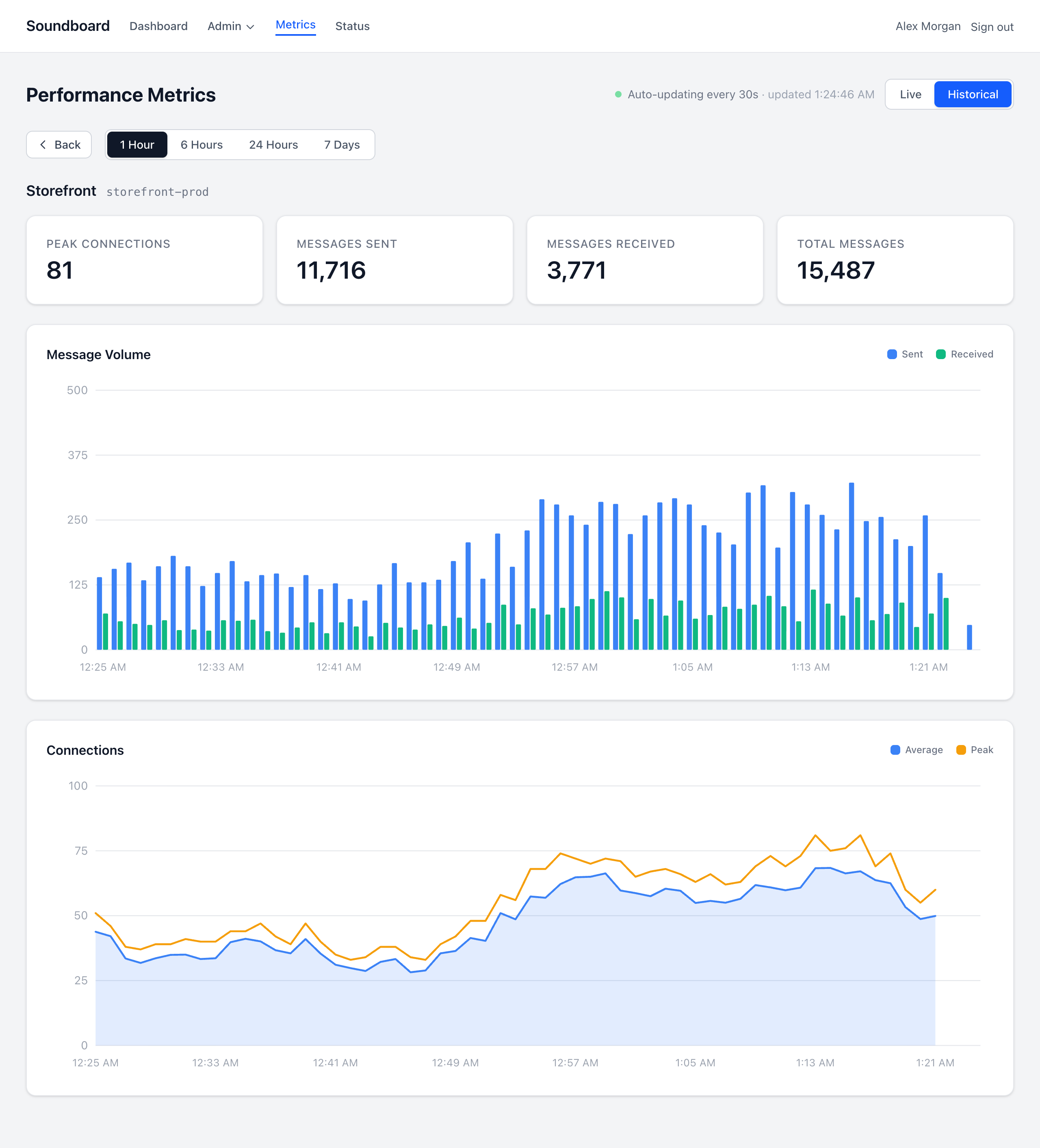
- Live and historical metrics: connections, channels, presence members, and messages, from 1 hour to 7 days.
- Alerts by email and signed webhook for connection and daily message limits, Reverb outages, clock skew, and stalled metrics.
- Role-based access control, an API with personal access tokens, and an audit log.
- Horizontal scaling: several Reverb servers sharing Redis, with correct metrics across them.
Tags
| Tag | What it is |
|---|---|
2, 2.3, 2.3.0 | A release, by major, minor, or exact version. Pin the major version (2) to get fixes and features without breaking changes. |
latest | The newest release |
sha-<commit> | One exact build |
Images are built for linux/amd64 and linux/arm64.
Quick start
One image runs as four containers: the dashboard, the Reverb WebSocket server, the Pulse metrics recorder, and a scheduler.
curl -fsSLO https://raw.githubusercontent.com/jncarter123/soundboard/main/compose.yaml
curl -fsSL -o docker.env https://raw.githubusercontent.com/jncarter123/soundboard/main/docker.env.example
echo "SOUNDBOARD_IMAGE=jncarter/soundboard:2" > .env

docker compose up -d
docker compose exec app php artisan soundboard:add-user --role="Super Admin"
The dashboard listens on 127.0.0.1:8000 and Reverb on 127.0.0.1:8080. Both are plain HTTP on loopback, meant for a reverse proxy in front that terminates TLS.
Set APP_URL in docker.env to the dashboard's public URL, scheme included (https://soundboard.example.com). Otherwise the browser blocks the dashboard's assets as mixed content.
Back up the volume
On first start the dashboard container generates an APP_KEY onto the soundboard-data volume and says so in its log. That key encrypts every stored app secret, so without it your clients can't connect. Back up the volume, or set APP_KEY in docker.env yourself.
Data lives in SQLite on the same volume by default.
Configuration
Settings go in docker.env; docker.env.example documents each one.
| Variable | Default | What it does |
|---|---|---|
APP_URL | http://localhost:8000 | The dashboard's public URL |
APP_KEY | generated | Encrypts stored app secrets. Never change it on an existing install. |
DB_CONNECTION, DB_HOST, ... | SQLite | Set to mysql or mariadb to use MySQL 8+ or MariaDB |
ALERTS_MAIL_TO | Comma-separated alert recipients (needs MAIL_*) | |
ALERTS_WEBHOOK_URL, ALERTS_WEBHOOK_SECRET | A signed webhook for alerts | |
REVERB_APPS_CACHE_TTL | 10 | Seconds before dashboard changes reach the running Reverb server |
Upgrading
docker compose pull && docker compose up -d
Migrations run when the dashboard container starts.
Scaling Reverb
One Reverb process uses one CPU core. To run several Reverb servers behind a load balancer, sharing channels and presence through Redis:
curl -fsSLO https://raw.githubusercontent.com/jncarter123/soundboard/main/compose.scaling.yaml
docker compose -f compose.yaml -f compose.scaling.yaml up -d
See Scaling Reverb in the README for what changes with more than one server.
Connecting an application
Create an app in the dashboard, then point your Laravel app's broadcasting config at Soundboard's Reverb server with the credentials it shows:
BROADCAST_CONNECTION=reverb
REVERB_APP_ID=your-app-id
REVERB_APP_KEY=generated-key
REVERB_APP_SECRET=generated-secret
REVERB_HOST=realtime.example.com
REVERB_PORT=443
REVERB_SCHEME=https
Each app needs at least one allowed origin: a hostname such as app.example.com or *.example.com, or * for any.
License
MIT. See LICENSE.
Tag summary
Content type
Image
Digest
sha256:a18d6fef1…
Size
75.5 MB
Last updated
24 days ago
docker pull jncarter/soundboard