joebafra/pingscope
Latency and packet-loss monitoring for IPv4 and IPv6, SmokePing-style
967
joebafra/pingscope repository overview
PingScope
Latency and packet-loss monitoring for IPv4 and IPv6, in the spirit of SmokePing, with a modern web admin panel.
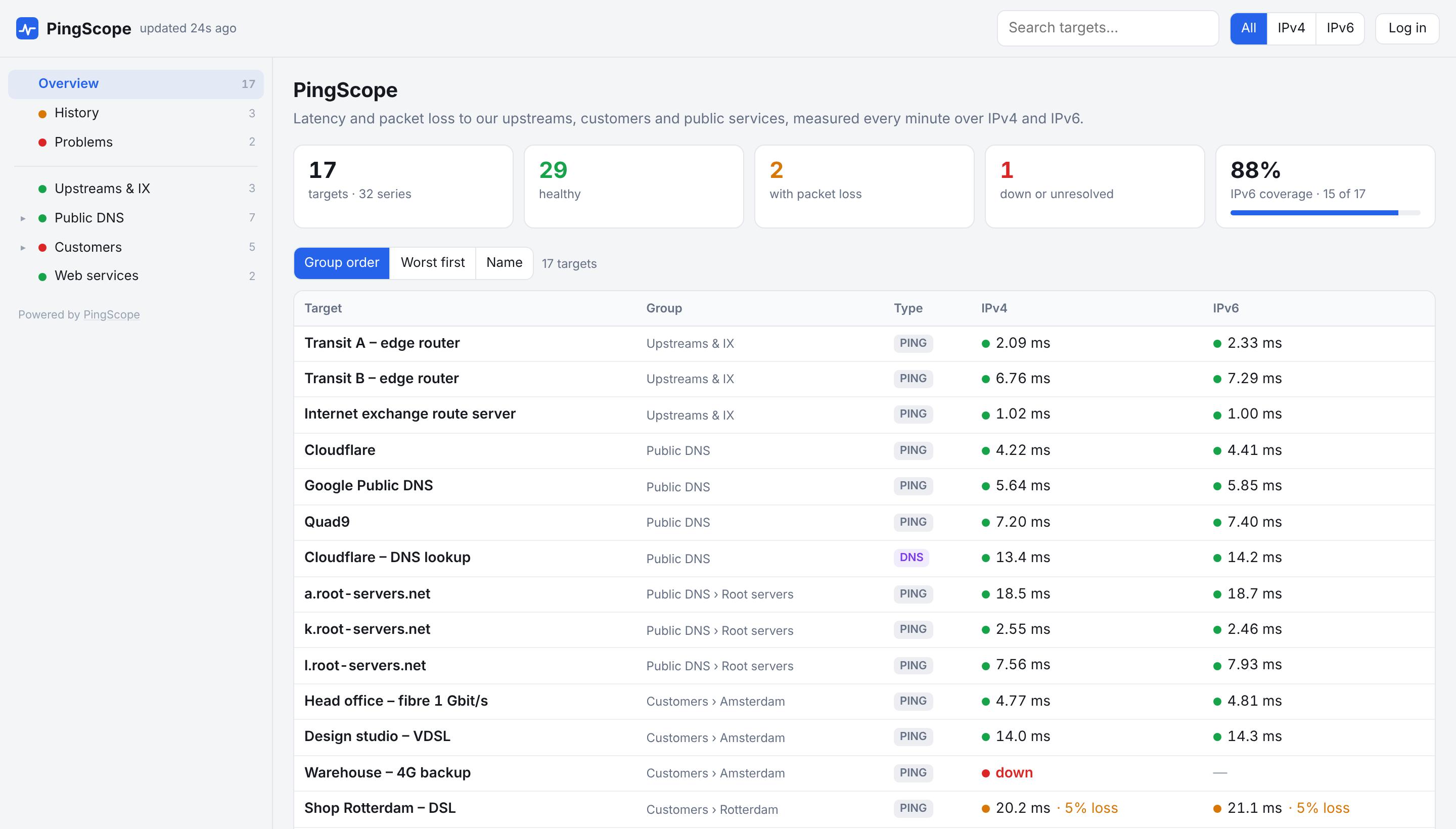
PingScope measures round-trip time and packet loss to your routers, customers, DNS servers and websites every minute, over IPv4 and IPv6 side by side. It draws SmokePing-style "smoke" graphs, runs mtr traceroutes when something goes wrong, and sends alerts by Telegram and email. Everything is configured in the browser.
- Probes: ping (fping), DNS query time, TCP connect time
- IPv4 + IPv6 graphs next to each other, with A/AAAA lookups and IPv6 suggestions
- SmokePing-style graphs from 3 hours to a year, with crosshair, drag-to-zoom and click-for-traceroute
- mtr traceroutes every 15 minutes, every minute during problems
- Alerts by Telegram and email per group, with a preview and extra chats for customers
- Public dashboard without hostnames or IP addresses, or with them per group; Admin and Viewer accounts
- SmokePing import, JSON export, a single SQLite file for all data
Source code, screenshots and full documentation: https://github.com/joebafra/PingScope
Quick start
docker run -d --name pingscope --restart unless-stopped \
  --network host --cap-add NET_RAW \
  -v pingscope-data:/data \
  -e TZ=Europe/Amsterdam \
  joebafra/pingscope:latest
Get the one-time setup code and open http://<server-ip>:8080/admin to create your admin account:
docker logs pingscope 2>&1 | grep "setup code"
--network hostlets PingScope measure with the server's own IPv4 and IPv6 connectivity (Linux hosts).--cap-add NET_RAWis needed for ping (fping) and traceroutes (mtr).- All data (settings, targets, measurements) is in
/data/pingscope.db.
Docker Compose
services:
  pingscope:
    image: joebafra/pingscope:latest
    container_name: pingscope
    restart: unless-stopped
    network_mode: host
    cap_add: [NET_RAW]
    volumes:
      - ./data:/data
    environment:
      PINGSCOPE_LISTEN: 0.0.0.0    # 127.0.0.1 when a reverse proxy runs on the same host
      PINGSCOPE_PORT: 8080
      TZ: Europe/Amsterdam
HTTP by IP address, or HTTPS
Plain HTTP works out of the box: the container listens on all addresses, so open http://<server-ip>:8080. No hostname or certificate is needed. Open the port in the firewall if needed (ufw allow 8080/tcp), or use -e PINGSCOPE_PORT=80 for http://<server-ip> without a port number.
Without HTTPS the login and password go over the network unencrypted, so use plain HTTP on a trusted network (LAN, VPN) only.
For HTTPS, put PingScope behind a reverse proxy (Caddy, nginx, Traefik) and set PINGSCOPE_LISTEN=127.0.0.1. The installer in the GitHub repository sets up PingScope with Caddy and a Let's Encrypt certificate in one go: see the install guide.
Updating
Every change on GitHub is built automatically and published here as a new latest within a few minutes. A running container doesn't update itself: fetch the new image and recreate the container. Your data in /data is kept, and the database is upgraded automatically on start.
With Docker Compose:
docker compose pull && docker compose up -d
With docker run:
docker pull joebafra/pingscope:latest
docker rm -f pingscope
Then run the same docker run command as in the quick start. To update automatically, use a tool that watches for new images, such as Watchtower. For a copy of the database first: docker exec pingscope python -m pingscope backup /data/backup.db.
Tags
| Tag | What it is |
|---|---|
latest | The newest version on the main branch |
1.0.0-beta, … | A release |
sha-<commit> | One exact commit |
Images are built for linux/amd64 and linux/arm64.
Environment variables
| Variable | Default | Purpose |
|---|---|---|
PINGSCOPE_LISTEN | 0.0.0.0 | Listen address |
PINGSCOPE_PORT | 8080 | Port |
PINGSCOPE_DB | /data/pingscope.db | Database file |
PINGSCOPE_TRUSTED_PROXIES | 127.0.0.1 | Reverse proxies whose X-Forwarded-* headers are trusted |
PINGSCOPE_DOMAIN | Your hostname, used for links in alerts | |
TZ | Time zone for logs and alert messages | |
TELEGRAM_BOT_TOKEN | Telegram bot token (or set it in the admin panel) | |
LETTERMINT_TOKEN | Lettermint API token for alert emails (or set it in the admin panel) |
Everything else (measurement interval, probes, alerts, users) is set in the admin panel.
Useful commands
docker exec -it pingscope python -m pingscope create-admin                 # extra admin account
docker exec pingscope python -m pingscope backup /data/backup.db           # consistent database copy
docker exec -i pingscope python -m pingscope import /dev/stdin < Targets   # import a SmokePing config
License
Tag summary
Content type
Image
Digest
sha256:ee6910f31…
Size
50.6 MB
Last updated
about 9 hours ago
docker pull joebafra/pingscope