joherma1/sia repository overview
Its objective is to bring to the agricultural world 3 main things:
- Information System: A J2EE server to gather, process and offer information.
- Internet Of the things: An ubiquitous network made with open source sensors and actuators.
- Extensible Architecture: An infrastructure that allows connect new functionalities
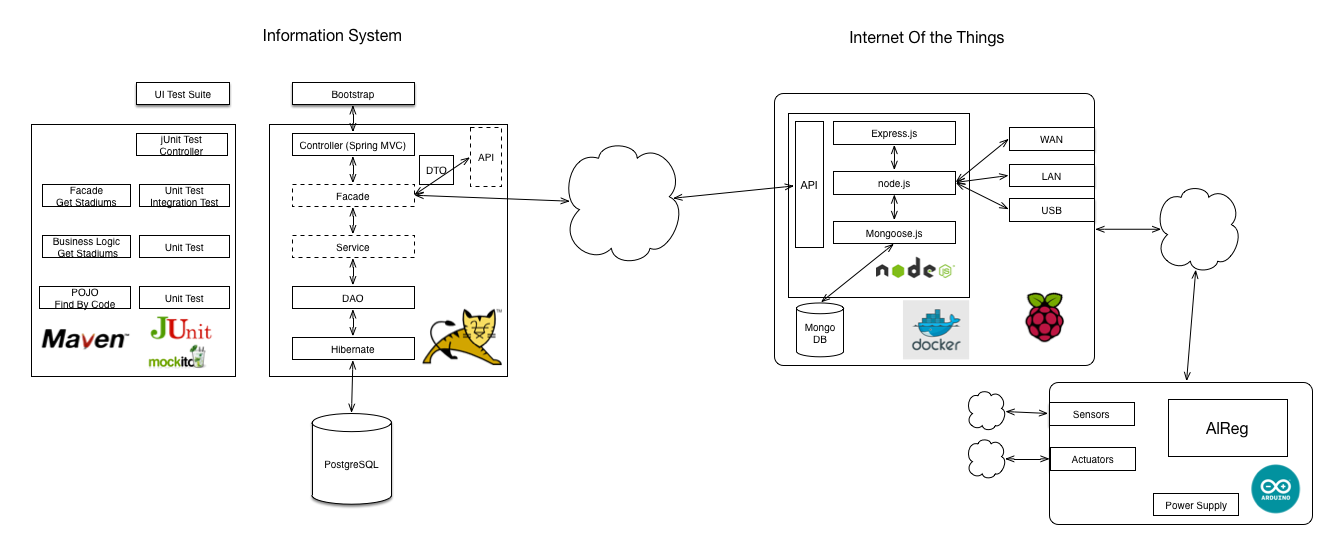

The information system (called SIA) is hosted in this repository. It's a web application created using the standards of the current J2EE world: Spring, MVC, Maven, jUnit, Hibernate.
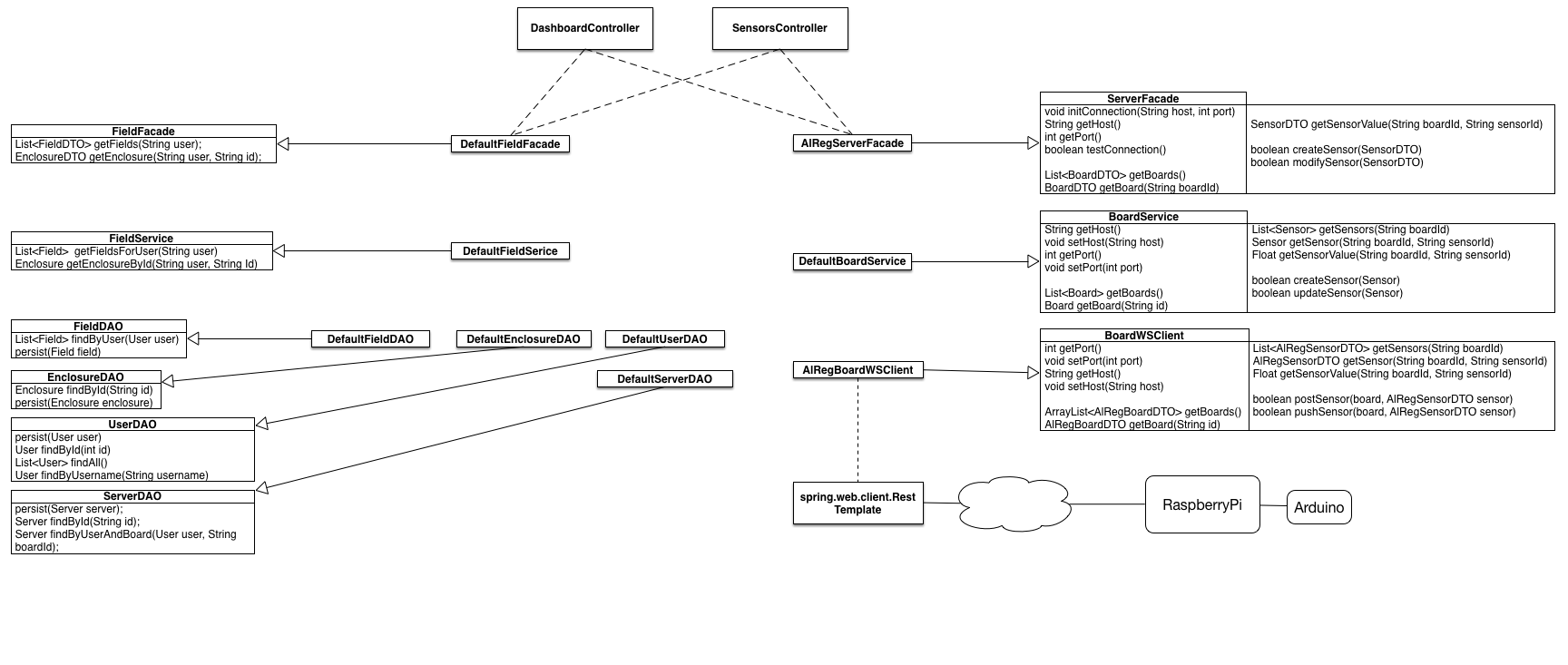
The information processed could come from legacy data, input manually or gathered by the IoT network, an offers its services through API build ubiquitous in low-energy systems (Raspberry and Arduino). It’s build in Node.js and hosted in the project SIAREST.
About the extensible architecture, it’s an aspect that covers all the system, everything is designed to attach new components and extend the usability dynamically.
Alias
mvn test
mvn integration-test
mvn install
mvn tomcat7:run
#Initialize
mvn exec:java -Dexec.mainClass=org.sysreg.sia.model.InitializeDatabase
Deploy
RaspberryPi2

#JDK
docker build -t joherma1/rpi-java:7-jdk deploy/java/.
#Database
docker build -t joherma1/rpi-postgres deploy/postgres/.
#SIA
docker build -t joherma1/rpi-sia .
docker run -p 5432:5432 -e POSTGRES_PASSWORD=agricultura.1 -e POSTGRES_USER=sia --name postgres-sia -d joherma1/rpi-postgres
docker run -p 8888:8080 -e POSTGRES_PASSWORD=agricultura.1 -e POSTGRES_USER=sia -e POSTGRES_SCHEMA=sia --name sia --link postgres-sia:postgres -d joherma1/rpi-sia
#Test SIA image
docker run -i --link postgres_sia_test:postgres --rm -e POSTGRES_PASSWORD=agricultura.1 -e POSTGRES_USER=sia -e POSTGRES_SCHEMA=sia joherma1/rpi-sia /bin/bash -c 'cd /opt/sia; mvn exec:java -Dexec.mainClass=org.sysreg.sia.model.InitializeDatabase'
docker run -i --link postgres_sia_test:postgres --rm -e POSTGRES_PASSWORD=agricultura.1 -e POSTGRES_USER=sia -e POSTGRES_SCHEMA=sia joherma1/rpi-sia /bin/bash -c 'cd /opt/sia; mvn integration-test'
x86_64
docker pull postgres
docker build -t joherma1/sia .

docker run -p 5432:5432 -e POSTGRES_PASSWORD=agricultura.1 -e POSTGRES_USER=sia --name postgres-sia -d postgres

docker run -p 8080:8080 -e POSTGRES_PASSWORD=agricultura.1 -e POSTGRES_USER=sia -e POSTGRES_SCHEMA=sia --name sia --link postgres-sia:postgres -d joherma1/sia
#Test SIA image
docker run -i --link postgres_sia_test:postgres --rm -e POSTGRES_PASSWORD=agricultura.1 -e POSTGRES_USER=sia -e POSTGRES_SCHEMA=sia joherma1/rpi-sia /bin/bash -c 'cd /opt/sia; mvn exec:java -Dexec.mainClass=org.sysreg.sia.model.InitializeDatabase'
docker run -i --link postgres_sia_test:postgres --rm -e POSTGRES_PASSWORD=agricultura.1 -e POSTGRES_USER=sia -e POSTGRES_SCHEMA=sia joherma1/rpi-sia /bin/bash -c 'cd /opt/sia; mvn integration-test'
 How to use this image start a postgres instance
docker run -p 5432:5432 -e POSTGRES_PASSWORD=postgres -e POSTGRES_USER=postgres --name postgres-arm -d postgres
Usage:
docker run -e POSTGRES_PASSWORD=postgres -e POSTGRES_USER=postgres -e POSTGRES_SCHEMA=postgres --link postgres:postgres -d you_app
Tag summary
Content type
Image
Digest
Size
390.5 MB
Last updated
almost 11 years ago
docker pull joherma1/sia