jonfairbanks/yo-api
Yo Dawg, heard you're tired of remembering URLs
100K+
jonfairbanks/yo-api repository overview
Yo - The URL Shortener
Yo Dawg, heard you're tired of remembering URLs
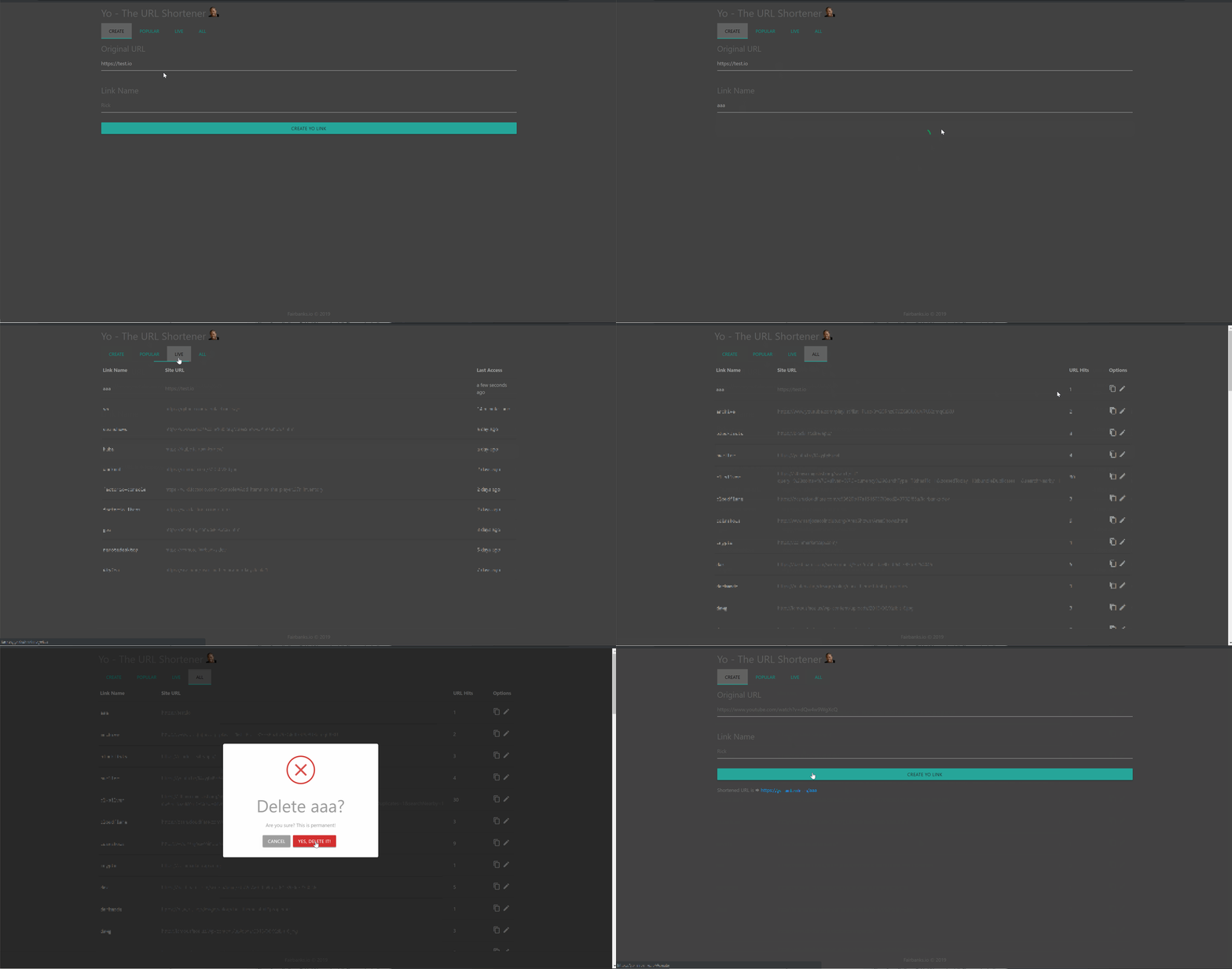






Turn long, hard to remember URLs into easily sharable short-links.
Getting Started
Prerequisites
The following will need to be installed before proceeding:
- Node v8+
- Mongo DB
- Nginx
Clone the Project
# Clone it
git clone https://github.com/jonfairbanks/yo.git
cd yo
Run Backend
# Move to server Folder
cd server/

# Install Dependencies
npm install

# Start Server
npm start
Set Environment Variables
Rename the included .env.sample files to .env and update variables as appropriate for your install.
Client:
| ENV | Required? | Details | Example |
|---|---|---|---|
REACT_APP_API_URL | Yes | Used to connect to the Yo API. Be sure to include the trailing slash. | https://yo-api.mysite.io/api/ |
REACT_APP_SOCKET_URL | Yes | This will be used to connect to Yo API’s Socket.io endpoint. | https://yo-api.mysite.io |
REACT_APP_BASE_URL | Yes | The url of the website where Yo is hosted. The slash is not required. | https://yo.mysite.io |
REACT_APP_BLOCKED_NAMES | No | Comma separated string of words that cannot be used as link names. | "blocked1,blocked2" |
REACT_APP_ALLOWED_NAMES | No | Comma separated string of words to allow through the filter. A complete list of blocked names can be found here. | "allowed1,allowed2" |
REACT_APP_URL_PLACEHOLDER | No | Overwrite the default URL placeholder shown on the submit form. | https://www.youtube.com/watch?v=dQw4w9WgXcQ |
REACT_APP_NAME_PLACEHOLDER | No | Overwrite the default link name placeholder shown on the submit form. | Rick |
REACT_APP_AUTH | No | Enforces user logins via Auth0. For more details, see the Enabling API Authentication section below. | true |
REACT_APP_SIGNUPS | No | Forces the ability for users to sign-up during initial login. Not currently recommended. | true |
REACT_APP_AUTH0_CLIENT | No | Required for Authentication Setup | Provided during Auth0 Setup |
REACT_APP_AUTH0_DOMAIN | No | Required for Authentication Setup | mysite.auth0.com |
PORT | No | Override the application port. Defaults to 3000. | 3001 |
Server:
| ENV | Required? | Details | Example |
|---|---|---|---|
ERROR_URL | Yes | Where should users be directed when navigating to an unknown link? (Feature is WIP) | https://mysite.io/error |
BASE_URL | Yes | The url where Yo client is hosted. The trailing slash is not required. | https://yo.mysite.io |
API_URL | Yes | The url where Yo client is hosted. The trailing slash is required. | https://yo-api.mysite.io/api/ |
MONGO_URI | No | What Mongo instance to use. If the ENV is not provided, mongodb://localhost/yo is used. | mongodb://user:password@localhost:27018/yo |
LOG_LOCATION | No | Override where the Yo access log is written. By default the log is written into the app directory. | /Logs/yo.log |
AUTH | No | Enforces token authentication. If enabled, Auth0 should also be enabled on the client side. | true |
AUTH0_DOMAIN | No | Required to authenticate user tokens. Should match the AUTH0_DOMAIN provided to the client. | mysite.auth0.com |
PORT | No | Override the application port. Defaults to 7000. | 7001 |
Run Front End
# Move to client Folder
cd client/

# Install Dependencies
npm install

# Start Client
npm start
Configure Nginx
Client:
server {
    location /manifest.json {
    proxy_pass http://127.0.0.1:3000/manifest.json;
    }
    location / {
        proxy_pass http://127.0.0.1:3000/;
        proxy_set_header X-Real-IP $remote_addr;
        # Upgrade for Websockets
        proxy_http_version 1.1;
        proxy_set_header Upgrade $http_upgrade;
        proxy_set_header Connection "upgrade";
    }
}
Server:
server {
    location ~* "^/[0-9a-z!?@_-]{1,99}$"  {
    proxy_set_header X-Real-IP $remote_addr;
    rewrite ^/(.*)$ https://my-api-url.com/api/link/$1 redirect;
    }
    location /socket.io {
        proxy_pass http://127.0.0.1:7000;
        proxy_set_header x-real-ip $remote_addr;
        # Upgrade for Websockets
        proxy_http_version 1.1;
        proxy_set_header Upgrade $http_upgrade;
        proxy_set_header Connection "upgrade";
    }
    location / {
        proxy_pass http://127.0.0.1:7000;
        proxy_set_header X-Real-IP $remote_addr;
        # Upgrade for Websockets
        proxy_http_version 1.1;
        proxy_set_header Upgrade $http_upgrade;
        proxy_set_header Connection "upgrade";
    }
}
Enabling API Authentication
By default, the Yo backend API is open which would allow anyone who knew your API endpoint to list, edit or even delete links if they chose. To prevent this, you can enable Auth0 authentication for requests between the client and server.
- Sign up for an Auth0 account @ https://auth0.com
- Create and Setup a Regular Web Application. Configure it as you see fit.
- In the Yo config.js files, set the Client and/or Domain provided by Auth0.
- Before leaving Auth0, create a user account for your application under User & Roles.
- When starting the Yo client, pass
REACT_APP_AUTH=trueas an ENV variable to enforce user logins. - When starting the Yo server, pass
AUTH=trueas an ENV variable to enable authentication checks. - Navigate to Yo and login with the previously created user. If successful, you should be logged into the dashboard successfully.
By default, sign-ups via the Auth0 UI are disabled. If you would like to allow user-signup however, you can force this on by passing REACT_APP_SIGNUPS=true during Yo client startup.
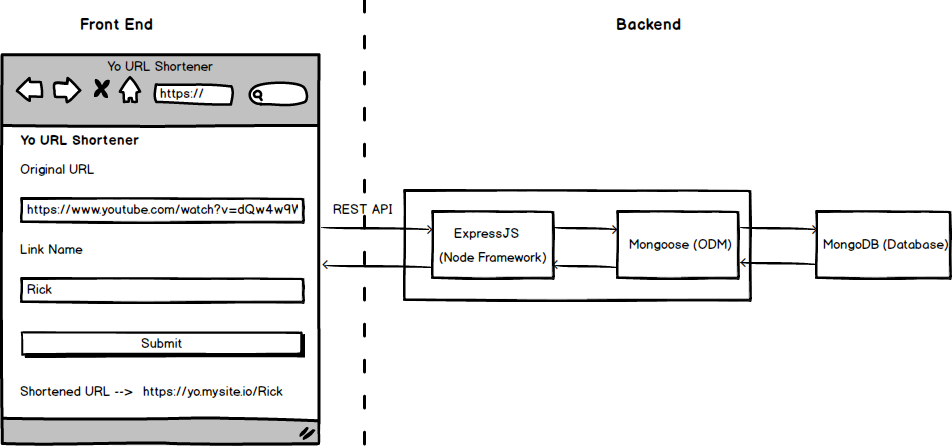
Architecture
Extras
- If you're using PM2 to manage your node processes, you can use the included
yo-pm2.yamlto start and deploy the app. - Yo can also be deployed via Docker using the included
docker-compose.yamlfile. Enter the Yo root directory and rundocker-compose upto deploy the Yo client, backend and database.
☑ To Do
- Auto Update Tab Data
- Client Dockerfile
- Server Dockerfile
- API Authentication
- Edit/Delete Functionality
- Build and Deploy App
- Better Error Handling when Navigating to Unset Links
- Swipeable Tabs
- Further refactor Home.js
Contributers
Jon Fairbanks - Maintainer
Tag summary
Content type
Image
Digest
Size
78.4 MB
Last updated
over 4 years ago
docker pull jonfairbanks/yo-api