jonocodes/pwder
Turn your documentation into a live demo with clickable console commands
100K+
jonocodes/pwder repository overview
PWDer

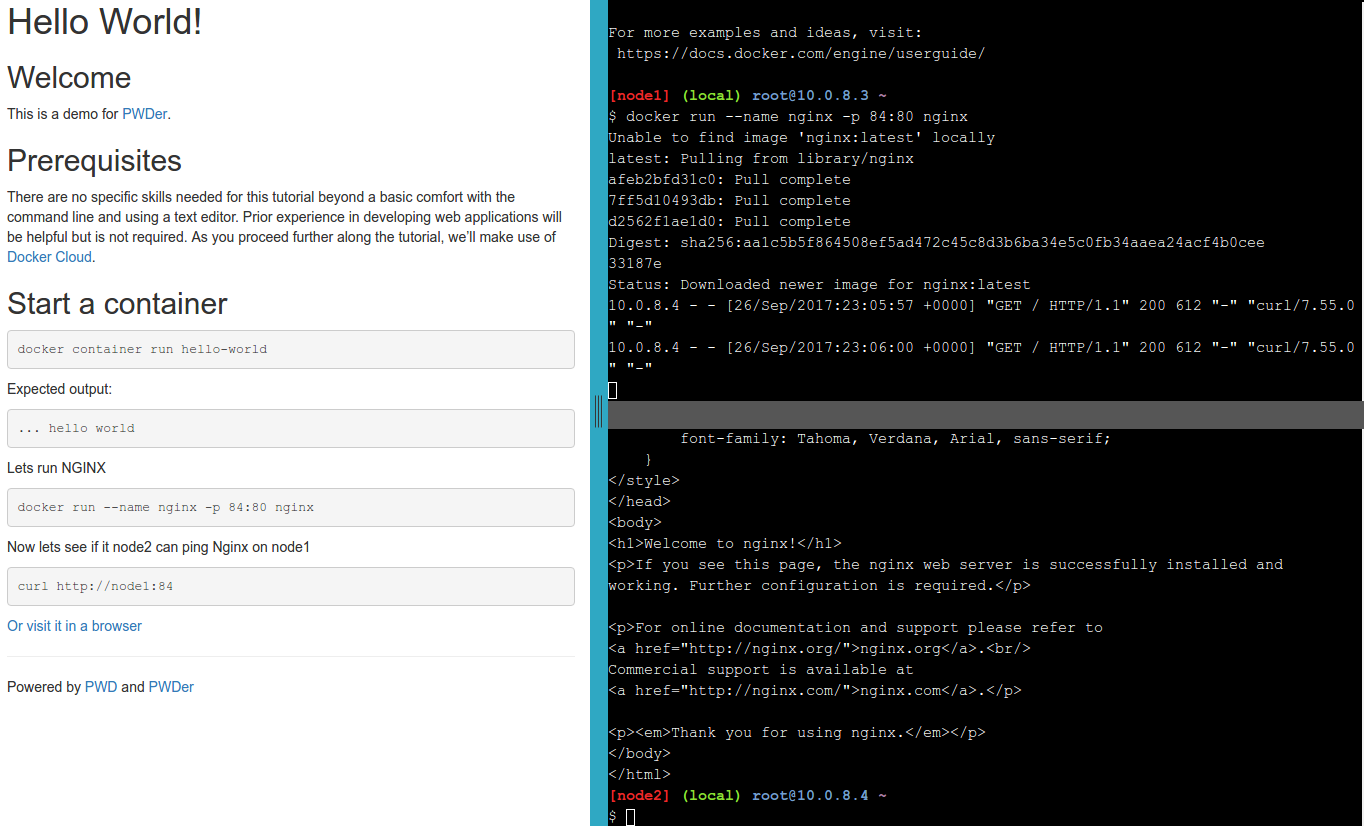
Turn your project readme into a fully interactive demo. Write nothing more then Markdown.
Everything is run in the browser. Under the hood Play with Docker is used to spin up machine instances so users dont need to install anything. You dont even need to use Docker if your project does not.
Purpose
Play with Docker is a fantastic tool for spinning up VMs for use in a browser for learning and testing your Docker knowledge.
The Play with Docker classroom is also a great resource that provides canned tutorials to showcase different Docker features and integrations.
If you want to showcase your own application there is not a simple way to do it. You could either write the HTML/Javascript yourself to make use of the PWD Javascript SDK or you could fork the classroom repo and host a copy of that.
PWD-er simplifies this for you by rendering the markdown into a template for you as needed. No Jekyll precompilation necessary. Just post a Markdown readme that [follows the writing guide]((https://github.com/play-with-docker/play-with-docker.github.io/blob/master/writing-tutorials.md) to your github project, a gist, or any public site and point to it with PWD-er.
Example Use
A Docker 'Hello World'
http://pwder.io/?doc=https://raw.githubusercontent.com/jonocodes/pwder/master/examples/hello.md
or use shorthand for content hosted on github:
http://pwder.io/gh/jonocodes/pwder/master/examples/hello.md
An Nginx 'hello world' without Docker
http://pwder.io/gh/jonocodes/pwder/master/examples/nginx.md
A more complex document
Parameters
Query parameters
doc (required) - URL path to a publicly accessible Markdown demo for your project. It should follow the format described in the [PWD guide for writing tutorials] (https://github.com/play-with-docker/play-with-docker.github.io/blob/master/writing-tutorials.md)
example: /?doc=https://raw.githubusercontent.com/jonocodes/pwder/master/examples/hello.md
template (optional) - URL path for a Liquid template that your markdown will be rendered into. If you want to do this, its probably best to copy default.html and make modifications to that.
example: /gh/jonocodes/pwder/master/examples/hello.md&template=https://raw.githubusercontent.com/jonocodes/pwder/master/default.html
(front matter parameters) (optional) - These can be used to override values specified in the front matter. For example you can specify a value for 'terms' in case you want to force a different number of terminals to be shown.
example: /gh/jonocodes/pwder/master/examples/hello.md?terms=0&title=Sample
Path parameters / shorthands
/gh/ - Shorthand for github raw content. Translates into a query parameter of doc=https://raw.githubusercontent.com/
example: /gh/jonocodes/pwder/master/examples/hello.md
/gst/ - Shorthand for github girt content. Translates into a query parameter of doc=https://gist.githubusercontent.com/
example: /gst/jonocodes/31ca8f1d33fe12fcd0b6e282a40776f2/raw/68bf014e31e9cbbdd567426f3c486892b3704eef/openfaas_kong.md
/examples/ - This will read a file out of this project's examples directory. This is primarily used for development, but can also be used to test writing your own documents if you dont want to publish them first.
example: /examples/hello.md
/here/ - If the environment variable PWDER_HERE_DIR is set at start time, this path will be used to serve documents from. Like /examples/ this is only used for testing and development.
example: /here/hello.md
Running PWDer
You can run your own instance of the service instead of using the hosted http://pwder.io/ . This can be useful when writing your own documents. The only requirement is to have Docker installed.
Using Docker
docker run -p 4567:4567 jonocodes/pwder
Visit http://localhost:4567/ in your browser.
Development
./run.sh
This will start a live instance that you can work on.
Configuration
Set the PWDER_HERE_DIR environment variable to serve documents from the local server. This is used by the /here/ route.
For example if you documents are in /tmp/docs:
PWDER_HERE_DIR=/tmp/docs ./run.sh
WARNING: This should be used in testing or development only, and if set incorrectly can expose a security risk to the server. For example if PWDER_HERE_DIR is set to '/', then the consumer can visit '/here/etc/passwd' in their browser.
Fun
Did you know that PWDer can render itself? Try some PWDer-ception - PWDer in PWDer in PWDer ...
Tag summary
Content type
Image
Digest
Size
38.9 MB
Last updated
almost 9 years ago
docker pull jonocodes/pwder:master