juliangut/phpdev
PHP/PHP-FPM/Jenkins Docker image for development/CI, based on Alpine Linux for minimal size
100K+
juliangut/phpdev repository overview




PHP Docker images for development
PHP/PHP-FPM/Jenkins Docker images for development/CI, based on Alpine Linux for minimal size
Bundled with:
- UTC timezone
- Latest Xdebug (3.x) configured and enabled for development and debugging
- Latest Composer (2.x) installed globally
- Installed PHP extensions: Multibyte String, cURL, Intl, OpenSSL, Zlib, BCMath, GD, OPcache
- Installed PECL extensions: APCu
- Includes make utility
- Automatic Healthcheck on PHP-FPM images
Available tags
CLI
| latest | PHP 8.4 | Dockerfile |  |
| cli-latest | PHP 8.4 | Dockerfile |  |
| cli | PHP 8.4 | Dockerfile |  |
| 8 | PHP 8.4 | Dockerfile |  |
| 8.4 | PHP 8.4 | Dockerfile |  |
| 8.3 | PHP 8.3 | Dockerfile |  |
| 8.2 | PHP 8.2 | Dockerfile |  |
| 8.1 | PHP 8.1 | Dockerfile |  |
| 8.0 | PHP 8.0 | Dockerfile |  |
| 7 | PHP 7.4 | Dockerfile |  |
| 7.4 | PHP 7.4 | Dockerfile |  |
FPM
| fpm-latest | PHP 8.4 | Dockerfile |  |
| fpm | PHP 8.4 | Dockerfile |  |
| 8-fpm | PHP 8.4 | Dockerfile |  |
| 8.4-fpm | PHP 8.4 | Dockerfile |  |
| 8.3-fpm | PHP 8.3 | Dockerfile |  |
| 8.2-fpm | PHP 8.2 | Dockerfile |  |
| 8.1-fpm | PHP 8.1 | Dockerfile |  |
| 8.0-fpm | PHP 8.0 | Dockerfile |  |
| 7-fpm | PHP 7.4 | Dockerfile |  |
| 7.4-fpm | PHP 7.4 | Dockerfile |  |
Jenkins
| jenkins-latest | PHP 8.4 | Dockerfile |  |
| jenkins | PHP 8.4 | Dockerfile |  |
| 8-jenkins | PHP 8.4 | Dockerfile |  |
| 8.4-jenkins | PHP 8.4 | Dockerfile |  |
| 8.3-jenkins | PHP 8.3 | Dockerfile |  |
| 8.2-jenkins | PHP 8.2 | Dockerfile |  |
| 8.1-jenkins | PHP 8.1 | Dockerfile |  |
| 8.0-jenkins | PHP 8.0 | Dockerfile |  |
| 7-jenkins | PHP 7.4 | Dockerfile |  |
| 7.4-jenkins | PHP 7.4 | Dockerfile |  |
Jenkins' images are specially designed to be run as a Jenkins slave on a CI pipeline
Environment variables
General
STDOUT_LOG
- Type: int
- Default:
0
Output logs to stdout by setting a non zero value. By default PHP errors are sent to /var/log/php/php.log
This setting does not affect Xdebug session logs which will still be sent to /var/log/php/debug.log
Xdebug
XDEBUG_DISABLE
- Type: int
- Default:
0 - Not recommended, use XDEBUG_MODE=off instead
Disable Xdebug by setting a non zero value
XDEBUG_MODE
- Type: string
- Default:
develop,coverage,debug - To disable Xdebug set to
off
Running Xdebug mode. Review xdebug.mode documentation
XDEBUG_CLIENT_HOST
- Type: string
- Default: auto-discovered host
The remote server host to connect to
Auto discovery tries to use host.docker.internal host if defined or automatically detects remote host IP
XDEBUG_CLIENT_PORT
- Type: integer
- Default:
9003
The remote server port to connect to
XDEBUG_FILE_LINK_FORMAT
- Type: string
- Default: not set
Protocol format to integrate IDEs with stack trace file links. You can provide your custom format or use one of the following: phpstorm, idea, vscode, sublime, netbeans, atom, vim, emacs, gvim, textmate or macvim.
If you use your custom format remember to escape the string for use in "sed". Review xdebug.file_link_format documentation
Environment update guide
Due to the upgrade to Xdebug 3 some environment variables have been changed or removed from previous versions
- XDEBUG_REMOTE_HOST and XDEBUG_REMOTE_PORT have been renamed to XDEBUG_CLIENT_HOST and XDEBUG_CLIENT_PORT
- Default remote port for debug session has changed to
9003 - XDEBUG_REMOTE_AUTOSTART has been removed, see Starting a Xdebug debug session
- XDEBUG_IDE_KEY has been removed, if needed, extend the image to include it as a Xdebug config
- XDEBUG_PROFILER_ENABLE and XDEBUG_AUTO_TRACE have been removed, their functionality is now controlled by XDEBUG_MODE
OPcache
OPCACHE_VALIDATE_TIMESTAMP
- Type: int
- Default:
1
Disable file timestamp validation by setting to 0
OPCACHE_MEMORY_CONSUMPTION
- Type: int
- Default:
128
Memory consumption limit in megabytes
OPCACHE_MAX_ACCELERATED_FILES
- Type: int
- Default:
1000
Max number of in-memory cached files
Volumes
/app
The default working directory. You should mount your project root path in this volume
/var/log/php
Logging volume for PHP logs, PHP-FPM logs and Xdebug files
Usage
Getting the image
docker pull juliangut/phpdev:latest

docker pull juliangut/phpdev:fpm-latest

docker pull juliangut/phpdev:jenkins-latest
Running a container
docker run --rm -it -v `pwd`:/app juliangut/phpdev:latest

docker run -d -v `pwd`:/app juliangut/phpdev:fpm-latest
Running built-in server
docker run -d -p 8080:8080 -v `pwd`:/app juliangut/phpdev:latest php -S 0.0.0.0:8080 -t /app/public
With Docker Compose
version: "3"

services:
  app:
    image: juliangut/phpdev:latest
    ports:
      - 8080:8080
    volumes:
      - .:/app
    command: "php -S 0.0.0.0:8080 -t /app/public"
Access running server on "http://localhost:8080"
Running a composer command
docker run --rm -v `pwd`:/app juliangut/phpdev:latest composer [command]

docker run --rm -v `pwd`:/app juliangut/phpdev:fpm-latest composer [command]
Composer authentication
If you work with privately hosted packages and repositories and your local composer is already configured you can share that configuration with your containers
docker run --rm -v `pwd`:/app -v ~/.composer/auth.json:/home/docker/.composer/auth.json juliangut/phpdev:latest composer [command]
Accessing a running container
docker exec -it [container_id] /bin/bash
Starting a Xdebug debug session
The way of starting a debug session is by dynamically setting a session identifier by one of the following means
CLI
This will enable XDebug for each and every request
- Setting "XDEBUG_SESSION" environment variable on container start
Browser
This allows to specify which requests will have XDebug enabled
- Setting "XDEBUG_SESSION" cookie with the session identifier as its value. eg:
curl -b "XDEBUG_SESSION=PHPSTORM" http://localhost:8080/ - On HTTP request by adding "XDEBUG_SESSION_START" query parameter to the URI. eg:
curl http://localhost:8080?XDEBUG_SESSION_START=PHPSTORM - On POST requests by adding a "XDEBUG_SESSION_START" parameter. eg:
curl -X POST -F "XDEBUG_SESSION_START=PHPSTORM" http://localhost:8080
Browser support
There are browser plugins/extensions available to very easily toggle the required cookies
Debugging with PHPStorm
Review Xdebug configuration
- Debug port must be the same previously defined in
XDEBUG_CLIENT_PORTenvironment variable (9003 by default)

Create a server
- Server name will be used later so make it relevant
- Set
0.0.0.0as Host to allow any - Map your project root to
/app
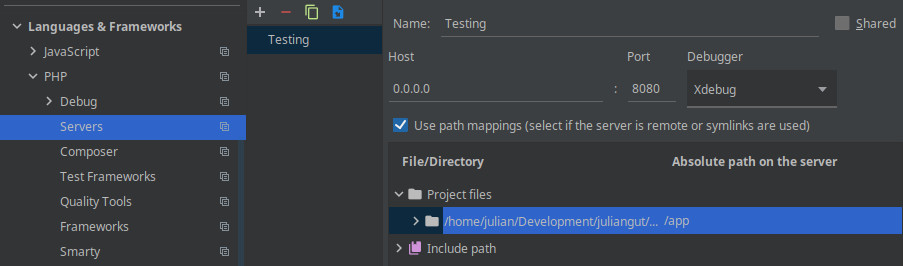
Start debugging
Start listening for incoming connections by toggling Run > Start Listening for PHP Debug Connections, or by clicking the phone icon

Start the container
Setting PHP_IDE_CONFIG environment variable to the server name you defined earlier, this will instruct PHPStorm which mapping to use
docker run -d -p 8080:8080 -e XDEBUG_SESSION="PHPSTORM" -e PHP_IDE_CONFIG="serverName=Testing" -v `pwd`:/app --add-host host.docker.internal:host-gateway juliangut/phpdev:latest php -S 0.0.0.0:8080 -t /app/public
Using Docker Compose
version: "3"

services:
  app:
    image: juliangut/phpdev:latest
    ports:
      - 8080:8080
    environment:
      XDEBUG_SESSION: PHPSTORM
      PHP_IDE_CONFIG: serverName=Testing
    volumes:
      - .:/app
    extra_hosts:
      - host.docker.internal:host-gateway
    command: "php -S 0.0.0.0:8080 -t /app/public"
Firewalld & NetworkManager notice
By default, firewalld blocks all outgoing connections from docker containers, such as Xdebug connection to port 9003 on the host. In order to allow docker containers to connect with Xdebug server you need to include docker0 interface into a "trusted" zone both on NetworkManager and firewalld:
Assign docker0 interface to "trusted" zone and stop NetworkManager service
nmcli connection modify docker0 connection.zone trusted
systemctl stop NetworkManager.service
Assign "trusted" zone for docker0 interface on firewalld. Additionally, 172.0.0.0/8 source is added to cover any created docker network
firewall-cmd --permanent --zone=trusted --change-interface=docker0
firewall-cmd --permanent --zone=trusted --add-source=172.0.0.0/8
firewall-cmd --reload
Restart NetworkManager and reassign docker0 interface, just in case
systemctl start NetworkManager.service
nmcli connection modify docker0 connection.zone trusted
Restart docker service, so it recreates its iptables
systemctl restart docker.service
Extending the image
The image comes with just the bare minimum PHP extensions, you will most probably need more
This is an example on extending the image adding extra extensions and composer dependencies
FROM juliangut/phpdev:latest

# Add PHP extensions
RUN set -xe \
  && apk add --no-cache --virtual .build-deps \
    $PHPIZE_DEPS \
  \
  && docker-php-ext-configure \
    pdo_mysql \
      --with-pdo-mysql=mysqlnd \
  && docker-php-ext-install \
    pdo_mysql \
  \
  && pecl install \
    apcu \
    redis \
  && docker-php-ext-enable \
    apcu \
    redis \
  \
  && apk del .build-deps \
  && rm -rf /tmp/* /var/cache/apk/*

# Add global composer dependencies as 'docker' user
USER docker
RUN composer global require phpunit/phpunit

# Remember to always return to user 'root'
USER root
Requiring Composer V1
If for whatever reason you need Composer downgraded to version 1
FROM juliangut/phpdev:latest

RUN composer self-update --1
Contributing
Found a bug or have a feature request? Please open a new issue. Have a look at existing issues before
License
See file LICENSE included with the source code for a copy of the license terms
Tag summary
Content type
Image
Digest
sha256:c18dce36f…
Size
111.2 MB
Last updated
8 months ago
docker pull juliangut/phpdev:7.4-jenkins