kangkang223/openwrt
基于sulinggg/openwrt做了部分修改,适配极空间Nas
Image
17
10K+
kangkang223/openwrt repository overview
OpenWrt-Docker For 极空间Nas
- 基础镜像来源: https://hub.docker.com/r/sulinggg/openwrt
- 本镜像主要解决极空间Nas上无特权造成的部分问题(当然其他设备一样可以用该镜像),如 /etc/resolv.conf无法写入正确dns地址等
- 增加几个环境变量,简化配置流程
- 修复luci缓存异常问题
版本说明
kangkang223/openwrt:z4
基于x86_64 , x86设备可通用
kangkang223/openwrt:z2
暂无
环境变量说明
## lan接口ip地址 , 会替换 /etc/config/network 中的lan接口 "option ipaddr" 配置
ENV LAN_ADDR 192.168.123.100

## lan接口网关, 会替换 /etc/config/network 中的lan接口 "option gateway" 配置
ENV LAN_GATEWAY 192.168.123.1

## lan接口dns, 会替换 /etc/config/network 中的lan接口 "option dns" 配置
ENV LAN_DNS 192.168.123.1

## dnsmasq的主机地址,由于openwrt默认启动该服务,这里只填写127.0.0.1即可, 也可填写114.114.114.114等公共dns
## 该选项会被写入/etc/resolv.conf : nameserver 127.0.0.1
ENV DNS_MASQ_SERVER 127.0.0.1
参考示例
docker run --privileged -e "LAN_ADDR=192.168.10.100" -e "LAN_GATEWAY=192.168.10.1" -e "LAN_DNS=192.168.10.1" --restart always --name openwrt -d --network macnet kangkang223/openwrt:z4 /sbin/init
解决luci缓存异常的问题
openwrt后端管理页面偶发异常:
/usr/lib/lua/luci/dispatcher.lua:417: Fatal: Indexcache is not sane!stack traceback: [C]: in function 'assert'
/usr/lib/lua/luci/dispatcher.lua:417: in function 'createindex'
/usr/lib/lua/luci/dispatcher.lua:452: in function 'createtree'
/usr/lib/lua/luci/dispatcher.lua:188: in function 'dispatch'
/usr/lib/lua/luci/dispatcher.lua:95: in function </usr/lib/lua/luci/dispatcher.lua:94>
解决方案:,进入容器删除缓存或重启容器:
rm -r /tmp/luci-indexcache
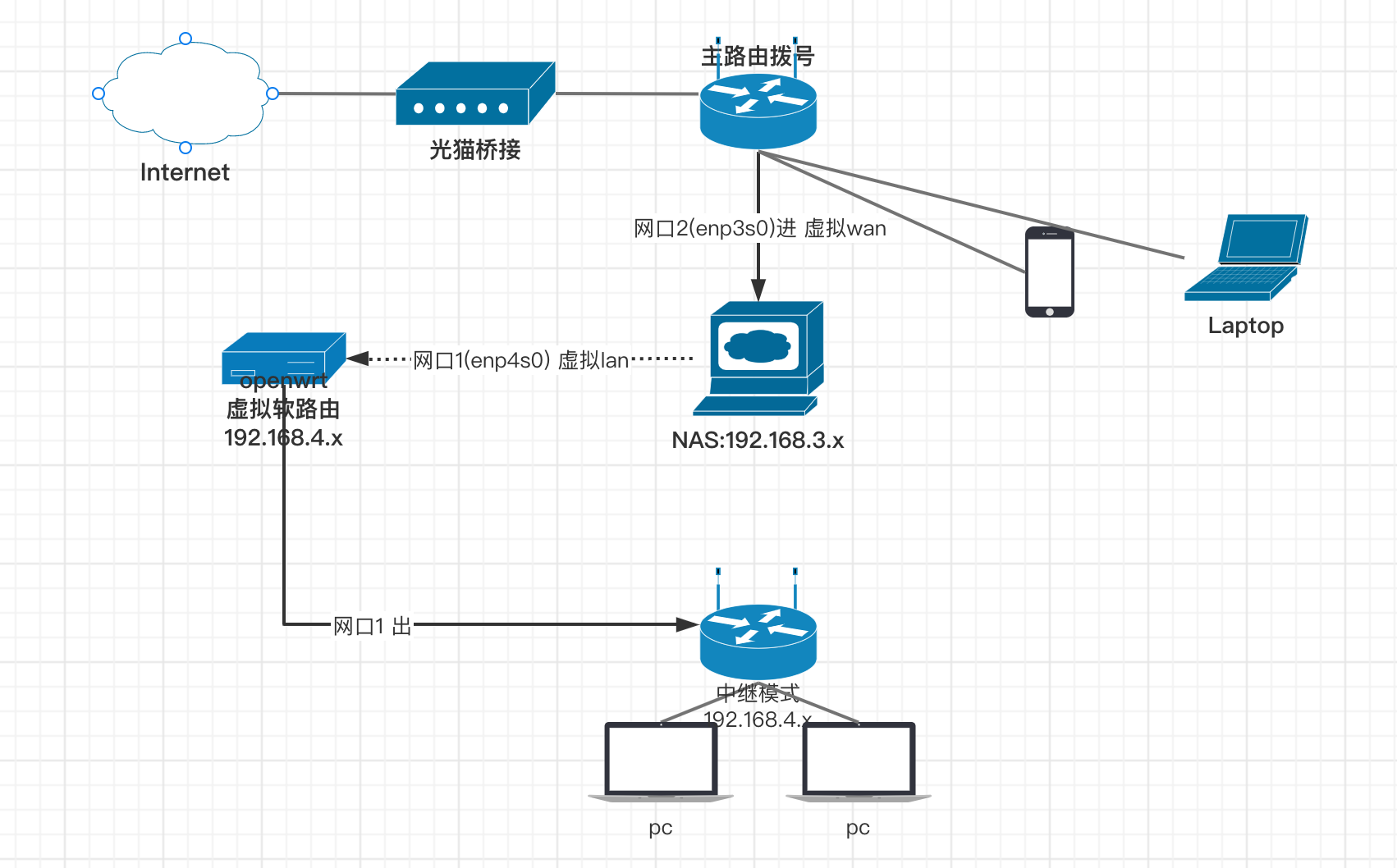
Z4下路由模式
Tag summary
Content type
Image
Digest
Size
75.4 MB
Last updated
over 4 years ago
docker pull kangkang223/openwrt:z4