karloie/kompass repository overview
🧭 Kompass


%22&replace=%24%3Cversion%3E&label=homebrew)

Kompass is a Kubernetes explorer for understanding resource relationships in real clusters. Query with patterns and browse connected topology, logs, YAML, certs, and diagnostics from one UI.
Features

- Wildcard selectors - Patterns like
*/namespace/*,deployment/*/frontend - 30+ Kubernetes resources - Workloads, networking, storage, RBAC, cert-manager, Cilium
- Web UI + JSON APIs - Topology exploration and machine-friendly integration
- Dependency-aware ordering - Controllers and related resources are grouped for readable topology
- Go library - Use in your tools
- HTTP API - Programmatic access
- Mock data - Test without cluster
Supported Resources
- Workloads: Pod, Deployment, ReplicaSet, StatefulSet, DaemonSet, Job, CronJob
- Networking: Service, Endpoints, EndpointSlice, Ingress, NetworkPolicy, Gateway, HTTPRoute, CiliumNetworkPolicy
- Storage: PersistentVolume, PersistentVolumeClaim, StorageClass, VolumeAttachment, CSIDriver, CSINode
- Config: ConfigMap, Secret, ServiceAccount
- RBAC: Role, RoleBinding, ClusterRole, ClusterRoleBinding
- Cert: Certificate, Issuer, ClusterIssuer
- Other: HorizontalPodAutoscaler, Node
Web Quick Start
Kompass provides an interactive web UI and API for exploring topology, workloads, traffic paths, logs, YAML, certificates, and related Kubernetes metadata in one place.
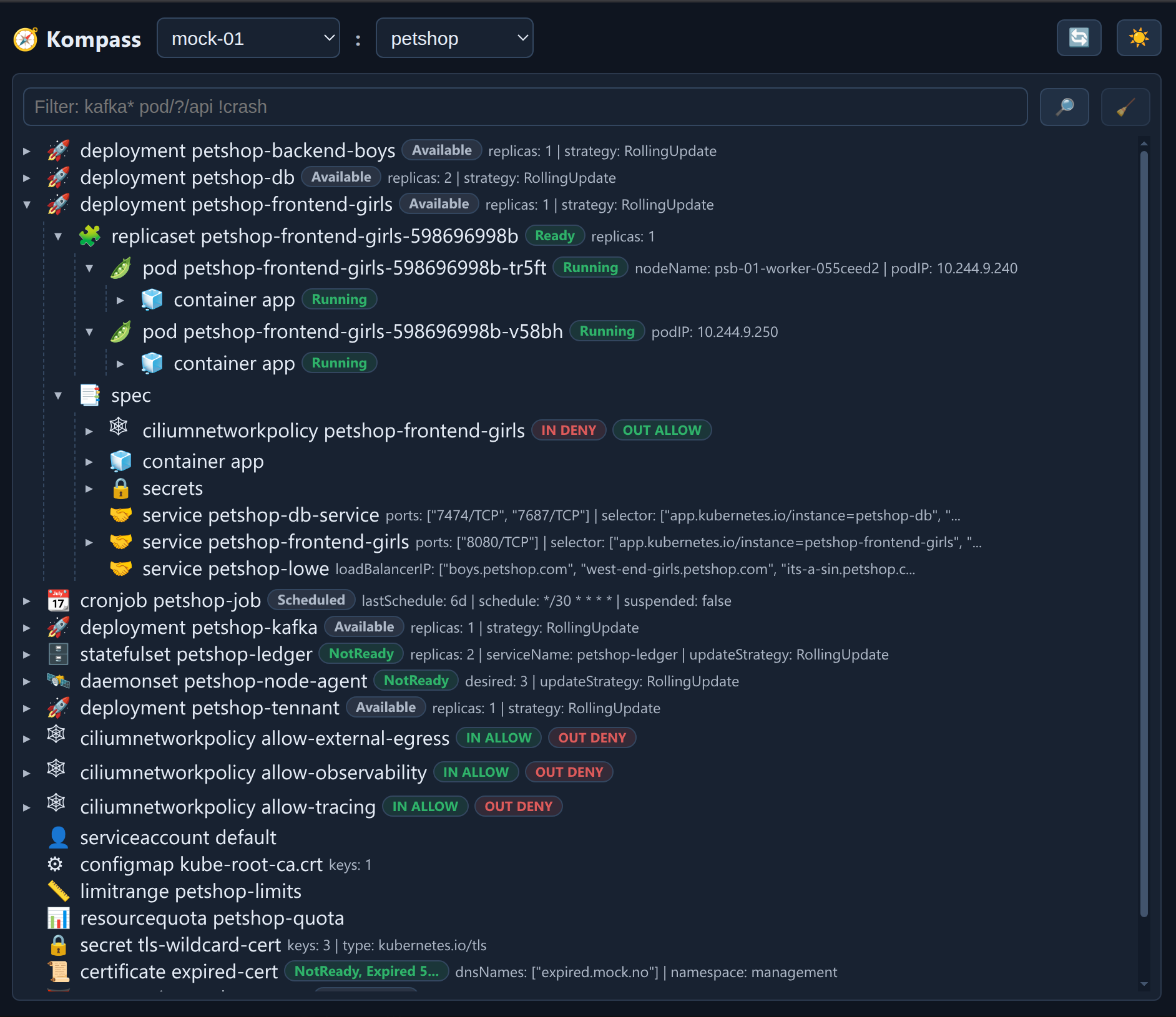
Quick start (in cluster):
kubectl apply -f kubernetes.yaml
kubectl -n kompass rollout status deploy/kompass
kubectl -n kompass port-forward svc/kompass 8080:8080
Then open:
http://localhost:8080/(web app)http://localhost:8080/api/healthz(liveness)
CLI Quick Start
Prerequisite: For CLI usage against a real cluster, you need a valid Kubernetes client configuration (kubeconfig) for your target context.
kubectlis the most common way to set this up, but any valid kubeconfig source works.
# List all pods in current namespace
kompass
Example Output
🌍 Kompass Context: mock-cluster, Namespace: petshop, Selectors: [*/petshop/petshop-frontend-girls], Config: mock, Cache: 32 calls | 0 hits | 32 misses | 0.0% hit rate

🚀 deployment petshop-frontend-girls [AVAILABLE] {available=1, current=1, namespace=petshop, ready=1, replicas=1, strategy=RollingUpdate, updated=1}
├─ 🧩 replicaset petshop-frontend-girls-598696998b [READY] {available=1, current=1, ready=1, replicas=1}
│  └─ 🫛 pod petshop-frontend-girls-598696998b-tr5ft [RUNNING] {podIP=10.244.9.240}
│     └─ 🧊 container app [RUNNING]
│        └─ 🐋 image petshop/petshop-frontend-girls:tr-6.0.6
├─ 🤝 service petshop-frontend-girls {ports=[8080/TCP], type=ClusterIP}
└─ 📑 spec
   └─ 🧊 container app
      ├─ ♻️ environment
      │  └─ 💬 NEO4J_URI=bolt://petshop-db-service:7687
      ├─ 🐋 image petshop/petshop-frontend-girls:tr-6.0.6
      └─ 🔧 resources {limits=memory:512Mi, requests=cpu:100m memory:128Mi}
Output shown is truncated for readability.
Basic Commands
# Exact resource
kompass --mock deployment/petshop/petshop-kafka

# Multiple resources
kompass --mock */petshop/* */kafka-system/*

# Wildcard patterns
kompass '*/myapp/*'              # All resources in myapp namespace
kompass 'pod/*/*-api'            # All pods ending with -api
kompass 'deployment/prod/*'      # All deployments in prod namespace
Resource Selector Format
name- Resource in default namespacenamespace/name- Resource in namespacetype/namespace/name- Exact resource*/namespace/*- All in namespace
CLI Options
| Flag | Short | Description |
|---|---|---|
--context <name> | -c | Kubernetes context |
--namespace <name> | -n | Namespace |
--mock | Use mock data | |
--debug | -d | Enable debug logging |
--service [addr] | Start API server (localhost:8080) | |
--version | -v | Show version |
--help | -h | Show help |
Installation
Go Install
go install github.com/karloie/kompass/cmd/kompass@latest
Homebrew (macOS/Linux)
brew install karloie/tap/kompass
Binary Download
Download pre-built binaries from GitHub Releases
Package Managers
# Debian/Ubuntu
wget https://github.com/karloie/kompass/releases/latest/download/kompass_<version>_linux_amd64.deb
sudo dpkg -i kompass_<version>_linux_amd64.deb

# Red Hat/Fedora/CentOS
wget https://github.com/karloie/kompass/releases/latest/download/kompass_<version>_linux_amd64.rpm
sudo rpm -i kompass_<version>_linux_amd64.rpm
Server Usage
Starting the Server
# Start server (default: localhost:8080)
kompass --service

# Custom port
kompass --service localhost:9090

# Bind to specific interface
kompass --service 0.0.0.0:8080

# With specific namespace and context
kompass --service --namespace production --context prod

# Using mock data
kompass --service --mock

# Enable debug logging
kompass --debug '*/petshop/*'
API Endpoints
| Endpoint | Output | Usage |
|---|---|---|
/api/graph | Graph JSON (nodes, edges, components) | Default JSON endpoint for topology graphing. Use context, namespace, and optional selector. |
/api/tree | Tree JSON (trees + shared nodes) | Send Accept: application/json. Use context, namespace, and optional selector. |
/api/metadata | Cache/build metadata JSON | Inspect cache status plus build metadata (gitVersion, gitCommit, buildDate). |
/api/healthz | Liveness probe (ok) | Basic health endpoint for uptime checks. |
/api/readyz | Readiness probe (ok when ready) | Readiness endpoint used by probes/orchestration. |
Endpoints accept query parameters:
| Parameter | Description |
|---|---|
context | Kubernetes context to use |
selector | Resource selector (comma-separated, optional) |
namespace | Target namespace |
Graph and tree JSON responses include request metadata under request.selectors as an array.
API Examples
# JSON graph
curl "http://localhost:8080/api/graph?context=in-cluster&selector=deployment/myapp/frontend&namespace=default"

# JSON tree
curl -H "Accept: application/json" "http://localhost:8080/api/tree?context=in-cluster&namespace=production&selector=pod/production/myapp"

# Cache metadata
curl "http://localhost:8080/api/metadata"

# Health check
curl "http://localhost:8080/api/healthz"  # Liveness
curl "http://localhost:8080/api/readyz"   # Readiness
Cilium
Kompass exposes network-flow diagnostics in the Cilium tab and uses the Hubble relay gRPC API underneath. The relay address is controlled by KOMPASS_HUBBLE_ADDR:
- Local: leave unset and run
kubectl port-forward -n kube-system svc/hubble-relay 4245:80. Default is127.0.0.1:4245. - In-cluster: set
KOMPASS_HUBBLE_ADDR=hubble-relay.kube-system.svc.cluster.local:80(included inkubernetes.yaml).
The pod app-view routes are /api/app/cilium and /api/app/cilium/watch.
If Hubble relay is unavailable, the Cilium tab shows an unavailable message and falls back to the hubble CLI if present in the container image.
Development
Building
make build
Service Modes
# Dev mode (hot reload)
make dev

# Standard build
make build

# Release build
make build-release
Runtime behavior:
kompass --serviceserves API endpoints onlocalhost:8080by default.- Use
kompass --service 0.0.0.0:8080to publish on all interfaces.
Snapshot behavior:
make snapshotwrites deterministic mock fixtures (testdata/fixtures/mock.json,testdata/fixtures/mock.txt).make snapshot-realwrites real-cluster fixtures (testdata/fixtures/real.json,testdata/fixtures/real.txt).
Running Tests
make test
Coverage Report
make coverage
Running Locally
# With mock data
make mock

# Against real cluster
make real
License
MIT - see LICENSE
Tag summary
Content type
Image
Digest
sha256:5af10b1f5…
Size
117.8 MB
Last updated
8 months ago
docker pull karloie/kompass