kirari04/convertarr
This tool converts all .mkv files from the defined folders so they use less storage.
2.9K
kirari04/convertarr repository overview
Convertarr
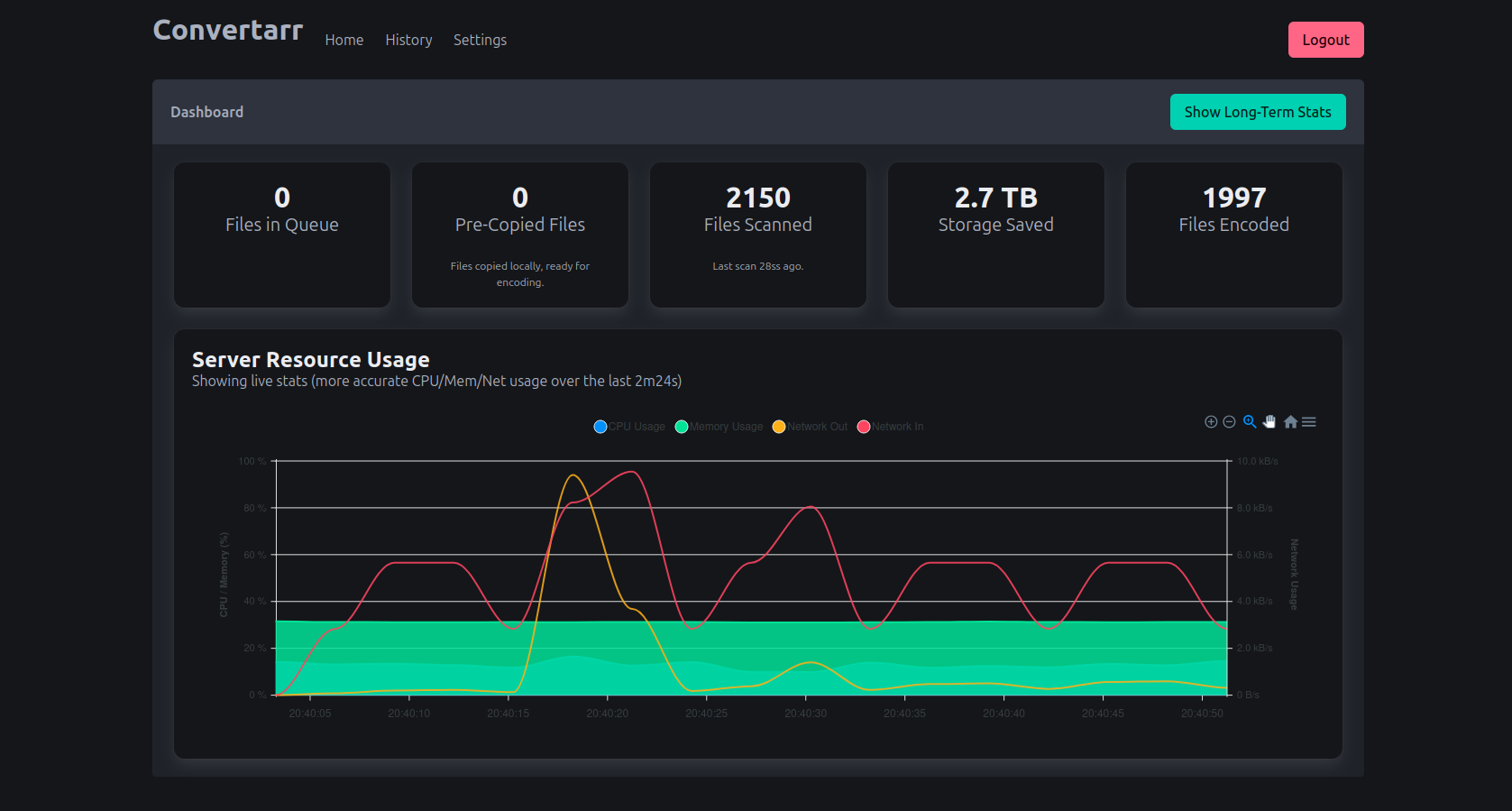



Convertarr is a powerful, web-based tool designed to automate the process of video conversion. It monitors your specified folders for new video files and encodes them into a more efficient format, saving you valuable storage space without sacrificing quality. With a rich web interface, you can monitor progress, view statistics, and fine-tune every aspect of the encoding process.
✨ Features
-
📊 Interactive Dashboard:
- View live and long-term statistics on server resource usage, including CPU, Memory, and Network I/O.
- Track the number of files in the encoding queue and files that are pre-copied for faster processing.
- See statistics on the last scan, total files encoded, and total storage saved.
-
⚙️ Powerful Encoding Engine:
- Choose between H.264 and the highly efficient HEVC (H.265) codec.
- Fine-tune video quality with adjustable CRF (Constant Rate Factor) and output resolution.
- Hardware Acceleration: Offload encoding to your GPU for significantly faster performance.
- NVIDIA (NVENC) support.
- AMD (VAAPI) support for Linux.
- Control the number of CPU threads used for encoding.
-
🗂️ Folder & File Management:
- Add and manage multiple folders for Convertarr to monitor.
- Enable automatic periodic scanning (with configurable intervals) and scanning on startup.
- Trigger a folder scan manually at any time from the UI.
- Workflow Optimization: Pre-copy files to a local temp directory to speed up the encoding pipeline.
-
🔐 Security:
- Secure your instance with optional user authentication.
- Supports both Form-Based login and HTTP Basic Auth.
- Easily manage user credentials.
-
📜 History & Quality Control:
- View a detailed history of all encoded files.
- The history table automatically refreshes to show the latest progress.
- Image Comparison: Generate a side-by-side comparison image of the original and encoded file to easily verify quality.
🚀 Install using Docker (No Hardware Acceleration)
---
services:
  convertarr:
    image: kirari04/convertarr:latest
    container_name: convertarr
    environment:
      - PUID=1000
      - PGID=1000
      - TZ=Etc/UTC
    volumes:
      - /path/to/data:/app/database
      - /path/to/comparisonimages:/app/img
      - /path/to/videofiles:/videofiles
    ports:
      - 8080:8080
    restart: unless-stopped
AMD GPU Acceleration (VA-API) using Docker Compose
For AMD GPU support, a special Docker image is required that includes the necessary VA-API drivers.
-
Use the custom Docker Compose file below. This points to the
kirari04/convertarr:amdimage and correctly configures device access. -
Verify your Group IDs (GIDs). The
group_addsection is critical for permissions. Before running, verify the GIDs for thevideoandrendergroups on your host system with these commands:getent group video | cut -d: -f3 getent group render | cut -d: -f3Update the values in the
docker-compose.ymlfile if they are different from the defaults (44and992).
docker-compose.yml for AMD:
---
services:
  convertarr:
    image: kirari04/convertarr:amd
    container_name: convertarr
    restart: unless-stopped
    ports:
      - "8080:8080"
    environment:
      - PUID=1000
      - PGID=1000
      - TZ=Etc/UTC
      # This environment variable may be needed for certain AMD GPUs.
      - ROC_ENABLE_PRE_VEGA=1
    volumes:
      # Your persistent data volumes.
      - ./data:/app/database
      - ./comparisonimages:/app/img
      - ./videofiles:/videofiles
    # Pass the GPU device from the host to the container.
    devices:
      - /dev/dri:/dev/dri
    # Add the container to the correct groups using the GIDs from your host system.
    # This grants the necessary permissions to access the GPU.
    group_add:
      - "44"  # GID for 'video'
      - "992" # GID for 'render'
    security_opt:
      - seccomp=unconfined
🔧 Configuration
Once the container is running, access the web UI at http://<your-server-ip>:8080.
- On the first run, you will be guided through an initial setup wizard to configure your administrator user and authentication settings.
- All further configuration, including adding media folders and tuning encoding settings, is done through the Settings page in the web UI.
Tag summary
Content type
Image
Digest
sha256:7ae43b880…
Size
67.5 MB
Last updated
10 months ago
docker pull kirari04/convertarr