knxbench/knxbench-server
KNX engineering in your browser: import projects, edit with undo, monitor bus. Less VM. More KNX.
2.2K
knxbench/knxbench-server repository overview
KNXBench — your KNX project, in a browser
Open your KNX project. Finally see what's in it.
Import ETS projects, edit them with undo, document them and watch the bus talk. This image brings the KNXBench web application and server in one container. No Windows VM required just to look up a group address. Your laptop may quietly thank you.
Website · Source code · Manual · Releases
Alpha software. Keep backups. KNXBench is an independent, open-source KNX engineering application, not ETS and not a promise of full ETS compatibility. Test on copies before trusting it with a building somebody paid for.
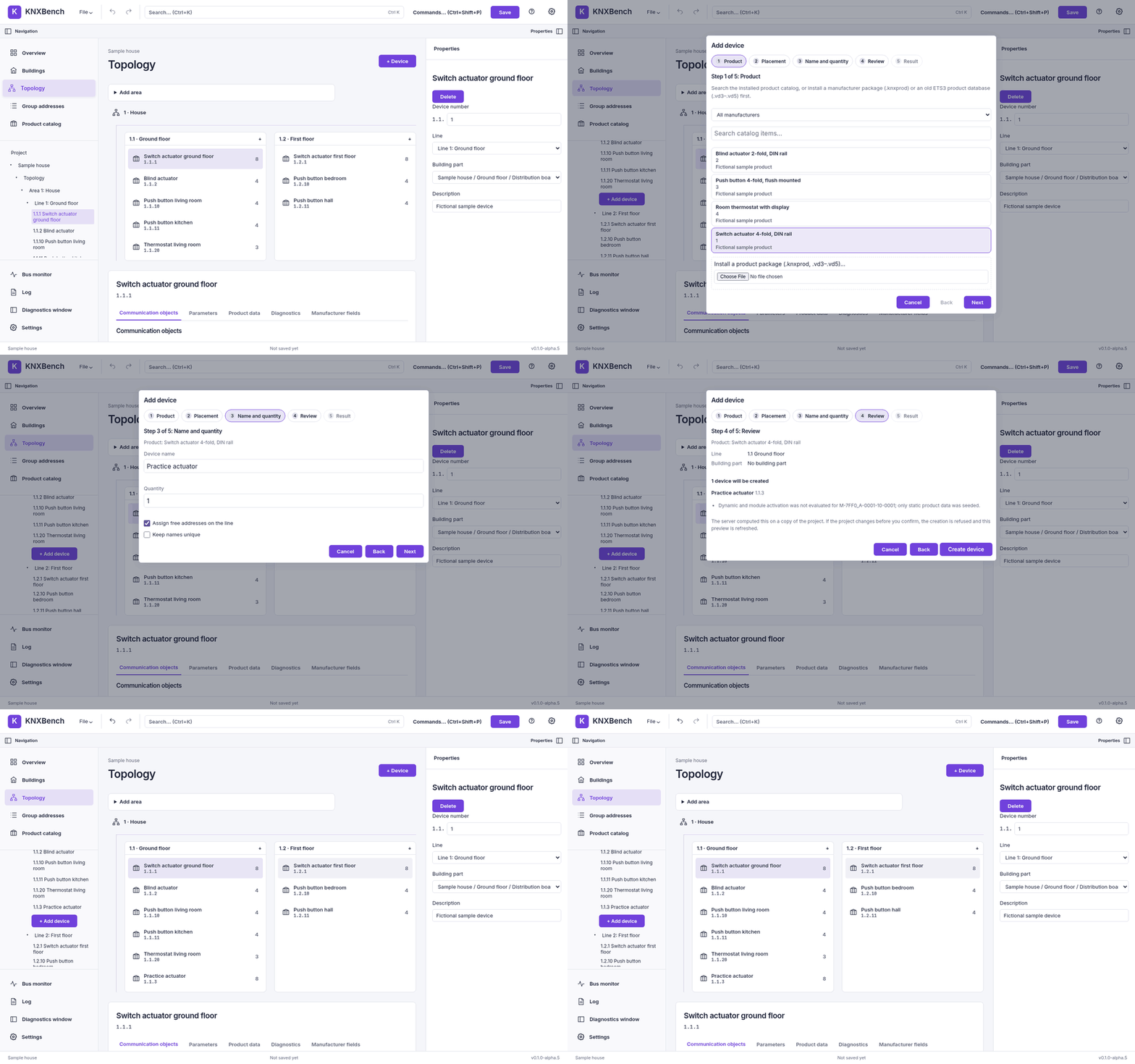
What's inside?
- Import with a report, not a shrug. Open
.knxprojfiles and review warnings, unsupported constructs and conflicts. Supported opaque data and retained source bytes preserve otherwise unmodelled information where technically possible; preservation limits are reported. Retained bytes do not imply complete ETS semantics. - Edit what matters. Undo what you regret. Topology, buildings and rooms,
devices, individual and group addresses, links, DPTs, flags and parameters.
Save projects as versioned
.knxdbfiles (SQLite). - Wizards that show their homework. Set up a project or add a device with a preview before anything is created.
- A product database with an appetite. Install manufacturer
.knxprodpackages or use the product data inside your projects. - Watch your bus think. KNXnet/IP gateway discovery, tunnelling, a live group monitor and a telegram flow view. Real bus access needs suitable networking; see below before expecting a Docker bridge to perform magic.
- Paperwork, automated. Group-address CSV import/export and self-contained HTML project documentation with print preview.
- A workbench, not a spreadsheet in disguise. Project explorer, properties inspector, search, command palette and keyboard shortcuts. Light/dark themes, plus LCARS and phosphor-green CRT for engineers with excellent taste in nostalgia.
Quick start: pull, run, open
The image includes the web frontend. No Git checkout, Rust installation or compilation coffee break required. The commands below use Bash on Linux:
docker pull knxbench/knxbench-server:latest

read -rsp 'Choose a long KNXBench password: ' KNX_AUTH_PASSWORD
printf '\n'
export KNX_AUTH_PASSWORD

docker run -d --name knxbench \
  --restart unless-stopped \
  --network host \
  -e KNX_PORT=8484 \
  -e KNX_AUTH_PASSWORD \
  -v knxbench-data:/data \
  knxbench/knxbench-server:latest

unset KNX_AUTH_PASSWORD
Open https://127.0.0.1:8484, sign in with your chosen password, and create a
project or import a .knxproj. The named volume knxbench-data stores your saved
projects across container replacements. Back it up; a volume is storage, not a
backup department.
A password enables HTTPS with a generated self-signed certificate. Before accepting the browser warning, compare the certificate fingerprint with the startup output:
docker logs knxbench
The Linux default uses host networking. With a password, the server listens on all host interfaces on port 8484, not only localhost. Restrict access to your trusted LAN/VPN with a firewall. There is one shared password, not per-user access control; do not expose this server directly to the internet. Without a password, it stays on the host's loopback interface.
The source server and new source-built images default to 8484. The explicit
KNX_PORT=8484 also supports Alpha.9 and older published images. Dockerfiles
cannot select runtime networking; keep --network host when creating the container.
Tags and platforms
| Item | Meaning |
|---|---|
latest | The most recently published release, including alpha pre-releases; not the newest main source |
0.1.0-alpha.6 | An example pinned release tag; choose a published version when updates should be your decision |
linux/amd64 | 64-bit x86 |
linux/arm64 | 64-bit Arm; requires a 64-bit host OS |
Ready-made images start at 0.1.0-alpha.6. Docker selects the architecture for your host. Both platforms are built and smoke-tested in CI; that is not a claim that every Raspberry Pi, host OS or gateway has been hand-tested. Linux is the tested deployment path. Docker Desktop on Windows/macOS is untested, particularly for live-bus networking.
Configuration and persistence
| Variable / path | Purpose |
|---|---|
KNX_AUTH_PASSWORD | Shared login password; enables HTTPS |
KNX_AUTH_PASSWORD_HASH | Alternative hashed credential; see the manual for creation and precedence |
KNX_PORT | Listener port (also the host port in host mode); source default 8484, explicitly set for older releases |
KNX_DATA_DIR | Persistent data directory; image default /data |
/data | Mount a named volume or chosen host directory here |
For password hashes, TLS configuration, uploads and deployment details, use the Web and Docker manual. Never remove your data volume as part of a routine update.
Talking to a real KNX bus
Project editing needs no hardware. Discovery and normal tunnelling to a real
KNXnet/IP gateway use host networking on Linux, already selected by the
quick start. Keep --network host; there is no -p mapping. To change the
listener port, change KNX_PORT and the browser URL together. Host mode gives
the container access to the host network; it is not network isolation.
Docker's default bridge does not carry discovery multicast onto the LAN. For a
manually entered gateway, KNX_TUNNEL_ROUTE_BACK=1 can allow tunnelling through
a bridge if the gateway supports Route Back; it does not fix discovery.
The manual explains both paths. A green container health check does not prove
that a physical gateway is reachable.
Updating without losing the plot
- Save your project and back up the data volume.
- Finish any device download or address programming before stopping the server.
- Pull the chosen image tag, then
docker stop knxbenchanddocker rm knxbench. - Run the new image with the same volume, password and network settings.
An image pull alone does not update a running container. Normal docker stop
allows an orderly server exit and tunnel disconnect and refuses new bus jobs.
While a device download or address programming is running, the server waits for
it up to KNX_STOP_WRITE_WAIT_SECS (default 120 s), but Docker kills it after
its own timeout (10 s by default), so use docker stop -t 130 knxbench (or a
Compose stop_grace_period) if a write may be running. A write cut short by a
timeout, a second signal or a kill may leave the device partly written.
Limits, help and licence
Import support is scoped and reported. Unsupported data are not a licence to invent device behaviour, and a successful import is not a commissioning certificate. Read the known issues and compatibility guide before work on real installations.
Found a bug? Bring a reproducible example to the issue tracker, not your private building project or credentials. Fictional houses make excellent witnesses.
Licence: AGPL-3.0-or-later. The source and build recipe are public. KNXBench is independent of ETS and the KNX Association.
Tag summary
Content type
Image
Digest
sha256:a8c482527…
Size
44 MB
Last updated
14 minutes ago
docker pull knxbench/knxbench-server