kosdk/changelog-generator-action
Change Log Generator Action for Github
1.5K
kosdk/changelog-generator-action repository overview
Release Note Generator GitHub Action
This repository provides a GitHub action to automatically create a release notes when a milestone is closed. This repo was forked from the Decathlon/release-notes-generator-action repository and updated to the latest version.
Table of Contents
Common usage
Each time a milestone is closed, this GitHub action scans its attached issues and pull request, and automatically generates a release notes.
The action uses Spring.io changelog generator tool.

Purpose
This allows a convenient way to build a change log which can then be fed into the Create release action or written to a file for other uses. Developers no longer need to manually maintain a change log for a new release of software.
Startup
Use GitHub action
Settings for v2.1.4+ release
The configuration is loaded from the .github/workflows/release-notes.yml file.
# Trigger the workflow on milestone events
on:
  milestone:
    types: [closed]
name: Milestone Closure
jobs:
  create-release-notes:
    runs-on: ubuntu-latest
    steps:
    - uses: actions/checkout@master
    - name: Create Release Notes
      uses: Cossey/[email protected]
      env:
        GITHUB_TOKEN: ${{ secrets.GITHUB_TOKEN }}
        OUTPUT_FOLDER: temp_release_notes
It is important to add the
GITHUB_TOKENsecret because the action needs to access to your repository Milestone/Issues information using the GitHub API.
As we filtered on milestone the action will execute anytime an event occurs on your repository milestones.
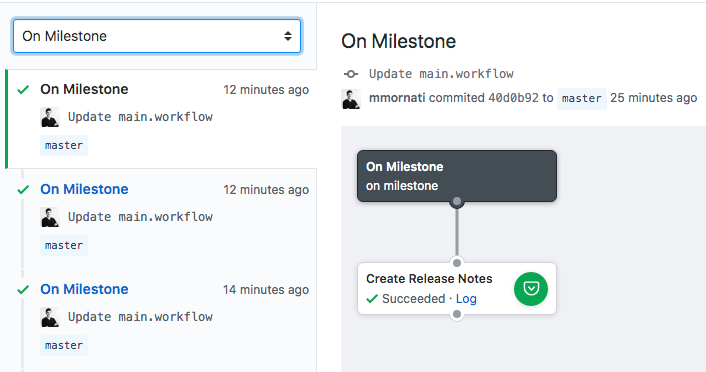
The action is then filtered on closed events. All other events on the milestones will only log an action execution but the release notes won't be created.
### STARTED Create Release Notes 14:25:34Z
[...]
Getting Action Information
Release note generation skipped because action was: opened

### SUCCEEDED Create Release Notes 14:25:55Z (21.262s)
Configure output folder
By default the release file is created into the Docker home folder. If you want you can specify a custom folder for your file creation via the OUTPUT_FOLDER environment variable.
Custom output release file
By default the output is written to the changelog.md file. You can control the output name using environment variables in your action.
Prefixed name using v2.1.4+
- name: Create Release Notes
  uses: Cossey/[email protected]
  env:
    GITHUB_TOKEN: ${{ secrets.GITHUB_TOKEN }}
    FILENAME_PREFIX: MyMilestone
The output filename will be MyMilestone_2 (if the milestone id is 2).
Use Milestone title
Providing the USE_MILESTONE_TITLE environment variable which allow you to switch the name to the Milestone title instead of providing a static one.
The title will be modified replacing spaces with underscore '_' char.
Prefixed name using v2.1.4+
- name: Create Release Notes
  uses: Cossey/[email protected]
  env:
    GITHUB_TOKEN: ${{ secrets.GITHUB_TOKEN }}
    USE_MILESTONE_TITLE: "true"
Section configuration
You can manage the sections and how they are used by the release generator, creating the .github/release-notes.yml file in the repository where you activate the action.
More configuration options are available at the Spring.io changelog generator repository.
changelog:
  sections:
  - title: "Enhancements"
    labels: ["new"]
  - title: "Bugs"
    labels: ["fix"]
Tag summary
Content type
Image
Digest
Size
80.1 MB
Last updated
almost 6 years ago
docker pull kosdk/changelog-generator-action