krateng/maloja
Self-hosted music scrobble database to create personal listening statistics and charts
1M+
krateng/maloja repository overview
Maloja



Simple self-hosted music scrobble database to create personal listening statistics.
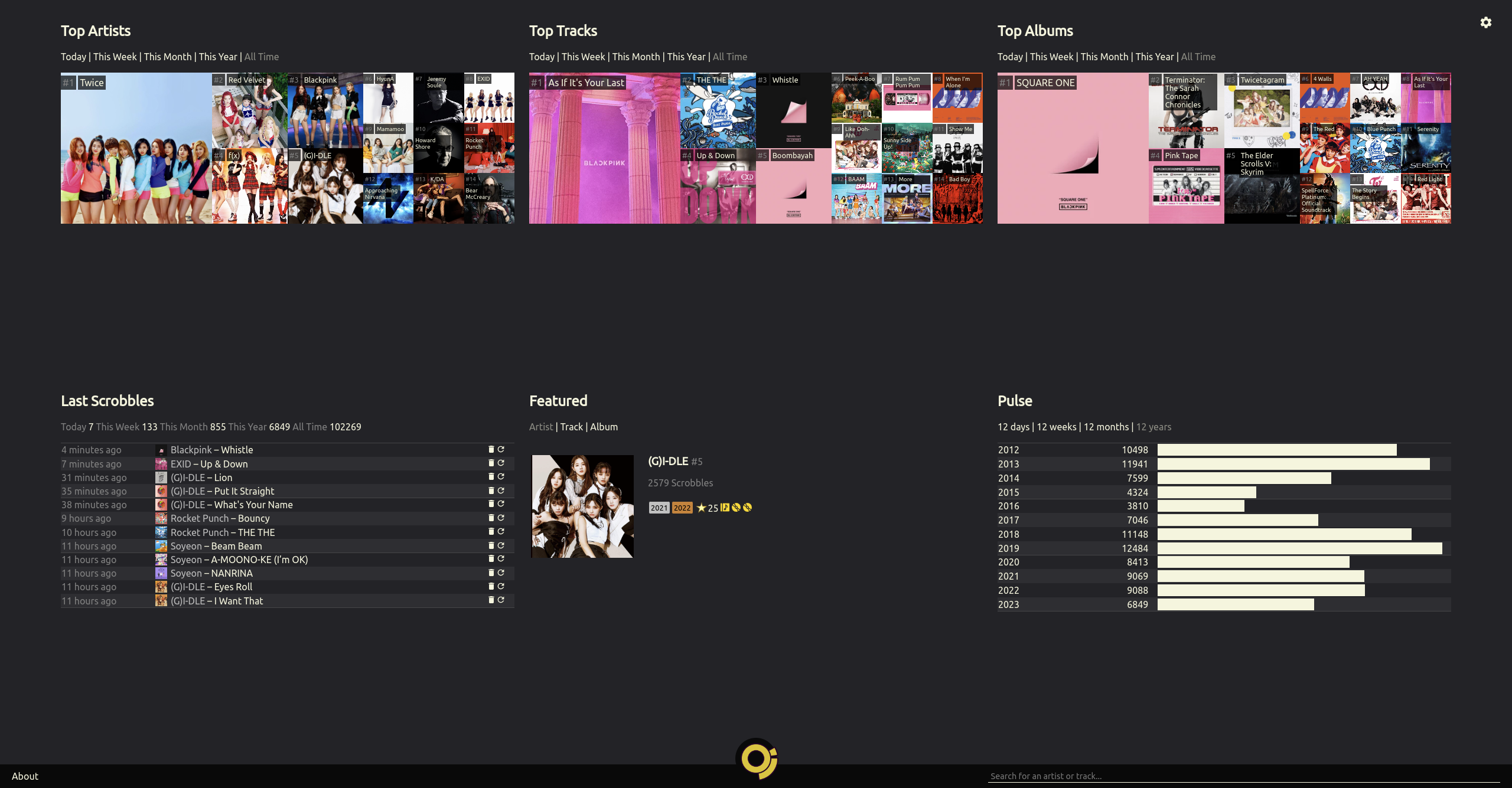
You can check my own Maloja page as an example instance.
Table of Contents
Features
- Self-hosted: You will always be able to access your data in an easily-parseable format. Your library is not synced with any public or official music database, so you can follow your own tagging schema.
- Associated Artists: Compare different artists' popularity in your listening habits including subunits, collaboration projects or solo performances by their members. Change these associations at any time without losing any information.
- Multi-Artist Tracks: Some artists often collaborate with others or are listed under "featuring" in the track title. Instead of tracking each combination of artists, each individual artist competes in your charts.
- Custom Images: Don't rely on the community to select the best pictures for your favorite artists. Upload your own so that your start page looks like you want it to look.
- Proxy Scrobble: No need to fully commit or set up every client twice - you can configure your Maloja server to forward your scrobbles to other services.
- Standard-compliant API: Use existing, mature apps or extensions to scrobble to your Maloja server.
- Manual Scrobbling: Listening to vinyl or elevator background music? Simply submit a scrobble with the web interface.
- Keep it Simple: Unlike Last.fm and similar alternatives, Maloja doesn't have social networking, radios, recommendations or any other gimmicks. It's a tool to keep track of your listening habits over time - and nothing more.
How to install
To avoid issues with version / dependency mismatches, Maloja should only be used in Docker or Podman, not on bare metal. I cannot offer any help for bare metal installations (but using venv should help).
Pull the latest image or check out the repository and use the included Containerfile.
Of note are these settings which should be passed as environmental variables to the container:
MALOJA_SKIP_SETUP-- Make the server setup process non-interactive. Maloja will not work properly in a container without this variable set. This is done by default in the provided Containerfile.MALOJA_FORCE_PASSWORD-- Set an admin password for Maloja. You only need this on the first run.MALOJA_DATA_DIRECTORY-- Set the directory in the container where configuration folders/files should be located- Mount a volume to the specified directory to access these files outside the container (and to make them persistent)
You must publish a port on your host machine to bind to the container's web port (default 42010). The container uses IPv4 per default.
An example of a minimum run configuration to access maloja via localhost:42010:
docker run -p 42010:42010 -v $PWD/malojadata:/mljdata -e MALOJA_DATA_DIRECTORY=/mljdata krateng/maloja
If you are using rootless containers with Podman the following DOES NOT apply to you, but if you are running Docker on a Linux Host you should specify user:group ids of the user who owns the folder on the host machine bound to MALOJA_DATA_DIRECTORY in order to avoid docker file permission problems. These can be specified using the environmental variables PUID and PGID.
To get the UID and GID for the current user run these commands from a terminal:
id -u-- prints UID (EX1000)id -g-- prints GID (EX1001)
The modified run command with these variables would look like:
docker run -e PUID=1000 -e PGID=1001 -p 42010:42010 -v $PWD/malojadata:/mljdata -e MALOJA_DATA_DIRECTORY=/mljdata krateng/maloja
Extras
-
If you'd like to display images, you will need API keys for Last.fm and Spotify. These are free of charge!
-
Put your server behind a reverse proxy for SSL encryption. Make sure that you're proxying to the IPv6 or IPv4 address according to your settings.
How to use
Basic control
When not running in a container, you can run the application with maloja run.
Data
If you would like to import your previous scrobbles, copy them into the import folder in your data directory. This works on:
- a Last.fm export generated by ghan64's website
- an official Spotify data export file
- an official ListenBrainz export file
- the export of another Maloja instance
Customization
-
Have a look at the available settings and specifiy your choices in
/etc/maloja/settings.ini. You can also set each of these settings as an environment variable with the prefixMALOJA_(e.g.MALOJA_SKIP_SETUP). -
If you have activated admin mode in your web interface, you can upload custom images for artists or tracks by simply dragging them onto the existing image on the artist or track page. You can also manage custom images directly in the file system - consult
images.infoin the/var/lib/maloja/imagesfolder. -
To specify custom rules, consult the
rules.infofile in/etc/maloja/rules. You can also apply some predefined rules on the/admin_setuppage of your server.
How to scrobble
You can set up any amount of API keys in the file apikeys.yml in your configuration folder (or via the web interface). It is recommended to define a different API key for every scrobbler you use.
Some scrobbler clients support Maloja's native API. You can also use any scrobbler that allows you to set a custom Listenbrainz or GNUFM server. See API.md for details.
If you're the maintainer of a music player or server and would like to implement native Maloja scrobbling, feel free to reach out!
If you can't automatically scrobble your music, you can always do it manually on the /admin_manual page of your Maloja server.
How to extend
If you'd like to implement anything on top of Maloja, visit /api_explorer.
Tag summary
Content type
Image
Digest
sha256:313b58d28…
Size
46 MB
Last updated
15 days ago
docker pull krateng/maloja