longmeidao/peach
Local-first video metadata scraper and media manager. Self-hosted web UI for VPS and NAS.
50K+
longmeidao/peach repository overview

Peach
A local-first video metadata scraper and media manager, packaged for self-hosting on a VPS or NAS.
Website · Live demo · Source and full README · Docker guide (Chinese) · Releases · Issues · 简体中文
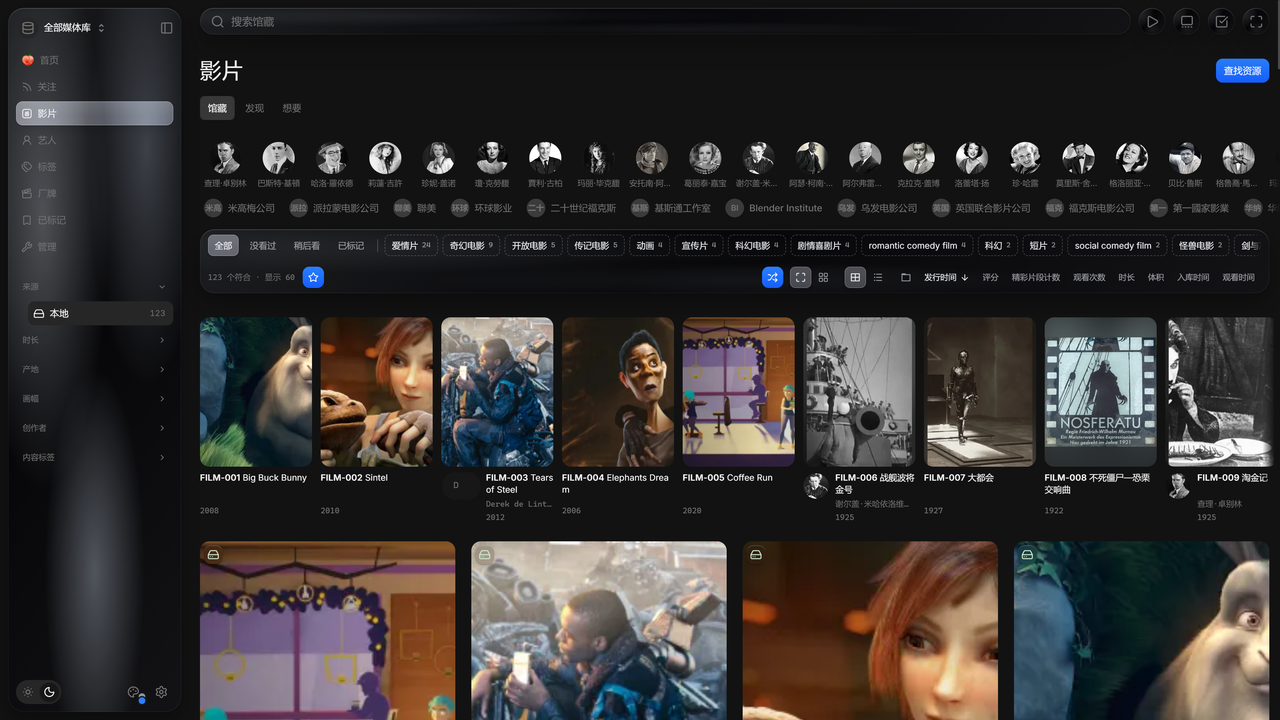
Movie demo data; see asset credits and licenses. More screenshots are in the GitHub README.
Features
- Metadata scraping: recognize video codes, read NFO files and fill titles, performers, studios and covers from multiple sources while keeping your edits.
- Local and cloud libraries: browse mounted folders, SMB shares and CloudDrive2 cloud mounts in one library. Scanning is read-only and media stays where it is.
- Playback and history: stream in the browser with subtitles, playback speed, resume and timeline previews.
- Follows and discovery: track performer and creator updates, discover titles and manage a want list.
- Library management: manage tags, duplicates, versions and parts; metadata and watch history stay in your data volume.
- Any device: manage and watch from a desktop, tablet or phone browser.
Image and tags
| Item | Value |
|---|---|
| Image | longmeidao/peach; the same image is also published as ghcr.io/peach-mitao/peach |
| Version tags | One per release, built from the release commit |
edge | Moves to the latest complete release |
| Platform | linux/amd64; ARM NAS is not yet verified |
| User | UID/GID 1000, non-root |
| Port | 8900/tcp |
/data | Settings, database, credentials and image cache; must be persistent |
/media | Your media, mounted read-only by default |
The image includes Peach, the web UI, FFmpeg, FFprobe, OpenSSL and the amane scraping runtime. It runs headless; there is no desktop tray in the container.
Quick start with Docker Compose
This example targets a Linux host with Docker Engine and Docker Compose. The media folder must already exist and be readable by UID 1000. If you use CloudDrive2, finish binding and mounting your cloud drives on the host first.
Save this as compose.yaml in an empty folder:
services:
  peach:
    image: longmeidao/peach:${PEACH_VERSION:-edge}
    init: true
    restart: unless-stopped
    stop_grace_period: 75s
    ports:
      - "${PEACH_BIND:-127.0.0.1}:${PEACH_PORT:-8900}:8900"
    volumes:
      - peach-data:/data
      - type: bind
        source: ${PEACH_MEDIA_ROOT:?Set PEACH_MEDIA_ROOT in .env to an existing media folder}
        target: /media
        read_only: true
        bind:
          propagation: rslave
          create_host_path: false

volumes:
  peach-data:
Save .env next to it and replace the path with the absolute media path on your host:
PEACH_MEDIA_ROOT=/absolute/path/to/media
PEACH_BIND=127.0.0.1
PEACH_PORT=8900
Pull the image:
docker compose pull
Start Peach:
docker compose up -d
Show the first sign-in token. It is private, so run this in your own terminal only:
docker compose exec peach peach token
Open http://127.0.0.1:8900 on the host, or reach it through a private VPN or SSH tunnel. Sign in, set an access password, then add a media folder inside the container, such as /media, on the settings page.
NAS and LAN access
PEACH_BIND=127.0.0.1 only accepts connections from the host itself. To open Peach from another computer, set PEACH_BIND to the NAS's LAN IP, recreate the container and open http://<NAS LAN IP>:<PEACH_PORT>. Set an access password first. The image has no multi-user accounts; for public hosting, read the security policy.
On NAS container UIs, run peach token in the Peach container's terminal to get the sign-in token.
Updating
Run docker compose pull and docker compose up -d again. Keep the peach-data volume: deleting it removes your settings, database and watch history. Hardware transcoding, CloudDrive2 networking, path mapping and diagnostics are covered in the Docker guide.
License
AGPL-3.0-or-later. Third-party components, including the bundled amane runtime, retain their own licenses.
Manage only media you own or are authorized to use, subject to laws, copyright and source-platform access, age and regional restrictions. Peach does not provide video resources or access to paid content.
Tag summary
Content type
Image
Digest
sha256:0a4b3aef4…
Size
437.1 MB
Last updated
4 days ago
docker pull longmeidao/peach:edge