lotuxpunk/hestia
Simple file manipulation service via a REST API
1.8K
lotuxpunk/hestia repository overview
Hestia
Hestia is a simple file manipulation service, it allows you to upload, download, delete and list files via a REST API.
This project intends to be a reliable and simple solution for small scale file manipulation and avoid the need to setup a full fledged cloud storage service.
Notice
- Inter-server communication, since it's an api key based authentication, the key should be kept secret and not exposed to the client side.
- It is intended to be used with small/constrained file sizes, the file you'll try to manipulate will be loaded into memory and then sent to the server. For large files, it's recommended to use a more robust solution like AWS S3, Google Cloud Storage or Azure Blob Storage.
1. Environment Variables
To run this project, you will need to add the following environment variables:
API_KEY, a random secret key that will be used to authenticate the requests.BASE_DIRECTORY, the base directory where the files will be stored.
2. Documentation
2.1. Endpoints
2.1.1. Authorization
All requests must have the Authorization header with the value of a one-time-token generated by the server.
Since the API key is a secret, it should not be exposed to the client side, so the server will generate a one-time-token that will be used to authenticate the requests.
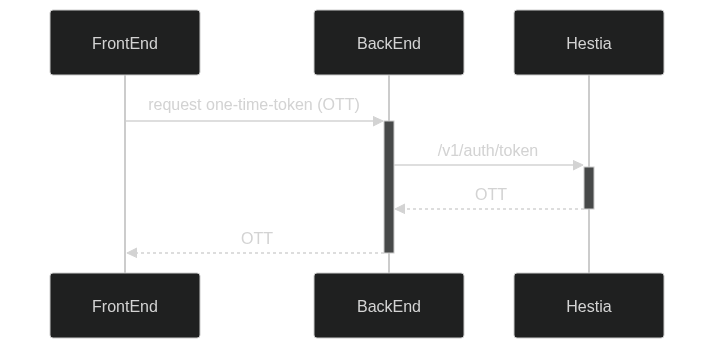
GET /v1/auth/token
Generates a one-time-token that will be used to authenticate the requests.
Query Parameters
| Name | Type | Description |
|---|---|---|
fileName | string | The name of the file that will be manipulated. |
path | string | The path of the file that will be manipulated. |
Headers
| Name | Type | Description |
|---|---|---|
Authorization | string | The API key. |
Content-Type | string | application/json. |
Accept | string | application/json. |
Response
```json
{
    "token": "...",
}
```
:warning: Token expiration time: 5 minutes.
2.1.2. File Manipulation
POST /v1/file
Uploads a file to the server.
Headers
| Name | Type | Description |
|---|---|---|
Authorization | string | The one-time-token. |
Content-Type | string | application/json. |
Accept | string | application/json. |
Request Body
```json
{
    "fileName": "example.txt",
    "path": "/",
    "file": "base64-encoded-file"
}
```
GET /v1/file
Downloads a file from the server.
Query Parameters
| Name | Type | Description |
|---|---|---|
fileName | string | The name of the file that will be downloaded. |
path | string | The path of the file that will be downloaded. |
Headers
| Name | Type | Description |
|---|---|---|
Authorization | string | The one-time-token. |
Content-Type | string | application/json. |
Accept | string | application/json or application/octet-stream |
Response
If the Accept header is application/json:
```json
{
    "fileName": "example.txt",
    "path": "/",
    "file": "base64-encoded-file"
}
```
If the Accept header is application/octet-stream: stream the file.
GET /v1/file/embed
Downloads a file from the server, usually used to embed the file in an <img>, <audio>, <video> or <iframe> tag.
Query Parameters
| Name | Type | Description |
|---|---|---|
fileName | string | The name of the file that will be downloaded. |
path | string | The path of the file that will be downloaded. |
token | string | The one-time-token. |
download | string | Download filename (via Content-Disposition ) |
DELETE /v1/file
Deletes a file from the server.
Query Parameters
| Name | Type | Description |
|---|---|---|
fileName | string | The name of the file that will be deleted. |
path | string | The path of the file that will be deleted. |
recursive | boolean | If true, deletes all files in the path. |
path is required, but fileName is optional. If fileName is not provided, it'll try to delete the whole path specified in path
recursive is optional, if true, it'll delete recursively all files in the path. (even nested directories)
Headers
| Name | Type | Description |
|---|---|---|
Authorization | string | The one-time-token. |
Content-Type | string | application/json. |
Accept | string | application/json. |
Tag summary
Content type
Image
Digest
sha256:e12c8fa71…
Size
175.8 MB
Last updated
3 months ago
docker pull lotuxpunk/hestia