lsbnb/docmethyl
DocMethyl - EpiMOLAS Galaxy Docker container for WGBS analysis.
1.2K
lsbnb/docmethyl repository overview
Requirement
- This Galaxy docker container have tested with demo dataset under the Ubuntu 16.04 64 bit system equipped with four-core CPU, 32GB RAM, 400GB storage.
Installation
Step 0 . Install the Docker engine and start the daemon.
Step 1 . Pull down Galaxy Docker image from Docker Hub.
docker pull lsbnb/docmethyl
Step 2. Run the Galaxy Docker container and set port numbers for network accessibility and ftp connection.
docker run -d -t -i -p 8080:80 -p 8021:21 -p 8022:22 -v $('pwd')/galaxy_guest/:/root/galaxy/database/ftp/[email protected]/ lsbnb/docmethyl /bin/bash
Step 3. Launch localhost (DOCKER) with port 8080 in a browser. (http://docker_IP:8080). In this version, we provide two kinds of workflows to meet the need of raw reads in pair-end (epiMOLAS-PE) and single end(epiMOLAS-SE), respectively.
Step 4. Login with default user account ‘[email protected]’ and password ‘epimolas’ and run the built-in workflow with example dataset. Meanwhile, the account and password for administrator are [email protected] and admin@galaxy, respectively.
Brief description of each tool in the workflow
Trim Sequences : Trim Galore – A quality and adapter trimming tool. It also can remove the reads with too-short length.
Check QC of Raw reads : FastQC – It provides read quality report that user can have a quick screen on the read data like GC content, length distribution and overrepresented sequences.
Map Reads on Genome : Bismark Mapper – A commonly used BS-seq aligner which map bisulfite treated reads to reference genome.
Extract Methylated sites : Bismark Meth. Extractor – This program extracts methylation information for individual cytosines.
Generate output of submission to epiMOLAS : Our utility tool for Epi-genomics online analysis system (EpiMOLAS) – It calculates the methylation level on promoter and gene body region of three sequence contexts (CG, CHG, and CHH). The methylation level calculation is to average at least five observations (individual cytosines) on particular regions (promoter or gene body), and each observation has at least four occurrences (mapping reads).

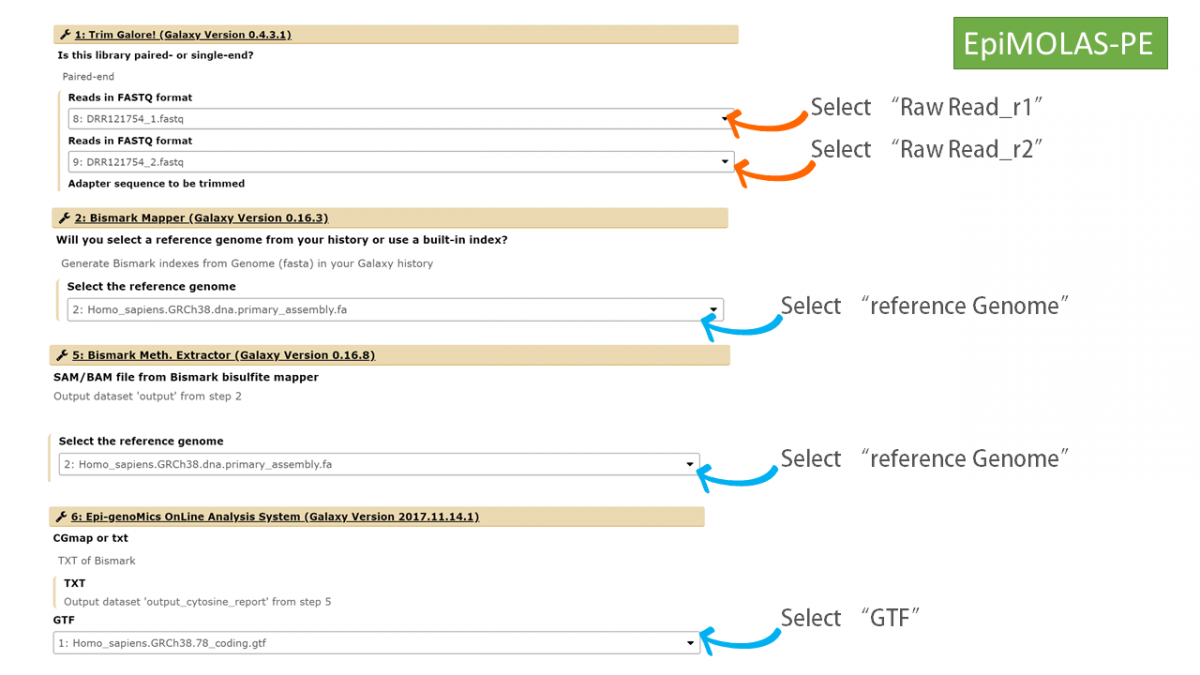
Execute the workflow by selection of suitable dataset
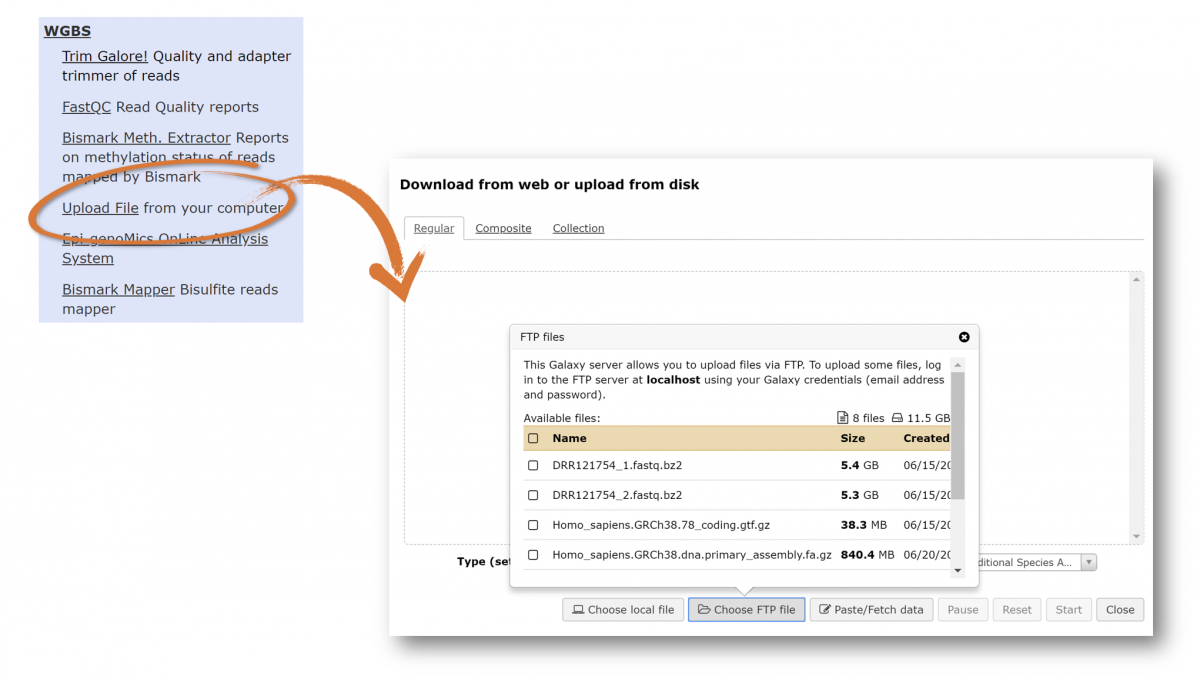
How to upload files
A. If the size of file is less than 2GB, please use "WBGS/ upload file/ choose local file".
B. For those files > 2GB, two approaches below you can choose.
-
B1. Use "WGBS/ upload file/ paste and fetch data" to paste the URLs to get the files. ex. ftp://ftp.ddbj.nig.ac.jp/ddbj_database/dra/fastq/SRA068/SRA068307/SRX247357/SRR776587_1.fastq.bz2
-
B2. Use "WGBS/ upload file/ choose FTP file". In our script for starting the docker (lsbnb/docmethyl), we have mounted the local directory named as "galaxy_guest" at localhost. So you can find the directory in the home directory you executed the DOCKER image. Please copy / ftp those files for analysis in this directory, then you can find them when you click the button "choose FTP site".
Transfer outputs to EpiMOLAS_web for deep analysis
- The output file named as "*.mtable" can be uploaded to EpiMOLAS_web "New Submission".
- EpiMOLAS_web is publicly accessible at http://symbiosis.iis.sinica.edu.tw/epimolas/
Example dataset:
- Human GRCh38 Genome reference
- human GRCh38 Genome Gene Transfer Format (GTF)
http://molas.iis.sinica.edu.tw/Homo_sapiens.GRCh38.78_coding.gtf.gz
Notice: Please "Edit Dataset Attributes/ Data type" as "gtf" if Galaxy has incorrectly guessed the type of your dataset.
- Experiment A: ERX1965658 for WGBS
https://www.ebi.ac.uk/ena/data/view/ERX1965658
R1: ftp://ftp.sra.ebi.ac.uk/vol1/fastq/ERR190/007/ERR1905277/ERR1905277_1.fastq.gz ---> 8 Gb
R2: ftp://ftp.sra.ebi.ac.uk/vol1/fastq/ERR190/007/ERR1905277/ERR1905277_2.fastq.gz ---> 9.3 Gb
- Experiment B: SRX3518560 for WGBS
https://www.ebi.ac.uk/ena/data/view/SRX3518560
R1: ftp://ftp.sra.ebi.ac.uk/vol1/fastq/SRR642/001/SRR6426181/SRR6426181_1.fastq.gz ---> 13 Gb
R2: ftp://ftp.sra.ebi.ac.uk/vol1/fastq/SRR642/001/SRR6426181/SRR6426181_2.fastq.gz ---> 17 Gb
- Experiment C: SRX3518437 for WGBS
https://www.ebi.ac.uk/ena/data/view/SRX3518437
R1: ftp://ftp.sra.ebi.ac.uk/vol1/fastq/SRR642/007/SRR6426297/SRR6426297_1.fastq.gz ----> 13.5 Gb
R2: ftp://ftp.sra.ebi.ac.uk/vol1/fastq/SRR642/007/SRR6426297/SRR6426297_2.fastq.gz ----> 13.2 Gb
Tag summary
Content type
Image
Digest
Size
1.5 GB
Last updated
about 8 years ago
docker pull lsbnb/docmethyl