lsbnb/eln
Electronic Laboratory Notebook: ELN Docker Version 3.2.3
Image
1
1.8K
lsbnb/eln repository overview
This image is provided by Institute of Information Science, Academia Sinica, TAIWAN.
Contact information:
Chung-Yen Lin ([email protected]); LAB website: http://eln.iis.sinica.edu.tw
Team members:
Shu-Hwa Chen ([email protected])
Chih-Wei Huang ([email protected])
Wei Hsuan Chuang ([email protected])
ELN Document
https://elncloud.iis.sinica.edu.tw/eln_document
ELN Demo Site
https://elncloud.iis.sinica.edu.tw/
Github
https://github.com/lsbnb/eln
Issue report
https://github.com/lsbnb/eln/issues/new
▲Description
ELN are software programs designed to replace paper laboratory notebooks. Compared with paper lab notebooks, ELNs bring many benefits, including improving search capability, supporting for discussion among many users, providing backup mechanism, and enhancing security. Scientists saving time and therefore increasing productivity through reduced time spent writing experimental records and searching data.
ELN in Brief on YouTube
https://www.youtube.com/watch?v=KXOa5WNytCM
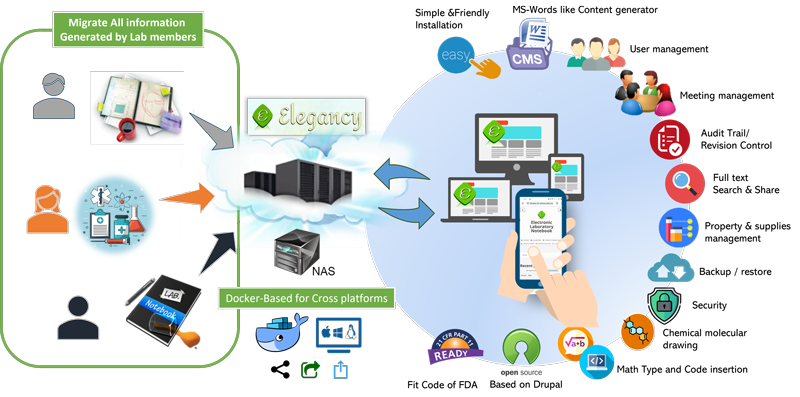

▲Installation & Setup: (In Linux, mscOS or Windows)
(1) Download image from docker hub (Install Docker Environment)
### Linux system : Open your terminal
### Windows system : Open Windows PowerShell
docker pull lsbnb/eln
(2) ELN control scripts : You can use this script to access ELN
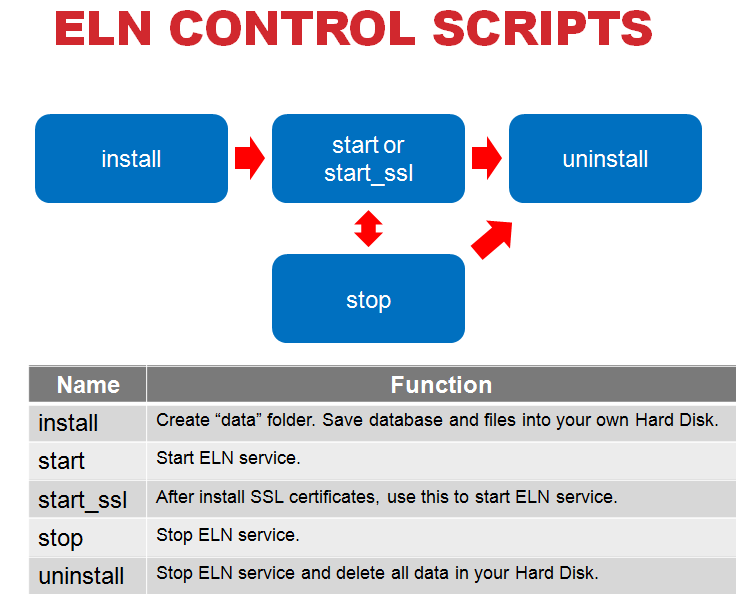
How to get scripts?
(a) You can get from github.
── Linux system (one script)
─── https://github.com/lsbnb/eln/blob/main/eln_control_scripts/ELN_Linux-macOS/elnctl
── Windows system (five scripts)
─── https://github.com/lsbnb/eln/blob/main/eln_control_scripts/ELN_Windows/eln_install.ps1
─── https://github.com/lsbnb/eln/blob/main/eln_control_scripts/ELN_Windows/eln_start.ps1
─── https://github.com/lsbnb/eln/blob/main/eln_control_scripts/ELN_Windows/eln_start_ssl.ps1
─── https://github.com/lsbnb/eln/blob/main/eln_control_scripts/ELN_Windows/eln_stop.ps1
─── https://github.com/lsbnb/eln/blob/main/eln_control_scripts/ELN_Windows/eln_uninstall.ps1
(b) You can get from docker image.
docker run --name=eln -dti lsbnb/eln bash
### Linux system
    docker cp eln:/usr/local/bin/elnctl $(pwd)
### Windows system
    docker cp eln:/usr/local/bin/ELN_Win (Get-Location).path
docker rm -f eln
(3) You can use below instructions to install, start, stop and uninstall ELN.
### Linux system
     Install ELN                 : ./elnctl install
     Start ELN Service           : ./elnctl start
     Start ELN Service with SSL  : ./elnctl start_ssl
     Stop ELN Service            : ./elnctl stop
     Uninstall ELN               : ./elnctl uninstall
     Show ELN Version            : ./elnctl version
     Show help                   : ./elnctl help
### Windows system
     Install ELN                 : Right click mouse on eln_install.ps1 then select use "PowerShell"
     Start ELN Service           : Right click mouse on eln_start.ps1 then select use "PowerShell"
     Start ELN Service with SSL  : Right click mouse on eln_start_ssl.ps1 then select use "PowerShell"
     Stop ELN Service            : Right click mouse on eln_stop.ps1 then select use "PowerShell"
     Uninstall ELN               : Right click mouse on eln_uninstall.ps1 then select use "PowerShell"
(4) Install & start ELN
### Linux system
    ./elnctl install
### Windows system
    Right click mouse on eln_install.ps1 then select use "PowerShell"
### You need input your port for ELN service
### We will create one folder "data". You data will save in this folder.
### Your ELN URL is http://[your ip]:[your port]
▲For security, we recommend that you should change the MySQL password. Login as site manager and go to Site Configuration page.
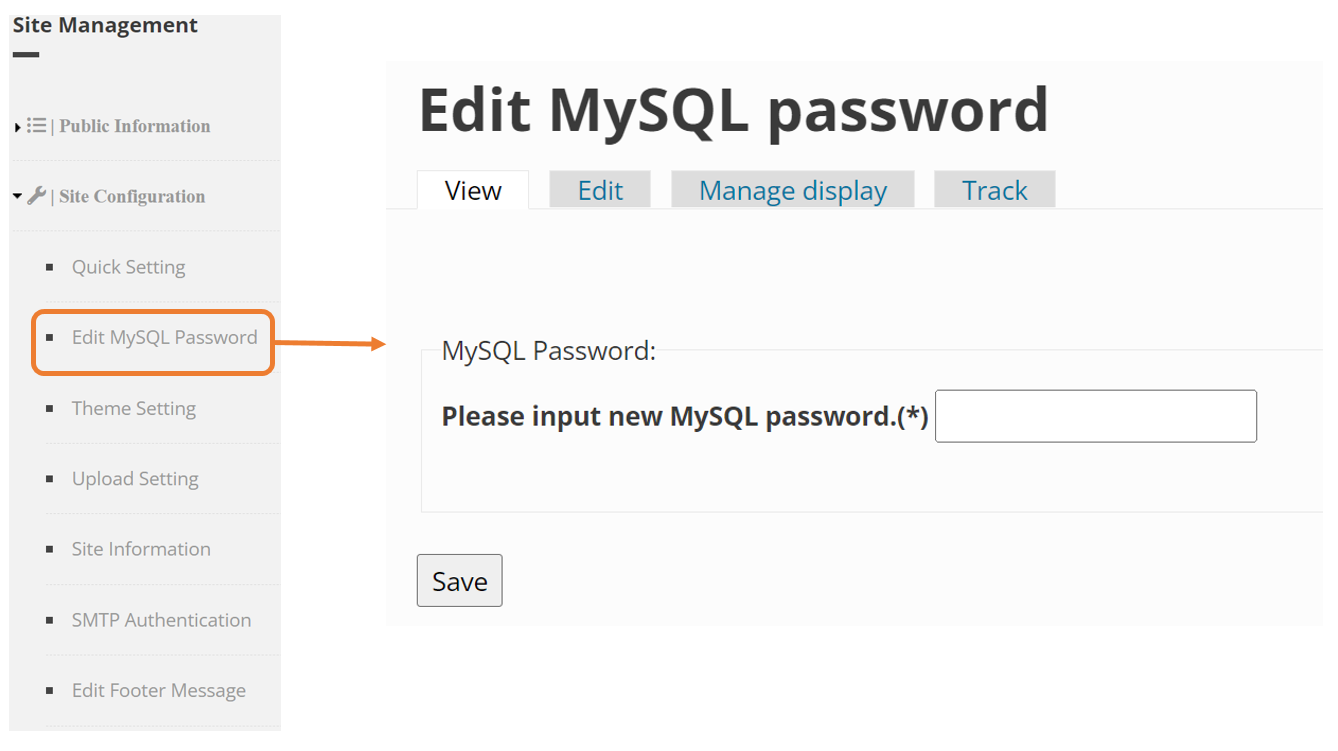
▲Troubleshooting
### Sometimes you will see apache2 or Mysql start fail message when you start ELN.
### Another case is you can't use ELN control scripts in your system.
### You only just type below instruction.
docker rm -f eln
docker run --name=eln -dti -p [your port]:80 lsbnb/eln bash
docker exec eln service apache2 start
docker exec eln service mysql start
### Your ELN URL is http://[your ip]:[your port]
▲Install Let’s Encrypt SSL
### HTTPS is a protocol for secure communication between a server (instance) and a client (web browser).
### Let’s Encrypt , which provides free SSL certificates, HTTPS are adopted by everyone and also provides trust to your audiences.
### Please open 443 port,  type below instruction and select the appropriate option
### Linux system
     ./elnctl stop
     ./elnctl start_ssl
### Windows system
    Right click mouse on eln_stop.ps1 then select use "PowerShell"
    Right click mouse on eln_start_ssl.ps1 then select use "PowerShell"
docker exec eln certbot --apache --agree-tos --redirect -m [email protected] -d domainname.com

### Certificates provided by Let’s Encrypt are valid for 90 days only, so you need to renew them often.
### Please using the following command to renew.
docker exec eln certbot renew --dry-run

### You can add above renew script into crontab. Now you can auto renew your Certificates.
### Create file : certbot-renew
### Add below script
   #!/bin/bash
   certbot renew --dry-run
### copy certbot-renew into container
docker cp ./certbot-renew eln:/etc/cron.daily
docker exec eln chmod +x /etc/cron.daily/certbot-renew

### After you install or renew Let’s Encrypt SSL, please remember to commit your image.
docker commit -m="eln" -a="[Your Name]" [container id] lsbnb/eln
(5) Stop ELN
### Linux system
    ./elnctl stop
### Windows system
    Right click mouse on eln_stop.ps1 then select use "PowerShell"
(6) Start ELN
### Linux system
    ./elnctl start
### Windows system
    Right click mouse on eln_start.ps1 then select use "PowerShell"
(7) Start ELN with SSL
### Linux system
    ./elnctl start_ssl
### Windows system
    Right click mouse on eln_start_ssl.ps1 then select use "PowerShell"
(8) Uninstall ELN
### Linux system
    ./elnctl uninstall
### Windows system
    Right click mouse on eln_uninstall.ps1 then select use "PowerShell"
### Your "data" folder will be delete.
▲Backup system
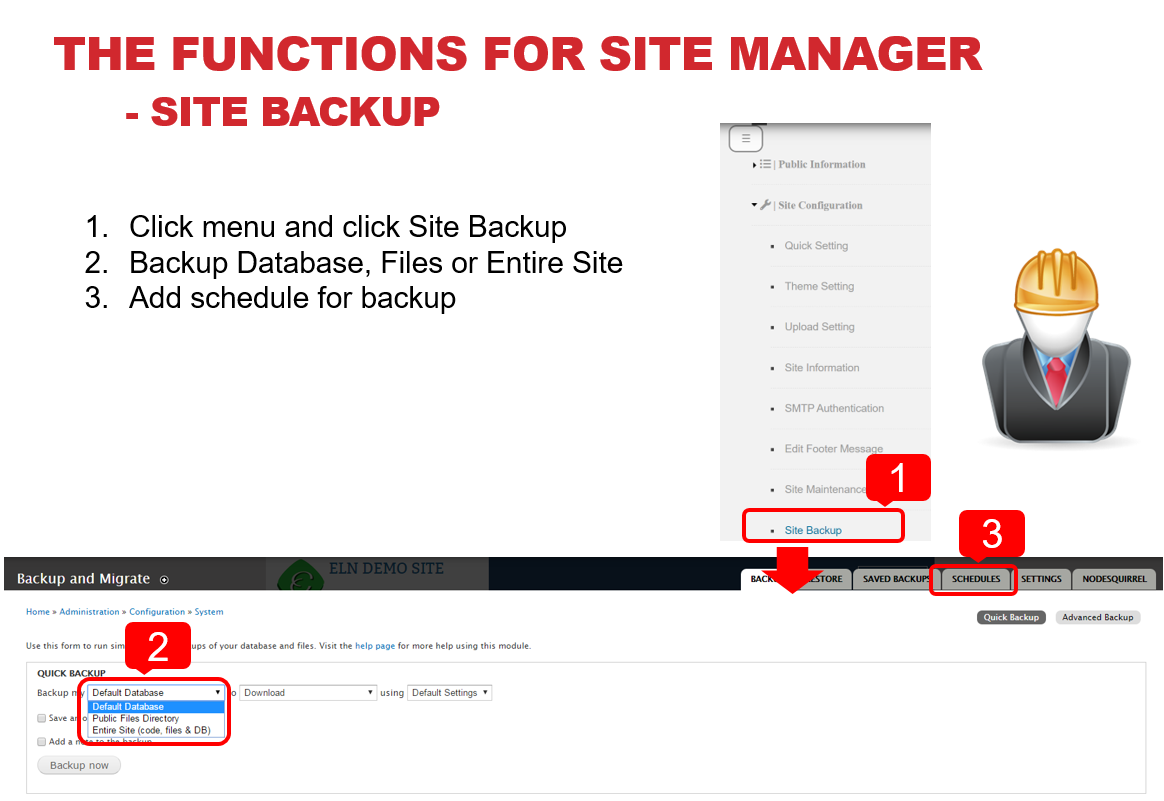
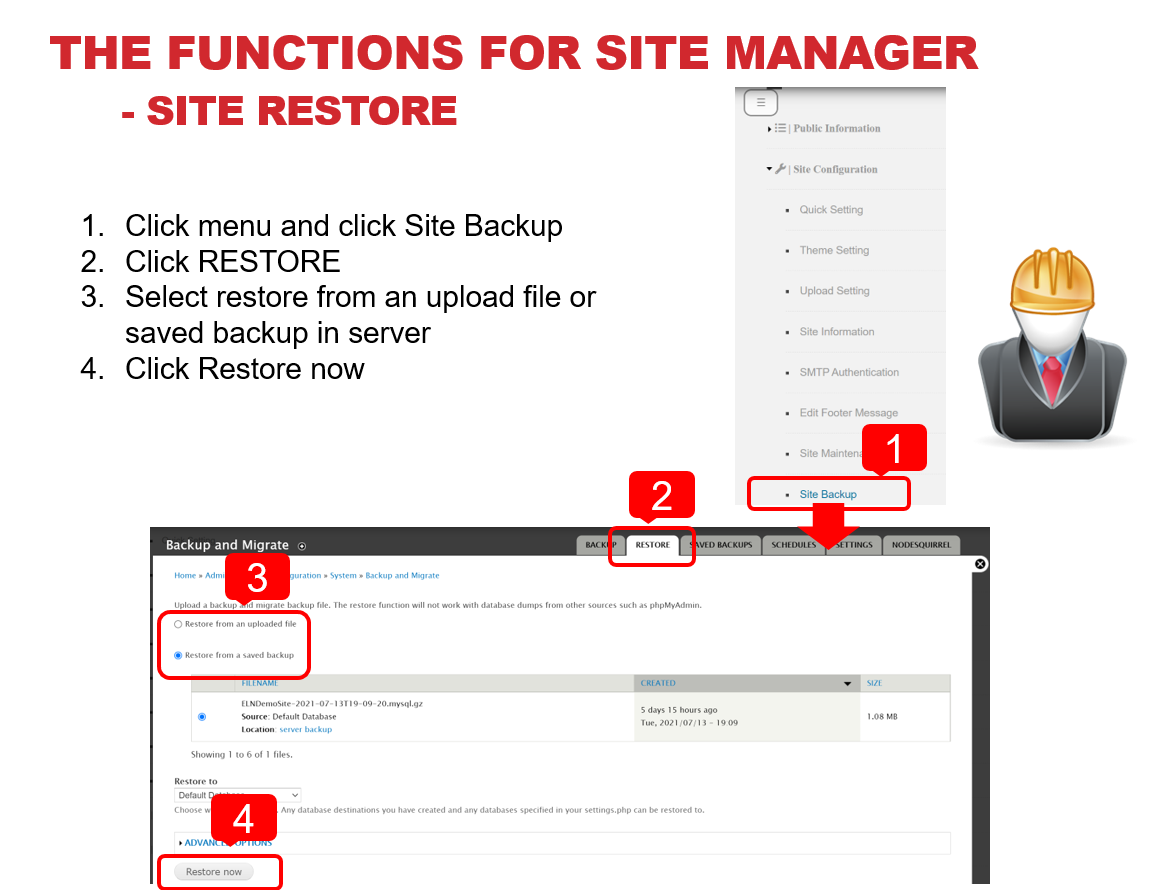
▲Restore system
Tag summary
Content type
Image
Digest
sha256:58ddcfa2e…
Size
812.7 MB
Last updated
over 2 years ago
docker pull lsbnb/eln