lsbnb/seashell repository overview
Seashell v1.0.2
This is the first version of the R/Shiny-based Seashell web application.
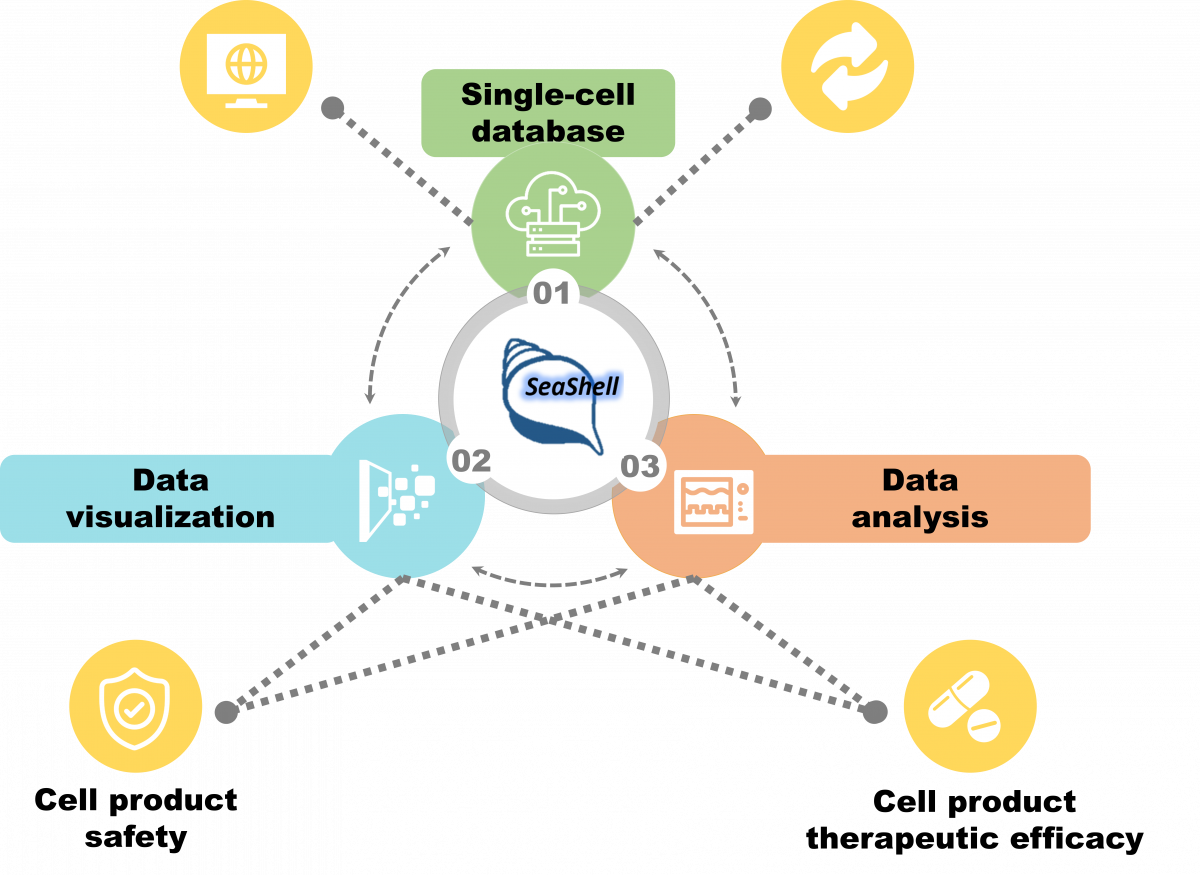
This image is provided by Institute of Information Science, Academia Sinica, TAIWAN.
Contact information:
Chung-Yen Lin ([email protected]); LAB website: http://eln.iis.sinica.edu.tw
Team members:
Bo-Yi Yu ([email protected] )
Chih-Wei Huang ([email protected])
Chia-Hsien Chuang ([email protected])
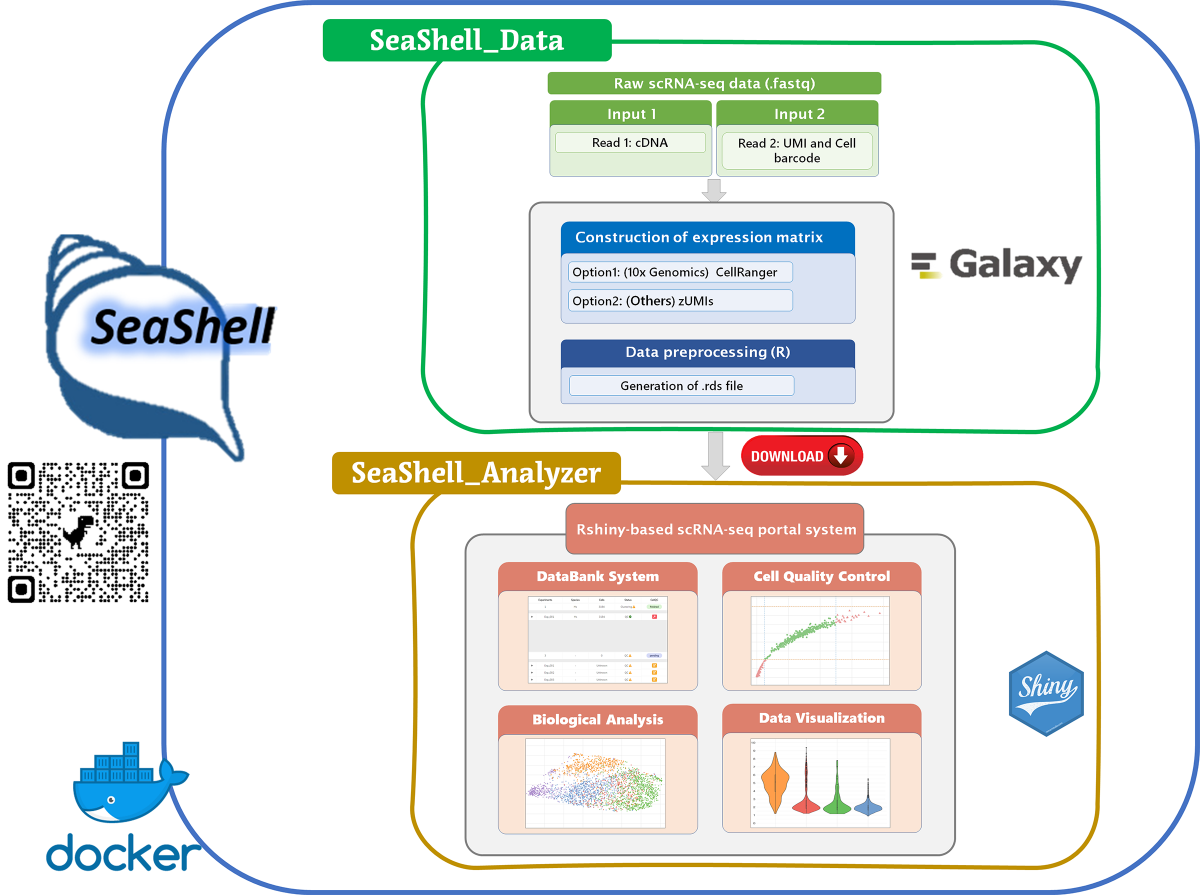
System Structure
Usage
1. Set up docker environment
1-1. Create required folders for input and output files
### Linux or macOS system (Type below scripts)
    mkdir -m 777 ./my_dir ./my_dir/ref ./my_dir/ref/cellranger_ref ./my_dir/ref/zumi_ref ./my_dir/input ./my_dir/output ./my_dir/exps ./my_dir/meta
### Windows system (Open PowerShell and type below scripts)
    'input','output','meta','exps' | % {New-Item -Name ".\my_dir\$_" -ItemType 'Directory'}
    'cellranger_ref','zumi_ref' | % {New-Item -Name ".\my_dir\ref\$_" -ItemType 'Directory'}
1-2. Data hierarchy
my_dir/
|----- input/
|      |----- folder1/
|      |              |----- R1.fastq
|      |              |----- R2.fastq
|      |----- folder2/
|      |              |----- R3.fastq
|      |              |----- R4.fastq
|
|----- ref/
|      |----- cellranger_ref/
|      |		|-----hg38/
|      |		|-----mm10/
|      |
|      |----- zumis_ref/
|      		|-----hg38/
|      		|-----mm10/
|
|----- output/
|
|----- meta/
|----- exps/
1-3. Download reference files from docker image (There are four reference folders. You can just download which you need.)
### Reference for run CellRanger hg38
docker pull lsbnb/seashell_ref_cellranger_hg38
docker run --name=seashell_ref_cellranger_hg38 -dti lsbnb/seashell_ref_cellranger_hg38 /bin/bash
#### Linux or macOS system
    docker cp seashell_ref_cellranger_hg38:/home/cellranger_ref/hg38 $(pwd)/my_dir/ref/cellranger_ref
#### Windows system
    $curPath = (Get-Location).path + '\my_dir\ref\cellranger_ref'
    docker cp seashell_ref_cellranger_hg38:/home/cellranger_ref/hg38 $curPath
docker rm -f seashell_ref_cellranger_hg38

### Reference for run CellRanger mm10
docker pull lsbnb/seashell_ref_cellranger_mm10
docker run --name=seashell_ref_cellranger_mm10 -dti lsbnb/seashell_ref_cellranger_mm10 /bin/bash
#### Linux or macOS system
    docker cp seashell_ref_cellranger_mm10:/home/cellranger_ref/mm10 $(pwd)/my_dir/ref/cellranger_ref
#### Windows system
    $curPath = (Get-Location).path + '\my_dir\ref\cellranger_ref'
    docker cp seashell_ref_cellranger_mm10:/home/cellranger_ref/mm10 $curPath
docker rm -f seashell_ref_cellranger_mm10

### Reference for run zUMIs hg38
docker pull lsbnb/seashell_ref_zumi_hg38
docker run --name=seashell_ref_zumi_hg38 -dti lsbnb/seashell_ref_zumi_hg38 /bin/bash
#### Linux or macOS system
    docker cp seashell_ref_zumi_hg38:/home/zumi_ref/hg38 $(pwd)/my_dir/ref/zumi_ref
#### Windows system
    $curPath = (Get-Location).path + '\my_dir\ref\zumi_ref'
    docker cp seashell_ref_zumi_hg38:/home/zumi_ref/hg38 $curPath
docker rm -f seashell_ref_zumi_hg38

### Reference for run zUMIs mm10
docker pull lsbnb/seashell_ref_zumi_mm10
docker run --name=seashell_ref_zumi_mm10 -dti lsbnb/seashell_ref_zumi_mm10 /bin/bash
#### Linux or macOS system
    docker cp seashell_ref_zumi_mm10:/home/zumi_ref/mm10 $(pwd)/my_dir/ref/zumi_ref
#### Windows system
    $curPath = (Get-Location).path + '\my_dir\ref\zumi_ref'
    docker cp seashell_ref_zumi_mm10:/home/zumi_ref/mm10 $curPath
docker rm -f seashell_ref_zumi_mm10
1-4. Run the docker
docker pull lsbnb/seashell:latest
### Linux or macOS system
    docker run --name=seashell -dti -p 8080:8080 -p 8081:80 -v $(pwd)/my_dir:/home/my_dir lsbnb/seashell /bin/bash
### Windows system
    $curPath = (Get-Location).path + '\my_dir:/home/my_dir'
    docker run --name=seashell -dti -p 8080:8080 -p 8081:80 -v $curPath lsbnb/seashell /bin/bash
2. Run SeaShell_Data by command mode
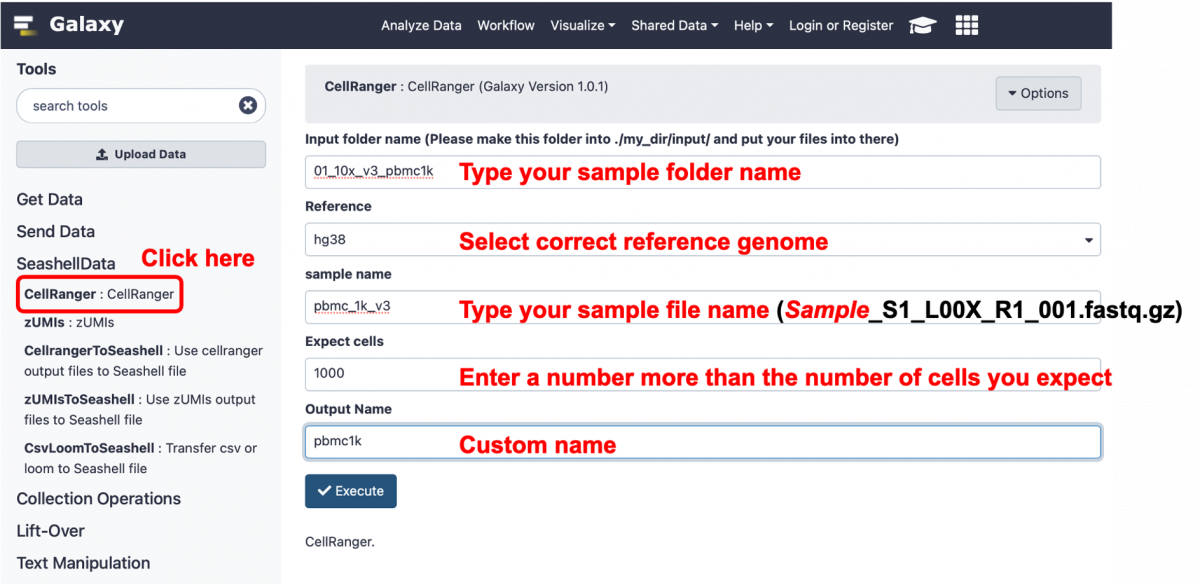
2-1. CellRanger 3.0.2 -> output = 'matrix.mtx.gz', 'features.tsv.gz', 'barcodes.tsv.gz', and 'web_summary.html'
### Create one folder and put your input files into ./my_dir/input/
docker exec seashell /home/apps/cellranger-3.0.2/cellranger count --id=output_folder1 \
--transcriptome=/home/my_dir/ref/cellranger_ref/hg38 \
--fastqs=/home/my_dir/input/01_10x_v3_pbmc1k \
--sample=pbmc_1k_v3 \
--expect-cells=1000 \
--nosecondary

### id = output folder name
### transcriptome = reference folder name
### fastqs = input folder
### sample = prifix of input file name
Example
pbmc1k_cellranger_matrix.mtx.gz /
pbmc1k_cellranger_features.tsv.gz /
pbmc1k_cellranger_barcodes.tsv.gz
2-2. CellRanger to SeaShell_Analyzer data -> output = 'S01_preprocessed.rds'
### copy 'matrix.mtx.gz', 'features.tsv.gz', 'barcodes.tsv.gz', and 'web_summary.html' to ./my_dir/output
docker cp seashell:/output_folder1/outs/filtered_feature_bc_matrix/matrix.mtx.gz ./my_dir/output
docker cp seashell:/output_folder1/outs/filtered_feature_bc_matrix/features.tsv.gz ./my_dir/output
docker cp seashell:/output_folder1/outs/filtered_feature_bc_matrix/barcodes.tsv.gz ./my_dir/output
docker cp seashell:/output_folder1/outs/web_summary.html ./my_dir/output

### Generate 'S01_preprocessed.rds'
docker exec seashell Rscript /home/script/ToSeashell.R -d /home/my_dir/output -t cellranger
Example
S01_preprocessed.rds (pbmc1k_cellranger2seashell.rds)
2-3. zUMIs 2.9.4 -> output = 'BD_Rhapsody.dgecounts.rds', 'BD_Rhapsody.readcount.exon.all.loom' and 'BD_Rhapsody.detected_cells.pdf'
### create zUMIs_used.yaml
docker exec seashell python3 /home/script/config_editor.py \
-o /home/my_dir/output \
-f /home/my_dir/input/02_BD_wholeblood/SRR14702879_1.fastq.gz \
-q /home/my_dir/input/02_BD_wholeblood/SRR14702879_2.fastq.gz \
-r /home/my_dir/ref/zumis_ref/hg38 \
-p BD -s hs -t 12

### Run zUMIs
docker exec seashell /home/apps/zUMIs/zUMIs.sh -c -y /home/my_dir/output/zUMIs_used.yaml
2-4. zUMIs to SeaShell_Analyzer data -> output = 'S01_preprocessed.rds'
### copy 'BD_Rhapsody.dgecounts.rds' to ./my_dir/output
cp ./my_dir/output/zUMIs_output/expression/BD_Rhapsody.dgecounts.rds ./my_dir/output

### If you want to see 'BD_Rhapsody.readcount.exon.all.loom' and 'BD_Rhapsody.detected_cells.pdf'
cp ./my_dir/output/zUMIs_output/expression/BD_Rhapsody.readcount.exon.all.loom ./my_dir/output
cp ./my_dir/output/zUMIs_output/stats/BD_Rhapsody.detected_cells.pdf ./my_dir/output

### Generate 'S01_preprocessed.rds'
docker exec seashell Rscript /home/script/ToSeashell.R -d /home/my_dir/output -t zUMIs
2-5. Csv or Loom to SeaShell_Analyzer data -> output = 'S01_preprocessed.rds'
### copy your csv or loom file to ./my_dir/output
#### csv file
    docker exec seashell Rscript /home/script/ToSeashell.R -d /home/my_dir/output -t csv
#### loom file
    docker exec seashell Rscript /home/script/ToSeashell.R -d /home/my_dir/output -t loom
3. Run SeaShell_Data by galaxy mode
### Start galaxy server
docker exec seashell sh /root/galaxy/run.sh &

### Open the galaxy in the browser. Account/Password = [email protected]/seashell@2021
http://Your_IP_Address:8080/
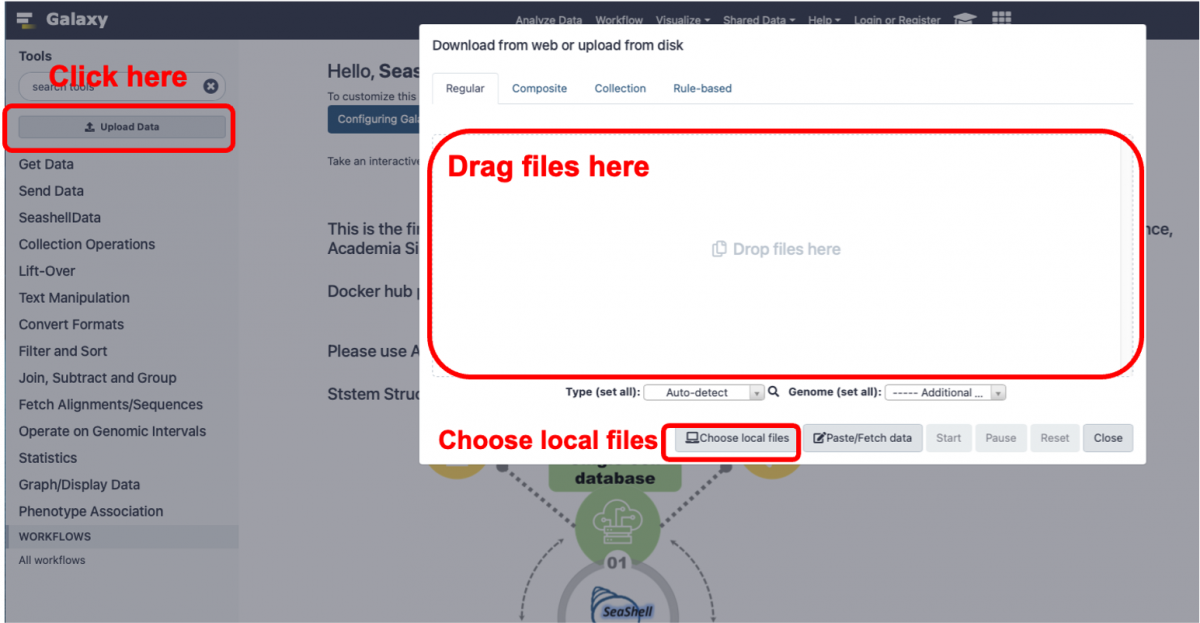
3-0. Upload files
3-1. CellRanger 3.0.2 -> output = 'matrix.mtx.gz', 'features.tsv.gz', 'barcodes.tsv.gz', and 'web_summary.html'
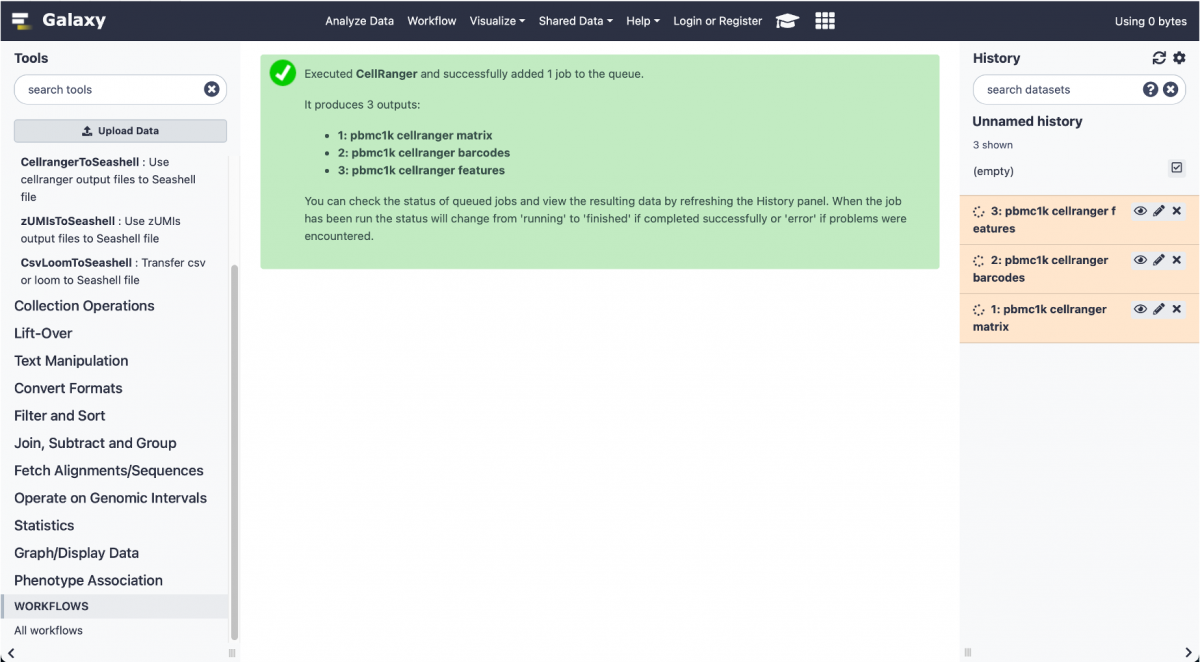
3-2. CellRanger to SeaShell_Analyzer data -> output = 'S01_preprocessed.rds'
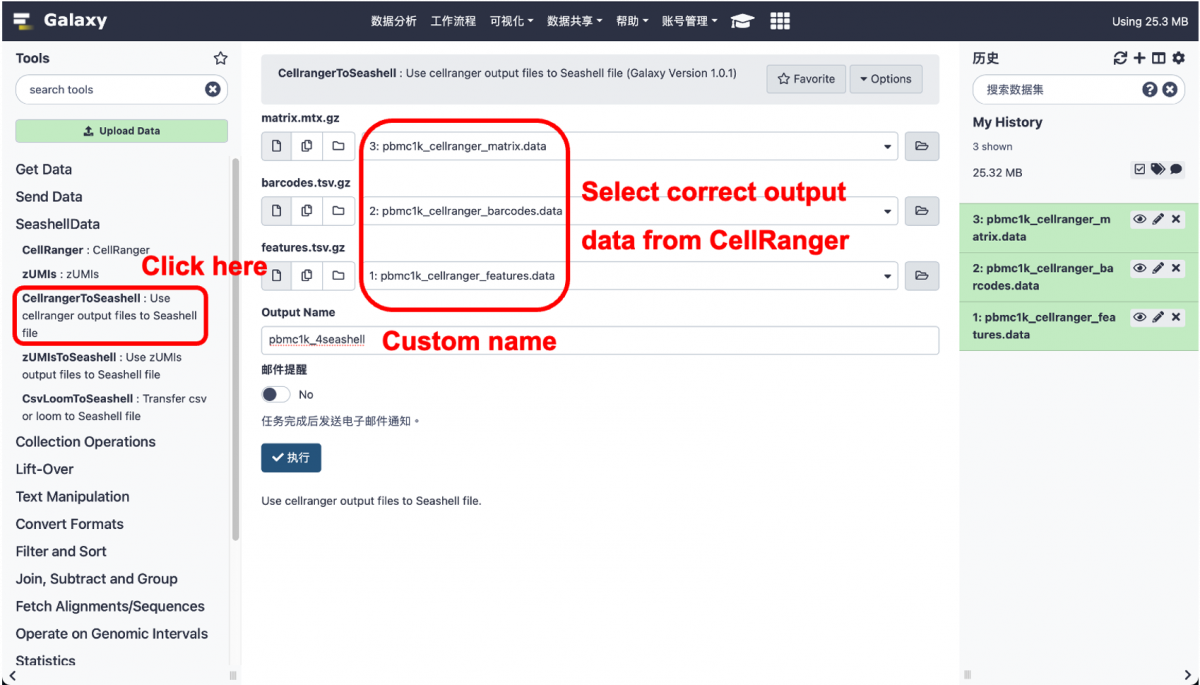
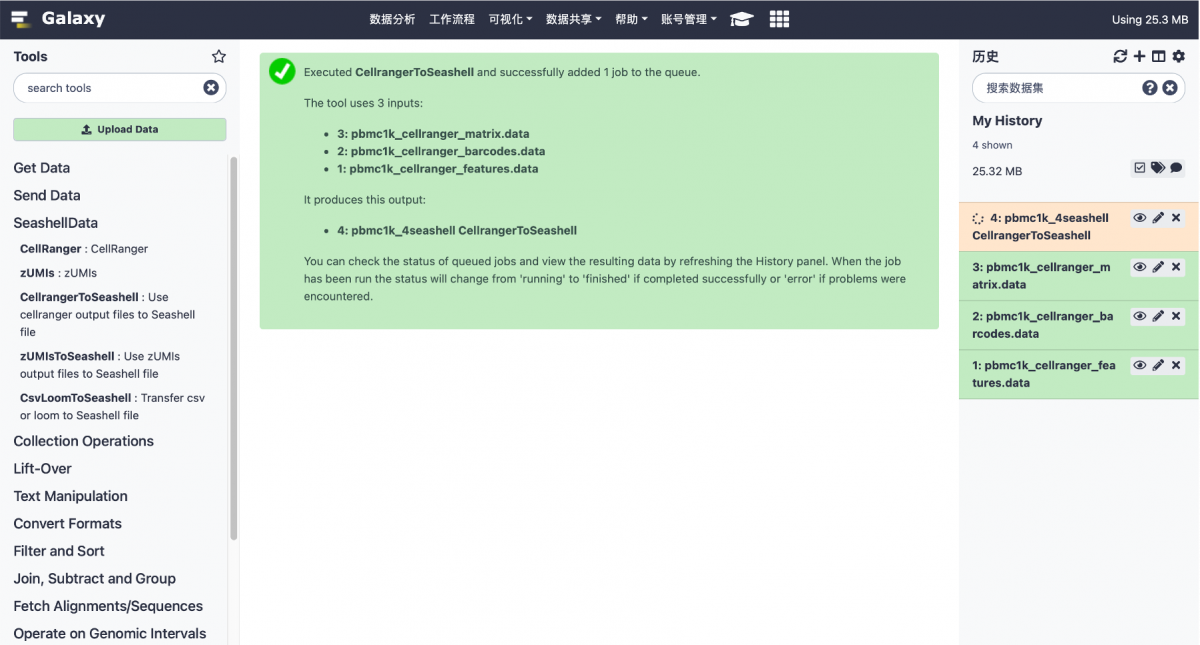
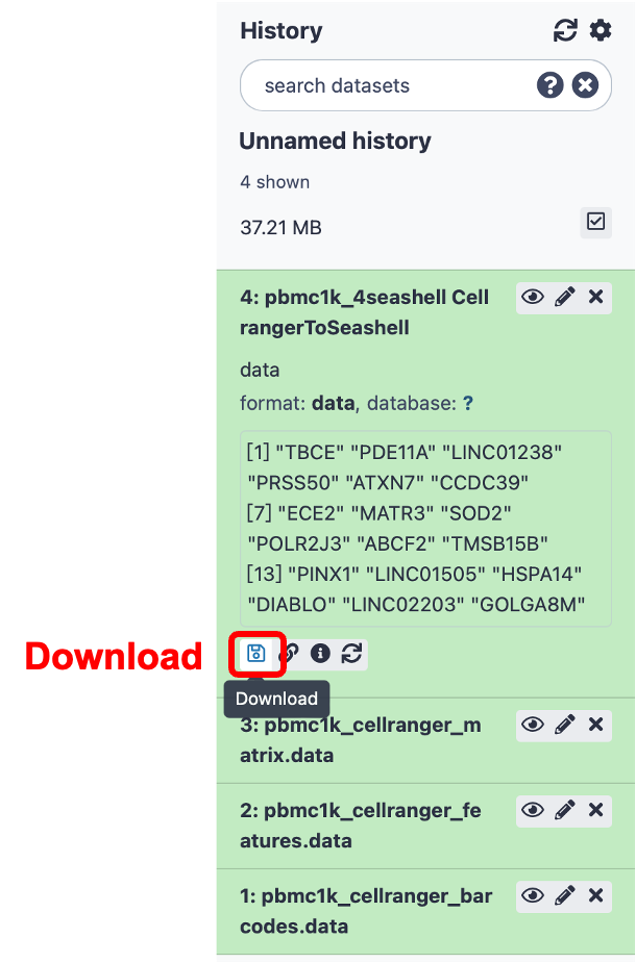
3-3. zUMIs 2.9.4 -> output = 'BD_Rhapsody.dgecounts.rds', 'BD_Rhapsody.readcount.exon.all.loom' and 'BD_Rhapsody.detected_cells.pdf'
3-4. zUMIs to SeaShell_Analyzer data -> output = 'S01_preprocessed.rds'
3-5. Csv or Loom to SeaShell_Analyzer data-> output = 'S01_preprocessed.rds'
4. Use Seashell_Analyzer
### Start Shiny server
docker exec seashell nohup shiny-server &

### Open the Seashell in the browser.
http://Your_IP_Address:8081/seashell/
5. Stop service
### remove seashell container
docker rm -f seashell
Current problems
- If the website is not active for a period of time, it will be automatically back to the home page.
- Only UMAP can be used in the clustering module.
Tag summary
Content type
Image
Digest
Size
6.5 GB
Last updated
almost 5 years ago
docker pull lsbnb/seashell