lsgrep/jumpget repository overview
JumpGet 

This tool makes sense if your network drops packets a lot. It works as if a file CDN on demand, assuming you have a good network connectivity on your VPS & you've set better TCP params on your VPS. I have a shitty network and this tool is making my life easier.
JumpGet client submits download url to the JumpGet server with ssh tunnel, then JumpGet server downloads & serves the
file only to the JumpGet client IPs(whitelisted).
Why?
-
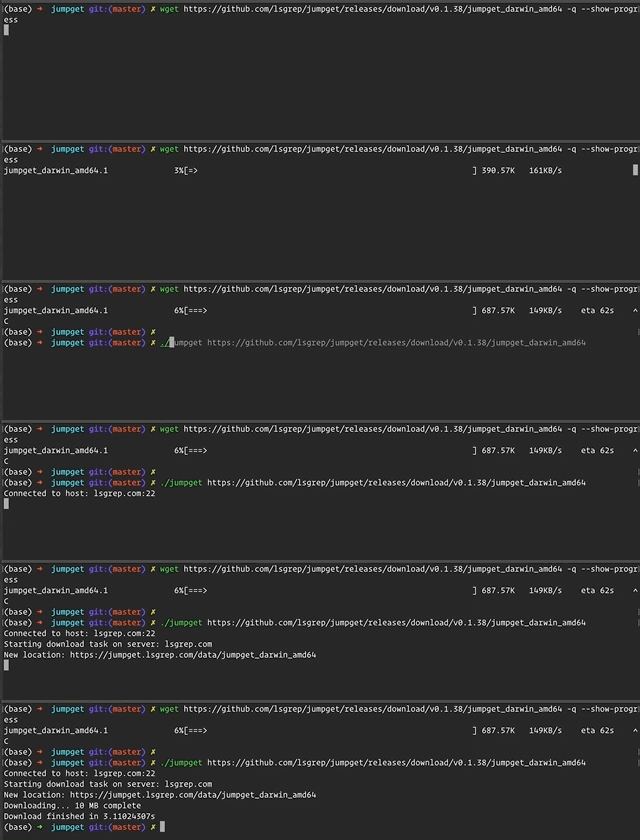
scp,rsyncare slow -
wgetvsJumpGet
Installation
JumpGet Server
-
You need a VPS instance with fast network. You can get a cheap instance from Linode ( referral link), Digital Ocean or AWS Lightsail etc.
-
Add your SSH public key to the server(
~/.ssh/authorized_keys). -
Setup the JumpGet Server
Without TLS
docker run --name jumpget -p 3100:3100 \
  -p 127.0.0.1:4100:4100 -d \
  -e JUMPGET_PUBLIC_PORT=3100 -e JUMPGET_LOCAL_PORT=4100 \
  -e JUMPGET_PUBLIC_URL="http://example.com:3100"  jumpget/jumpget
JumpGet Server with LetsEncrypt TLS
You can setup TLS with Traefik or Nginx. Checkout docker-compose.yaml for Traefik setup.
-
replace
[email protected]with your own email address -
relpace
jumpget.example.comwith your own domain name,assuming the DNS has been configured correctly
-
docker-compose up -d
JumpGet Client
Checkout Releases for CircleCi built binaries.
For *nix systems:
JUMPGET_LATEST_VERSION=$(curl -s https://api.github.com/repos/jumpget/jumpget/releases/latest | grep "tag_name" | cut -d'v' -f2 | cut -d'"' -f1)
sudo curl -L https://github.com/lsgrep/jumpget/releases/download/v${JUMPGET_LATEST_VERSION}/jumpget_$(uname -s|tr '[:upper:]' '[:lower:]')_amd64 -o /usr/local/bin/jumpget
sudo chmod +x /usr/local/bin/jumpget
or just:
go get -u github.com/lsgrep/jumpget
Configuration
Server Side Environment Variables
JUMPGET_LOCAL_PORTJUMPGET_PUBLIC_PORTJUMPGET_PUBLIC_URLJUMPGET_FILE_RETAIN_DURATIONdefault value 12, files will be deleted after 12 hours.
Client Configuration
$HOME/.jumpget.yaml stores client configuration info.
# $HOME/.jumpget.yaml
host: "example.com"
user: "example_user"
ssh-port: "2253"
jumpget --help to detailed information
JUMPGET_LOCAL_PORTdefault value 4100, this value should be consistent with server
Security
- If you put JumpGet server on the same machine with the proxy or VPN, keep in mind that your traffic will go directly to the server.
- Download tasks are submitted through
ssh - Public File Server can only accessed through whitelisted IPs
- whitelisted IPs are fetched through:
- $SSH_CONNECTION on JumpGet server
Performance
- Enable better TCP congestion control method on JumpGet server
# /etc/sysctl.conf
# you have to have >= 4.15 Linux kernel to use bbr
net.ipv4.tcp_congestion_control=bbr
Here are the full set of params I've tweaked for my VPS instance for better connectivity.
net.ipv4.ip_forward=1

# Uncomment the next line to enable packet forwarding for IPv6
#  Enabling this option disables Stateless Address Autoconfiguration
#  based on Router Advertisements for this host
net.ipv6.conf.all.forwarding=1
net.ipv4.conf.all.proxy_arp = 1
net.core.netdev_max_backlog = 250000


# Usually SIP uses TCP or UDP to carry the SIP signaling messages over the internet (<=> TCP/UDP sockets).
# The receive buffer (socket receive buffer) holds the received data until it is read by the application.
# The send buffer (socket transmit buffer) holds the data until it is read by the underling protocol in the network stack.

net.core.rmem_max = 67108864

net.core.wmem_max = 33554432

net.core.rmem_default = 31457280
net.core.wmem_default = 31457280

net.ipv4.tcp_rmem = 10240 87380 10485760
net.ipv4.tcp_wmem= 10240 87380 10485760

# Increase the write-buffer-space allocatable
net.ipv4.udp_rmem_min = 131072
net.ipv4.udp_wmem_min = 131072
# net.ipv4.udp_mem = 65536 131072 262144
net.ipv4.udp_mem = 19257652 19257652 19257652
net.ipv4.tcp_mem = 786432 1048576 26777216

# Increase the maximum amount of option memory buffers
net.core.optmem_max = 25165824


# Set the value of somaxconn. This is the Max value of the backlog. The default value is 128.
# If the backlog is greater than somaxconn, it will truncated to it.
net.core.somaxconn = 65535

# The kernel parameter "netdev_max_backlog" is the maximum size of the receive queue.
net.core.netdev_max_backlog = 300000

# change the maximum number of open files
# be sure that /proc/sys/fs/inode-max is 3-4 times the new value of
# /proc/sys/fs/file-max, or you will run out of inodes.
# The upper limit on fs.file-max is recorded in fs.nr_open (which is 1024*1024)
fs.file-max = 500000

# The value 0 makes the kernel swap only to avoid out of memory condition.
# Do less swapping
vm.swappiness = 10
vm.dirty_ratio = 60
vm.dirty_background_ratio = 2

# The default operating system limits on mmap counts is likely to be too low
# used by vmtouch
vm.max_map_count=262144

# the maximum size (in bytes) of a single shared segment that a Linux process can allocate in its virtual address space.
# 1/2 of physical RAM,  shared memory segment theoretically is 2^64bytes. This is correspond to all physical RAM that you have.
kernel.shmmax = 1073741824

# total port range
net.ipv4.ip_local_port_range = 1024 65535


# fast fast fast
net.ipv4.tcp_fastopen = 3

# bbr
net.core.default_qdisc=fq
net.ipv4.tcp_congestion_control=bbr
TODO
- find a way to detect JumpGet server availability
- make fetch IP process robust
Tag summary
Content type
Image
Digest
Size
8.9 MB
Last updated
almost 6 years ago
docker pull lsgrep/jumpget