
lu6fer/flood-rtorrent repository overview
[Archived]
The repo is archived, you can find a working image at https://github.com/jesec/flood
rtorrent-flood
Flood is a modern rtorrent client

Credits
image based on linuxserver.io/nginx-alpine base image
Build
Clone repository
glit clone https://github.com/lu6fer/rtorrent-flood
Build image
cd rtorrent-flood && docker build . -t rtorrent-flood
Usage
docker
docker run -d \
  --name torrent \
  -v <path/to/downloads>:/downloads \
  -v <path/to/config>:/config \
  -p 80:80 \
  -p 49184:49184 \
  -p 49184:49184/udp \
  -e PUID=1000 \
  -e PGID=1000 \
  -e FLOOD_SECRET="floodsecret" \
  -e RPC_USER="admin" \
  -e RPC_PASSWORD="rtorrentadmin" \
  --restart unless-stopped \
  lu6fer/flood-rtorrent:latest
docker-compose
---
version: "2"
services:
  rtorrent-flood:
    image: lu6fer/flood-rtorrent
    container_name: torrent
    environment:
      - PUID=1000
      - PGID=1000
      - FLOOD_SECRET="floodsecret"
      - RPC_USER="admin"
      - rpc_PASSWORD="rtorrentadmin"
    volumes:
      - <path/to/downloads>:/downloads
      - <path/to/config>:/config
    ports:
      - 80:80
      - 49184:49184
      - 49184:49184/udp
    restart: unless-stopped
Warning Startup me take a while, changing user:group to flood's node_module take some time. Be patient, the container will be up :)
Parameters
| Parameter | Function |
|---|---|
-p 80 | Web port (flood and rpc) port |
-p 49184 | Bit-torrent port (don't forget to open port on your router) |
-p 49184/udp | Bit-torrent port (don't forget to open port on your router) |
-e PUID=1000 | for UserID - see below for explanation |
-e PGID=1000 | for GroupID - see below for explanation |
-e FLOOD_SECRET=secret | Flood secret token required |
-e RTORRENT_PORT="49184-49184" | Bit-torrent port change port mapping |
-e RTORRENT_SOCK=true | using socket file or scgi port for rtorrent communication |
-e RTORRENT_SOCK_PATH=/config/.sessions/rtorrent.sock | where the socket is located if RTORRENT_SOCK=true |
-e WEBSERVER_PORT=80 | scgi port to use |
-e RPC_USER="admin" | User name for rtorrent XML-RPC connection |
-e RPC_PASSWORD="rtorrentadmin" | Password for rtorrent XML-RPC connection |
Flood
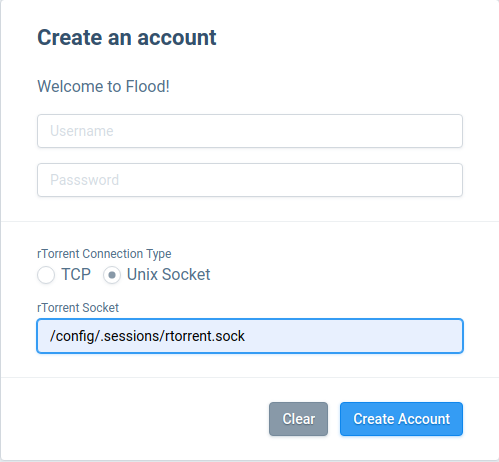
First login to Flood will ask you to create an account.
Configure your user name and your password,
then select Unix socket as rTorrent connexion type and put /config/.sessions/rtorrent.sock in rTorrent Socket field
Service
The flood UI is accessible via http://<ip-address>
The rtorrent RPC is accessible via http://<ip-address>/RPC2
User / Group Identifiers
When using volumes (-v flags) permissions issues can arise between the host OS and the container, we avoid this issue by allowing you to specify the user PUID and group PGID.
Ensure any volume directories on the host are owned by the same user you specify and any permissions issues will vanish like magic.
In this instance PUID=1000 and PGID=1000, to find yours use id user as below:
  $ id username
    uid=1000(dockeruser) gid=1000(dockergroup) groups=1000(dockergroup)
Tag summary
Content type
Image
Digest
Size
175.3 MB
Last updated
over 5 years ago
docker pull lu6fer/flood-rtorrent