lucifix/model-workshop-manager
Track your model kit stash, paint shelf, and builds — self-hosted, on your own hardware.
1.1K
lucifix/model-workshop-manager repository overview

Model Workshop Manager
Your model kit stash, paint shelf, and builds — self-hosted, on your own hardware.
Website · Quick start · Changelog · Discussions · Report a bug





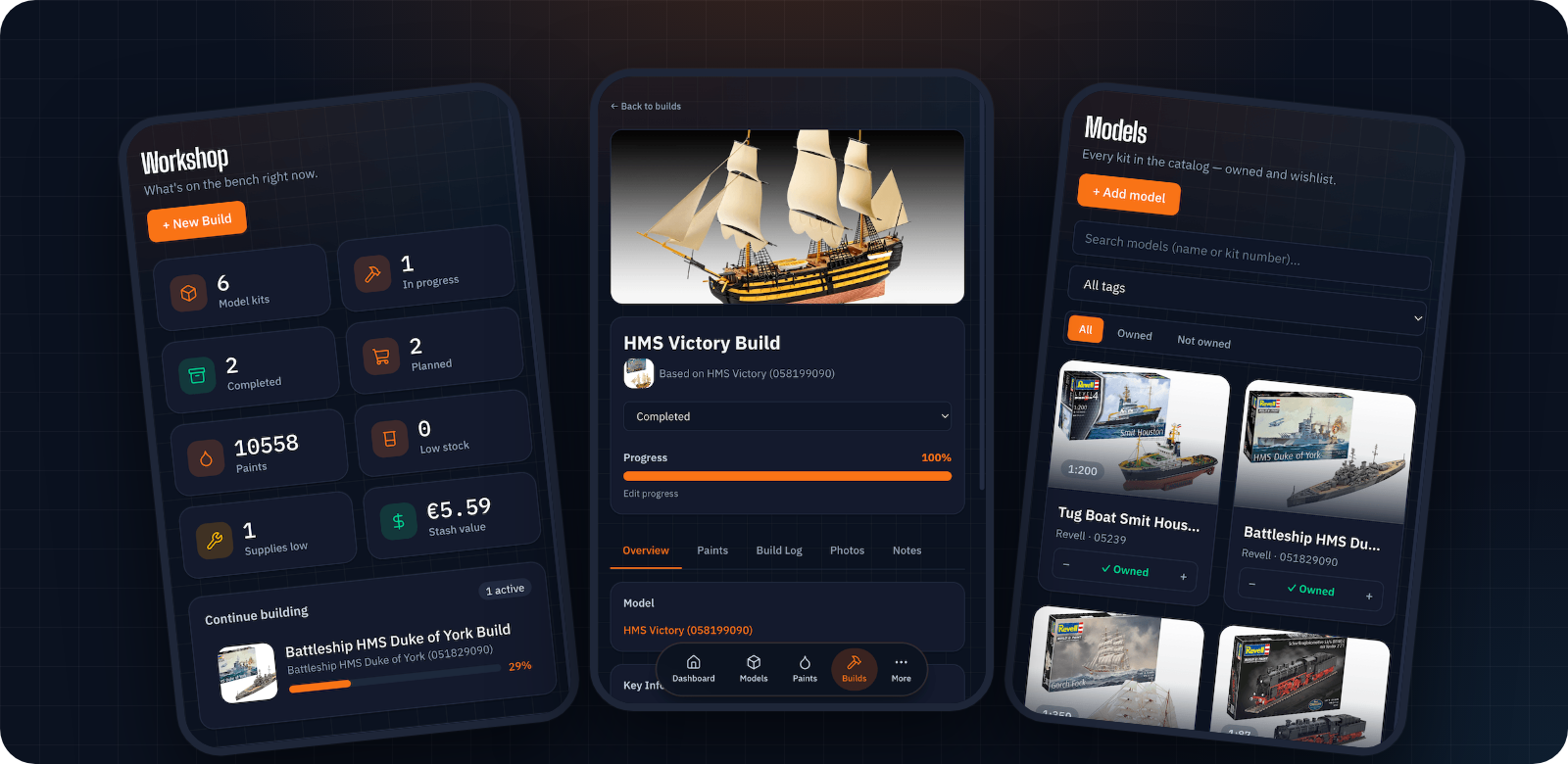
No more guessing whether you already own that Revell kit, digging through drawers for the right shade of Tamiya paint, or losing track of build progress. Model Workshop Manager keeps your catalog, inventory, and builds in one place — installable as an app on your phone or desktop, and running entirely on your own server.
Features
- 📦 Stash vs. catalog — a searchable catalog of models and paints, kept separate from what you actually own (and what's on your wishlist).
- 🎨 10,000+ paints in one click — the community miniature-paints dataset, with names, codes, and colors for 30+ brands: Tamiya, Vallejo, Citadel, Mr. Hobby, AK, Mig, Mission Models, Humbrol, Revell, and more. Find it under Import & Export → Import starter catalog.
- 📷 Barcode scanning — snap the barcode on a kit box and find out straight away if you already own it. Optional UPCitemdb lookup (off by default, enable in Settings) pre-fills name, brand, and box art.
- 🛠️ Builds — start one in a guided flow, log progress with timestamps and photos, and see "required vs. owned" paints for each project.
- 🛒 Shopping list & wishlist — one tap turns a build's missing paints into a shopping list; longer-term wants live in the wishlist.
- 🖌️ Supplies — brushes, cement, masking tape, and other consumables, with low-stock alerts.
- 📊 Dashboard — stash stats, low-stock and missing-paint alerts, and recent activity at a glance.
- 🔁 Import, export & backups — bring in an existing collection (or that spreadsheet you've been keeping) via CSV/JSON, and back up or restore from the UI.
- 📱 Installable app — add it to your phone's home screen or your desktop as a PWA.
- 🔒 Private by default — single-user login, one SQLite file, photos on your own disk. No accounts, no cloud, no tracking.
Quick start (Docker)
Two ways to run it: pull the published image (no clone needed — this is the one to use for a Portainer stack), or build from source.
Option A: pull the published image
Multi-arch (linux/amd64 + linux/arm64 — Raspberry Pi and ARM NAS boxes included):
- GHCR:
ghcr.io/lucifix/model-workshop-manager - Docker Hub:
docker.io/lucifix/model-workshop-manager
Paste this straight into Portainer (Stacks → Add stack → Web editor) or save it as
docker-compose.yml anywhere — nothing needs to be filled in:
services:
  app:
    image: ghcr.io/lucifix/model-workshop-manager:latest
    container_name: model-workshop-manager
    restart: unless-stopped
    ports:
      - 8080:3000
    environment:
      # Set true once you're serving this over HTTPS, or login will silently fail.
      SESSION_COOKIE_SECURE: "false"
      # Number of reverse proxies in front of the app, if any. Omit if none.
      # TRUST_PROXY: 1
    volumes:
      - workshop-data:/data
      - workshop-backups:/backups

volumes:
  workshop-data:
  workshop-backups:
Everything else (database path, uploads, port inside the container) is baked into the image.
For the full file — including the optional nightly-backup sidecar and bind-mount options — use
docker-compose.yml from this repo:
mkdir model-workshop-manager && cd model-workshop-manager
curl -O https://raw.githubusercontent.com/Lucifix/model-workshop-manager/main/docker-compose.yml
curl -O https://raw.githubusercontent.com/Lucifix/model-workshop-manager/main/.env.example
cp .env.example .env          # optional tweaks — nothing required
docker compose pull
docker compose up -d
Updating: docker compose pull && docker compose up -d — see CHANGELOG.md
for what's new.
Option B: build from source
git clone https://github.com/Lucifix/model-workshop-manager.git && cd model-workshop-manager
cp .env.example .env          # optional tweaks — nothing required
docker compose up -d --build  # migrations run automatically on boot
Updating: git pull && docker compose up -d --build
Both options open http://localhost:8080 (or whatever HOST_PORT you set) — first visit shows a
one-time setup screen to create your username/password, then you're logged in. To start with a
full paint catalog instead of an empty one, open Import & Export → Import starter catalog.
Stopping: docker compose down (your data lives in the workshop-data volume, untouched)
Before you expose this anywhere: it's a single-user app meant for your LAN or a VPN (Tailscale/WireGuard), not the open internet. See Security below.
Environment variables
Nothing is required — every variable has a working default.
All variables
All set in .env (copied from .env.example), read by docker-compose.yml.
| Variable | Required | Default | What it does |
|---|---|---|---|
SESSION_SECRET | No | (generated) | Signs the session cookie. Unset, a random key is generated on first boot into the data volume (/data/session-secret). Set it only to pin your own key. |
SESSION_COOKIE_SECURE | No | false | Set true once served over HTTPS — otherwise the browser won't send the cookie and login silently fails. |
TRUST_PROXY | No | (off) | Set to the number of reverse proxies in front of the app (usually 1) so the login rate limiter sees real client IPs. true is refused — it's spoofable. |
HOST_PORT | No | 8080 | Host port the app is served on. |
APP_PORT | No | 3000 | Port the app listens on inside the container. Rarely needs changing. |
APP_IMAGE_TAG | No | latest | Which published image tag to run (latest, or a pinned version like 1.2.3). Ignored when building from source. |
APP_UID / APP_GID | No | 1000 | uid:gid the container runs as. Set these to match the owner of WORKSHOP_DATA_DIR/BACKUP_DIR if bind-mounting. |
WORKSHOP_DATA_DIR | No | (named volume) | Host path for the database + uploaded photos, instead of the workshop-data Docker volume — e.g. a NAS mount. |
BACKUP_DIR | No | ./backups | Host path where backups (in-app, manual script, and the nightly job) are written. |
BACKUP_RETENTION_DAYS | No | 14 | How many days of nightly backups to keep before pruning. |
Local development
A single React Router v8 (framework mode) app → Express → Drizzle ORM → SQLite, one Node process behind Docker Compose. React + TypeScript UI and API resource routes live in the same app; photos live on disk, never as DB blobs.
Requires Node.js 22+ (see .nvmrc — better-sqlite3 needs a matching native build; older Node
versions fail silently instead of erroring).
npm install
npm run db:migrate && npm run db:seed   # first time only
npm run dev                              # :3000 — one process, UI + API
Open http://localhost:3000. Run tests with npm test.
Security
This is a single-user private app and it requires login — but login raises the bar, it isn't a substitute for not exposing an unaudited personal app to the open internet. Keep it behind a reverse proxy, LAN-only or on a VPN.
Implementation details
- The whole API is protected by default (allow-list of exactly four public paths:
/api/health,/api/auth/login,/api/auth/me,/api/auth/setup) — new routes are guarded automatically. - Credentials are one username/password row in the database (no user table — deliberately
single-user), hashed with scrypt. First visit to a fresh install shows a one-time setup screen
to create them;
AUTH_USERNAME/AUTH_PASSWORDin.envare an optional way to seed that same row on first boot instead (e.g. bringing an existing deployment forward) and are never read again afterwards. Change your password any time from Settings. Forgot it? There's no email flow — rundocker compose exec app npm run auth:resetand you'll get the setup screen again (or, ifAUTH_USERNAME/AUTH_PASSWORDare still set in.env, the next restart quietly recreates that same login instead — remove them from.envfirst if you want a blank setup screen). - Sessions are a signed,
httpOnlycookie (React Router's cookie session storage) — no server-side session store to run or lose. The 30-day expiry is stored inside the signed payload and checked on every request, not left to the browser's cookie lifetime. - With no session store there is nothing to delete, so logging out can only clear the browser's
copy of the cookie. Changing your password (or running
auth:reset) invalidates every other existing session immediately, the same way — no reason to also rotate the signing key for that. Deleting/data/session-secret(or changingSESSION_SECRET, if you set one) and restarting remains the blunter, whole-app option. - The login endpoint is rate-limited (5 attempts/minute). Behind a reverse
proxy, set
TRUST_PROXY(see the table above) or that budget is shared across all clients rather than counted per client. - The cookie-signing key is 32 random bytes generated on first boot and stored with
0600permissions at/data/session-secret, outside the database — so a backup restore doesn't sign you out.SESSION_SECREToverrides it if set. - Set
SESSION_COOKIE_SECURE=trueonce this is served over HTTPS, otherwise the browser won't send the cookie and login will silently fail. - File uploads are size-capped (25 MB/file) but not otherwise scanned.
Backup & restore
Three ways to get a backup, easiest first: the Backups tab in the app (create, list,
download, restore, delete), an automated nightly snapshot (a docker-volume-backup sidecar
container, opt-in — see below), or ./scripts/backup.sh for a manual one from the shell. All
three produce the same tarball format, so a backup from any one can be restored via any other.
Details
- In-app Backups tab (Import & Export page) — the easiest path day to day. Uploaded archives are capped at 2 GiB, and refused if they expand past 4 GiB on extraction.
- Automated nightly backup — opt-in:
docker compose --profile backup up -d. Thebackupservice indocker-compose.yml(offen/docker-volume-backup) snapshots theworkshop-datavolume toBACKUP_DIRevery night at 03:00, pruning byBACKUP_RETENTION_DAYS. PointBACKUP_DIRat a real host path already covered by whatever backs up your other apps. It's opt-in because it needs access to the Docker socket to pause the app during the snapshot, which is root-equivalent on the host — the in-app Backups tab above doesn't need it. - Manual script —
./scripts/backup.shwrites a timestamped.tar.gzof the database and uploaded photos to$BACKUP_DIR. Restore steps are in the comments at the top of the script: stop the stack, extract the tarball'sdatabase/anduploads/into theworkshop-datavolume, restart.
Contributing
Bug reports, feature requests, and PRs are welcome — see CONTRIBUTING.md for dev setup and conventions. Please also read the Code of Conduct. Found a security issue? See SECURITY.md instead of opening a public issue.
License
If this saves you from buying the same kit twice, a ⭐ helps other modellers find it.
Tag summary
Content type
Image
Digest
sha256:f5060686d…
Size
134.7 MB
Last updated
2 days ago
docker pull lucifix/model-workshop-manager