macbre/phantomas
Headless Chromium-based web performance metrics collector and monitoring tool
6.6K
macbre/phantomas repository overview
phantomas





Headless Chromium-based modular web performance metrics collector. And why phantomas? Well, because :)
Requirements
- NodeJS 12+
Installation
Via npm

npm install phantomas
This will install a recent version of Chromium supported by
puppeteermodule.
Via Docker
You can use phantomas Docker image:
docker pull macbre/phantomas:latest
Or you can fetch from GitHub's Containers registry
docker pull ghcr.io/macbre/phantomas:latest
Support
You can get support for phantomas via xs:code.
Usage example
const phantomas = require('phantomas'),
    promise = phantomas('http://example.com/');

promise.
    then(results => {
        console.log('Metrics', results.getMetrics());
        console.log('Offenders', results.getAllOffenders());
    }).
    catch(res => {
        console.error(res);
    });

// events handling
promise.on('recv', response => {
    console.log('Response: %s %s [%s]', response.method, response.url, response.contentType);
});

// including the custom one emitted by phantomas modules
promise.on('domQuery', (type, query) => {
        console.log('DOM query by %s - "%s"', type, query);
});
Or run ./examples/index.js.
Development version
To get the latest development version of phantomas (and install all required dependencies):
git clone [email protected]:macbre/phantomas.git
npm install
Running tests
First you need to start a local nginx container that will serve static assets used by integration tests suite. Then simply run npm t:
./test/server-start.sh
npm t
All pull requests that are filed for this repository will have tests run via GitHub Actions.
Having problems?
Please refer to /Troubleshooting.md
Features
- modular approach - each metric is generated by a separate "module"
- phantomas "core" acts as an events emitter that each module can hook into
- in-depth metrics such as: number of events bound via jQuery, calls to
window.writeor complex and duplicated CSS selectors (via analyze-css) - JSON as an output format
- easy integration with other nodejs projects via CommonJS module (see API docs)
- metrics can be emitted from JavaScript code of the page phantomas is run against (thanks to helper functions available in window.__phantomas)
- device profiles allow phantomas to emulate mobile or tablet (by setting a proper user agent and viewport)
Contributors
All the contributors
- macbre
- sjhcockrell
- jgonera
- william-p
- gmetais
- vgangan
- cphoover
- wladekb
- iNem0o
- gomezd
- stefanjudis
Usage
phantomas comes as a CommonJS module (see API docs) that you can use in your nodejs projects.
You can also use it as a command line tool. Run phantomas -h for more details.
Metrics
Please refer to
/docs/metrics.mdfile for a full, up-to-date list of all available modules and metrics that phantomas emits.
For developers
Let's make Web a bit faster!
- Best Practices for Speeding Up Your Web Site (by Yahoo!)
- Web Performance Best Practices (by Google)
- Planet Performance - news and views from the web performance blogosphere
- Performance of 3rd Party Content (by Steve Souders)
- Profiling CSS for fun and profit. Optimization notes.
Slides
- Know Your Engines: How to Make Your JavaScript Fast (by David Mandelin from Mozilla)
- Velocity Conf 2013 Workshop: Avoiding Web Performance Regression (by Marcel Duran from Twitter)
Blogosphere
Introductions to phantomas and use cases:
- phantomas – PhantomJS based, modular web performance metrics generator (an article for Performance Calendar)
- How to Measure Frontend Performance With Grunt
- MaxCDN Blog - Behind The Scenes: tools.maxcdn.com
- Measuring frontend performance
- Performance Budgets with Phantomas and Jenkins
- phantomas introduced at npmawesome.com
- Grunt.js for the Enterprise - Vol.1: Frontend Performance with Phantomas (by David Amend)
- Automated Frontend Testing at DrupalCon Austin 2014 (+video)
- Phantomas: Fais-moi un strip ! (in French)
- Untangle the JavaScript spaghetti code with YellowLabTools
Videos
Utilities
Use grunt to automate daily dev tasks, including your's application web performance, via these great tools:
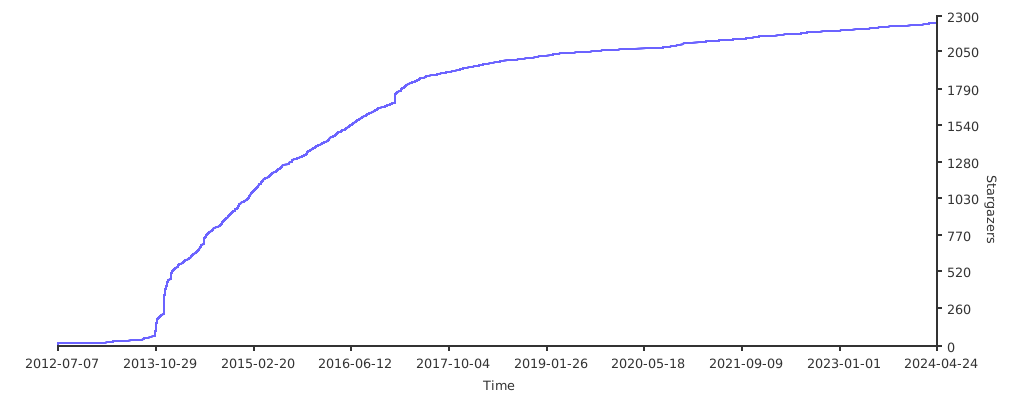
Stargazers over time
Tag summary
Content type
Image
Digest
sha256:775b85e6c…
Size
513.6 MB
Last updated
12 days ago
docker pull macbre/phantomas