mangolila/stockportfolio
Browser-based portfolio management with market data, charts and rebalancing. Powered by StockInfo.
72
mangolila/stockportfolio repository overview
StockPortfolio
Manage your portfolio in the browser: market data, valuation, price charts, target allocations and rebalancing simulations.
GitHub repository — documentation, source code and setup
StockPortfolio is a web app. Market data comes from a separate StockInfo instance that you provide. It does not connect to a brokerage or place orders.
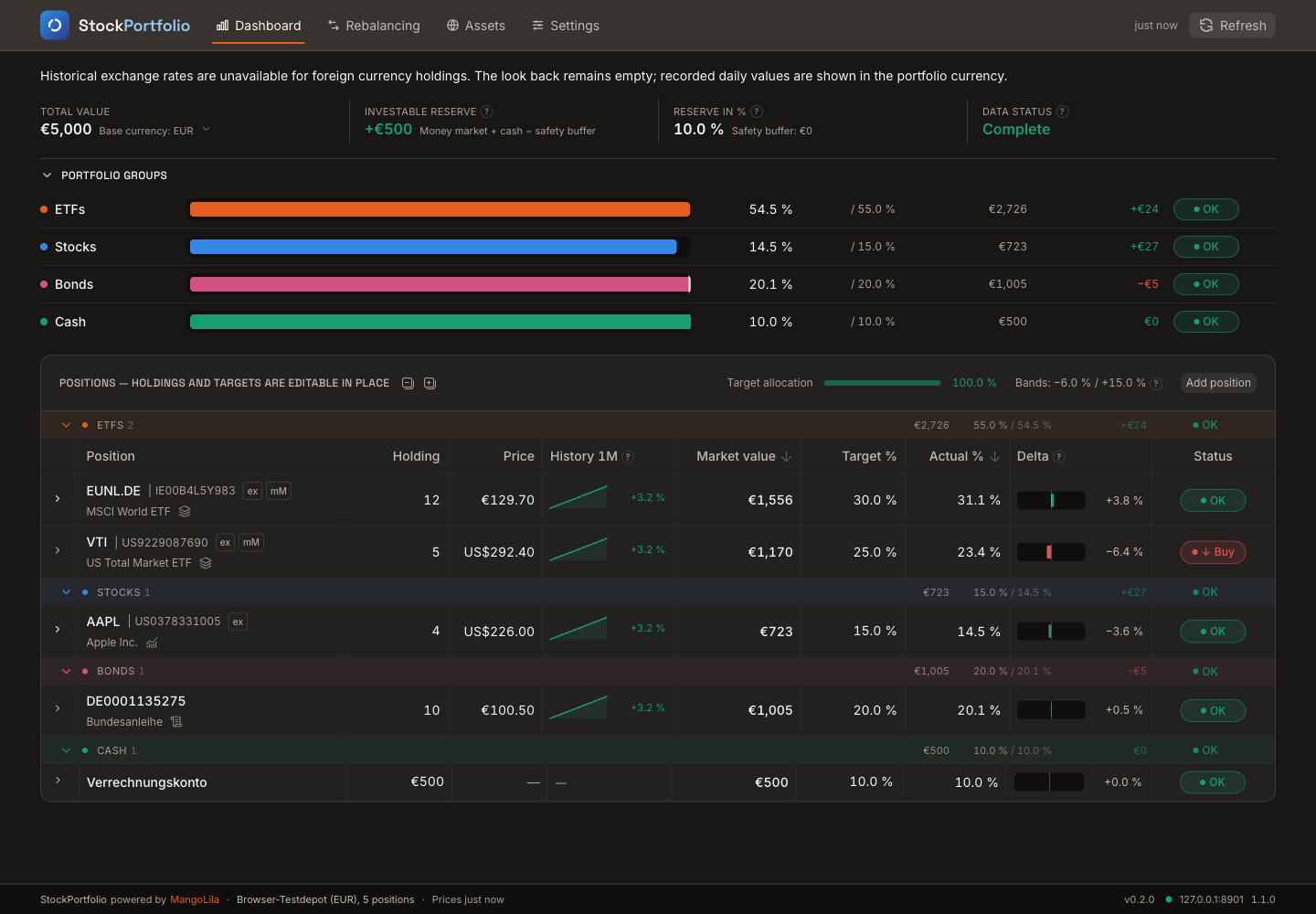
The dashboard: portfolio groups at the top, positions below. Holdings and targets are editable in place and through the position dialog. The screenshot shows the reusable browser test portfolio with sample quotes, in English.
Features
- Track holdings, cash and target allocations in portfolio groups.
- Value positions in your portfolio's base currency, with currency conversion.
- View price history, asset information and your own position notes.
- Plan rebalancing trades using tolerance bands or a schedule.
- Use the responsive interface in English or German, with light and dark themes.
- Export and restore portfolios and settings as JSON backups.
Quick start
Replace the example API URL with your StockInfo address:
docker run -d --name stockportfolio \
  -p 8080:8080 \
  -e STOCKINFO_API_URL=https://stockinfo.example.com \
  --restart unless-stopped \
  mangolila/stockportfolio:latest
Open http://localhost:8080, or use your Docker host's address.
The port mapping above accepts connections on the Docker host's network interfaces. The web interface has no built-in login; access control belongs in your network or reverse proxy. To allow access only from the Docker host, use -p 127.0.0.1:8080:8080 instead.
The browser connects directly to StockInfo. The API address must be reachable from the browser; a Docker-internal hostname usually is not. StockInfo must allow the web app's origin through CORS. For example, when opening the app at http://nas:8080, allow that exact origin in StockInfo. An HTTPS web address requires an HTTPS API.
There is no built-in public API. Without an API address, the app shows a configuration error. The active address and connection status are visible under Settings → Status.
Docker Compose
services:
  stockportfolio:
    image: mangolila/stockportfolio:latest
    ports:
      - "8080:8080"
    environment:
      STOCKINFO_API_URL: https://stockinfo.example.com
      TZ: Europe/Vienna
    restart: unless-stopped
Start with docker compose up -d.
Configuration
| Setting | Meaning |
|---|---|
Container port 8080/tcp | Web interface; map it to your preferred host port. |
STOCKINFO_API_URL | Your StockInfo API URL, reachable from the browser. Set it when starting the container. |
TZ | Container log timezone; defaults to UTC. The interface uses the browser's timezone. |
Restart the container after changing its environment variables. The image runs as user node (UID/GID 1000), without privileged mode. Its healthcheck verifies that the web page is served; it does not test StockInfo. The default build targets linux/amd64, including x86 Unraid servers.
Status and logs
docker ps --filter name=stockportfolio
docker logs --tail 100 stockportfolio
The container should become healthy after startup. For missing quotes or API connection errors, also check Settings → Status in the web interface.
Data and backups
Portfolio data and settings live in the browser. The container needs no database or appdata volume. Backing up the Docker host does not back up your portfolio.
Use Settings → Backup to download a JSON backup or restore one. Downloads are saved by your browser, normally in its Downloads folder. Other devices, browser profiles and web addresses have separate storage.
Keep the same web address and host port when updating. Clearing the browser's site data removes the locally stored portfolio.
Updating
With Compose:
docker compose pull
docker compose up -d
For docker run, pull the new image and recreate the container with the same environment and host port.
Upgrading from an older image: the container port changed from 80 to 8080. Update the container side of the mapping while keeping the host port unchanged, for example 8088:80 becomes 8088:8080.
Unraid and support
Use mangolila/stockportfolio:latest, map container port 8080, and set STOCKINFO_API_URL. No volume mapping is needed. The image includes WebUI and icon labels for Unraid.
Tag summary
Content type
Image
Digest
sha256:1a4a938a8…
Size
80.1 MB
Last updated
about 9 hours ago
docker pull mangolila/stockportfolio