markccchiang/texture-workbench
Texture analysis of image regions (GLCM/Haralick, GLRLM, GLSZM, NGTDM, LBP) in your web browser
228
markccchiang/texture-workbench repository overview

Texture Workbench measures the texture of regions in images: how smooth, coarse, uniform or directional a tissue, material or surface looks, as numbers you can compare between regions and images. It runs in your web browser.
This image contains the web app and its server, the glcm command line (with an MCP server for AI assistants), the
sample images and the documentation.
- Features: first-order statistics, co-occurrence (GLCM, Haralick), run length (GLRLM), size zone (GLSZM), gray tone difference (NGTDM), local binary patterns (LBP) and 2D shape, tested against PyRadiomics and scikit-image.
- Images: PNG, JPEG, BMP and TIFF (8 or 16 bits), DICOM images and series, and NIfTI volumes.
- Source: github.com/markccchiang/texture-workbench-docker (this image) and github.com/markccchiang/texture-workbench (the application).
Tags
| Tag | Texture Workbench | Platforms |
|---|---|---|
latest, 0.1.0 | 0.1.0 | linux/amd64, linux/arm64 |
latest follows the newest release. Pin a version tag, such as 0.1.0, if you need results that do not change.
Quick start
docker run -d --name texture-workbench -p 127.0.0.1:8080:8080 -v texture-data:/data markccchiang/texture-workbench
docker logs texture-workbench          # shows the access token
Open http://localhost:8080/, enter the access token from the log when the web app asks for it, and click Open sample image. The user guide and the equation of every feature are at http://localhost:8080/docs/.
The access token
Inside a container the server accepts connections from outside the container, which Texture Workbench treats as server mode, and server mode requires an access token.
-
No token given: the container makes one when it starts and prints it in its log. It changes on every start.
-
Your own token: at least 43 characters. It stays the same across restarts:
export GLCM_API_TOKEN="$(openssl rand -base64 32)"
docker run -d --name texture-workbench -p 127.0.0.1:8080:8080 -v texture-data:/data \
    -e GLCM_API_TOKEN markccchiang/texture-workbench
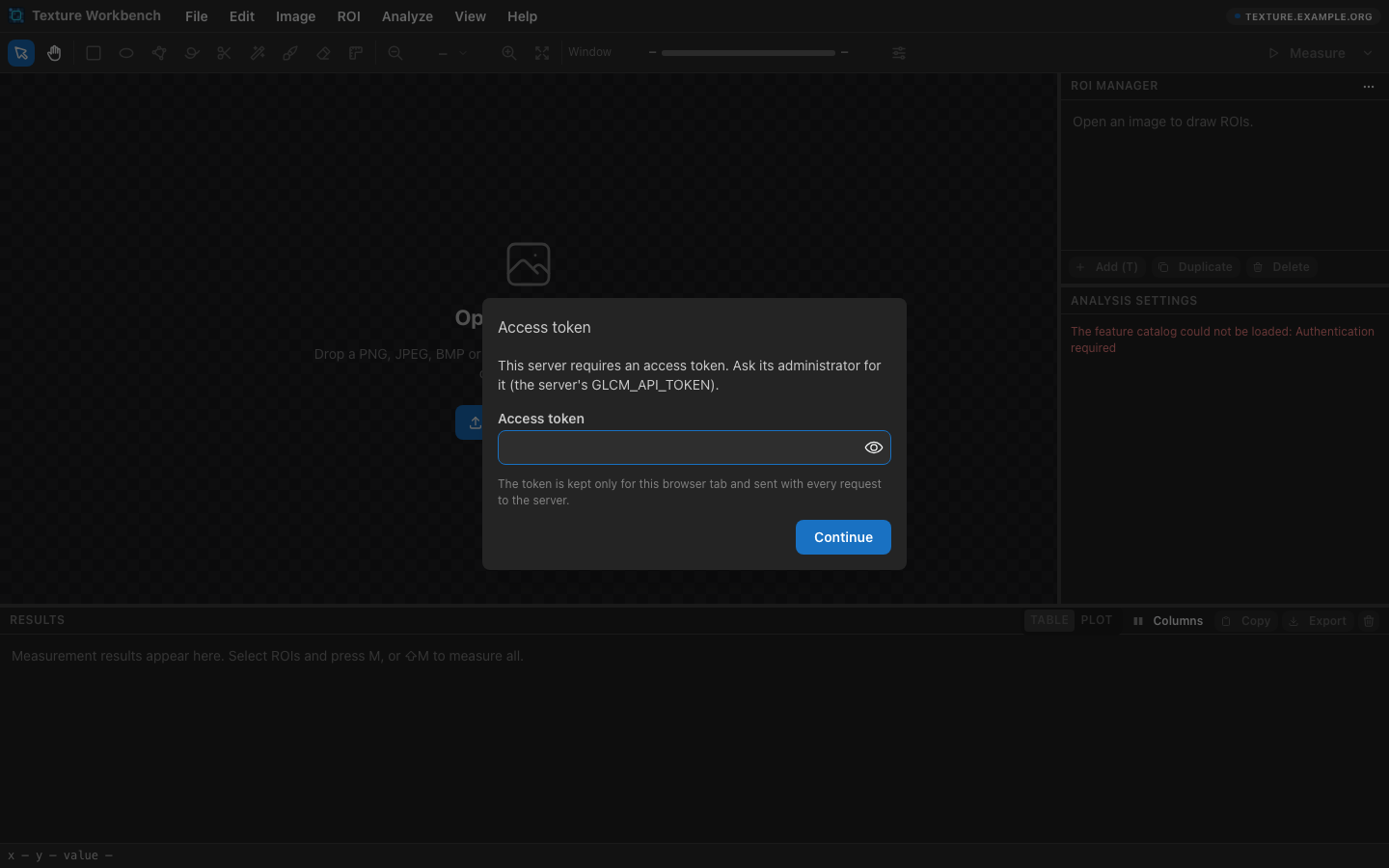
The web app asks for the token once per browser tab:
Keeping your data
Uploaded images, results and caches are stored in the /data volume. In server mode, images and results older than 7
days are deleted automatically; for a personal installation, turn that off with -e GLCM_RETENTION_HOURS=0. Projects
and exports saved from the web app to your computer are not affected.
The command line (glcm)
# The commands and the feature presets
docker run --rm markccchiang/texture-workbench glcm --help
docker run --rm markccchiang/texture-workbench glcm features --presets

# Measure a sample image
docker run --rm markccchiang/texture-workbench glcm measure sample:textures/brick.png --preset haralick

# Measure your own images in the current folder and write the results there
docker run --rm -v "$PWD":/work -w /work markccchiang/texture-workbench \
    glcm measure image.png --preset all --out results.csv

# Send a command to a running container's server
docker exec texture-workbench glcm measure sample:textures/brick.png --preset haralick
On Linux the container runs as UID 1000. To write output files as yourself, add
--user "$(id -u):$(id -g)" -e GLCM_DATA_DIR=/tmp/glcm.
AI assistants (MCP): glcm mcp lets an assistant open images, select regions and measure them. For Claude Code:
claude mcp add texture-workbench -- docker run --rm -i markccchiang/texture-workbench glcm mcp
Docker Compose
services:
  texture-workbench:
    image: markccchiang/texture-workbench
    ports:
      - "127.0.0.1:8080:8080"
    environment:
      GLCM_API_TOKEN: ${GLCM_API_TOKEN:?Set GLCM_API_TOKEN, e.g. export GLCM_API_TOKEN="$(openssl rand -base64 32)"}
      GLCM_RETENTION_HOURS: "0"
    volumes:
      - texture-data:/data
    restart: unless-stopped

volumes:
  texture-data:
Sharing the server with other users
-
Start it with a fixed token (see above),
--restart unless-stoppedand-e GLCM_TRUST_PROXY=true, still published on127.0.0.1only. -
Put a reverse proxy with HTTPS in front of it, so the token is never sent unencrypted. With Caddy:
texture.example.org { reverse_proxy 127.0.0.1:8080 } -
Give users the address and send them the token privately. They enter it in the web app, or pass it to the command line with
--server https://texture.example.org --token "$TOKEN".
Everyone shares the same token and the same data. To take access away, start a new container with a new token. See the deployment guide for nginx and a security checklist.
Configuration
| Variable | Default | Meaning |
|---|---|---|
GLCM_API_TOKEN | made at start-up | Access token, at least 43 characters |
GLCM_PORT | 8080 | Port inside the container |
GLCM_RETENTION_HOURS | 168 | Delete uploads and results older than this; 0 keeps everything |
GLCM_RATE_LIMIT_PER_MINUTE | 600 | API requests per minute per token; 0 for no limit |
GLCM_MAX_UPLOAD_BYTES | 100 MiB | Largest upload |
GLCM_ANALYSIS_CONCURRENCY | CPU cores | Analysis jobs running at the same time |
GLCM_TRUST_PROXY | false | true behind a reverse proxy |
All variables are listed in the developer guide.
Image details
- Based on
node:24-bookworm-slim(Debian 12). OpenCV is compiled with only the modules and image formats the application uses and linked into it, which keeps the image at about 130 MB to download (440 MB unpacked). - Runs as the unprivileged
nodeuser (UID 1000), exposes port8080, keeps its data in the/datavolume, and has a health check on/api/v1/health. - The
Dockerfileand instructions for building the image yourself (another branch, a fork, without the documentation) are on GitHub.
License
Texture Workbench and this image's Dockerfile are released under the MIT License. The sample images and the software in
the image (OpenCV, Node.js, Debian packages and other dependencies) keep their own licenses; see the
texture-workbench repository.
Tag summary
Content type
Image
Digest
sha256:4a46e6540…
Size
123.5 MB
Last updated
21 days ago
docker pull markccchiang/texture-workbench