markolofsen/cmdop
An AI agent inside the container you already have — two Dockerfile lines, your app keeps PID 1.
244
markolofsen/cmdop repository overview
Cmdop — an AI agent inside the container you already have
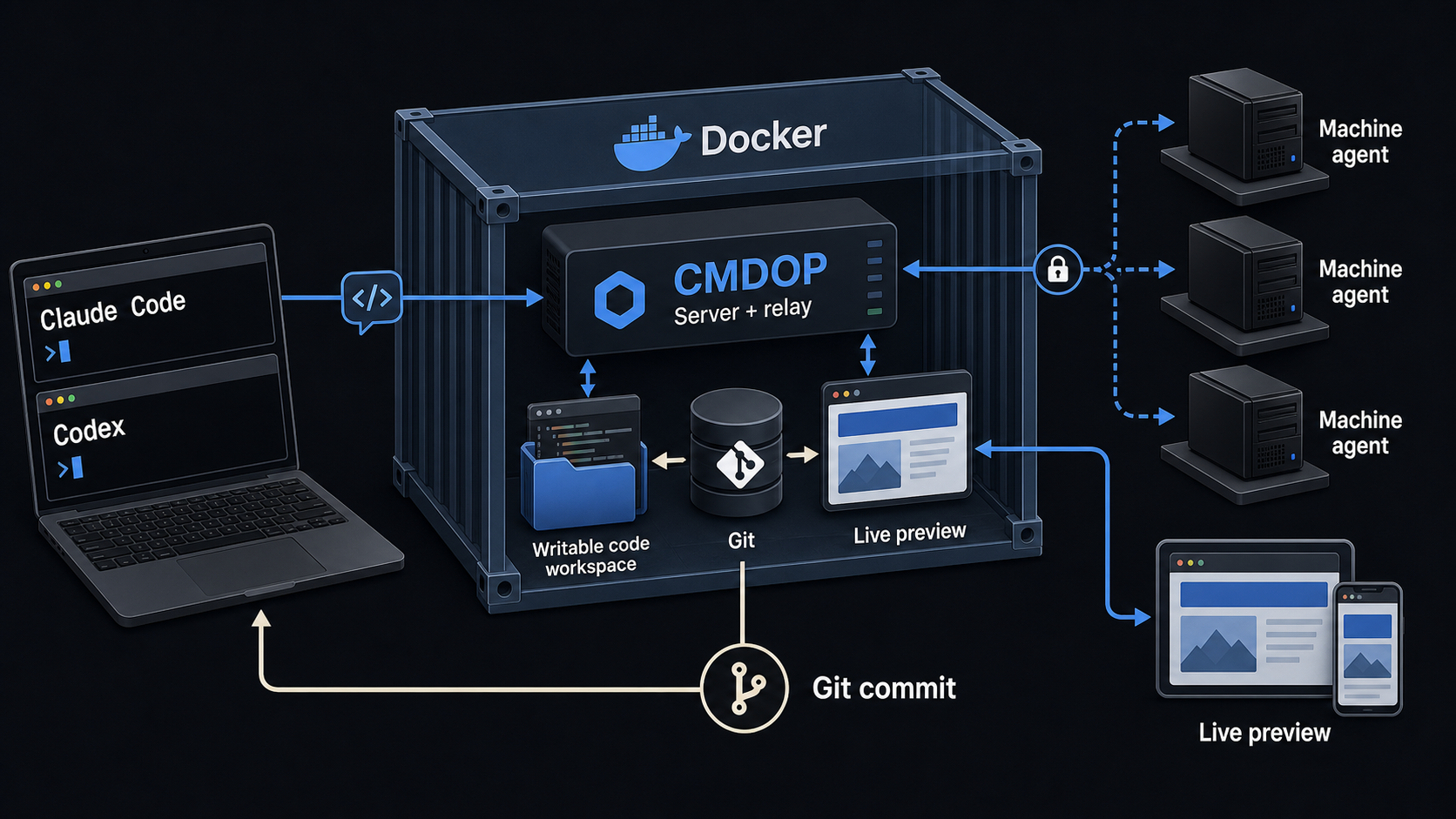
Two lines put a Cmdop agent beside your own application. Your process keeps PID 1; Cmdop rides along.
FROM your-image                                    # unchanged
COPY --from=markolofsen/cmdop:latest /cmdop /usr/local/bin/cmdop
ENTRYPOINT ["cmdop", "sidecar", "--"]
CMD ["your-app", "--your", "flags"]                # unchanged
Then hand it the fleet's join key:
docker run -d \
  -e CMDOP_SERVER_URL=https://your-team.cmdop.dev \
  -e CMDOP_JOIN_KEY=cmdop_enroll_xxxxxxxx \
  -e CMDOP_MACHINE_NAME=api-01 \
  -e HOME=/state -v cmdop-state:/state \
  your-image
The machine appears in your fleet: terminal, file access, AI chat, remote execution — from a browser, the CLI, or your phone.
What sidecar does
It starts the agent in the background, then execs your command. That word
is the whole design:
docker stopdelivers SIGTERM to your app, and its own graceful shutdown runs unchanged;- the container's exit code is your exit code;
restart:policies behave exactly as before.
Three rules follow from "your app is the point":
- A failing agent never blocks your app. Wrong key, unreachable relay, no network — Cmdop logs it and your command still starts.
- No join key, no Cmdop. With the variables unset,
sidecaris a plainexec. The same image runs unchanged where it was never enrolled. - Your flags stay yours. Everything after
--passes through untouched, socmdop sidecar -- myapp --versionprints your version.
Any base image
The binary links no libc, so Alpine, Debian, distroless and even scratch all
work. Nothing else is added to your image — this one carries no shell and
exists only to be copied from.
Settings worth knowing
| Variable | Why |
|---|---|
CMDOP_SERVER_URL | the relay to join |
CMDOP_JOIN_KEY | the fleet's join key (cmdop server join-key on the relay host) |
CMDOP_JOIN_KEY_FILE | path to a mounted secret — preferred: an env var is visible to docker inspect |
CMDOP_MACHINE_NAME | set this. Without it the name falls back to the container's hostname, which Docker regenerates on every recreate |
HOME + a volume | keeps the machine's identity across recreates; without it the relay honestly sees a brand-new machine |
The volume is for identity and state, never for executables. A binary
installed into it is seeded once, at first container creation, and then outlives
every later image build — so a rebuild silently keeps running the old one. Copy
cmdop to an image path (/usr/local/bin above); let the volume hold only what
must survive a recreate.
Health
HEALTHCHECK --interval=30s --timeout=10s --start-period=90s --retries=3 \
    CMD ["cmdop", "status", "--check"]
Exits non-zero unless the machine is connected — deliberately stricter than "the process is alive". An agent whose credential the relay refused is running and useless.
Running it directly
The image is also a working agent on its own, for a fleet member with no application of its own:
docker run -d -e CMDOP_SERVER_URL=… -e CMDOP_JOIN_KEY=… markolofsen/cmdop
Tags
:latest, and only :latest.
You do not need a pinned tag to stay on a known version: the agent keeps itself
current at runtime — it checks daily and applies updates in place — so an image
built months ago runs today's version without a rebuild. There is nothing to
chase. Your application image stays fixed; only the management agent moves — the
same bargain Tailscale, the Datadog agent and cloudflared make.
If your deployment must be immutable, that default is switchable.
CMDOP_NO_AUTO_UPDATE=1 stops the checks entirely; CMDOP_PIN_VERSION=v1.2.3
makes the updater resolve to exactly that version and refuse anything else
(also a rollback switch — pin a known-good release without reinstalling).
Built for linux/amd64 and linux/arm64, from the published release binary,
verified against its SHA256SUMS.
Links
- Docs: https://docs.cmdop.com
- Install on a host instead:
curl -fsSL https://install.cmdop.com | sh - Demo stand (Docker Compose): https://github.com/commandoperator/cmdop-docker
- Site: https://cmdop.com
Tag summary
Content type
Image
Digest
sha256:16aae9945…
Size
36.7 MB
Last updated
about 1 month ago
docker pull markolofsen/cmdop