markusfalk/cd-config-server
Continuous Delivery Configuration Server
799
markusfalk/cd-config-server repository overview
Continuous Delivery Configuration Server
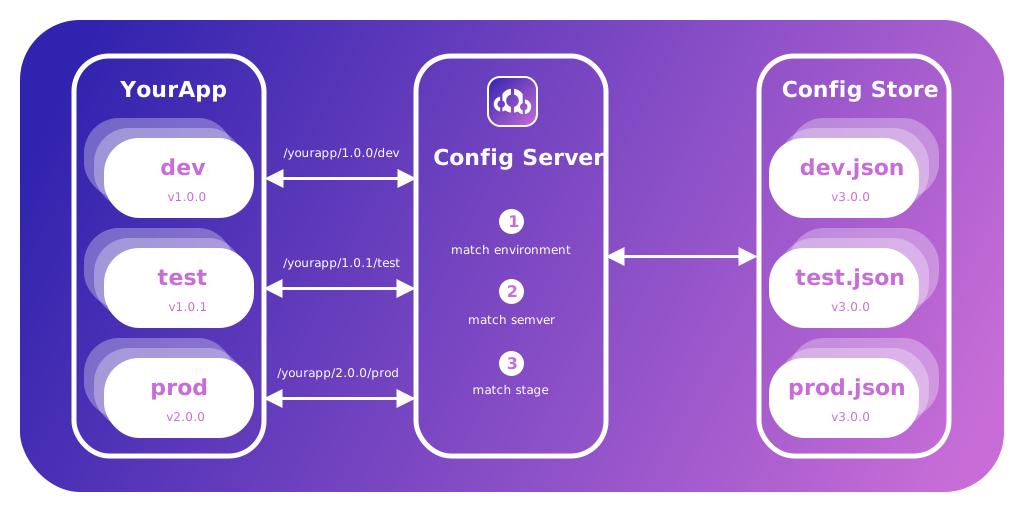
This server provides a configuration API to be used within Continuous Delivery environments.
Concept
The idea behind this software is to provide a global and public service for your apps to receive configuration values from. Configuration can be stored in a git repository that is seperated from the repositories in which your apps reside or synced to your file system. This makes it possible for apps and configurations to have independent lifecyles and both be treated like code.
This service allows for apps to be build once and then put through your continuous delivery pipeline without the need to rebuild them. They can load their configuration at runtime by telling the service what they need.
How it works
Application Configuration
A continuous delivery pipeline usually has mutlipe environments in which the app is tested or reviewed. The configuration repository contains one file per stage/environment of your pipeline.
These configuration files (*.json) contain all the values your app needs. If a pipeline has the four stages: development (local), test, staging, production, then you would create the following four files:
development.json
test.json
staging.json
production.json
It currently supports Github, Gitlab or the local file system as a source of your configuration files.
Independent Lifecyles and Deployments
Here is where the magic happens and where this configuration server is different from others.
To make applications and configurations truly independent and to avoid lock-step releases with your configuration, we need to somehow tell the service which configuration release is compatible with what version of our applications.
For that reason each configuration file contains this one additional and obligatory entry:
{
  "compatibleWithAppVersion": "^2.0.0"
}
Here you can define a semantic version range that tells the configuration server if this tag/release of your configuration is comapitble with the application version that is requesting configuration.
Note however, that in case of a breaking change in your app relating to a new configuration entry this will again become a required release with your application. You can release your configuration first by specifing a breaking change. Older apps will not consume the new configuration and as soon as your new app is deployed, the configuration is already there.
Naming Convention
Configuration Repository Name
The application id will be used to find the configuration repository by appending -config.
| application id requested in the url | configuration repositoy | url of your configuration repository |
|---|---|---|
| YourApp | YourApp-config | https://github.com/yournamespace/yourapp-config |
| Another | Another-config | https://gitlab.com/yournamespace/another-config |
Examples
| request url | url of your configuration repository |
|---|---|
| /cd-config-server-test/1.0.0/development | https://github.com/markusfalk/cd-config-server-test-config |
| /my-app/1.0.0/development | https://gitlab.com/markus_falk/my-app-config |
Matching Configuration Key
To match application version and configuration you must provide the compatibleWithAppVersion key in all of your configuration files.
{
  "compatibleWithAppVersion": "^1.0.0"
}
⚠️ Be aware that this is the version of the application that this specific configuration is compatible with not the version of the configuration itself. They vary because they now have different lifecycles.
⚠️ If the configuration has a breaking change, make sure to deploy the config first to avoid apps in production without propper configuration and be aware of the caching that is configured for configuration output.
In case of a none-breaking change in the configuration file, you would release a new version of the configuration that is still compatible with already deployed app causing for the config to have a new release but with no need to release a new app.
Setup
Prerequisits
- Configuration files hosted on filesystem, github or gitlab (including self hosted)
- This server is provided as a docker image
- Your applications need be versioned using semantic versioning
Options
The server is provided as a docker image and can be started with the following options:
Common
| name | default | description |
|---|---|---|
| CACHE_TTL | 300 | This service uses an in memory cache and this is how long it lives in seconds |
| CORS_ORIGIN | * | Setup which origins are allowed to access |
| SOURCE* | 'gitlab' | 'github' | 'filesystem' | |
| HTTPPORT | 3000 | What port would you like docker to expose this service to |
| RATE_LIMIT_MAX | 5000 | How many requests do you allow to this service per RATE_LIMIT_MS |
| RATE_LIMIT_MS | 360000 | Rate limit time range in milliseconds |
When using Github
| name | default | description |
|---|---|---|
| GITHUBPASSWORD* | used for authentication | |
| GITHUBUSERNAME* | used for authentication | |
| USERAGENT* | used for authentication |
When using Gitlab
| name | default | description |
|---|---|---|
| GITLAB_BASE_URL | https://gitlab.com/api/v4 | address your self hosted gitlab |
| GITLABUSERNAME* | used to find your project |
When using the file system
There is no additional configuration needed beyond the SOURCE but there needs to be a volume mounted to /app/dist/configfiles.
When this is done you can move your configuration files into that volume with the following structure:
- <appid> // identifies the app that is asking for configuration
  |- <configuration release version> // do not confuse with app version. This is the releases of your configuration
    |- <stage>.json // identifies the stage your app wants configuration for
Example:
- my-app
  |- 1.0.0
    |- development.json
    |- test.json
    |- production.json
- another-app
  |- 1.0.0
    |- development.json
    |- test.json
    |- production.json
  |- 1.1.0
    |- development.json
    |- test.json
    |- production.json
  |- 2.0.0
    |- development.json
    |- test.json
    |- production.json
Caveats
If you are using this configuration server publicly you need to make sure that your configurations files do not contain any secrets.
Migration Guide
Issues
Changelog
Questions?
If you have any questions reach out to me on twitter: https://twitter.com/markus_falk
Tag summary
Content type
Image
Digest
Size
85.2 MB
Last updated
about 5 years ago
docker pull markusfalk/cd-config-server