marlonb/mailcrab
Email test server for development, written in Rust
100K+
marlonb/mailcrab repository overview

MailCrab
Email test server for development, written in Rust.
Inspired by MailHog and MailCatcher.
MailCrab was created as an exercise in Rust, trying out Axum and functional components with Yew, but most of all because it is really enjoyable to write Rust code.
TLDR
docker run --rm -p 1080:1080 -p 1025:1025 marlonb/mailcrab:latest
Features
- Accept-all SMTP server
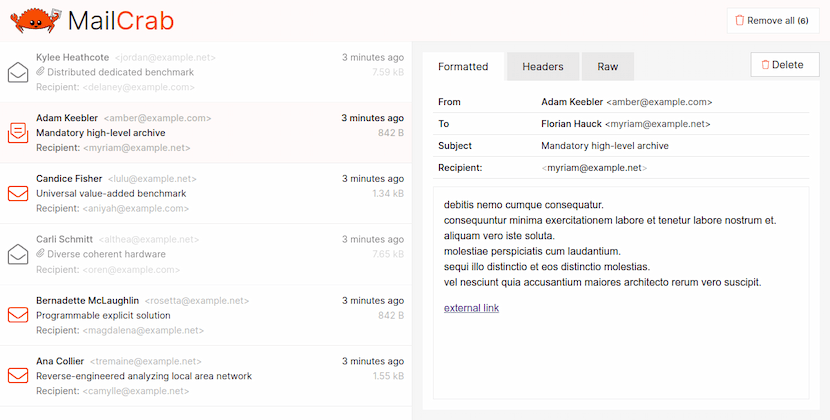
- Web interface to view and inspect all incoming email
- View formatted mail, download attachments, view headers or the complete raw mail contents
- Runs on all
amd64andarm64platforms using docker - Just a 7.77 MB docker image
Technical overview
Both the backend server and the fontend are written in Rust. The backend receives email over an unencrypted connection on a configurable port. All email is stored in memory while the application is running. An API exposes all received email:
/api/messagesreturn all message metadata/api/message/[id]returns a complete message, given itsid/wssend email metadata to each connected client when a new email is received
The frontend initially performs a call to /api/messages to receive all existing email metadata and then subscribes for new messages using the websocket connection. When opening a message, the /api/message/[id] endpoint is used to retrieve the complete message body and raw email.
The backend also accepts a few commands over the websocket, to mark a message as opened, to delete a single message or delete all messages.
Installation and usage
To run MailCrab only docker is required. Start MailCrab using the following command:
docker run --rm -p 1080:1080 -p 1025:1025 marlonb/mailcrab:latest
Open a browser and navigate to http://localhost:1080 to view the web interface.
The default SMTP port is 1025, the default HTTP port is 1080. You can configure the SMTP and HTTP port using environment variables (SMTP_PORT and HTTP_PORT), or by exposing them on different ports using docker:
docker run --rm -p 3000:1080 -p 2525:1025 marlonb/mailcrab:latest
Usage in a docker-compose.yml file:
version: "3.8"
services:
    mailcrab:
        image: marlonb/mailcrab:latest
        ports:
            - "1080:1080"
            - "1025:1025"
        networks: [default]
Development
# clone the code
git clone [email protected]:tweedegolf/mailcrab.git

# start the backend
cd backend
cargo run

# serve the frontend (in a new terminal window)
cd ../frontend
trunk serve

# optionally send test messages in an interval
cd ../backend
cargo test
Tag summary
Content type
Image
Digest
sha256:dd0e3933e…
Size
8.2 MB
Last updated
about 1 month ago
docker pull marlonb/mailcrab