mastermindg/gdrive_sync repository overview
gdrive_sync
Docker container that syncs a folder to Google Drive.
There are two builds on Docker Hub: ARM and x86.
Follow the following steps:
1) Create a new project, or select an existing project
Go to the credentials page in the Google Developer Console.

2) Enable Google Drive API
Go here and click Enable
3) Create a Token
- Click "Create credentials" -> "OAuth client ID".
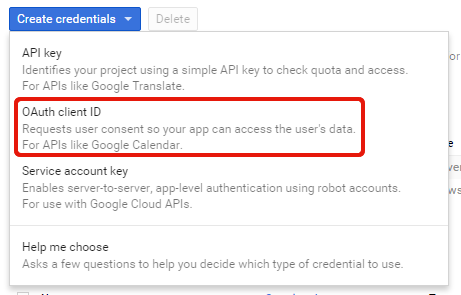
- Choose "Other UI" for "Application type".

- Choose User data for "What data will you be accessing?"
- Click "What credentials do I need?"
- Click "Create client ID"
- Enter a Product Name for "Product name shows to users"
- Click Done
- Click the client ID in the list - i.e. "Other client 1"
- Create a file config.json which contains the client ID and client secret from the page that you're on now, which looks like:
{
  "client_id": "xxxxxxxxxxxx-xxxxxxxxxxxxxxxxxxxxxxxxxxxxxxxx.apps.googleusercontent.com",
  "client_secret": "xxxxxxxxxxxxxxxxxxxxxxxx"
}
3) Get Started!
The start.sh script will make sure you're ready to go. Follow the on-screen instructions to get going. You'll need to authenticate against your account so be prepared to open up a browser window. Once you're ready you'll need to pick a folder to mount to the container. This folder will be where you're downloading files to, i.e. /myshare/files
./start.sh
Tag summary
Content type
Image
Digest
Size
330.2 MB
Last updated
about 9 years ago
docker pull mastermindg/gdrive_sync:x86