mdrideout/junjo-server-backend
backend container image for Junjo Server
1.2K
mdrideout/junjo-server-backend repository overview
Junjo Server
順序 - order, sequence, procedure
The Junjo Python Library is an AI Graph Workflow and state machine framework that makes it easy to build and run structured directed graph workflows that are dynamically traversed by an LLM.
Junjo Server is an opentelemetry ingestion server and AI graph workflow debugging interface. This provides telemetry, observability, and a debugging interface for the Junjo Python Library.
If you've struggled to understand what decisions your LLM is making in a chained sequence of events, and what data it is basing its decisions on, Junjo Server is for you. You will gain complete visibility to the state of the application, and every change LLMs make to the application state.
Complex, mission critical AI workflows are made transparent and understandable with Junjo and Junjo Server.
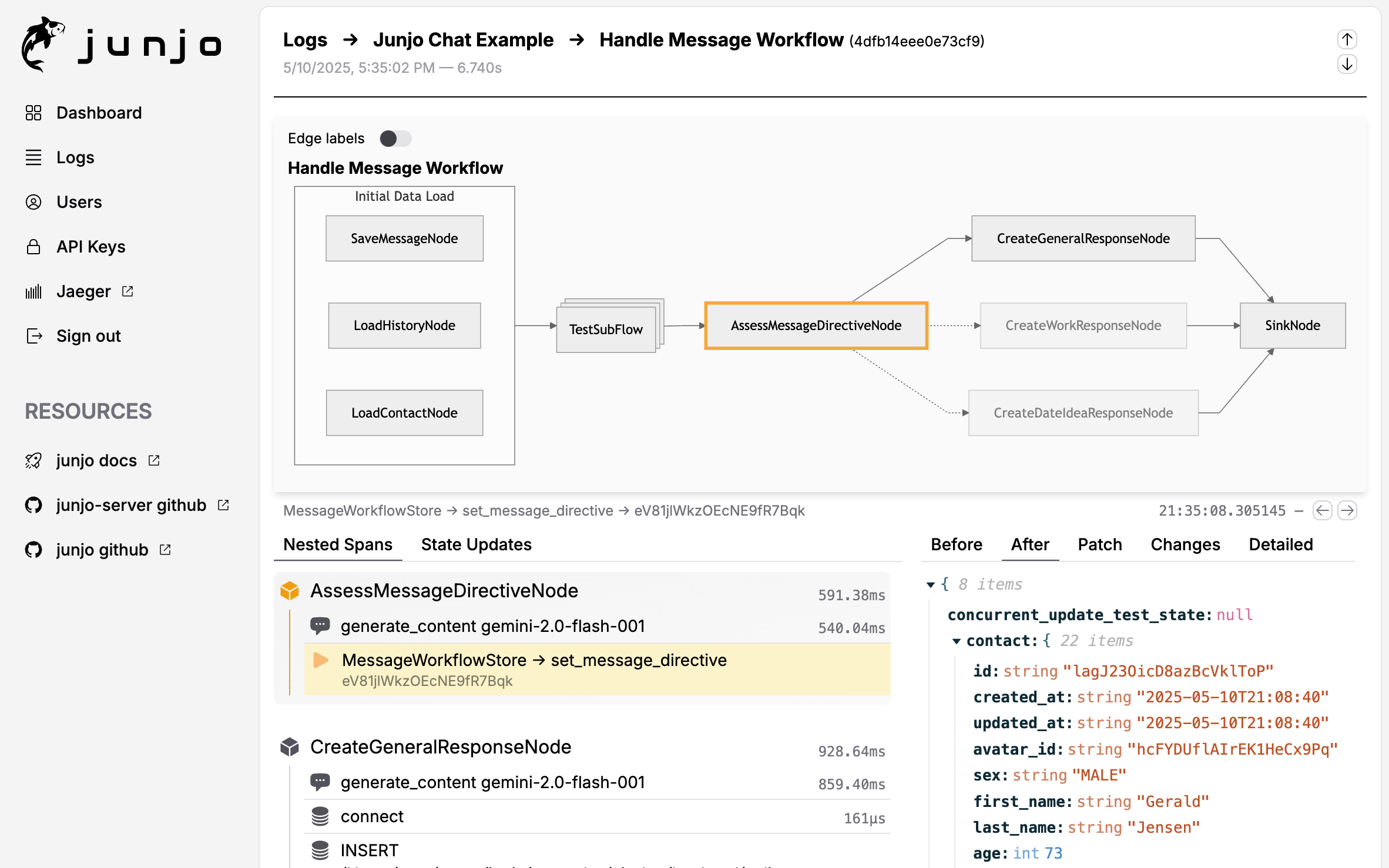
Junjo Server Frontend Screenshot
Architecture Overview
The Junjo Server is composed of three primary services:
-
junjo-server-backend: The main application server. It's an Echo-based Go application responsible for the HTTP API, user authentication, and all business logic. It uses SQLite for primary data and DuckDB for analytical queries on telemetry data. -
ingestion-service: A lightweight, high-throughput Go service responsible for ingesting OpenTelemetry (OTel) data. It exposes a gRPC endpoint to receive OTel spans and immediately writes them to a BadgerDB instance, which acts as a durable Write-Ahead Log (WAL). This decouples the data ingestion from the main backend, ensuring resilience and scalability. -
junjo-server-frontend: The web UI providing the user interface for debugging and monitoring Junjo workflows.
The backend service polls the ingestion-service's internal gRPC API to read batches of spans from the WAL, which it then indexes into DuckDB.
Turn-Key Example Repository
Junjo Server Deployment Example https://github.com/mdrideout/junjo-server-deployment-example.
- A complete example of a Junjo Server deployment, including a Junjo Python Library application.
Components: This repository is orchestrated with Docker Compose.
- Session cookie authentication
- Junjo Server pre-build images:
- Docker hub junjo-server-backend: https://hub.docker.com/r/mdrideout/junjo-server-backend
- Docker hub junjo-server-frontend: https://hub.docker.com/r/mdrideout/junjo-server-frontend
- Local development and production environment variable configurability
The README.md will walk you through the deployment process on a Digital Ocean Droplet virtual machine (or any VM provider of your choice). You can use this as the basis for your own deployment of Junjo Server.
VM Resource Requirements
Junjo is designed to be low resource. It uses SQLite, DuckDB, and BadgerDB for storage, which are all low resource embedded databases. It can be run on small affordable virtual machines with as little as a shared vCPU and 1GB of RAM.
Use & Deployment
Junjo Server is built and deployed to Docker Hub whenever a new release is published on GitHub.
- Backend: https://hub.docker.com/r/mdrideout/junjo-server-backend
- Ingestion Service: https://hub.docker.com/r/mdrideout/junjo-server-ingestion-service
- Frontend: https://hub.docker.com/r/mdrideout/junjo-server-frontend
Database Access
Badger DB
You can install the badger CLI tool to read the database for testing purposes.
go install github.com/dgraph-io/badger/v4/badger@latest
Inspect the data with the following command:
# Read the database (requires app connection to be closed)
badger stream --dir ./.dbdata/badgerdb

# Clean + Read (use if there is an issue reading from improper database flushing / shutdown)
badger stream --dir ./.dbdata/badgerdb --read_only=false
Environment Configuration
Before running the services, you need to set up your environment variables.
Copy the example environment file to a new .env file:
cp .env.example .env
The JUNJO_SERVER_API_KEY can be created in the Junjo Server frontend interface after you get it intially running.
Docker Compose - Hosted Images
Below if a brief example of using the Junjo Server pre-built images from Docker Hub.
For a more complete example, checkout the Junjo Server Deployment Example Repository.
services:
  junjo-server-backend:
    image: mdrideout/junjo-server-backend:latest
    container_name: junjo-server-backend
    restart: unless-stopped
    volumes:
      - ./.dbdata/sqlite:/dbdata/sqlite
      - ./.dbdata/duckdb:/dbdata/duckdb
    ports:
      - "1323:1323" # Public API server port
      - "50053:50053" # Internal gRPC server port
    networks:
      - junjo-network
    env_file:
      - .env
    user: root # requires root for writing to the duckdb vol
    healthcheck:
      test: ["CMD", "curl", "-f", "http://localhost:1323/ping"]
      interval: 5s
      timeout: 3s
      retries: 25
      start_period: 5s

  junjo-server-ingestion:
    image: mdrideout/junjo-server-ingestion-service:latest
    container_name: junjo-server-ingestion
    restart: unless-stopped
    volumes:
      - ./.dbdata/badgerdb:/dbdata/badgerdb
    ports:
      - "50051:50051" # Public gRPC telemetry server port (where data is received)
      - "50052:50052" # Internal gRPC server port
    networks:
      - junjo-network
    env_file:
      - .env
    healthcheck:
      test: ["CMD", "grpc_health_probe", "-addr=localhost:50052"]
      interval: 5s
      timeout: 3s
      retries: 5
      start_period: 5s

  junjo-server-frontend:
    image: mdrideout/junjo-server-frontend:latest
    container_name: junjo-server-frontend
    restart: unless-stopped
    ports:
      - "5153:80" # Access the frontend at http://localhost:5153
    env_file:
      - .env
    networks:
      - junjo-network
    depends_on:
      junjo-server-backend:
        condition: service_healthy
      junjo-server-ingestion:
        condition: service_healthy

networks:
  junjo-network:
    driver: bridge

# Network option if you want to use an existing shared server network
# networks:
#   your-network:
#     external: true # not coupled to this compose file
Running The Local Dev Environment
Docker is required for local development so your developer experience mirrors how things work in production.
- hot reloading is supported in both the frontend and backend.
Docker Commands
Docker compose can be used to launch all services (frontend, backend, and ingestion) together, with hot reloading for local development.
Ensure the project root
.envfile containsJUNJO_BUILD_TARGET=development
TIP:
docker compose down -vis required if node modules or go modules change (installed / uninstalled)
# Create the network (if it does not already exist)
$ docker network create junjo-network

# Start all services
$ docker compose up --build

# Close and clear volumes
$ docker compose down -v
Accessing Services (development environment)
- Frontend: https://localhost:5151
- Backend API: https://localhost:1323/
Troubleshooting
If you see a "failed to get session" error in the logs or have trouble logging in, try clearing your browser's cookies for localhost and restarting the services. This can happen if you have multiple Junjo server projects running on localhost and an old session cookie is interfering.
Tag summary
Content type
Image
Digest
sha256:7b27d8a91…
Size
51.4 MB
Last updated
about 1 year ago
docker pull mdrideout/junjo-server-backend