mellanox/ufm-plugin-efs
UFM Event Stream to FluentBit endpoint (EFS)
1.6K
mellanox/ufm-plugin-efs repository overview
UFM Event Stream to FluentBit endpoint (EFS)
This plugin is used to extract UFM events from UFM syslog and stream it to a remote Fluentd destination. It also has the option to duplicate current UFM syslog messages and forward them to a remote syslog destination
Overview
The UFM Enterprise product is Nvidia’s platform for IB fabric management. Through this platform, the various devices (switches, multi-chip systems, cables, etc.) are discovered, configured and the status of the entire fabric is reflected. As a fabric manager, it will be useful to collect the UFM Enterprise events/logs, stream them to the destination endpoint and monitor it. In order to do so, we present UFM Event Stream to FluentBit endpoint (EFS)
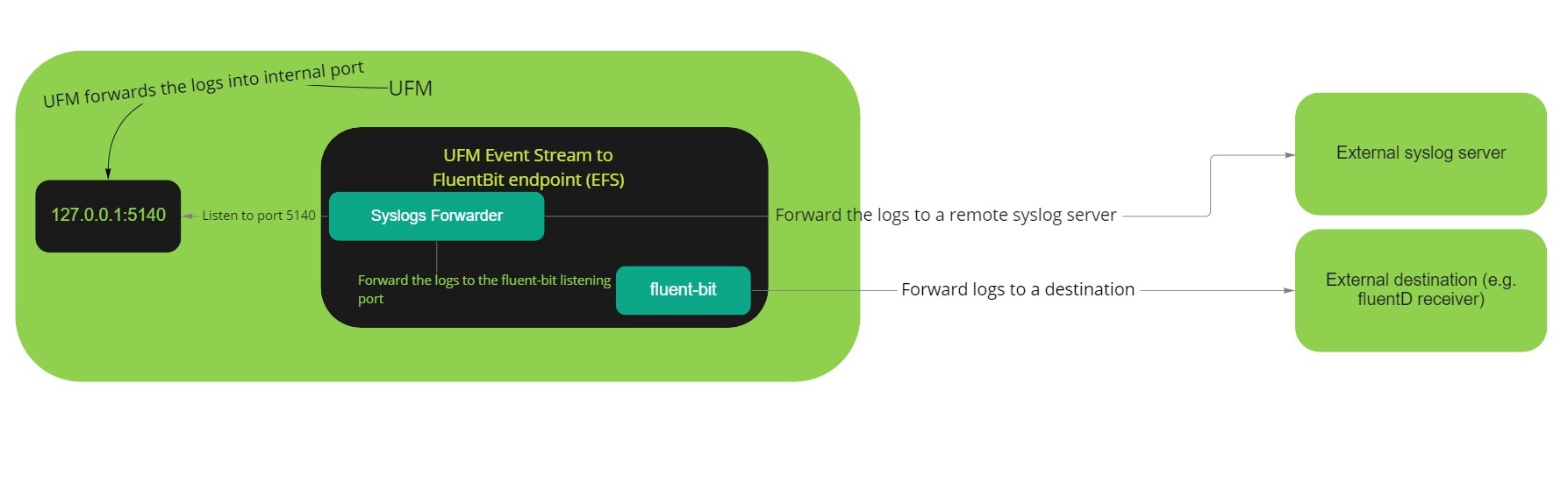
Plugin Deployment
To deploy the plugin on UFM-SDN Appliance:
-
Login as admin
-
Run
enable
config terminal
-
Make sure that UFM is running
show ufm status
-
if UFM is down then run it
ufm start
-
Make sure docker is running
no docker shutdown
-
Load the latest plugin container
- In case of HA, load the plugin on the standby node as well;
- if your appliance is connected to the internet, you could simply run:
docker pull mellanox/ufm-plugin-efs
- if your appliance is not connected to the internet, you need to load the image offline
- Use a machine that is connected to the internet to save the docker image
docker save mellanox/ufm-plugin-efs:latest | gzip > ufm-plugin-efs.tar.gz
- Move the file to scp shared location that is accessible to the appliance
- Fetch the image to the appliance
image fetch scp://user@hostname/path-to-file/ufm-plugin-efs.tar.gz
- Load the image
docker load ufm-plugin-efs.tar.gz
- Use a machine that is connected to the internet to save the docker image
-
Enable & start the plugin
ufm plugin efs add
-
Check that plugin is up and running with
show ufm plugin
To deploy the plugin on UFM Docker container:
-
Load the latest plugin container
- In case of HA, load the plugin on the standby node as well;
- if your machine is connected to the internet, you could simply run:
docker pull mellanox/ufm-plugin-efs
- if your server is not connected to the internet, you need to load the image offline
- Use a machine that is connected to the internet to save the docker image
docker save mellanox/ufm-plugin-efs:latest | gzip > ufm-plugin-efs.tar.gz
- Move the file to some shared location that is accessible to the UFM machine
- Load the image to UFM machine
docker load < /[some-shared-location]/ufm-plugin-efs.tar.gz
- Use a machine that is connected to the internet to save the docker image
-
Enable & start the plugin
docker exec ufm /opt/ufm/scripts/manage_ufm_plugins.sh add -p efs
-
Check that plugin is up and running with
docker exec ufm /opt/ufm/scripts/manage_ufm_plugins.sh show
To deploy the plugin with UFM Enterprise (SA or HA):
-
Install the latest version of UFM.
-
Load the latest plugin container
- In case of HA, load the plugin on the standby node as well;
- if your machine is connected to the internet, you could simply run:
docker pull mellanox/ufm-plugin-efs
- if your appliance is not connected to the internet, you need to load the image offline
- Use a machine that is connected to the internet to save the docker image
docker save mellanox/ufm-plugin-efs:latest | gzip > ufm-plugin-efs.tar.gz
- Move the file to some shared location that is accessible to the UFM machine
- Load the image to UFM machine
docker load < /[some-shared-location]/ufm-plugin-efs.tar.gz
- Use a machine that is connected to the internet to save the docker image
-
To enable & start the plugin, run :
/opt/ufm/scripts/manage_ufm_plugins.sh add -p efs
-
Check that plugin is up and running with
docker ps;
Log file efs.log is located in /opt/ufm/files/log on the host.
Usage
1.Configure the UFM syslog:
Enable the syslog on the UFM side using the following REST API:
METHOD: PUT
URL: _https://[HOST-IP]/ufmRest/app/syslog
Payload Example:
{
   "active": true,
   "destination": "127.0.0.1:5140",
   "level":"<severity>",
   "ufm_log":true,
   "events_log":true
}
cURL Example:
curl -XPUT 'https://10.209.36.68/ufmRest/app/syslog' \
  -k \
  -u admin:123456 \
  -H 'content-type: application/json' \
  -d '{"active": true,"level": "WARNING","ufm_log": true,"events_log": true,"destination": "127.0.0.1:5140"}'
- [severity] could be any of the following values: CRITICAL, ERROR, WARNING, INFO, or DEBUG.
2.Configure the destination endpoint:
You can forward the events to any external destination you want; we will show an example how to configure the fluentD as a destination:
-
Pull the Fluentd Docker by running:
docker pull fluent/fluentd
-
Run the Fluentd docker by running:
docker run -ti --rm --network host -v /tmp/fluentd:/fluentd/etc fluentd -c /fluentd/etc/fluentd.conf
- We provide fluentd.conf as a fluentd configurations sample.
3.Set the plugin configurations by the following API:
METHOD: PUT
URL: https://[HOST-IP]/ufmRest/plugin/efs/conf
Payload Example:
{
 "UFM-syslog-endpoint": {
     "host": "127.0.0.1",
     "port": 5140
 },
 "fluent-bit-endpoint": {
     "destination_host": "127.0.0.1",
     "destination_port": 24226,
     "enabled": true,
     "message_tag_name": "ufm_syslog",
     "source_port": 24227
 },
 "logs-config": {
     "log_file_backup_count": 5,
     "log_file_max_size": 10485760,
     "logs_file_name": "/log/efs.log",
     "logs_level": "INFO"
 },
 "streaming": {
     "enabled": false
 },
 "syslog-destination-endpoint": {
     "enabled": false,
     "host": "127.0.0.1",
     "port": 514
 }
}
cURL Example:
curl -XPUT 'https://10.209.36.68/ufmRest/plugin/efs/conf/' \
 -k \
 -u admin:123456 \
 -H 'Content-Type: application/json' \
 -d '{"streaming": {"enabled": true}, "syslog-destination-endpoint":{"enabled": true,"host": "10.209.36.67","port": 514}, "fluent-bit-endpoint": {"enabled": true,"destination_host": "10.209.36.67","destination_port": 24225}}'
-
Updating the configurations while the streaming is running will restart all the running streaming services automatically and the new changes will take effect immediately
Configuration Parameters Details:
| Parameter | Required | Description |
|---|---|---|
| UFM-syslog-endpoint.host | True | Hostname or IPv4 or IPv6 of the UFM syslog address, which is normally the localhost [Default is 127.0.0.1] |
| UFM-syslog-endpoint.port | True | Port the UFM syslog address [This port should be the port that is configured in step #1] |
| fluent-bit-endpoint.enabled | True | If True, the logs will be forwarded to the external destination address once the required configurations have been set [Default is False] |
| fluent-bit-endpoint.source_port | True | Port of the syslog input of the fluent-bit [Default is 24227] |
| fluent-bit-endpoint.destination_host | False | Hostname or IPv4 or IPv6 of the destination endpoint |
| fluent-bit-endpoint.destination_port | False | Port for destination endpoint [this port should be the port that is configured in fluentd.conf, Default is 24225] |
| fluent-bit-endpoint.message_tag_name | False | Message Tag Name for Fluentbit collector [Default is the ufm_syslog] |
| syslog-destination-endpoint.enabled | True | If True, the logs will be forwarded to an external syslog server once the required configurations have been set [Default is False] |
| syslog-destination-endpoint.host | False | Hostname or IPv4 or IPv6 of the external syslog server address endpoint |
| syslog-destination-endpoint.port | False | Port of of the external syslog server address endpoint, Default is 514] |
| streaming.enabled | True | If True, the streaming will be started once the required configurations have been set [Default is False] |
| logs-config.logs_file_name | True | Log file name [Default = '/log/efs.log'] |
| logs-config.logs_level | True | Default is 'INFO' |
| logs-config.max_log_file_size | True | Maximum log file size in Bytes [Default is 10 MB] |
| logs-config.log_file_backup_count | True | Maximum number of backup log files [Default is 5] |
4.Get the plugin configurations by the following API:
METHOD: GET
URL: https://[HOST-IP]/ufmRest/plugin/efs/conf
Tag summary
Content type
Image
Digest
sha256:70ced12b2…
Size
258.3 MB
Last updated
over 2 years ago
docker pull mellanox/ufm-plugin-efs