meltaxa/musicfig
A Raspberry Pi jukebox that uses LEGO Dimensions and Minifigures to play Spotify or MP3 tracks.
1.4K
meltaxa/musicfig repository overview
Musicfig
Make your LEGO Minifigures play music using a Raspberry Pi and a LEGO Dimensions toy pad.
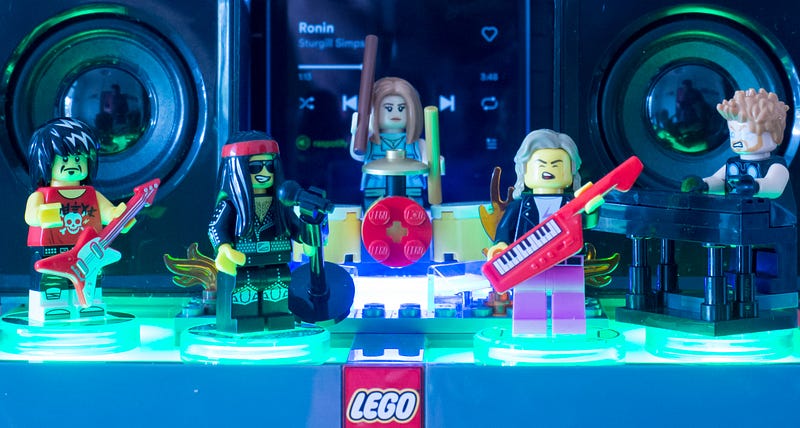
Leveraging the NFC chip in a LEGO Dimensions tag, Minifigues can be assigned songs and cue music like a jukebox.
Jukebox control is not limited to LEGO minifigures. Disney Infinity characters, Amiibos, Skylanders, NFC tags, stickers or cards can become a Musicfig.
During song play, the LEGO Dimensions pad will light up for the duration of the song.
For Spotify users, the album art of the currently playing track is displayed on your local Musicfig app site, as demonstrated on the https://nowplaying.musicfig.com site:

Musicfig's now playing page.
You will require
| Hardware | NFC tags |
|---|---|
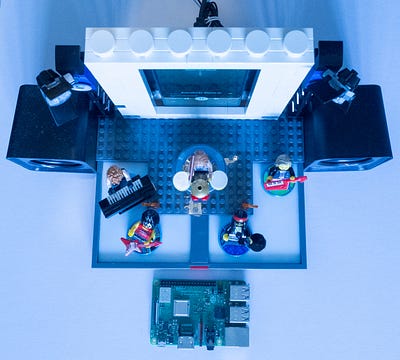
|  From Lego Dimensions character discs, Disney Infinity character toys, NFC NTAG213 tags, stickers or cards. |
To play music you can use the following options:
- MP3 files;
- A Spotify Premium subscription account. For an enhanced experience, Spotify is recommended but not required.
Feature list
- Support LEGO Dimensions toy pads for PlayStation and Wii.
- A lightshow will display on the LEGO Dimensions pad during song play.
- The lightshow can be enabled or disabled via the tags.yml file. Default: lights = on.
- Play MP3 files.
- Play Spotify music.
- The Musicfig web application will show in real time the currently playing Spotify track's album art.
- Musicfig allows automatic offline mode, for only MP3 music playing.
- Removing an active tag during song play will pause the track. Adding it back will resume play.
Install
- Complete installation instructions is available in the Medium article "My LEGO Minifigures Play Spotify".
Quick Install (without Spotify)
This allows Musicfig to play in offline mode, by accessing local MP3 files.
Firstly, connect your LEGO Dimensions toy pad to the Raspberry Pi via the USB port.
Now connect the speakers to the Raspberry Pi.
Follow these steps to install and config the Musicfig software:
- Install Python 3.8+.
- Clone this repository and run the install.sh script. Musicfig will start automatically.
- Copy your mp3 files to the music folder.
- Place your first tag on the pad and watch the console or musicfig.log as the app discovers the UID value.
- Edit the tags.yml file with the UID and the mp3 file to be played.
- Place the tag off and on again.
- A track should now start playing locally.
Using Docker
A Musicfig docker image is available from Docker hub. Before using the image, you will need to bootstrap the Raspberry Pi to configure the LEGO usb device which the container will need access to:
curl -L https://raw.githubusercontent.com/meltaxa/musicfig/master/install.sh | bash -s -- --docker
The bootstrap script also downloads the example config.py and tags.yml files. Place these in a directory of your choosing, say /home/pi/musicfig and update these files accordingly. See the complete install instructions in the Medium article "My LEGO Minifigures Play Spotify" for Spotify configuration steps.
Next, find the USB bus and device mappings for the LEGO pad. Make sure it is plugged in. Look for Id "0e6f:0241":
lsusb | grep 0e6f:0241
Example output:
Bus 001 Device 008: ID 0e6f:0241 Logic3
When running Docker, the device path will correspond to the bus and device numbers. For example, Bus 001 and Device 008 would correspond to: /dev/bus/usb/001/008.
Run Docker:
docker run -v <path/to/configs>:/config -p 5000:5000 --device=/dev/bus/usb/<bus>/<device> --device=/dev/snd meltaxa/musicfig
The /path/to/configs is the directory where you store the config.py and tags.yml files.
Stopping and Starting
To stop Musicfig:
sudo systemctl stop musicfig
To Start Musicfig:
sudo systemctl start musicfig
Updating
- Re-run the install.sh script to pull down the latest code.
Everything is Awesome!

Tag summary
Content type
Image
Digest
Size
79.6 MB
Last updated
over 4 years ago
docker pull meltaxa/musicfig