mfconsole/kvm-manager
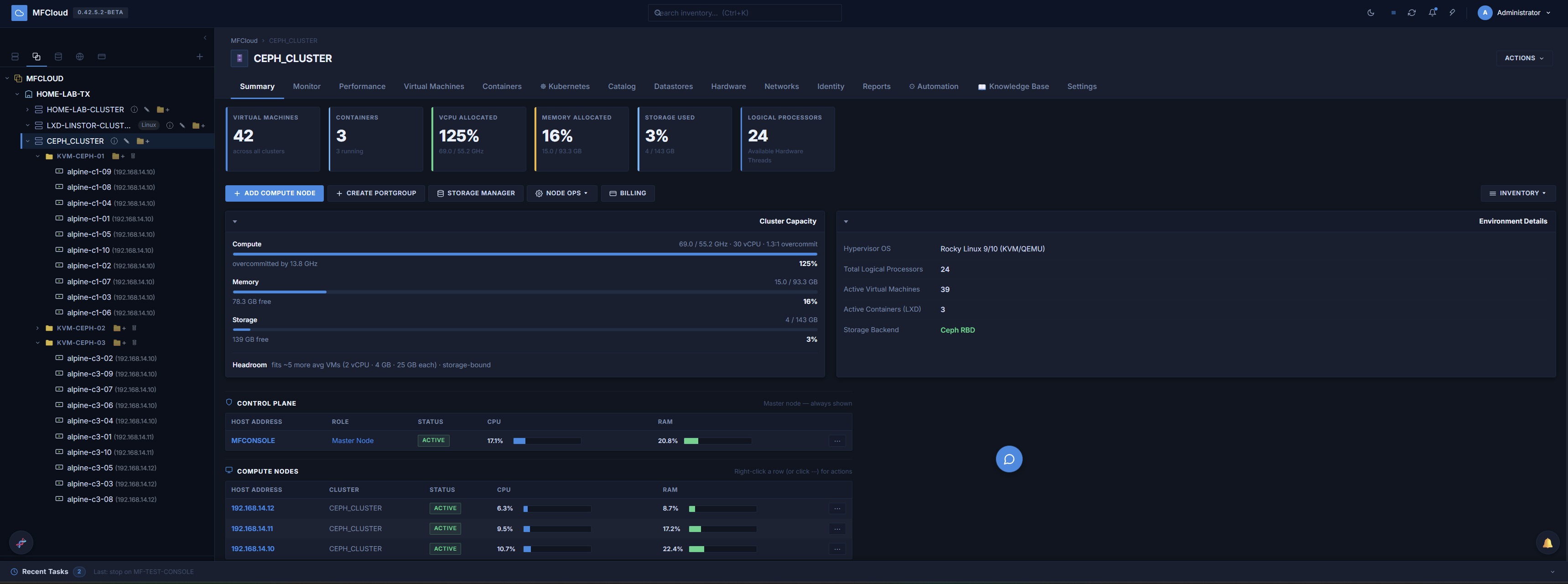
MFCloud Console — enterprise KVM cloud management: VMs, storage, SDN, and HA in a single image
4.4K
mfconsole/kvm-manager repository overview
MFConsole
MFCloud Console is the control plane for the MFCloud platform — an
enterprise KVM hypervisor manager. One image runs the web console, Celery
worker, and beat scheduler (selected by command: in the shipped compose
files). It manages VM lifecycle and live migration, Ceph/LINSTOR/ZFS
storage, OVN networking, Kubernetes clusters, and multi-tenant RBAC, with
optional HA via Patroni/TimescaleDB.
1.3 release candidate. Runs on the Free edition out of the box (2 nodes / 10 VMs, no license key needed) — paste a license key in Settings → Edition & License later to unlock higher caps and paid features (HA, S3 backup, multi-tenant, LDAP, and more).
Deploy MFConsole — step by step
1. Get the deploy files from the image itself. docker create pulls
the image if you don't already have it, then this copies the compose
bundle out of it:
docker pull mfconsole/kvm-manager:latest
id=$(docker create mfconsole/kvm-manager:latest)
docker cp "$id":/app/deploy-files ./mfconsole
docker rm "$id"
cd mfconsole
Running Podman instead of Docker? Same commands, podman in place of
docker (fully-qualify the image so Podman doesn't need to prompt for a
registry):
podman pull docker.io/mfconsole/kvm-manager:latest
id=$(podman create docker.io/mfconsole/kvm-manager:latest)
podman cp "$id":/app/deploy-files ./mfconsole
podman rm "$id"
cd mfconsole
This gives you docker-compose.yml, compose.prod.yml, install.sh,
setup.sh, Caddyfile, .env.example — the actual stack definition.
Pulling the image alone never gives you these; the image only holds app
code, not the orchestration files, which is why nothing was "installing."
2. Run the installer:
./install.sh
This creates .env, generates secrets (SECRET_KEY, INTERNAL_SECRET,
DB_PASS, admin password), auto-detects your host's LAN IP for
CONTROL_PLANE_IP, pulls the image, and brings up the single-node
profile (db, redis, linstor-controller, caddy, app-1, worker,
beat, watchtower). It auto-detects Docker or Podman on the host — pass
--engine docker or --engine podman to force one if both are installed.
3. Verify it came up:
docker compose ps                                  # or: podman compose ps
docker compose logs -f app-1   # wait for "Application startup complete"
4. Log in: https://<CONTROL_PLANE_IP>/ — accept the self-signed cert
warning, login admin / mfpro (forced password change on first login).
Prerequisites to double check first — this is the most common reason nothing runs
- Docker (Compose v2 plugin) or Podman —
docker compose versionmust work (not the olddocker-composev1 binary), orpodman compose version/podman-compose --versionfor Podman. - A Linux host (Rocky/Debian) —
install.shis bash, won't run on Windows directly. - 4 vCPU / 8 GB RAM minimum.
Need compute nodes too? Download the MFConsole Node ISO — the hypervisor image your KVM hosts boot from — at https://mfcloud.io/download.html
What's New
1.3.0-rc12 (2026-10-07)
Site recovery safety. Code that ships to compute nodes changed; after you update, the console pushes it to every active node on its own.
Fixed
- Failback no longer destroys data at the protected site without asking. It checks the source first and stops, listing what would be lost, before it changes anything. To go ahead anyway, choose Discard it and fail back anyway; the run's report lists what was discarded.
- Failback refuses a VM that is running at the source again. Shut it down and turn autostart off first.
- A replica host that can't run KVM guests is shown before a run, on the plan page and in the checks that test failover and failover make before they touch anything.
- A failed boot step shows libvirt's error (
virsh create failed: …) instead of an internal command.
Changed
- A recovery plan change triggers a control-plane backup ten minutes after the last change, so a standby console restored from it has the plan.
- Restoring the console into a new database cluster creates any missing roles, and checks the TimescaleDB version before it starts.
TIMESCALEDB_IMAGEin.envsets the single-node database image.
1.3.0-rc11.5 (2026-10-07)
AI Workers, an AI alarm triage agent, NIC teaming and live backups. It carries 1.3.0-rc7 to rc11.4, none of which was published here separately. Code that ships to compute nodes changed in rc8; after you update, the console pushes it to every active node on its own.
New
- AI Workers (new tab, off by default). A job is a goal, a repo and a list of tasks: each task runs on its own short-lived VM, which clones the repo, runs Claude Code, runs the job's tests and sends back a patch. Nothing is pushed; you review and download the patches. Workers never hold the API key: every model call goes through the console, which counts cost per job and stops at the budget. Local llama.cpp/Ollama backends work too. mfcloud-mcp can start and collect jobs.
- AI alarm triage agent (beta, off by default). An alarm active for more than a minute gets a diagnosis: summary, likely cause, confidence, evidence and next steps. It only reads the console's own data and never connects to a host. Admins rate each diagnosis Right or Wrong, and the new AI diagnoses page lists them all in full.
- AI assistant: bulk VM actions. "Power on every VM in CEPH_CLUSTER" is
one approval card listing every VM it will act on and every VM it skips,
and why. Start, stop, shutdown, reboot, reset, snapshot and backup, up to
200 VMs per batch. New
list_vmslookup. - NIC teaming. Networks → New NIC Team bonds idle NICs as Active / Standby or LACP (802.3ad), with live status per member. A team works as the uplink of a bridge, OVN chassis or VLAN port group.
- Live backups. A local/NFS backup of a running VM no longer pauses it, when the host has enough free local scratch space.
- Apply a NIC bandwidth limit live, and a new Live Migration Limit (Settings → Traffic Control) with auto-converge.
- Add Host… from a cluster's right-click menu.
- An alarm when the console database is short of replicas.
Fixed
- Container clusters: enrolling one member no longer locks the console out of the others ("403 Forbidden"). If you hit this, click Re-Enroll on each affected member under Containers → Nodes.
- Dissolving a container cluster no longer orphans a running cluster, works with an offline member, and can remove the cluster's shared storage for you.
- Deleting a Kubernetes cluster no longer frees nodes it couldn't reach; a new Leftover K8s nodes strip offers Retry cleanup or Release anyway.
- Deleting an SNAT rule now removes it from OVN too. Check Networks → OVN → Drift for rules deleted before this update.
- AI assistant: approving one card no longer marks every card approved.
- 3-node HA: a control-plane reboot could leave that host without its database, and maintenance mode could drain two hosts at once.
- Actions → Node Ops… and Inventory Ops… open again.
1.3.0-rc6.6 (2026-10-04)
Fixes only. It carries 1.3.0-rc6.4 and rc6.5, neither of which was published here separately. One file that ships to compute nodes changed; after you update, the console pushes it to every active node on its own.
Fixed
- Sign-in with MFA. The box asking for the code opened behind the sign-in form, so nothing seemed to happen after Sign in. With Require MFA on, a user who hadn't enrolled couldn't get in from a browser. Dialogs opened from the sign-in screen now show above it.
- Settings → Node Updates did nothing. A syntax error stopped the page's script from loading. Broken since 1.3.0-rc3.
- Background tasks failed for a minute or so after every worker start ("no results to fetch", "server closed the connection unexpectedly"). Each worker process now opens its own database connections.
- A Content Library publish could stay at "Queued" after its copy finished, when two copies went to the same host. Each task now updates its own row. This also covers image downloads to a datastore, template preparation and copies from the release store.
- Publish no longer reports success for a copy it didn't make. A file of the same name and size on the host is reused, and the task says nothing was copied. One of a different size fails the task with both sizes, and is left alone in case VMs use it.
Docs
- New KB page Two-Factor Authentication (MFA). Upgrading MFConsole now
rolls back with
./install.sh <previous-version>. - SBOMs for every image here are published at https://mfcloud.io/sbom/.
1.3.0-rc6.3 (2026-10-03)
Disaster recovery to a second site. It carries 1.3.0-rc5.6 to rc6.2, none of which was published here separately. Code that ships to compute nodes changed; after you update, the console pushes it to every active node on its own.
New
- Recovery plans (new Recovery tab, Super Admin). A plan lists the VMs that fail over to a standby site, in boot groups, and maps each network they use to one at that site. Test failover boots copies on an isolated network, then deletes them; production isn't touched. Failover moves the VMs in boot order: planned (one last sync first, nothing lost) or unplanned (from the newest replica). Failback brings them home and resumes replication. Every run records the measured RTO and is audited.
- Replication to another site. ZFS replication can target hosts at another site. Copies are relayed through the console, so the two sites' hosts need no SSH trust between them.
- Standby console. A console restored from a backup at the second site
stays passive with
CONSOLE_STANDBY=truein.env: no schedules, HA monitoring or background work against the hosts. Set it tofalseand restart app, worker and beat to promote it. See Site failover indeployment/DR_RUNBOOK.md. - Move a cluster to another datacenter (right-click → Move to Datacenter…), e.g. to place it at the standby site.
- Tables show placeholder rows while they load.
Changed
- The online release channel is now
https://dl.mfcloud.io/releases/. A console that kept the old default switches on its own; one pointed at your own mirror is left alone. With sovereign mode on, allowdl.mfcloud.ioto stay online for updates only.
Fixed
- The Hardware page could show the previous host's PSUs, temperatures, DIMMs and NICs after switching hosts during a slow BMC query.
1.3.0-rc5.5 (2026-10-02)
Kubernetes and VM/container images for sites with no internet. It carries 1.3.0-rc5 to rc5.4, none of which was published here separately. Code that ships to compute nodes changed; after you update, the console pushes it to every active node on its own.
New
- Content bundles. The release store also takes signed content bundles, imported, copied to every console host and deleted just like releases. Kubernetes content carries k3s and RKE2 with their air-gap images, Helm, the Ceph CSI and MetalLB charts and their images. Image content carries cloud templates, ISOs and LXD images.
- Kubernetes without internet. When the store has Kubernetes content for a cluster's engine, the console copies it to each node and installs from it: new clusters, HA control planes, added nodes, and Ceph storage or MetalLB added later. No node pulls anything. With sovereign mode on, those requests are no longer refused.
- Content Library → From the release store. Copy a template or ISO to the nodes you pick, or import an LXD image, straight from the console.
Fixed
- Kubernetes node VMs grow
/varinto the disk size you ask for (the Kubernetes template kept every image in a fixed 5 GB/var, too small for Ceph CSI). - MetalLB setup waits for its webhook before applying the address pool.
1.3.0-rc4 (2026-10-02)
It carries 1.3.0-rc2, rc3 and rc3.1, none of which was published here separately: a full update channel for the console and its compute nodes, online or offline. One file that ships to compute nodes changed. After you update, the console pushes the new code to every active node on its own.
New
- Signed release bundles. A release can travel as one
.mfbundlefile (the console image, the node code and the release notes), signed with ECDSA P-384. Settings → Release Updates imports it by upload, or from the release store'sincomingfolder. The console checks the signature and every file before keeping anything, keeps a copy on each console host, andupdate-from-store.shapplies it with nothing downloaded. - Online release channel. The console can read a signed release index every 6 hours, list newer releases and download one into the same store, where it's checked exactly like an uploaded bundle. Automatic download is off by default. With sovereign mode on, allow just the channel's host to stay offline for everything except updates. You can point the channel at your own mirror, or switch checking off.
- Rolling node updates. A bundle can carry dnf repositories for EL9 and EL10 compute nodes. Settings → Node Updates previews what each host would install, then updates a cluster one host at a time: move its VMs away, upgrade from the console's own repository (no internet needed), reboot if needed, pass a health check, take its VMs back. A host that fails stays in maintenance and the run stops with the reason. Ceph OSD hosts wait for the cluster to be healthy again before the next host.
- Resource pool picker in the deploy dialog (admins).
Fixed
- A VM could end up running on two hosts at once, unnoticed. A migration refused because the destination already ran a VM of the same name was recorded as a success. It's now reported as a failure naming both hosts.
- A migration longer than two minutes could leave its VM stuck at "migrating" even though the VM had moved.
- The deploy dialog's Placement Rules were never sent. Affinity group and host labels were only used for the placement preview. Deployed VMs now keep their affinity group, so HA and site rules can act on it.
- Deleting a resource pool now removes its CPU slice from the hosts.
- The update check understands point releases like 1.3.0-rc1.1, and orders release candidates numerically.
Full per-version detail is in the console's What's New dialog and its
built-in /kb changelog.
→ Full version history: https://mfcloud.io/changelog.html
Full docs: mfcloud.io/docs · Pricing: mfcloud.io/pricing.html · Community: forum.mfcloud.io
***** ANY QUESTION PLEASE REACH OUT TO [email protected] *****
Tag summary
Content type
Image
Digest
sha256:9c57574e4…
Size
725.4 MB
Last updated
9 days ago
docker pull mfconsole/kvm-manager