mgldvd/slim-python3-uv
Slim Python 3 image with uv, Bash tooling, and sudo-enabled user
10K+
mgldvd/slim-python3-uv repository overview

slim Python3 + uv Docker Image



Docker + Python 3 + uv
This repo builds the mgldvd/slim-python3-uv Docker image on top of python:3-slim, adding Bash tooling and uv.
- GitHub: https://github.com/Mgldvd-Docker/slim-python3-uv
- Docker Hub: https://hub.docker.com/r/mgldvd/slim-python3-uv
🧭 Overview
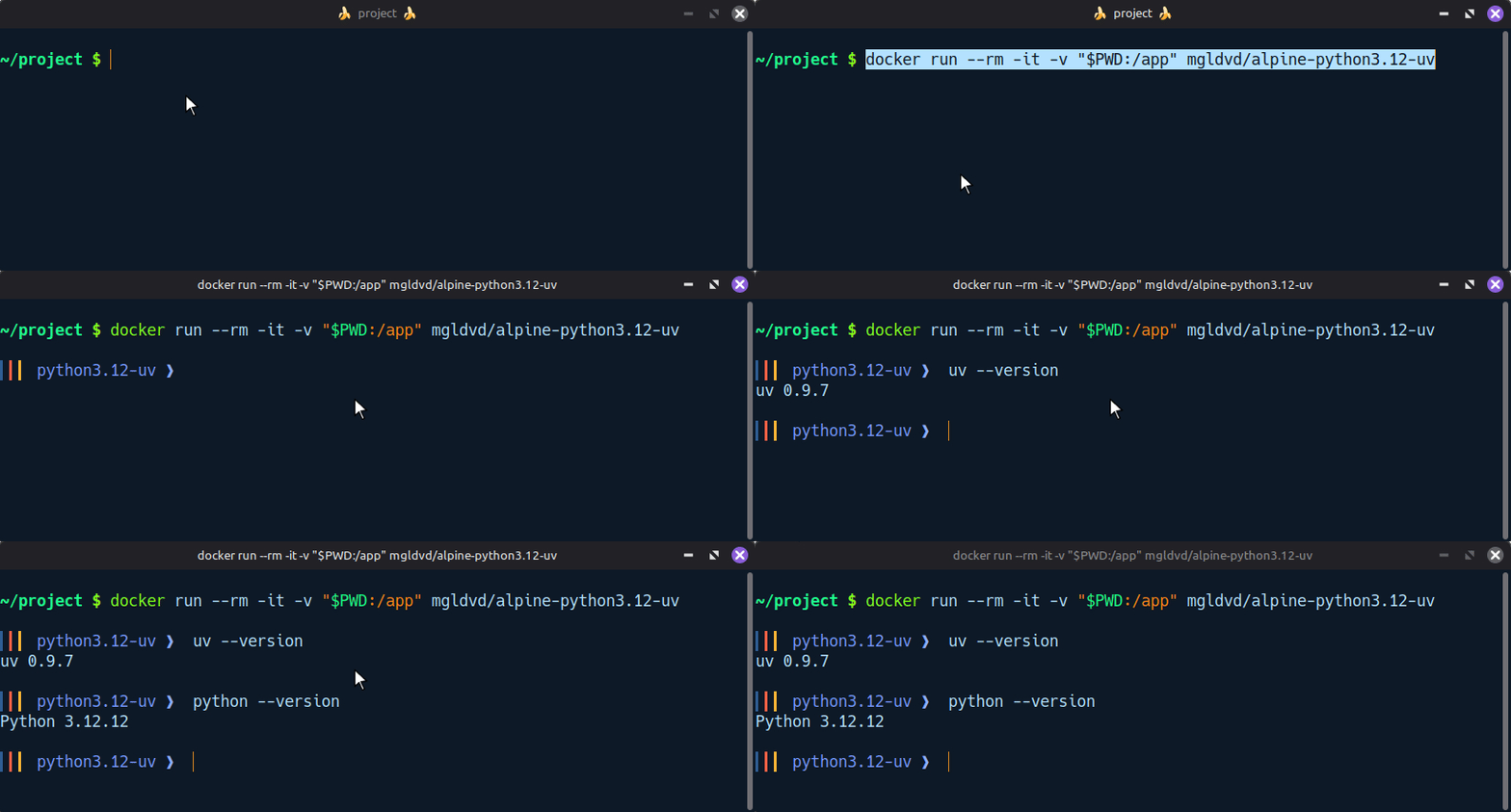
Single Dockerfile using slim and Python 3 with uv preinstalled, published by the GitHub Actions workflow on deploy/hub.
📦 Packages installed via apk add
bashsudocurlca-certificatesneovimcoreutilsgituv- https://docs.astral.sh/uv/
🔧 Added tooling
- uv installed via the official installer and linked at
/usr/local/bin/uv - Non-root user
masterwith passwordless sudo - Bash profile with a custom prompt,
llhelper, andvimalias tonvim - Working directory
/appowned bymaster
🏷️ Image Tags
| Tag | Description |
|---|---|
latest | Most recent successful build on deploy/hub |
☁️ Docker Hub
🚀 Quick start
docker run --rm -it -v "$PWD:/app" mgldvd/slim-python3-uv bash
🧪 Python requests example
Inside the container:
uv init requests-demo

cd requests-demo

uv add requests
cat <<'PY' > main.py
import requests


def main() -> None:
  response = requests.get("https://httpbin.org/json", timeout=5)
  print(response.json()["slideshow"]["title"])


if __name__ == "__main__":
  main()
PY
uv run main.py
🏗️ Building Locally
Clone the project and build the image using the provided Dockerfile:
git clone https://github.com/Mgldvd-Docker/slim-python3-uv.git

cd slim-python3-uv
docker build -t mgldvd/slim-python3-uv:local .
Run the container to verify the build:
docker run --rm -it -v "$PWD:/app" mgldvd/slim-python3-uv:local bash
🏗️ Building Locally (python 3.11)
# build
docker build -t mgldvd/slim-python3.11-uv:local -f Dockerfile.python3-11 .
# run
docker run --rm -it -v "$PWD:/app" mgldvd/slim-python3.11-uv:local bash
🐳 Docker Compose
Use the bundled compose.yml to launch an interactive shell with your local app/ directory mounted into the container:
mkdir app
wget https://raw.githubusercontent.com/Mgldvd-Docker/slim-python3-uv/refs/heads/master/compose.yml
or create file: compose.yml
services:
    app:
        image: mgldvd/slim-python3-uv
        command: bash
        volumes:
            - ./app:/app
        stdin_open: true
        tty: true
        restart: "no"
docker compose run --rm app
To keep the container running in the background instead, start it detached and exec into it when needed:
docker compose up -d
docker compose exec app bash
📤 Publishing Workflow
The GitHub Actions workflow at .github/workflows/docker-publish.yml automates image publication. It performs the following steps:
- Checks out the repository.
- Prepares Docker Buildx for multi-platform builds.
- Authenticates against Docker Hub using repository secrets.
- Generates OCI metadata, including links back to GitHub and Docker Hub.
- Builds the image and pushes the multi-arch
latesttag.
🔐 Required Secrets
Add the following secrets in the GitHub repository settings before running the workflow:
DOCKERHUB_USERNAME: Docker Hub account name (for examplemgldvd).DOCKERHUB_TOKEN: Docker Hub access token with permission to push the repository.
▶️ Triggering a Publish
Push commits to the deploy/hub branch or run the workflow manually from the GitHub Actions tab to build and publish a new image version.
🤝 Contributing
Issues and pull requests are welcome. Please open a discussion in the GitHub repository if you plan substantial changes so proposals can be coordinated with the publishing workflow.
Tag summary
Content type
Image
Digest
sha256:be6da270d…
Size
104.2 MB
Last updated
2 months ago
docker pull mgldvd/slim-python3-uv