micrib/mqdockerup
Monitor and control docker containers via MQTT and homeassistant.
500K+
micrib/mqdockerup repository overview


MqDockerUp
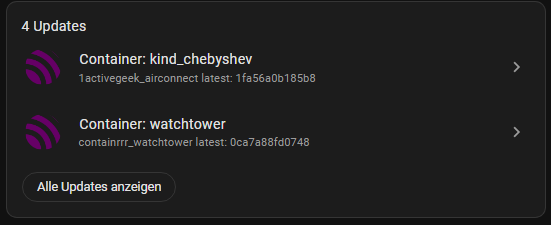
Mqtt Docker Updater (MqDockerUp) is a tool for updating Docker containers. It provides an easy way to check for updates and publish changes to a MQTT broker. The goal of this project is to provide an easy and seamless way of updating containers.
In the future, it may also be a tool for updating Home Assistant Container, making it as easy as updating Hass.IO. The plan is to implement Home Assistant discovery - done and Home Assistant UpdateEntities support to allow for a single click update in the Home Assistant UI.
The project is open-source and any help is welcome. It is also planned to containerize MqDockerUp itself in the future. - Done
How it works
MqDockerUp uses Docker APIs to get information about containers and images. It then makes a request to the Docker Hub API to get information about the latest image tags. If there is a new version, it will publish the change to a specified MQTT broker.
How to use
Standalone application
- Clone the repository and install dependencies with
npm install. - Change the
config.yamlfile with your desired configuration. - Run the project with
npm run start.
Docker container
- Pull the image from Docker Hub with
docker pull micrib/mqdockerup. - Mount the docker.sock file to the container with
docker run -v /var/run/docker.sock:/var/run/docker.sock micrib/mqdockerup. - Optionally, you can use environment variables to override the values in the config file. See the Environment Variables section for more details.
Configuration
The configuration file config.yaml contains the following sections:
Main Configuration
The main configuration is specified in the main section:
main:
  interval: "15m"
The interval parameter specifies the frequency at which updates are checked and published to the MQTT broker. The interval must be in the format [number][unit], where [number] is a positive integer and [unit] is one of s (seconds), m (minutes), h (hours), d (days), or w (weeks).
MQTT Configuration
The MQTT configuration is specified in the mqtt section:
mqtt:
  ha_discovery: true
  connectionUri: "mqtt://localhost:1883"
  topic: "mqdockerup"
  clientId: "mqdockerup"
  username: "ha"
  password: "12345678"
  connectTimeout: 60
  protocolVersion: 5
  qos: 2
  retain: false
The mqtt section contains the following parameters:
ha_discovery: Specifies whether or not to enable Home Assistant discovery.connectionUri: The URL of the MQTT broker to connect to.topic: The MQTT topic to publish updates to.clientId: The MQTT client ID to use when connecting to the broker.username: The username to use when connecting to the MQTT broker.password: The password to use when connecting to the MQTT broker.connectTimeout: The maximum time, in seconds, to wait for a successful connection to the MQTT broker.protocolVersion: The MQTT protocol version to use when connecting to the broker.qos: The MQTT Quality of Service level to use when publishing updates.retain: Specifies whether or not to retain the latest update when publishing to the MQTT broker.
Environment Variables
You can also use environment variables to override the values in the config file. The environment variables must have the same name as the config keys, but in uppercase and with underscores instead of dots. For example, to override the mqtt.connectionUri value, you can set the MQTT_CONNECTIONURI environment variable. Here is the list of environment variables that you can use:
MAIN_INTERVAL: The interval at which updates are checked and published to the MQTT broker.MQTT_HA_DISCOVERY: Specifies whether or not to enable Home Assistant discovery.MQTT_CONNECTIONURI: The URL of the MQTT broker to connect to.MQTT_TOPIC: The MQTT topic to publish updates to.MQTT_CLIENTID: The MQTT client ID to use when connecting to the broker.MQTT_USERNAME: The username to use when connecting to the MQTT broker.MQTT_PASSWORD: The password to use when connecting to the MQTT broker.MQTT_CONNECTTIMEOUT: The maximum time, in seconds, to wait for a successful connection to the MQTT broker.MQTT_PROTOCOLVERSION: The MQTT protocol version to use when connecting to the broker.MQTT_QOS: The MQTT Quality of Service level to use when publishing updates.MQTT_RETAIN: Specifies whether or not to retain the latest update when publishing to the MQTT broker.
Screenshots

Contribute
This project is open source and contributions are welcome. If you have any ideas or suggestions, please open an issue or a pull request.
Tag summary
Content type
Image
Digest
sha256:90e6a2377…
Size
247.5 MB
Last updated
about 18 hours ago
docker pull micrib/mqdockerup