mihalbsh/peass repository overview
INSTRUCTIONS
PeASS requires that the analyzed project is written in Java, has JUnit tests, is built by maven and managed by git
Set Up Image & Container
-
Download Docker
- Windows & Mac: Download Docker Desktop
- Linux run
$ sudo apt install docker.io
-
Make sure Docker is installed
Run$ docker -v. You should be getting something like this:
Docker version 19.03.13, build 4484c46d9d -
Pull this image by running
$ docker pull mihalbsh/peass:peass -
Start Container
- Run
$ docker run --name peass -i -t mihalbsh/peass:peass
Thats for the first time, if you need to run the container again simply use$ docker start -i -a peass - Run
$ exitto pause the container for now, that should bring you back to the host terminal-cmd
- Run
Run
-
Send the project you want to analyze to the container
- Locate the target folder's path then run
$ docker cp FOLDER_PATH peass:home/DaGeRe. For Example$ docker cp users/user1/Desktop/demo_project peass:home/DaGeRe
- Locate the target folder's path then run
-
Run Peass to analyze the target folder
- Start container again by running
$ docker start -i -a peass - Run Peass (see example below or github documentation)
- Exit container when the process has finished by using
$ exit
- Start container again by running
-
Get Results
- To get the generated results to your host, run
$ docker cp peass:home/DaGeRe/peass/results LOCAL_PATHfor example$ docker cp peass:home/DaGeRe/peass/results users/user1/Desktop/demo_project
- To get the generated results to your host, run
Use sudo if unix requires permissions
Use this Small Demo Project to test
Example
Example for a project called demo1
-
Executing the Regression Test Selection
- Specifies which tests could have changed performance based on source code analysis:
$ ./peass select -folder ../demo1(Could also run it for specific commits to make the process faster)
- Specifies which tests could have changed performance based on source code analysis:
-
Executing the Measurement and Getting the Changes
- Obtain performance measurements
$ ./peass measure -executionfile results/execute_demo1.json -folder ../demo1 -iterations 1 -warmup 0 -repetitions 1 -vms 2 - Identify the changes
$ ./peass getchanges -data ../demo1_peass/ -dependencyfile results/deps_demo1.json
- Obtain performance measurements
-
Executing the Root Cause Analysis
Pick one of the commits that contain performance regression (generated by the previous commands). Let's pick commit with hash: 9caed514e0759dbfa4ef29acca78787e34d99975
- Get changes by running
$ ./peass searchcause -vms 2 -iterations 1 -warmup 0 -version 9caed514e0759dbfa4ef29acca78787e34d99975 -test de.test.CalleeTest#onlyCallMethod1 -folder ../demo1 -executionfile results/execute_demo1.json - Get the root cause analysis visualization
./peass visualizerca -data ../demo1_peass/ -propertyFolder results/properties_demo1/
- Get changes by running
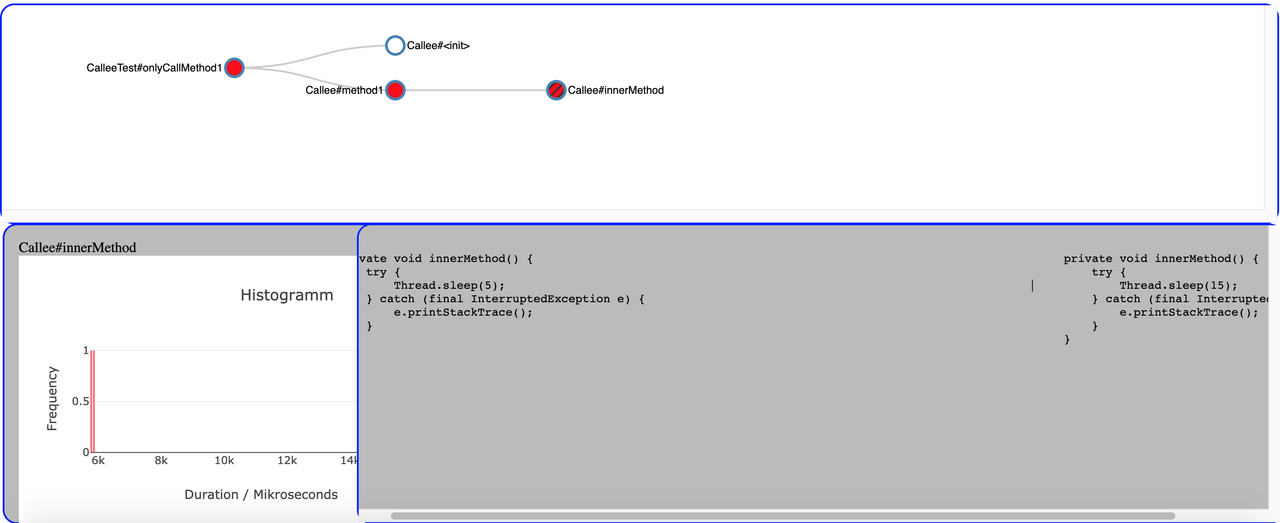
The top corner tracks the regression. It originated from the callee test, which called method 1 which calls the inner method. And you can see on the bottom right corner the inner method before and after the regression. Before it slept for 5ms, after for 15ms which made it "slower".
Tag summary
Content type
Image
Digest
Size
348.8 MB
Last updated
almost 6 years ago
docker pull mihalbsh/peass:peass