mixaverross88/angular-rest-crud-dev repository overview
Very simple CRUD operations with Angular
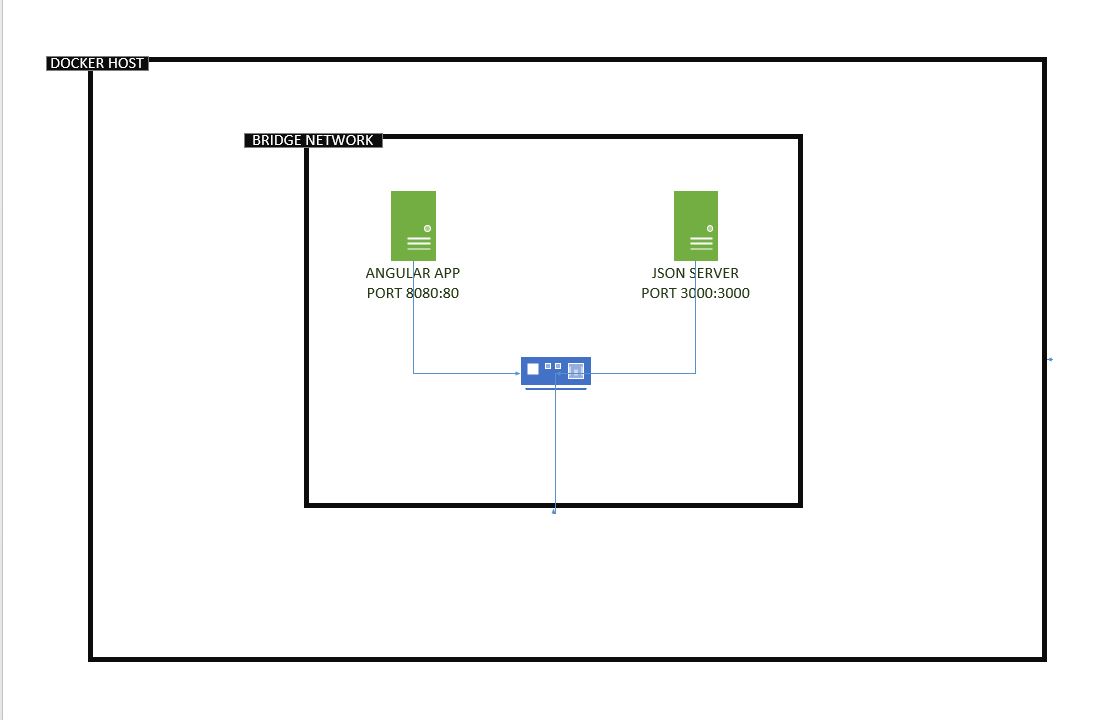
This example combines 2 containers inside a bridge network. The first container runs the angular app and the other container the json server.
We use the bridge network in order to reach the json server without the IP address but with the container name.
You can use the run.sh file in order to spin up the containers or you can execute the following commands
echo "Step 1: run docker json server"
docker run  -d -p 3000:3000 --name fake_server williamyeh/json-server --watch products.json
echo "Step 2: replace the routes.json in to the running container"
docker cp routes.json fake_server:/usr/local/lib/node_modules/json-server/routes.json
docker cp products.json fake_server:/data/products.json
docker cp routes.json fake_server:/data/routes.json
echo "Step 3: run the image "
docker run -d -p 8080:80 --name angular_simple_crud_app mixaverross88/angular-rest-crud
echo "Step 4: create a network"
docker network create --driver bridge isolated_network
echo "Step 5: Assing the fake_server container into the network"
docker network connect isolated_network fake_server
echo "Step 6: Assing the angular_simple_crud_app container into the network"
docker network connect isolated_network angular_simple_crud_app
The main purpose of the following instructions is if you don't want to run the project in docker.
Please change the value of URL_PRODUCT_PATH in ProductComponent in localhost:555
json-server instructions
- Install server: npm install -g json-server
- Navigate to the path where json server is installed (json-server-master folder).
- Replace the file routes.json and add the file products.json (these files are stored in root folder of the project).
- Run server (in the server folder): json-server --port 555 --routes routes.json --watch products.json
Development server
Run ng serve for a dev server. Navigate to http://localhost:4200/. The app will automatically reload if you change any of the source files.
This project was generated with Angular CLI version 6.0.8.
Tag summary
Content type
Image
Digest
Size
8.5 MB
Last updated
over 6 years ago
docker pull mixaverross88/angular-rest-crud-dev