mobufan/speedtest-go-zh repository overview

LibreSpeed 网速测速工具(中文版)
这是一个基于Golang和JavaScript实现的非常轻量级的网络速度测试工具,使用的是XMLHttpRequest和Web Workers,并提供简单的前端Web和后台统计Web界面。
本项目支持所有现代浏览器:IE11,最新的Edge,最新的Chrome,最新的Firefox,最新的Safari,当然也适用于移动版本。
界面预览
🌙 暗色模式(默认)
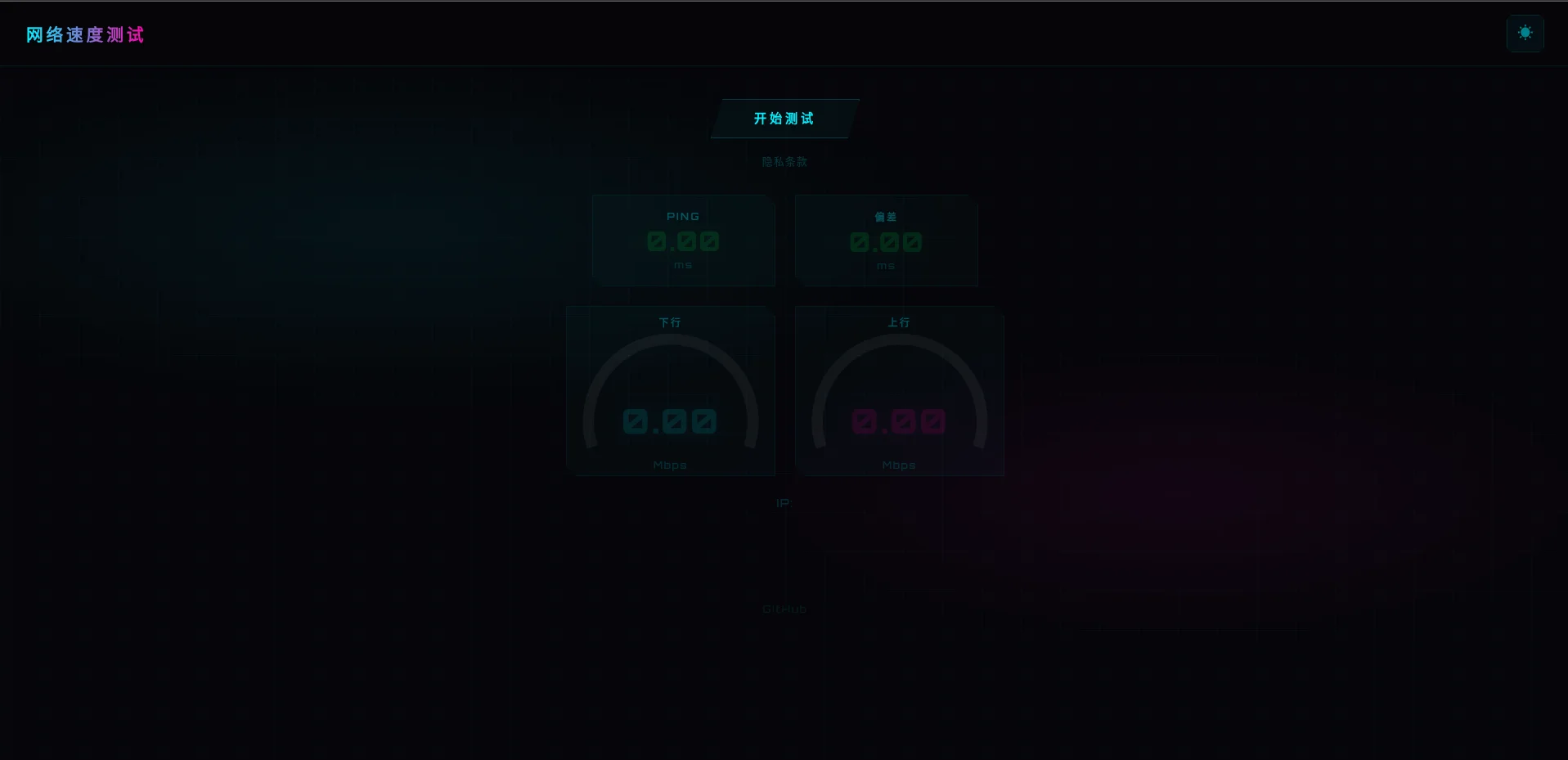
☀️ 亮色模式
支持一键切换明暗主题,右上角按钮即可切换。
🎨 赛博朋克 2077 主题
- 霓虹青
#00f0ff/ 霓虹粉#ff00aa/ 霓虹绿#00ff41三色配色 - 几何斜角裁切(
clip-path)设计 - 扫描线网格背景 + 径向光晕
- Orbitron 科技字体 + 发光文字效果
- 按钮扫描线滑过动画
- 结果分享图片支持暗色/亮色自动适配
功能
- 下行测速
- 上行测速
- Ping延迟
- Ping抖动
- IP地址显示
- 明暗主题切换
- 统计记录
- 截图分享
- 结果分享
服务器需求
- 任何 Go 支持平台
- BoltDB, PostgreSQL或MySQL数据库存储测试结果(可选)
- 提供网络连接
BoltDB是一个文件数据库,类似于Sqlite数据库,是一种轻量级的数据库,默认配置使用该数据库。
快速部署
1. 安装Docker和Docker-compose
2. 创建YAML文件
在你喜欢的目录中,创建一个 docker-compose.yml 文件:
services:
  speedtest:
    container_name: speedtest
    image: mobufan/speedtest-go-zh:latest
    restart: always
    network_mode: bridge
    ports:
      - 7878:8989
    volumes:
      - ./config:/app/config
    environment:
      - TZ=Asia/Shanghai
3. 部署运行
docker-compose up -d
4. 网速测试
当你的docker容器成功运行,使用浏览器访问 7878 端口。
有些时候需要稍等一段时间。
5. 构建自定义镜像
docker buildx build \
  --platform linux/amd64,linux/arm64 \
  --cache-from type=registry,ref=mobufan/speedtest-go-zh:buildcache \
  -t mobufan/speedtest-go-zh:latest \
  -t mobufan/speedtest-go-zh:$(date +%Y.%m.%d) \
  --push .
5. 配置文件修改
配在文件存放在docker-compose.yml目录下的 ./config/settings.toml 文件中。
详细配置说明参阅:配置说明
配置文件修改完成后需要重启容器使其生效:
docker-compose restart
6. 容器升级
docker-compose down
docker-compose pull
docker-compose up -d
这个项目将自动更新任何数据库或其他要求,所以你不必遵循任何疯狂的指示。上面的这些步骤将提取最新的更新并重新创建docker容器。
主题定制
前端界面支持明暗主题切换,默认采用赛博朋克 2077 风格设计。如需更换主题:
- 编辑
web/assets/index.html中的<style>部分 - 修改仪表盘配色变量
dlColor、ulColor、meterBk等 - 重新构建 Docker 镜像即可生效
结果分享图片会根据前端明暗模式自动传递 ?theme=dark 参数,后端(results/telemetry.go)渲染对应配色的 PNG。
二次开发
你需要用Go 1.17+来编译二进制文件。 如果你有一个旧版本的Go并且不想手动安装打包工具,你可以安装更新版本的Go到你的“GOPATH”:
0. 安装 Go 1.17
$ go get golang.org/dl/go1.17.1
# Assuming your GOPATH is default (~/go), Go 1.17.1 will be installed in ~/go/bin
$ ~/go/bin/go1.17.1 version
go version go1.17.1 linux/amd64
1. 克隆项目:
$ git clone github.com/meimolihan/speedtest-go-zh
2. 编译
# Change current working directory to the repository
$ cd speedtest-go
# Compile
$ go build -ldflags "-w -s" -trimpath -o speedtest main.go
3. 部署文件
复制 assets 文件夹, settings.toml 文件与已编译的 speedtest 将二进制文件放入一个目录
4. 后台统计功能
- 对于PostgreSQL/MySQL,创建并导入相应的数据库
.sql下的文件database/{postgresql,mysql}
# 假设您已经在当前用户下创建了名为 `speedtest` 的数据库
$ psql speedtest < database/postgresql/telemetry_postgresql.sql
- 对于文件数据库BoltDB,确保在
settings.toml中定义了database_file路径:
database_file="./config/speedtest.db"
5. 前端说明
将 assets 文件夹放在与编译好的二进制文件相同的目录下。
- 确保字体文件和
JavaScripts都在assets目录下 - 你可以在“assets”目录下有多个HTML页面。 可以在服务器根目录下直接访问它们 (例如:
/example-singleServer-full.html) - 可以有一个默认的页面映射到
/,简单地把一个名为index.html的文件放在assets下。
6. 配置说明
修改 settings.toml 配置文件:
# 绑定地址,使用空字符串绑定到所有接口
bind_address="127.0.0.1"
# 服务监听端口,默认为8989
listen_port=8989
# 代理协议端口,使用0禁用
proxyprotocol_port=0
# 服务器位置,使用0自动从API获取
server_lat=0
server_lng=0
# ipinfo.io API密钥,禁用可以为空
ipinfo_api_key=""

# assets目录路径,默认为在同一目录下的 assets
# 如果找不到路径,将使用嵌入的默认资源
assets_path="./assets"

# 登录后台页面的密码,内容为"PASSWORD"表示禁用后台
statistics_password="PASSWORD"
# 编辑IP地址
redact_ip_addresses=false

# 用于后台数据的数据库类型,目前支持:none、memory、bolt、mysql、postgresql
# 如果没有指定,则不会记录统计数据,也不会生成结果图片
database_type="postgresql"
database_hostname="localhost"
database_name="speedtest"
database_username="postgres"
database_password=""

# 如果使用 `bolt` 作为数据库,将database_file设置为数据库文件位置
database_file="./config/speedtest.db"

# TLS和HTTP/2设置。 HTTP/2需要TLS协议
enable_tls=false
enable_http2=false

# 如果您使用HTTP/2或TLS,您需要准备证书和私钥
# tls_cert_file="cert.pem"
# tls_key_file="privkey.pem"
License
Copyright (C) 2016-2020 Federico Dossena Copyright (C) 2020 Maddie Zhan Copyright (C) 2022 Chishin
This program is free software: you can redistribute it and/or modify it under the terms of the GNU Lesser General Public License as published by the Free Software Foundation, either version 3 of the License, or (at your option) any later version.
This program is distributed in the hope that it will be useful, but WITHOUT ANY WARRANTY; without even the implied warranty of MERCHANTABILITY or FITNESS FOR A PARTICULAR PURPOSE. See the GNU General Public License for more details.
You should have received a copy of the GNU Lesser General Public License along with this program. If not, see https://www.gnu.org/licenses/lgpl.
Tag summary
Content type
Image
Digest
sha256:caa6108b7…
Size
9.8 MB
Last updated
3 months ago
docker pull mobufan/speedtest-go-zh