modischfabrications/mqtt_switcher repository overview
MQTT_Switcher
This short script is used to trigger 433MHz radio sockets from MQTT messages.
Usage
This service is docker based and will only run on a Raspberry Pi or something similar enough that port mappings, GPIO access and libraries are equal.
Using a pre-build image
Have a look at docker-compose.yml and copy it to your own setup, I published a pre-build image to Docker Hub. I would not advice starting this and every other service manually, just use compose.
Customize this to your specific setup by modifying config.yml.
You will surely need to do that as most remote controlled sockets use different codes.
Start it using docker-compose up -d when ready.
Building your own image (not recommended)
Clone this repository and build it by calling docker-compose up --build -d.
Follow the recipe provided in the previous chapter to configure your system.
Manual execution
You can execute it manually by cloning and following the developer hints below. Don't do this if you are unsure or you will get conflicts with the python distribution provided by your OS.
Hardware
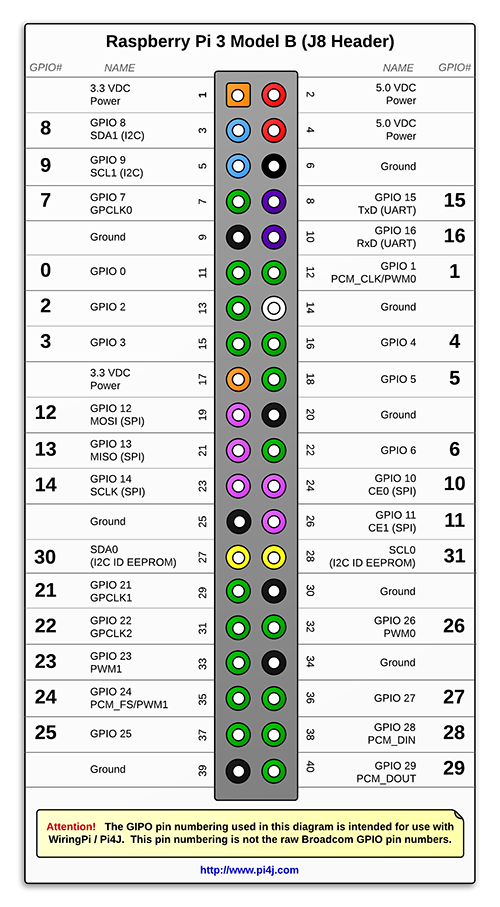
Connect your transmitter module like described in many other guides:
- Data: GPIO 0 (wiringpi) / Pin 11 / GPIO 17
- 5V
- GND
A receiver can be connected to sniff code from the remote control, the default pin is GPIO 2 / pin 13 / GPIO 27. This is necessary for the configuration, I have not found a way to calculate it yet, see [Code configurations].
See this image (not made by me, please don't sue me!):
Allow GPIO
This is needed only once per system and might have ben done already.
This script accesses GPIO (which can be used maliciously), you need to manually unlock it:
- Allow yourself access to GPIOs with
usermod -aG gpio modischpi - Relog/Restart (yes I really mean that) to update group policies for your account
You might get the message RuntimeError: No access to /dev/mem. Try running as root!,
this is an indicator that the previous step did not work (or you forgot to restart).
You can also try exposing only /dev/gpiomem instead, which is a usable subset of mem.
It might be necessary to configure your Pi to wait for network connections before starting this service. This script makes several attempts to connect, but it's better to be on the safe side. Example setup for raspbian-style systems:
sudo raspi-config-> Boot -> Wait for Network at Bootsudo reboot now
Code configurations (WIP)
You need to fill in the config and pass it to the container.
Trying to find the pattern between (system id + device id + state) and the rpi-rf code
This is WIP and shouldn't be necessary for end users (at least when I figure out the pattern and provide some translator).
Recordings (view as raw)
Sockets used: Brennenstuhl RCS 1000SN, very easy and generic device with DIPs for channel selection
(default config, default pins) ["01010", "2"] true: 4477265 [pulselength 308, protocol 1] -> 100 0100 0101 0001 0101 0001 ["01010", "2"] false: 4477268 [pulselength 310, protocol 1] -> 100 0100 0101 0001 0101 0100
["01010", "1"] true: 4474193 [pulselength 308, protocol 1] -> 100 0100 0100 0101 0101 | 0001
["01010", "1"] false: 4474196 -> 100 0100 0100 0101 0101 0100
SYS, DEV RECEIVED REC (BIN) "01011", 1" ON: 4457809 -> 0100 0100 0000 0101 0101 0001 -> 440551 "01011", 1" OFF: 4457812 -> 0100 0100 0000 0101 0101 0100 -> 440554
"01010", "1" ON: 4474193 -> 0100 0100 0100 0101 0101 0001 -> 444551 "01010", "1" OFF: 4474196 -> 0100 0100 0100 0101 0101 0100 -> 444554
"01010", "2" ON: 4477265 -> 0100 0100 0101 0001 0101 0001 -> 445151 "01010", "2" OFF: 4477268 -> 0100 0100 0101 0001 0101 0100 -> 445154
"11010", 1" ON: 279889 -> 0000 0100 0100 0101 0101 0001 -> 044551 "11010", 1" OFF: 279892 -> 0000 0100 0100 0101 0101 0100 -> 044554
"01010", 5" ON: 4478273 -> 0100 0100 0101 0101 0100 0001 "01010", 5" OFF: 4478276 -> 0100 0100 0101 0101 0100 0100
AAAA ABBB BBCC
A: System code, inverted B: unit code, inverted C: ON = 01; OFF = 10
Pad with 0 on every second position (starting with pos 0).
References
https://github.com/HeptaSean/SocketPi/blob/master/socket_switch.py
24 bits every second bit is 0 and can be ignored -> [0, 1, 4, 5]
last block is on/off -> 1 is on, 4 is off
TODO: diff INPUT -> OUTPUT line by line to find corresponding bits
system is first 5 codes (minus 0-pads) inverted.
https://github.com/sui77/rc-switch/blob/master/RCSwitch.cpp https://github.com/r10r/rcswitch-pi/blob/master/RCSwitch.cpp switchOn(SYS: str, DEV: int)
Developer hints
Be aware that you are unable to run it on a desktop as it depends on RPI's GPIOs. YOu will probably need to comment out the import for that and set a breakpoint somewhere.
Dependencies
paho-mqtt
Test script manually without docker
Get it to your System:
git clone ###cd MQTT_Switchergit checkout dockerizechmod +x build.sh
Update to newest version
git reset --hardgit pull [origin dockerize]pipenv updatepipenv shell
Execute
export PYTHONPATH=.-> enables relative imports from /apppython3 app/main.py -f config.yaml- send MQTT messages with the correct topics and watch for your sockets
Tag summary
Content type
Image
Digest
Size
298 MB
Last updated
almost 7 years ago
docker pull modischfabrications/mqtt_switcher