muebau/docker-ddns
A simple DynDNS like service with a web interface to manage user accounts.
50K+
muebau/docker-ddns repository overview
Dynamic DNS with Docker, Go and Bind9
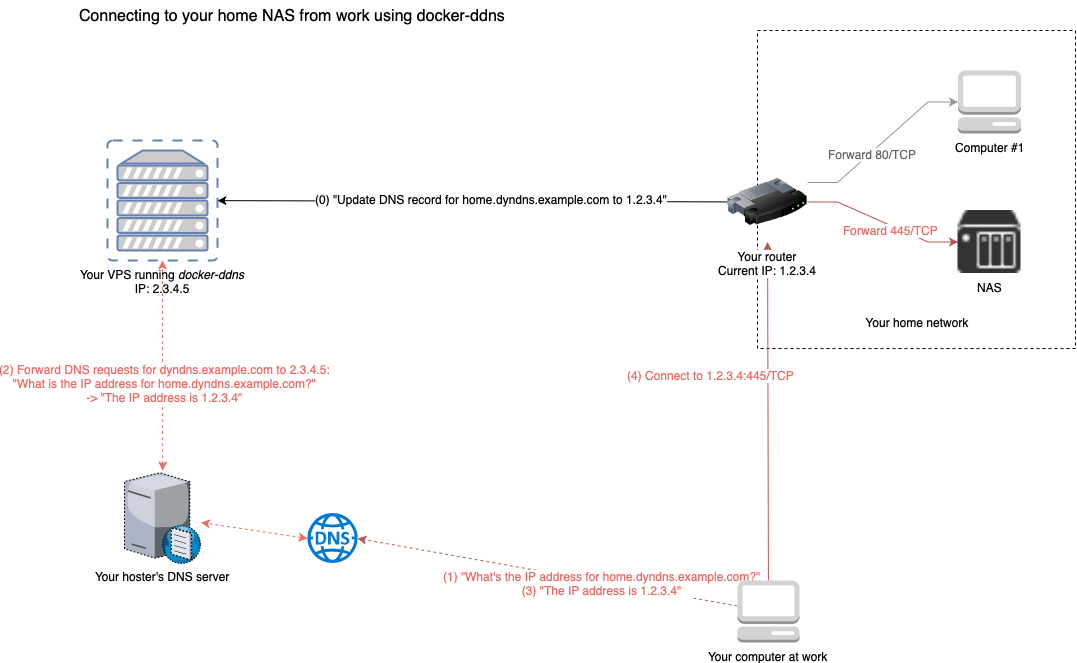
This package allows you to set up a dynamic DNS server that allows you to connect to devices at home from anywhere in the world. All you need is a cheap VPS, a domain and access to it's nameserver.
Installation
You can either take the image from DockerHub or build it on your own.
Using DockerHub
Just customize this to your needs and run:
docker run -it -d \
    -p 8080:8080 \
    -p 53:53 \
    -p 53:53/udp \
    -e DDNS_ADMIN_LOGIN="admin:secret"
    -e DDNS_DOMAIN=ddns.domain.example
    -e DDNS_PARENT_NS=ns.domain.example
    -e DDNS_DEFAULT_TTL=60
    --name=dyndns \
    muebau/docker-ddns
If you want to persist DNS configuration across container recreation, add -v /somefolder:/var/cache/bind. If you are experiencing any
issues updating DNS configuration using the API (NOTAUTH and SERVFAIL), make sure to add writing permissions for root (UID=0) to your
persistent storage (e.g. chmod -R a+w /somefolder).
You can also use Compose / Swarm to set up this project. For more information and an example docker-compose.yml with persistent data
storage, please refer to this file: https://raw.githubusercontent.com/muebau/docker-ddns/master/docker-compose.yml
Exposed ports
Afterwards you have a running docker container that exposes three ports:
- 53/TCP -> DNS
- 53/UDP -> DNS
- 8080/TCP -> Management REST API & Web interface (NO HTTPS!!!)
HTTPS
It is highly recommended to put a reverse proxy before the API. A good example with automatic letsencrypt certificates is https://github.com/nginx-proxy/docker-letsencrypt-nginx-proxy-companion
DynDNS compatible API
The API follows the scheme of the poplular dyndns.org.
The handlers will listen on:
- /update
- /nic/update
- /v2/update
- /v3/update
Basic URL scheme:
https://{user}:{password}@ddns.domain.example/{handler}?hostname={hostname}&myip={IP Address}
So a request to:
https://sampleuser:[email protected]/update?hostname=test.ddns.domain.example
OR
https://sampleuser:[email protected]/v2/update?hostname=test.ddns.domain.example
OR
https://sampleuser:[email protected]/v3/update?hostname=test.ddns.domain.example
OR
https://sampleuser:[email protected]/nic/update?hostname=test.ddns.domain.example
optional with ip set explicitly:
https://sampleuser:[email protected]/update?hostname=test.ddns.domain.example&myip=1.1.1.1
would update:
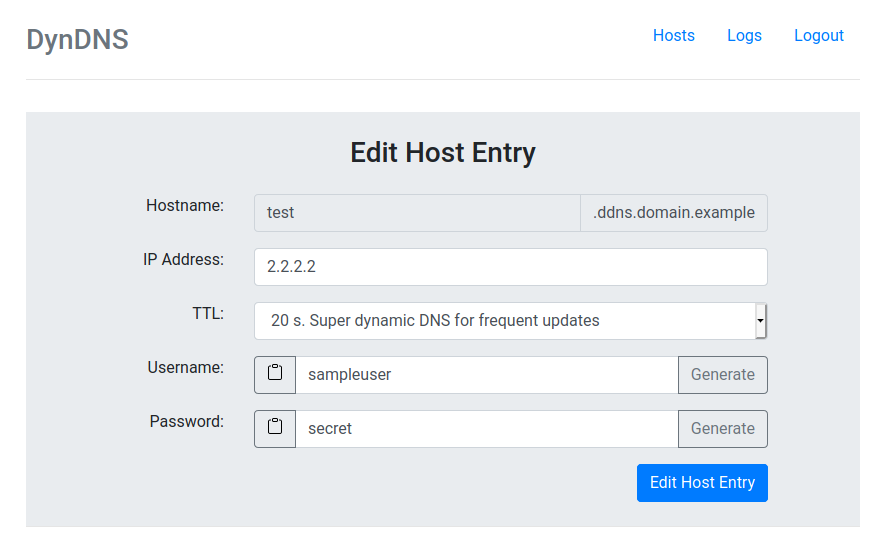
- DNS Record: "test.ddns.domain.example"
- user: "sampleuser"
- password: "secret"
- IP: whatever IP the request came from OR it set "1.1.1.1" in this example
For the DynDNS compatible fields please see Dyn's documentation here:
https://help.dyn.com/remote-access-api/perform-update/
Screen shots
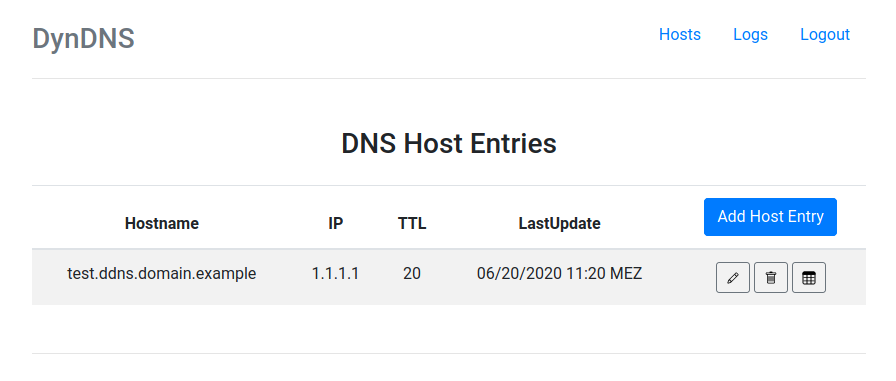
Hosts
Edit host
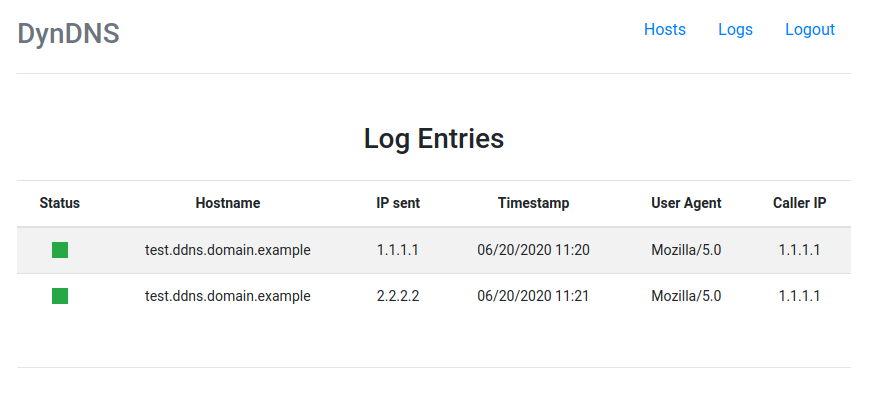
Log
Examples
An example on the ddclient (Linux DDNS client) based Ubiquiti router line:
set service dns dynamic interface eth0 service dyndns host-name <your-ddns-hostname-to-be-updated>
set service dns dynamic interface eth0 service dyndns login <username>
set service dns dynamic interface eth0 service dyndns password <password>
set service dns dynamic interface eth0 service dyndns protocol dyndns2
set service dns dynamic interface eth0 service dyndns server <your-ddns-server>
Optional if you used this behind an HTTPS reverse proxy like I do:
set service dns dynamic interface eth0 service dyndns options ssl=true
This also means that DDCLIENT works out of the box and Linux based devices should work.
D-Link DIR-842:
Another router that has been tested is from the D-Link router line where you need to fill the details in on the Web Interface. The values are self-explanatory. Under the server (once you chosen Manual) you need to enter you DDNS server's hostname or IP. The protocol used by the router will be the dyndns2 by default and cannot be changed.
Common pitfalls
- If you're on a systemd-based distribution, the process
systemd-resolvedmight occupy the DNS port 53. Therefore starting the container might fail. To fix this disable the DNSStubListener by addingDNSStubListener=noto/etc/systemd/resolved.confand restart the service usingsudo systemctl restart systemd-resolved.servicebut be aware of the implications... Read more here: https://www.freedesktop.org/software/systemd/man/systemd-resolved.service.html and https://github.com/dprandzioch/docker-ddns/issues/5
Tag summary
Content type
Image
Digest
Size
83.7 MB
Last updated
over 6 years ago
docker pull muebau/docker-ddns